Page 2 - WARNING; TO REDUCE THE RISK OF FIRE, ELECTRIC SHOCK OR INJURY:; READ ALL INSTRUCTIONS BEFORE USING YOUR APPLIANCE.; IMPORTANT SAFETY INSTRUCTIONS
2 BISSELL.com WARNING TO REDUCE THE RISK OF FIRE, ELECTRIC SHOCK OR INJURY: • This appliance can be used by children aged from 8 years and above and persons with reduced physical, sensory or mental capabilities or lack of experience and knowledge if they have been given supervision or instruction co...
Page 3 - SAVE THESE INSTRUCTIONS; ORIGINAL INSTRUCTIONS.; THIS MODEL IS FOR HOUSEHOLD USE ONLY.; IMPORTANT INFORMATION; SYMBOL; Wet Mop Mode for Hard Surfaces
BISSELL.com 3 SAVE THESE INSTRUCTIONS ORIGINAL INSTRUCTIONS. FOR OPERATION ON A 220-240 VOLT A.C. 50-60 HZ POWER SUPPLY ONLY. THIS MODEL IS FOR HOUSEHOLD USE ONLY. IMPORTANT INFORMATION • The software included in this product contains open source software. The open source licenses associated with th...
Page 4 - Docking and Charging Your Robot; Status
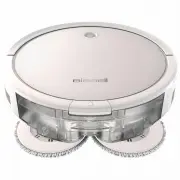
4 BISSELL.com Formula Water BISSELL® SpinWave® Robot with Dirt Bin Mop Tank with Mop Pads Docking Station Docking Tray Power Adapter Cleaning Tool Trial-Size Formula Replacement Edge Cleaning Brushes (select models) (2) Extra Mop Pads Extra Filter What’s in the Box? Standard accessories may vary by ...
Page 5 - Connecting to the App; Automatic Cleaning
BISSELL.com 5 Connecting to the App For more help, visit support.BISSELL.com . Automatic Cleaning Download the BISSELL Connect App to set up automatic features. Downloading the BISSELL Connect App means you can change your robot’s cleaning mode, start, pause, or stop your robot, schedule cleanings, ...
Page 6 - Filling Your Mop Tank; Mop Mode; Choosing Your Formula; intended for use with this appliance.
6 BISSELL.com Filling Your Mop Tank In Mop Mode, your robot will clean using dual rear rotating mop pads combined with a BISSELL formula to clean your home’s hard floors. While mopping, your robot will also sweep and collect a limited amount of dry debris for a complete cleaning experience. Formula ...
Page 7 - Sanitizing with Spot Mode; Manual Cleaning
BISSELL.com 7 Sanitizing with Spot Mode Spot mode can be used with BISSELL Hard Floor Sanitize Formula to sanitize floors after tough messes, like a pet accident. Spot mode also works to give certain areas extra cleaning attention when used with BISSELL Multi-Surface or Hard Floor Formulas. Access “...
Page 8 - Maintaining the Mop Pads and Debris Trap
8 BISSELL.com Maintaining the Mop Pads and Debris Trap While in Mop Mode, your robot can sweep up a limited amount of dry debris, so be sure to empty the trap after each clean. Formula Water 1. Turn the Power Switch OFF. Press the button on top of the Mop Tank and pull to remove. Place tank upside d...
Page 9 - Do not wash the filters.; Dry Vacuum Mode
BISSELL.com 9 Spot Mode x3 40 inches (1m) 40 inches (1m) 40 inches (1m) 40 inches (1m) 1. Place the robot in the center of the area you want to clean. 2. To start cleaning, press the Start/Pause button 3 times or select “Spot” mode in the BISSELL Connect App. 3. The robot will clean in a spiral patt...
Page 10 - Maintaining the Brushes and Wheels; troubleshooting checks.
10 BISSELL.com 1. Turn the Power Switch OFF. Pinch the tabs on the brush guard inward and pull to remove. Lift to remove the Brush Roll. 2. Clean the Brush Roll with the Cleaning Tool. 3. Replace the Brush Roll and brush guard. Note: The Brush Roll has two different end pieces. Ensure the square- sh...
Page 11 - Sensors and Contacts; Do not remove the plastic
BISSELL.com 11 Cleaning the Sensors Replacing the Battery WARNING To reduce the risk of electric shock, turn the Power Switch OFF before performing maintenance or troubleshooting checks. After repeated use, debris can accumulate on the sensors of the robot and performance could be affected.Turn the ...
Page 12 - Troubleshooting; Problem; Error Notifications; Sound Button Light State Error; Storing Your Robot; NOTICE; components may result.
12 BISSELL.com Troubleshooting For a comprehensive walkthrough of your product and support tips visit support.BISSELL.com . This guide has everything you need to get ready for first use, including setting up, using and maintaining your machine, but online you’ll find additional resources like tips a...
Page 13 - Warranty; BISSELL® One-Year Warranty; For Australian Consumers Only:; Consumer Care; Australia
Warranty This warranty gives you specific legal rights, in addition to rights you may have under the Australian Consumer Law . If you need additional instruction regarding this warranty or have questions regarding what it may cover, please contact your local BISSELL® Consumer Care on the details set...
Page 14 - Notes