Page 2 - Portable Active Noise-Canceling; Quick Start Guide
Quick Start Guide 2 English NC1 Portable Active Noise-Canceling Headphone QE6239 Quick Start Guide U6239_NC1_QSG.indb 2 1/12/11 3:20:47 PM
Page 3 - Package contents; ASUS NC1 headphone; Getting to know your headphone
ASUS NC1 3 English Package contents - 1 x ASUS NC1 headphone - 1 x Dual-pin airline headset adapter - 1 x Protective carrying case Noise-canceling switch Activity LED Volume control Battery compartment Mute button Clip Ear cups Getting to know your headphone The illustrations are for reference only....
Page 4 - Wearing your headphone; To wear your headphone; Installing the battery; To install the battery; Activating the noise-canceling function; To activate the noise-canceling function; Turn the noise-cancelling switch to ON. The activity LED turns red.; Using the dual-pin airline headset adapter
Quick Start Guide 4 English Wearing your headphone There are R and L markings on the ear cups. To wear your headphone • Adjust the headphone straps so it fits snugly on your head. • Adjust the ear cups so it fits comfortably around your ears. • Move the volume control to the right /left to increase/...
Page 5 - To use the dual-pin airline headset adapter; Storing your Headphone; To store your headphone; Specifications
ASUS NC1 5 English This dual-pin airline headset adapter does not fit all airlines. The audio jacks vary in different airlines. To use the dual-pin airline headset adapter 1. Insert the audio cable into the dual-pin airline headset adapter. 2. Insert the dual-pin airline headset adapter into the air...
Page 6 - Casque audio à réduction de bruit; Guide de démarrage rapide
NC1 Casque audio à réduction de bruit F6239 Guide de démarrage rapide U6239_NC1_QSG.indb 6 1/12/11 3:20:54 PM
Page 7 - Contenu de la boîte; casque ASUS NC1; Faire connaissance avec votre casque
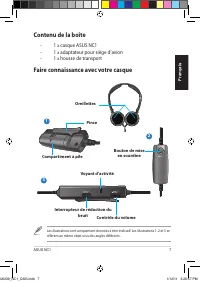
ASUS NC1 7 Français Contenu de la boîte - 1 x casque ASUS NC1 - 1 x adaptateur pour siège d’avion - 1 x housse de transport Interrupteur de réduction du bruit Voyant d’activité Contrôle du volume Compartiment à pile Bouton de mise en sourdine Pince Oreillettes Faire connaissance avec votre casque Le...
Page 8 - Utiliser votre casque; Pour utiliser votre casque :; gauche pour augmenter ou baisser le volume.; Installer la pile; Pour installer la pile :; Activer la fonction de réduction du bruit; Pour activer la fonction de réduction du bruit :; Utiliser l’adaptateur pour siège d’avion; Cet adaptateur permet d’utiliser votre casque à bord d’un avion.
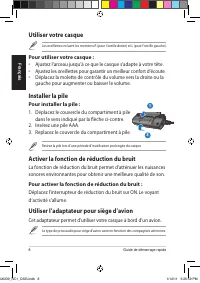
Guide de démarrage rapide 8 Français Utiliser votre casque Les oreillettes incluent les mentions R (pour l’oreille droite) et L (pour l’oreille gauche). Pour utiliser votre casque : • Ajustez l’arceau jusqu’à ce que le casque s’adapte à votre tête. • Ajustez les oreillettes pour garantir un meilleur...
Page 9 - Pour utiliser l’adaptateur pour siège d’avion :; Ranger votre casque; Pour ranger votre casque :; Spécifications
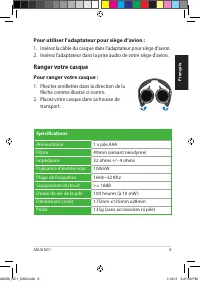
ASUS NC1 9 Français Pour utiliser l’adaptateur pour siège d’avion : 1. Insérez la câble du casque dans l’adaptateur pour siège d’avion. 2. Insérez l’adaptateur dans la prise audio de votre siège d’avion. Ranger votre casque Pour ranger votre casque : 1. Pliez les oreillettes dans la direction de la ...
Page 10 - Mobile Kopfhörer mit aktiver; Schnellstartanleitung
Deutsch Deutsch NC1 Mobile Kopfhörer mit aktiver Geräuschunterdrückung G6239 Schnellstartanleitung U6239_NC1_QSG.indb 10 1/12/11 3:21:00 PM
Page 11 - Verpackungsinhalt; ASUS NC1 Kopfhörer; Kennenlernen ihrer Kopfhörer
ASUS NC1 11 Deutsch Deutsch Verpackungsinhalt - 1 x ASUS NC1 Kopfhörer - 1 x Doppelsteckeradapter für Flugzeuge - 1 x Schutztasche Geräuschunterdrückungsschalter Aktivitäts-LED Lautstärkeregler Batteriefach Stummschalttaste Clip Hörmuscheln Kennenlernen ihrer Kopfhörer Dies sind Referenzabbildungen....
Page 12 - Verwenden der Kopfhörer; So setzen Sie die Kopfhörer auf; Einlegen der Batterie; So legen Sie die Batterie ein; Aktivieren der Geräuschunterdrückung; So aktivieren Sie die Geräuschunterdrückung; Verwenden des Doppelsteckeradapters
Schnellstartanleitung 12 Deutsch Deutsch Deutsch Deutsch Verwenden der Kopfhörer Die Hörmuscheln sind mit L für links und R für rechts markiert. So setzen Sie die Kopfhörer auf • Stellen Sie den Bügel so ein, dass er bequem auf Ihrem Kopf sitzt. • Stellen Sie die Hörmuscheln so ein, dass diese beque...
Page 13 - So verwenden Sie den Doppelsteckeradapter; Verpacken Ihrer Kopfhörer; So lagern Sie Ihre Kopfhörer; Spezifikationen
Deutsch Deutsch ASUS NC1 13 Deutsch Deutsch Der Adapter für Flugzeuge passt möglicherweise nicht in allen Flugzeugen. So verwenden Sie den Doppelsteckeradapter 1. Stecken Sie den Kopfhörerstecker in den Doppelsteckeradapter für Flugzeuge. 2. Stecken Sie den Doppelsteckeradapter für Flugzeuge in die ...
Page 14 - Guida Rapida
NC1 Cuffie Portatili a Riduzione Attiva del Rumore I6239 Guida Rapida U6239_NC1_QSG.indb 14 1/12/11 3:21:07 PM
Page 15 - Contenuto della confezione; Cuffie; Descrizione delle cuffie
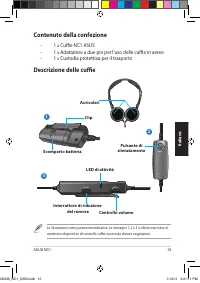
ASUS NC1 15 Italiano Contenuto della confezione - 1 x Cuffie NC1 ASUS - 1 x Adattatore a due pin per l’uso delle cuffie in aereo - 1 x Custodia protettiva per il trasporto Interruttore di riduzione del rumore LED di attività Controllo volume Scomparto batteria Pulsante di silenziamento Clip Auricola...
Page 16 - Come indossare le cuffie; Per indossare le cuffie; Come installare la batteria; Per installare la batteria; Come attivare la funzione di riduzione del rumore; Per attivare la funzione di riduzione del rumore; Come utilizzare l’adattatore a due pin in aereo
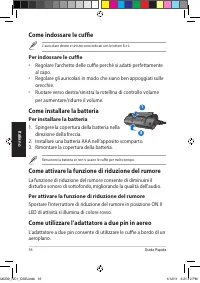
Guida Rapida 16 Italiano Come indossare le cuffie L’ auricolare destro e sinistro sono indicati con le lettere R e L. Per indossare le cuffie • Regolare l’archetto delle cuffie perchè si adatti perfettamente al capo. • Regolare gli auricolari in modo che siano ben appoggiati sulle orecchie. • Ruotar...
Page 17 - Per utilizzare l’adattatore a due pin in aereo:; Come custodire le cuffie; Per custodire le cuffie:; Specifiche tecniche
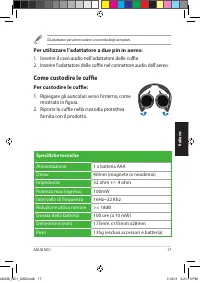
ASUS NC1 17 Italiano Gli adattatori per aereo variano a seconda degli aeroplani. Per utilizzare l’adattatore a due pin in aereo: 1. Inserire il cavo audio nell’adattatore delle cuffie. 2. Inserire l’adattatore delle cuffie nel connettore audio dell’aereo. Come custodire le cuffie Per custodire le cu...
Page 18 - Краткое руководство
NC1 Портативные наушники с активным шумоподавлением R6239 Краткое руководство U6239_NC1_QSG.indb 18 1/12/11 3:21:14 PM
Page 19 - Комплект поставки
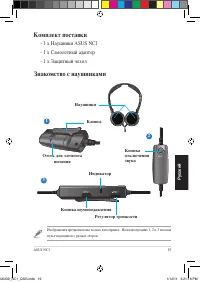
ASUS NC1 19 Русский Комплект поставки - 1 х Наушники ASUS NC1 - 1 х Самолетный адаптер - 1 х Защитный чехол Кнопка шумоподавления Индикатор Регулятор громкости Отсек для элемента питания Кнопка отключения звука Клипса Наушники Знакомство с наушниками Изображения предназначены только для справки. На ...
Page 20 - Ношение наушников; Для одевания наушников выполните следующее; Установка элемента питания; Для установки элемента питания; Использование функции активного шумоподавления; Для активации функции шумоподавления; Нажмите кнопку шумоподавления. Индикатор загорится красным.; Использование самолетного адаптера
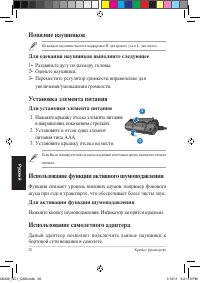
Краткое руководство 20 Русский Ношение наушников На каждом наушнике имеется маркировка 'R' для правого уха и 'L' для левого. Для одевания наушников выполните следующее 1• Раздвиньте дугу по размеру головы. 2• Оденьте наушники. 3• Переместите регулятор громкости вправо/влево для увеличения/уменьшения...
Page 21 - Для использования самолетного адаптера; Хранение наушников; Для хранения наушников; Спецификация
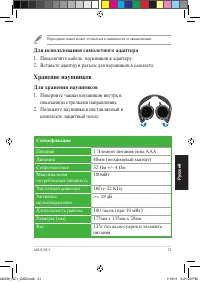
ASUS NC1 21 Русский Переходник может может отличаться в зависимости от авиакомпании. Для использования самолетного адаптера 1. Подключите кабель наушников к адаптеру. 2. Вставьте адаптер в разъем для наушников в самолете. Хранение наушников Для хранения наушников 1. Поверните чашки наушников внутрь ...
Page 22 - Stručná příručka
NC1 Mobilní sluchátka s aktivním potlačováním šumu CZ6239 Stručná příručka U6239_NC1_QSG.indb 22 1/12/11 3:21:21 PM
Page 23 - Obsah krabice; sluchátka ASUS NC1; Seznámení se sluchátky
ASUS NC1 23 Čeština Obsah krabice - 1 x sluchátka ASUS NC1 - 1 x dvoukolíkový adaptér sluchátek do letadla - 1 x ochranné pouzdro pro přenášení Spínač potlačování šumu Indikátor LED aktivity Ovládání hlasitosti Přihrádka na baterie Tlačítko ztlumení Spona Sluchátkové skořepiny Seznámení se sluchátky...
Page 24 - Nasazení sluchátek; Pokyny pro nasazení sluchátek; Vložení baterie; Pokyny pro vložení baterie; Aktivace funkce potlačování šumu; Pokyn pro aktivaci funkce potlačování šumu; Používání dvoukolíkového adaptéru sluchátek do
Stručná příručka 24 Čeština Nasazení sluchátek Sluchátkové skořepiny jsou označeny písmeny R a L. Pokyny pro nasazení sluchátek • Upravte pásky sluchátek tak, aby přiléhaly těsně k vaší hlavě. • Upravte sluchátkové skořepiny tak, aby pohodlně přiléhaly okolo vašich uší. • Posouváním ovladače hlasito...
Page 25 - Pokyny pro používání dvoukolíkového adaptéru sluchá-; Připojte zvukový kabel ke dvoukolíkovému adaptéru sluchátek; Uchovávání sluchátek; Pokyny pro uchovávání sluchátek; Sklopte sluchátkové skořepiny dovnitř ve; Technické údaje
ASUS NC1 25 Čeština Adaptér sluchátek do letadla se liší podle letecké společnosti. Pokyny pro používání dvoukolíkového adaptéru sluchá- tek do letadla 1. Připojte zvukový kabel ke dvoukolíkovému adaptéru sluchátek do letadla. 2. Zasuňte dvoukolíkový adaptér sluchátek do letadla do zvukové zásuvky v...
Page 26 - Hurtig startvejledning
NC1 Bærbar hovedtelefon med aktiv støjannullering DA6239 Hurtig startvejledning U6239_NC1_QSG.indb 26 1/12/11 3:21:27 PM
Page 27 - Emballageindhold; ASUS NC1 hovedtelefon; Bliv bekendt med hovedtelefonerne
ASUS NC1 27 Dansk Emballageindhold - 1 x ASUS NC1 hovedtelefon - 1 x To-benet adapter til flyveturen - 1 x Beskyttende bæretaske Støjannullerende afbryder Aktivitetslampe Lydstyrke Batterirum Lydknap Klemme Øretelefoner Bliv bekendt med hovedtelefonerne Illustrationerne er kun vist som eksempler. Il...
Page 28 - Sådan bæres hovedtelefonerne; Sådan lægges batteriet i; Sådan aktiveres den støjannullerende funktion; Sådan aktiveres den støjannullerende funktion
Hurtig startvejledning 28 Dansk Sådan bæres hovedtelefonerne Øretelefonerne er mærket med hhv. R (højre) og L (venstre). Sådan bæres hovedtelefonerne • Juster bøjlerne på hovedtelefonerne, så de passer bekvemt på hovedet. • Juster øretelefonerne, så de sidder behageligt på ørene. • Bevæg lydstyrkekn...
Page 29 - Sådan anvendes den to-benede adapter på flyveturen; Sådan opbevares hovedtelefonerne; Fold øretelefonerne indad i pilens retning.; Specifikationer
ASUS NC1 29 Dansk Flyadapteren varierer fra luftfartselskab til luftfartsselskab. Sådan anvendes den to-benede adapter på flyveturen 1. Tilslut lydkablet til den to-benede flyadapter. 2. Tilslut den to-benede flyadapter til flyets lydstik. Sådan opbevares hovedtelefonerne Sådan opbevares hovedtelefo...
Page 30 - Snelstartgids
NC1 Draagbare actieve ruisonderdruk- kende hoofdtelefoon DU6239 Snelstartgids U6239_NC1_QSG.indb 30 1/12/11 3:21:34 PM
Page 31 - Inhoud verpakking; ASUS NC1 hoofdtelefoon; Kennismaken met uw hoofdtelefoon
ASUS NC1 31 Nederlands Inhoud verpakking - 1 x ASUS NC1 hoofdtelefoon - 1 x 2-pins vluchtadapter voor headsets - 1 x Beschermende draagtas Ruisonderdrukkende schakelaar Activiteiten-LED Volumeregeling Batterijvak Knop Dempen Clip Oorschelpen Kennismaken met uw hoofdtelefoon De afbeeldingen zijn uits...
Page 32 - Uw hoofdtelefoon opzetten; Uw hoofdtelefoon dragen; De batterij installeren; De ruisonderdrukkingsfunctie activeren; De 2-pins vluchtadapter voor headsets gebruiken
Snelstartgids 32 Nederlands Uw hoofdtelefoon opzetten De oordopjes hebben de markeringen R en L. Uw hoofdtelefoon dragen • Regel de riemen van de hoofdtelefoon zodat deze goed aansluit rond uw hoofd. • Regel de oorschelpen zodat ze comfortabel rond uw oren passen. • Verplaats de volumenregeling naar...
Page 33 - Uw hoofdtelefoon opslaan; Specificaties
ASUS NC1 33 Nederlands De vluchtadapter voor headsets verschilt afhankelijk van de luchtvaartmaatschappij. De 2-pins vluchtadapter voor headsets gebruiken 1. Stop de audiokabel in de 2-pins vluchtadapter voor headsets. 2. Stop de 2-pins vluchtadapter voor headsets in de audio- aansluiting op het vli...
Page 34 - Pikakäynnistysopas
NC1 Kannettavat aktiivisella melunvaimennuksella (ANC) varustetut kuulokkeet FI6239 Pikakäynnistysopas U6239_NC1_QSG.indb 34 1/12/11 3:21:41 PM
Page 35 - Pakkauksen sisältö; ASUS NC1 -kuulokkeet; Kuulokkeiden esittely
ASUS NC1 35 Suomi Pakkauksen sisältö - 1 x ASUS NC1 -kuulokkeet - 1 x Kaksinastainen lentokonekuulokesovitin - 1 x Suojaava kantokotelo Melunvaimennuskytkin Toiminnan LED-merkkivalo Äänenvoimakkuuden säädin Paristolokero Mykistyspainike Kiinnike Korvakuvut Kuulokkeiden esittely Kuvitus on vain viitt...
Page 36 - Kuulokkeiden käyttäminen; Pariston asentaminen; Melunvaimennustoiminnon aktivointi; Melunvaimennustoiminnon aktivointi
Pikakäynnistysopas 36 Suomi Kuulokkeiden käyttäminen Korvakuvuissa on R- ja L (Oikea ja Vasen) -merkintä. Kuulokkeiden käyttäminen • Säädä kuulokkeen hihnoja niin että kuulokkeet ovat mukavasti päässä. • Säädä korvakupuja niin, että ne ovat mukavasti korvien ympärillä. • Siirrä äänenvoimakkuuden sää...
Page 37 - Kuulokkeiden säilytys; Tekniset tiedot
ASUS NC1 37 Suomi Lentokonekuulokesovitin vaihtelee lentoyhtiöittäin. Kaksinastaisen lentokonekuulokesovittimen käyttö 1. Liitä audiokaapeli kaksinastaiseen lentokonekuulokesovittimeen. 2. Liitä kaksinastainen lentokonekuulokesovitin lentokoneen audioliitäntään. Kuulokkeiden säilytys Kuulokkeiden sä...
Page 38 - Οδηγός γρήγορης εκκίνησης
NC1 Φορητά ακουστικά ενεργητικής αποκοπής θορύβου GK6239 Οδηγός γρήγορης εκκίνησης U6239_NC1_QSG.indb 38 1/12/11 3:21:48 PM
Page 39 - Περιεχόμενα συσκευασίας; Ακουστικά ASUS NC1; Γνωριμία με τα ακουστικά σας
ASUS NC1 39 Ελληνικά Περιεχόμενα συσκευασίας - 1 x Ακουστικά ASUS NC1 - 1 x Μετατροπέα/αντάπτορα δύο ακίδων για σύνδεση των ακουστικών στο αεροπλάνο - 1 x Προστατευτική θήκη μεταφοράς Διακόπτης αποκοπής θορύβου Λυχνία LED ένδειξης δραστηριότητας Χειριστήριο έντασης ήχου Διαμέρισμα μπαταρίας Κουμπί σ...
Page 40 - Πώς να φορέσετε τα ακουστικά σας; Για να φορέσετε τα ακουστικά σας; Τοποθέτηση της μπαταρίας; Για να εγκαταστήσετε τη μπαταρία; Ενεργοποίηση της λειτουργίας αποκοπής θορύβου; Για να ενεργοποιήσετε τη λειτουργία αποκοπής θορύβου; Χρήση του μετασχηματιστή δύο ακίδων για
Οδηγός γρήγορης εκκίνησης 40 Ελληνικά Πώς να φορέσετε τα ακουστικά σας Υπάρχουν οι σημάνσεις R (Δ) και L (Α) πάνω στα μαξιλαράκια αυτιών. Για να φορέσετε τα ακουστικά σας • Ρυθμίστε τα λουράκια των ακουστικών ώστε να τα νιώθετε άνετα στο κεφάλι σας. • Ρυθμίστε τα μαξιλαράκια αυτιών ώστε να εφαρμόζου...
Page 41 - Για να χρησιμοποιήσετε τον μετατροπέα δύο ακίδων για; Αποθήκευση των ακουστικών σας; Για να αποθηκεύσετε τα ακουστικά σας; Τεχνικά χαρακτηριστικά
ASUS NC1 41 Ελληνικά Ο μετατροπέας/αντάπτορας για χρήση των ακουστικών σε αεροπλάνο διάφέρει ανάλογα με την αεροπορική εταιρία. Για να χρησιμοποιήσετε τον μετατροπέα δύο ακίδων για χρήση των ακουστικών στο αεροπλάνο 1. Εισάγετε το καλώδιο ήχου στο μετατροπέα/αντάπτορα δύο ακίδων για σύνδεση των ακου...
Page 42 - Gyors üzembe helyezési útmutató
NC1 Hordozható, aktív zajkioltó fejhallgató HUG6239 Gyors üzembe helyezési útmutató U6239_NC1_QSG.indb 42 1/12/11 3:21:56 PM
Page 43 - A csomag tartalma; ASUS NC1 fejhallgató; Ismerkedés a fejhallgatóval
ASUS NC1 43 Magyar A csomag tartalma - 1 x ASUS NC1 fejhallgató - 1 x Kétérintkezős, repülőgépfedélzeti headset-adapter - 1 x Védelmet biztosító hordtáska Zajkioltó kapcsoló Tevékenység LED Hangerő-szabályozó Elemtartó rekesz Némítás gomb Csat Fülhallgatóbetétek Ismerkedés a fejhallgatóval Az ábrák ...
Page 44 - A fejhallgató viselése; A fejhallgató viseléséséhez; Az elem behelyezése; Az elem behelyezéséhez:; A zajkioltó funkció aktiválása; A zajkioltó funkció aktiválásához; A kétérintkezős, repülőgépfedélzeti headset-
Gyors üzembe helyezési útmutató 44 Magyar A fejhallgató viselése A fülhallgató-kagylókon R és L jelzés mutatja a jobb, illetve bal oldalt. A fejhallgató viseléséséhez • „Állítsa be a fejhallgató pántjait, hogy szorosan illeszkedjen a fejéhez. • Állítsa be a fülhallgató-kagylókat, hogy a kényelmesen ...
Page 45 - A kétérintkezős, repülőgépfedélzeti headset-adapter; A fejhallgató tárolása; A fejhallgató tárolásához; Műszaki adatok
ASUS NC1 45 Magyar A repülőgépfedélzeti headset-adapter légitársaságoktól függően eltérhet. A kétérintkezős, repülőgépfedélzeti headset-adapter használatához 1. Csatlakoztassa az audió kábelt a kétérintkezős, repülőgépfedélzeti headset-adapterhez. 2. Csatlakoztassa a kétérintkezős, repülőgépfedélzet...
Page 46 - Hurtigstartsguide
NC1 Bærbar hodetelefoner med aktiv støyreduksjon NW6239 Hurtigstartsguide U6239_NC1_QSG.indb 46 1/12/11 3:22:03 PM
Page 47 - Innhold i pakken; ASUS NC1-hodetelefon; Bli kjent med hodetelefonene
ASUS NC1 47 Norsk Innhold i pakken - 1 x ASUS NC1-hodetelefon - 1 x Hodetelefonadapter med doble pinner - 1 x Beskyttende bæreveske Bryter for støyreduksjon Aktivitet-LED-lampe Lydkontroll Batterirom Dempeknapp Klemme Øreklokker Bli kjent med hodetelefonene Tegninger er kun for referanse. Illustrasj...
Page 48 - Bruke hodetelefonene dine; Ta på hodetelefonene; Sette i batteriet; Installere batteriet; Aktivere støyreduksjonsfunksjonen; For å aktivere støyreduksjonsfunksjonen; Bruke hodetelefonadapteren med doble pinner
Hurtigstartsguide 48 Norsk Bruke hodetelefonene dine Det er R- og L-merker på øreklokkene. Ta på hodetelefonene • Juster hodetelefonstroppen slik at den sitter godt rundt hodet ditt. • Juster øreklokkene så de passer godt rundt ørene. • Flytt volumkontrollen til høyre/venstre for å øke/redusere volu...
Page 49 - For å bruke hodetelefonadapteren med doble pinner; Sett inn lydkabelen i hodetelefonadapteren med doble pinner.; Oppbevare hodetelefonene; For å oppbevare hodetelefonene; Brett øreklokkene innover i retning av pilen.; Spesifikasjoner
ASUS NC1 49 Norsk Hodetelefonadapteren varierer i forskjellige flyselskaper. For å bruke hodetelefonadapteren med doble pinner 1. Sett inn lydkabelen i hodetelefonadapteren med doble pinner. 2. Sett inn hodetelefonadapteren med doble pinner i flyets lydkontakt. Oppbevare hodetelefonene For å oppbeva...
Page 50 - Instrukcja szybkiego uruchomienia
NC1 Przenośne słuchawki z aktywnym usuwaniem zakłóceń PL6239 Instrukcja szybkiego uruchomienia U6239_NC1_QSG.indb 50 1/12/11 3:22:11 PM
Page 51 - Zawartość opakowania; Słuchawki ASUS NC1; Budowa słuchawek
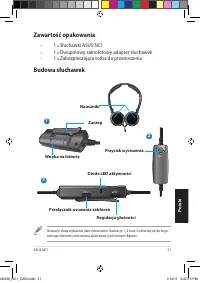
ASUS NC1 51 Polski Zawartość opakowania - 1 x Słuchawki ASUS NC1 - 1 x Dwupinowy samolotowy adapter słuchawek - 1 x Zabezpieczająca torba do przenoszenia Przełącznik usuwania zakłóceń Dioda LED aktywności Regulacja głośności Wnęka na baterię Przycisk wyciszenia Zaczep Nauszniki Budowa słuchawek Ilus...
Page 52 - Zakładanie słuchawek; W celu założenia słuchawek; Instalacja baterii; W celu instalacji baterii; Uaktywnianie funkcji usuwania zakłóceń; W celu uaktywnienia funkcji usuwania zakłóceń; Używanie dwupinowego samolotowego adaptera
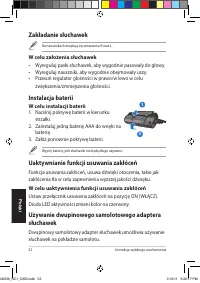
Instrukcja szybkiego uruchomienia 52 Polski Zakładanie słuchawek Na nausznikach znajdują się oznaczenia R oraz L. W celu założenia słuchawek • Wyreguluj paski słuchawek, aby wygodnie pasowały do głowy. • Wyreguluj nauszniki, aby wygodnie obejmowały uszy. • Przesuń regulator głośności w prawo/w lewo ...
Page 53 - W celu użycia dwupinowego samolotowego adaptera; Włóż kabel audio do dwupinowego samolotowego adaptera; Przechowywanie słuchawek; W celu przechowywania słuchawek; Złóż nauszniki do wewnątrz, zgodnie z; Specyfikacje
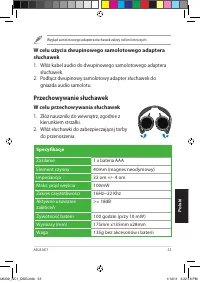
ASUS NC1 53 Polski Wygląd samolotowego adaptera słuchawek zależy od linii lotniczych. W celu użycia dwupinowego samolotowego adaptera słuchawek 1. Włóż kabel audio do dwupinowego samolotowego adaptera słuchawek. 2. Podłącz dwupinowy samolotowy adapter słuchawek do gniazda audio samolotu. Przechowywa...
Page 54 - Guia de Consulta Rápida
NC1 Auscultadores portáteis com cancelamento de ruído activo PG6239 Guia de Consulta Rápida U6239_NC1_QSG.indb 54 1/12/11 3:22:19 PM
Page 55 - Conteúdo da embalagem; Auscultadores ASUS NC1; Conheça os seus auscultadores
ASUS NC1 55 Português Conteúdo da embalagem - 1 x Auscultadores ASUS NC1 - 1 x Adaptador de ficha dupla para avião - 1 x Caixa de transporte Interruptor de cancelamento de ruído LED de actividade Controlo do volume Compartimento da pilha Botão Sem som Clip Auriculares Conheça os seus auscultadores A...
Page 56 - Utilizar os seus auscultadores; Para utilizar os seus auscultadores; Colocar a pilha; Para Colocar a pilha; Activar a função de cancelamento de ruído; Para activar a função de cancelamento de ruído; Utilizar o adaptador de ficha dupla para avião
Guia de Consulta Rápida 56 Português Utilizar os seus auscultadores Existem marcações R (Direita) e L (Esquerda) nos auriculares. Para utilizar os seus auscultadores • Ajuste as fitas do suporte para a cabeça para que os auscultadores encaixem correctamente. • Ajuste os auriculares de modo a que cub...
Page 57 - Para utilizar o adaptador de ficha dupla para avião; Insira o cabo de áudio no adaptador de ficha dupla para avião.; Armazenar os seus auscultadores; Para armazenar os seus auscultadores; Dobre os auriculares na direcção indicada; Especificações
ASUS NC1 57 Português O adaptador para avião poderá variar de acordo com as diferentes companhias aéreas. Para utilizar o adaptador de ficha dupla para avião 1. Insira o cabo de áudio no adaptador de ficha dupla para avião. 2. Insira o adaptador de ficha dupla para avião na ficha de áudio do avião. ...
Page 58 - Ghid de pornire rapidă
NC1 Căşti portabile cu eliminare activă a zgomotului de fond RO6239 Ghid de pornire rapidă U6239_NC1_QSG.indb 58 1/12/11 3:22:26 PM
Page 59 - Conţinutul pachetului; căşti NC1 ASUS; Descrierea căştilor
NC1 ASUS 59 Română Conţinutul pachetului - 1 x căşti NC1 ASUS - 1 x adaptor căşti cu 2 pini pentru avion - 1 x Husă protectoare Comutator eliminare zgomot LED activitate Control volum Compartiment baterie Buton oprire sonor Sistem de prindere Căşti Descrierea căştilor Ilustraţiile sunt doar de refer...
Page 60 - Pentru a purta căştile
Ghid de pornire rapidă 60 Română Purtarea căştilor Căştile sunt marcate cu R pentru dreapta şi L pentru stânga. Pentru a purta căştile • Reglaţi cureaua căştilor astfel încât să vă simţiţi confortabil când le purtaţi. • Reglaţi poziţia cupelor astfel încât să vă stea confortabil pe urechi. • Mişcaţi...
Page 61 - Pentru a utiliza adaptorul pentru căşti cu 2 pini pentru; Introduceţi cablul audio în adaptorul pentru căşti cu 2 pini; Păstrarea căştilor; Pentru a păstra căştile; Pliaţi cupele căştilor spre interior, pe; Specificaţii tehnice
NC1 ASUS 61 Română Adaptorul pentru căşti pentru avion poate varia în funcţie de linia aeriană. Pentru a utiliza adaptorul pentru căşti cu 2 pini pentru avion 1. Introduceţi cablul audio în adaptorul pentru căşti cu 2 pini pentru avion. 2. Introduceţi adaptorul pentru căşti cu 2 pini pentru avion în...
Page 62 - Vodič za hitri začetek
NC1 Prenosne slušalke z aktivnim izničevalnikom šumov SL6239 Vodič za hitri začetek U6239_NC1_QSG.indb 62 1/12/11 3:22:34 PM
Page 63 - Vsebina paketa; slušalka ASUS NC1; Seznanitev s slušalkami
ASUS NC1 63 Slovenščina Vsebina paketa - 1 x slušalka ASUS NC1 - 1 x dvopinski vmesnik za letalske slušalke - 1 x zaščitni prenosni kovček Stikalo za izničevanje šumov LED aktivnosti Nastavljanje glasnosti Prostor za baterijo Gumb za nemo Sponka Slušalke Seznanitev s slušalkami Slike so zgolj refere...
Page 64 - Nošenje slušalk; Kako nositi slušalke; Vstavljanje baterij; Kako vstaviti baterijo; Aktiviranje funkcije za izničevanje šumov; Kako aktivirati funkcijo za izničevanje šumov; Uporaba dvopinskega vmesnika za letalske
Vodič za hitri začetek 64 Slovenščina Nošenje slušalk Na slušalkah sta oznaki R in L. Kako nositi slušalke • Trakove nastavite tako, da se slušalke udobno prilegajo glavi. • Slušalke nastavite tako, da se udobno prilegajo ušesom. • Kolesce za nastavljanje glasnosti zasučite v desno/levo, da povečate...
Page 65 - Kako uporabljati dvopinski vmesnik za letalske slušalke; Zvočni kabel vstavite v dvopinski vmesnik za letalske slušalke.; Shranjevanje slušalk; Kako shranjevati slušalke; Slušalke zložite navznoter v smeri puščice.; Specifikacije
ASUS NC1 65 Slovenščina Vmesnik za letalske slušalke se razlikuje pri različnih letalskih prevoznikih. Kako uporabljati dvopinski vmesnik za letalske slušalke 1. Zvočni kabel vstavite v dvopinski vmesnik za letalske slušalke. 2. Dvopinski vmesnik za letalske slušalke vstavite v zvočno vtičnico letal...
Page 66 - Guía de inicio rápido
NC1 Auriculares con función de cancel- ación de ruido activa S6239 Guía de inicio rápido U6239_NC1_QSG.indb 66 1/12/11 3:22:41 PM
Page 67 - Contenido del paquete; Auriculares ASUS NC1; Familiarícese con los auriculares
ASUS NC1 67 Español Contenido del paquete - 1 x Auriculares ASUS NC1 - 1 x Doble conector para toma de avión - 1 x Funda protectora para el transporte Interruptor de cancelación de ruido Indicador LED de actividad Control de volumen Compartimento de la batería Botón de silencio Pinza Copas Familiarí...
Page 68 - Colocarse los auriculares; Para colocarse los auriculares; Instalación de la batería; Para instalar la batería:; Activación de la función de cancelación de ruido; Para activar la función de cancelación de ruido; Uso del doble conector para la toma de avión
Guía de inicio rápido 68 Español Colocarse los auriculares Las copas incorporan las marcas R (derecha) y L (izquierda). Para colocarse los auriculares • Ajuste las correas de los auriculares de modo que descansen sobre su cabeza sin ejercer presión. • Ajuste las copas de modo que cubran cómodamente ...
Page 69 - Uso del adaptador de doble conector para toma de; Almacenamiento de los auriculares; Cómo guardar los auriculares; Especificaciones
ASUS NC1 69 Español El adaptador de auriculares para toma de avión podría no ser apto para todos los aviones. Uso del adaptador de doble conector para toma de avión 1. Inserte el cable de audio en el adaptador de auriculares para toma de avión de doble conector. 2. Inserte el adaptador de auriculare...
Page 70 - Snabbstartguide
NC1 Portabla aktiva bruseliminerande hörlurar SW6239 Snabbstartguide U6239_NC1_QSG.indb 70 1/12/11 3:22:49 PM
Page 71 - Förpackningsinnehåll; ASUS NC1 hörlurar; Lär känna dina hörlurar
ASUS NC1 71 Svenska Förpackningsinnehåll - 1 x ASUS NC1 hörlurar - 1 x Dubbelpinnad flygplanshörlursadapter - 1 x Skyddande bärväska Bruseliminerande knapp Aktivitets-LED Volymkontroll Batteriutrymme Mute-knapp Clips Öronkåpor Lär känna dina hörlurar Illustrationen är endast till som referens. Illus...
Page 72 - Bär dina hörlurar; Att bära dina hörlurar; Sätta i batteriet; Installation av batteriet; Aktivera den bruseliminerande funktionen; Att aktivera bruseliminerande funktionen; Använd den dubbelpinnade
Snabbstartguide 72 Svenska Bär dina hörlurar Det finns R och L markeringar på öronkåporna. Att bära dina hörlurar • Justera hörlurarnas remmar så att de passar skönt på huvudet. • Justera öronkåporna så att de passar bekvämt runt dina öron. • Flytta volymkontrollen åt höger/vänster för att öka/minsk...
Page 73 - Att använd den dubbelpinnade flygplanshörlursadapt-; Förvaring av dina hörlurar; Att förvara dina hörlurar
ASUS NC1 73 Svenska Flygplanshörlursadaptern varierar mellan olika flygplan. Att använd den dubbelpinnade flygplanshörlursadapt- ern 1. Sätt in ljudkabeln i den dubbelpinnade flygplanshörlursadaptern. 2. Sätt in en dubbelpinnande flygplanshörlursadaptern i flygplanets ljuduttag. Förvaring av dina hö...
Page 74 - Коротка інструкція
NC1 Портативні навушники із активним усуненням шумів UA6239 Коротка інструкція U6239_NC1_QSG.indb 74 1/12/11 3:22:56 PM
Page 75 - До комплекту входять; навушники ASUS NC1; Знайомство з навушниками
ASUS NC1 75 Українська До комплекту входять - 1 x навушники ASUS NC1 - 1 x адаптер для користування навушниками у літаку - 1 x захисний чохол Перемикач усунення шумів Індикатор активності Регулювання гучності Батарейний відсік Кнопка "вимкнення звуку" Кліпс Навушники Знайомство з навушниками...
Page 76 - Як носити навушники; Щоб вдягти навушники; Встановлення батареї; Щоб вставити батарею; Активація функції усунення шумів; Щоб активувати функц; Користування навушниками в літаку за
Коротка інструкція 76 Українська Як носити навушники Навушники позначені R (правий) та L (лівий). Щоб вдягти навушники • Відрегулюйте ремінці, щоб вони зручно охоплювали голову. • Відрегулюйте кожен з навушників, щоб він зручно розміщувався довкола вуха. • Пересуньте регулятор гучності праворуч/ліво...
Page 77 - Щоб користуватися навушниками в л; Вставте кабель аудіо до для навушників.; Збер; Щоб зберігати навушники; Складіть навушники рухом до середини,; Технічні
ASUS NC1 77 Українська Роз’єми для навушників у різних літаків є різними., тому цей адаптер інколи може не підходити. Щоб користуватися навушниками в л і таку за допомогою адаптера 1. Вставте кабель аудіо до для навушників. 2. Вставте адаптер до роз’єму для навушників у літаку. Збер і гання навушник...






























 Asus 1001P-MU17-WT
User Manual
Asus 1001P-MU17-WT
User Manual
 Asus 1 E1309
User Manual
Asus 1 E1309
User Manual
 Asus 1015E
User Manual
Asus 1015E
User Manual
 Asus 1064E - PIKE Storage Controller SAS
User Manual
Asus 1064E - PIKE Storage Controller SAS
User Manual
 Asus 136-480A
User Manual
Asus 136-480A
User Manual
 Asus 1225 Series
User Manual
Asus 1225 Series
User Manual
 Asus 13VH192C
Manual
Asus 13VH192C
Manual
 Asus 1U
User Manual
Asus 1U
User Manual
 Asus 1U Rackmount Barebone Server RS160-E3/PS4
User Manual
Asus 1U Rackmount Barebone Server RS160-E3/PS4
User Manual
 Asus 200/266 MHZ FSB AGP 4X
User Manual
Asus 200/266 MHZ FSB AGP 4X
User Manual
 Asus 1U Rackmount Chassis Kit R10-A2P4
User Manual
Asus 1U Rackmount Chassis Kit R10-A2P4
User Manual
 Asus 24T1E
User Manual
Asus 24T1E
User Manual
 Asus 22T1E
User Manual
Asus 22T1E
User Manual