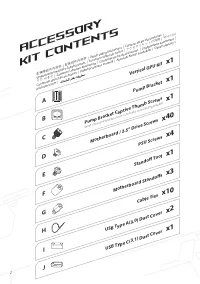
Page 3 - Contents; ACCESSORY KIT CONTENTS
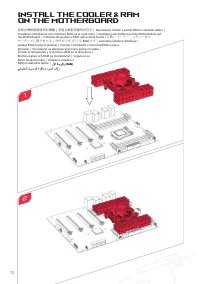
1 Contents Remove the Side Panels Remove the PSU Cover Multi Function Cover Install the Power Supply Unit (PSU) Install the Cooler & RAM on the Motherboard Install the I/O Shield Install the Motherboard Unit Attach the Front I/O Connectors Sync Case Lighting With Addressable RGB Compatible Mothe...
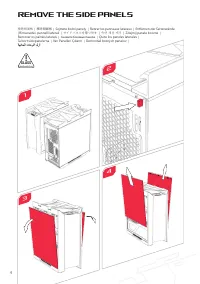
Page 6 - Remove the Side Panels
4 Remove the Side Panels 1 3 移除側面板 | 移除侧面板 | Sejm ě te bo č ní panely | Retirer les panneaux latéraux | Entfernen der Seitenwände | Rimuovete i pannelli laterali | サイドパネルを取り外す | 측면 패널 제거 | Zdejmij panele boczne | Remover os painéis laterais | Снимите боковые панели | Quite los paneles laterales | Ta...
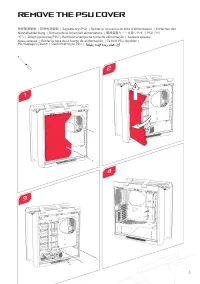
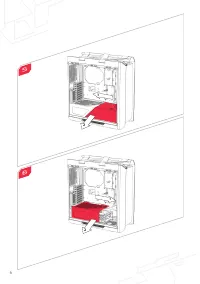
Page 7 - Remove the PSU Cover
5 Remove the PSU Cover 移除電源遮板 | 移除电源盖板 | Sejm ě te kryt PSU | Retirer le couvercle du bloc d'alimentation | Entfernen der Netzteilabdeckung | Rimuovete la cover dell'alimentatore | 電源装置カバーを取り外す | PSU 커버 제거 | Zdejmij pokryw ę PSU | Remover a tampa da fonte de alimentação | Снимите крышку блока питани...
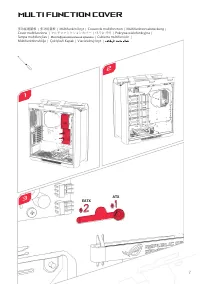
Page 9 - Multi Function Cover
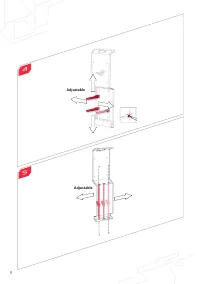
Multi Function Cover 多功能遮蓋板 | 多功能盖板 | Multifunk č ní kryt | Couvercle multifonction | Multifunktionsabdeckung | Cover multifunzione | マルチファンクションカバー | 다기능 커버 | Pokrywa wielofunkcyjna | Tampa multifunções | Многофункциональная крышка | Cubierta multifunción | Multifunktionshölje | Çok İş levli Kapak |...
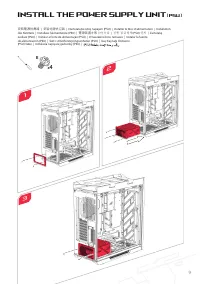
Page 11 - Install the Power Supply Unit
E 4 x 9 Install the Power Supply Unit (PSU) 安裝電源供應器 | 安装电源供应器 | Nainstalujte zdroj napájení (PSU) | Installer le bloc d'alimentation | Installation des Netzteils | Installate l'alimentatore (PSU) | 電源装置を取り付ける | 전원 공급장치 (PSU) 설치 | Zainstaluj zasilacz (PSU) | Instalar a fonte de alimentação (PSU) | Ус...
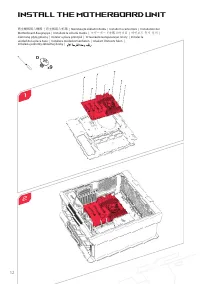
Page 14 - Install the Motherboard Unit
D 9 x Install the Motherboard Unit 將主機板裝入機殼 | 将主板装入机箱 | Nainstalujte základní desku | Installer la carte mère | Installation der Motherboard-Baugruppe | Installate la scheda madre | マザーボードを取り付ける | 메인보드 유닛 설치 | Zainstaluj płytę główną | Instalar a placa principal | Установите материнскую плату | Inst...
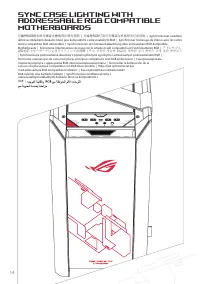
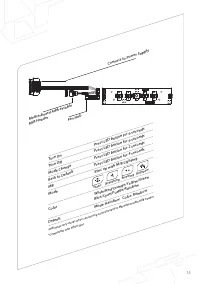
Page 16 - Sync Case Lighting With
可編程RGB燈光與可兼容主機板同步燈光控制 | 可编程RGB灯效与可兼容主机板同步灯光控制 | Synchronizovat osvětlení skříně se základními deskami, které jsou kompatibilní s adresovatelným RGB | Synchroniser l'éclairage du châssis avec les cartes mères compatibles RGB adressables | Synchronisieren der Gehäusebeleuchtung über ansteuerbare RGB-k...
Page 18 - Fan Hub Connectivity
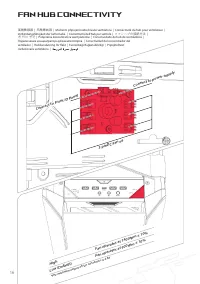
Fan Hub Connectivity 風扇集線器 | 风扇集线器 | Možnosti připojení rozbočovače ventilátoru | Connectivité du hub pour ventilateur | Verbindungsfähigkeit der Lüfternabe | Connettività dell'hub per ventole | ファンハブの接続方法 | 팬 허브 연결 | Połączenia koncentratora wentylatorów | Conectividade de hub de ventiladores | Под...
Page 19 - Install the PCI-E Card
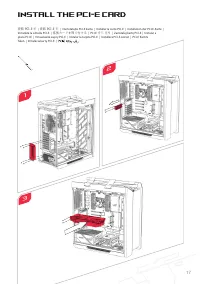
17 Install the PCI-E Card 安裝 PCI-E 卡 | 安裝 PCI-E 卡 | Nainstalujte PCI-E kartu | Installer la carte PCI-E | Installation der PCI-E-Karte | Installate la scheda PCI-E | 拡張カードを取り付ける | PCI-E 카드 설치 | Zainstaluj kartę PCI-E | Instalar a placa PCI-E | Установите карту PCI-E | Instalar la tarjeta PCI-E | Ins...
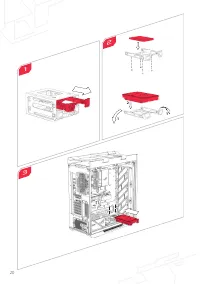
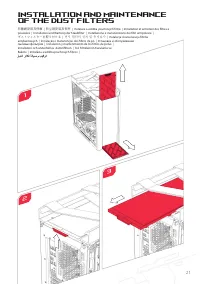
Page 23 - Installation and Maintenance
21 防塵網安裝及保養 | 防尘网安装及保养 | Instalace a údržba prachových filtrů | Installation et entretien des filtres à poussière | Installation und Wartung der Staubfilter | Installazione e manutenzione dei filtri antipolvere | ダストフィルターを取り付ける | 먼지 필터의 설치 및 유지보수 | Instalacja i konserwacja filtrów antykurzowych | In...
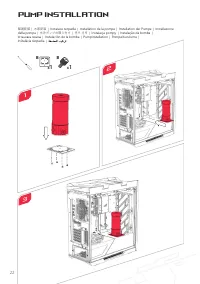
Page 24 - Pump Installation
Pump Installation 幫浦安裝 | 水泵安装 | Instalace č erpadla | Installation de la pompe | Installation der Pumpe | Installazione della pompa | 水冷ポンプの取り付け | 펌프 설치 | Instalacja pompy | Instalação da bomba | Установка помпы | Instalación de la bomba | Pumpinstallation | Pompa Kurulumu | Inštalácia č erpadla | 1...
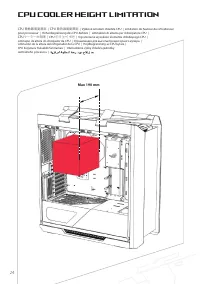
Page 26 - CPU Cooler Height Limitation
CPU Cooler Height Limitation CPU 散熱器高度限制 | CPU 散热器高度限制 | Výškové omezení chladiče CPU | Limitation de hauteur du refroidisseur pour processeur | Höhenbegrenzung des CPU-Kühlers | Limitazioni di altezza per il dissipatore CPU | CPUクーラーの制限 | CPU 쿨러 높이 제한 | Ograniczenie wysokości elementu chłodzącego C...
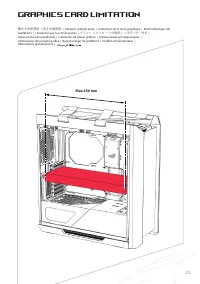
Page 27 - Graphics Card Limitation
25 Graphics Card Limitation 顯示卡長度限制 | 显卡长度限制 | Omezení grafické karty | Limitations de la carte graphique | Beschränkungen der Grafikkarte | Limitazioni per la scheda grafica | グラフィックスカードの制限 | 그래픽 카드 제한 | Ograniczenia karty graficznej | Limitações de placas gráficas | Ограничения для видеокарты | Li...
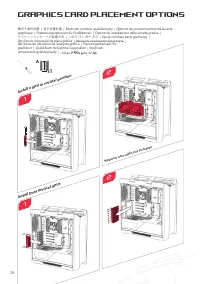
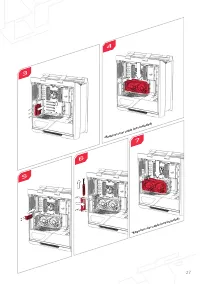
Page 28 - Graphics Card Placement Options
Graphics Card Placement Options 顯示卡替代放置 | 显卡放置位置 | Možnosti umíst ě ní grafické karty | Options de positionnement de la carte graphique | Platzierungsoptionen für Grafikkarten | Opzioni di installazione della scheda grafica | グラフィックスカードの設置方法 | 그래픽 카드 배치 옵션 | Opcje monta ż u karty graficznej | Opções...
Page 30 - Fan Setup Compatibility; Top
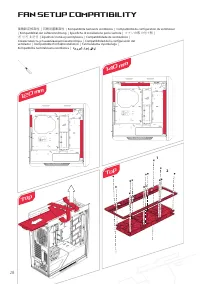
120 mm 140 mm Fan Setup Compatibility 風扇設定相容性 | 风扇设置兼容性 | Kompatibilita nastavení ventilátoru | Compatibilité de configuration du ventilateur | Kompatibilität der Lüftereinrichtung | Specifiche di installazione per le ventole | ファンの取り付け例 | 팬 설치 호환성 | Zgodność instalacji wentylatora | Compatibilid...
Page 32 - Water-cooling Radiatior Options
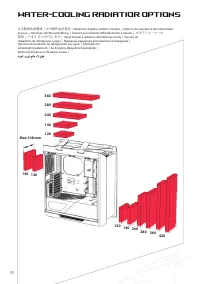
Water-cooling Radiatior Options 水冷散熱系統選項 | 水冷散热系统选项 | Možnosti chladiče vodního chlazení | Options de radiateur à refroidissement par eau | Optionen der Wasserkühlung | Opzioni per radiatore raffreddamento a liquido | 水冷ラジエーターの 制限 | 수냉식 라디에이터 옵션 | Opcje instalacji radiatora chłodzonego wodą | Opções...
Page 33 - Compatibility
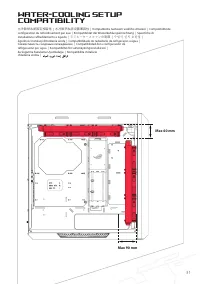
31 Water-cooling Setup Compatibility 水冷散熱系統設定相容性 | 水冷散热系统设置兼容性 | Kompatibilita nastavení vodního chlazení | Compatibilité de configuration du refroidissement par eau | Kompatibilität der Wasserkühlungseinrichtung | Specifiche di installazione raffreddamento a liquido | ラジエーターとファンの制限 | 수냉식 설치 호환성 | Z...
Page 36 - ROG Addressable
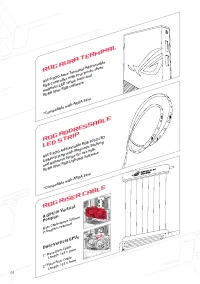
ASUS ROG Addressable RGB 5050 LED Lighting Strip with Magnetic Backing and Adhesive Strips for use with AURA Sync RGB Lighting Software *Compatible with ARUA Sync *Compatible with ARUA Sync 2 nd Place Riser Cable Length: 135 ± 5mm 1 st place Riser Cable Length: 163 ± 5mm Dual-Vertical GPUs Riser Cab...
Page 39 - AEEE Yönetmeliğine Uygundur.
37 Zgodnie z rozporządzeniem REACH (Rejestracja, ocena, autoryzacja i ograniczenie środków chemicznych), publikujemy informacje o środkach chemicznych w naszych produktach, na stronie internetowej ASUS REACH pod adresem http://csr.asus.com/english/REACH.htm (Polski) Cumprindo o quadro regulamentar R...