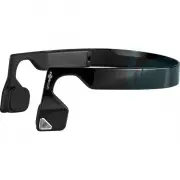
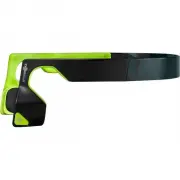
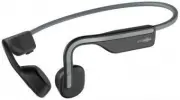
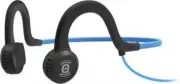
Page 2 - On the right side of the headset, as worn, there are three controls.
• Multi-Function Button: Triangular button located on the outside of the left transducer housing. The Multi-Function Button is raised slightly above the surface of the transducer housing. This button is used in a variety of ways and will be further explained in this document. • On the right side of ...
Page 3 - Accessories
Accessories • Adjustable Tension Band • Micro-USB Charging Cable • Reflective Stickers • Weatherproof Storage Pouch • Warranty Registration Card What’s special? • Bluez 2 are stereo Bluetooth headphones with wireless phone and music functions that rely on bone conduction technology to transmit sound...
Page 4 - How to wear
How to wear • Begin by holding the headphones horizontally, with the transducer side facing up, closest to your body. Lift the headphones over your head, so the back of the wraparound headband sets in place at the base of the head, and the transducers rest on your cheekbones in front of your ears (n...
Page 5 - How to use the Adjustable Tension Band; in the inside of the headband.; How to use the Reflective Stickers
How to use the Adjustable Tension Band 1. Put the headphones on a table horizontally, with the transducer side facing up, closest to your body. 2. Put the Adjustable Tension Band along the interior of the headband. Twist the Adjustable Tension Band to a semicircle, along the inside of the headband, ...
Page 6 - How to operate Bluez 2
How to operate Bluez 2 • To turn on/off: Hold down the Power Button for two seconds to turn on/off. When powering on, the headphones will vibrate and Audrey’s voice will prompt with the phrase: “Welcome to Bluez 2”. When powering off, the headphones will vibrate and play four descending beeps, then ...
Page 7 - Check battery status:; Note: Reset erases all paired devices stored in your headset.; Change music EQ setting:
• Charging: Connect Bluez 2 to a standard USB port on your PC or wall charger with the Micro-USB Charging Cable. Bluez 2 will be fully charged within two hours. The LED Indicator will show solid red when charging, and will turn solid blue when the device is fully charged. Note: Though the headphones...
Page 8 - Note: EQ setting will reset to default if Bluez 2 is re-paired.; Answer or end a call:; Press and hold the Multi-Function Button for two seconds.; Answer the second incoming call and hold on the current call:
Hold the Volume Up and Volume Down button for two seconds. Audrey’s voice will prompt you with the phrase “Equalization changed”. Note: EQ setting will reset to default if Bluez 2 is re-paired. • Adjust volume: Press the button with the dot on the rocker switch to increase the volume, and press the ...
Page 10 - How to contact us
Note: Design and specifications are subject to change without notice. For the most up-to-date product information, please visit aftershokz.com. How to contact us AfterShokz 6311 Fly Road Suite 106 East Syracuse, NY 13057 [email protected] aftershokz.com Note: If you need to return your product for r...