Page 8 - ENGLISH; Charge; How to Set Up OpenMove
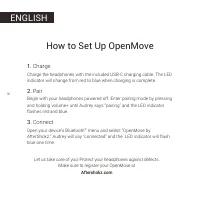
ENGLISH 06 1. Charge 2. Pair 3. Connect Charge the headphones with the included USB-C charging cable. The LED indicator will change from red to blue when charging is complete. Begin with your headphones powered off. Enter pairing mode by pressing and holding volume+ until Audrey says “pairing” and t...
Page 11 - Specifications
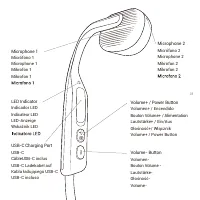
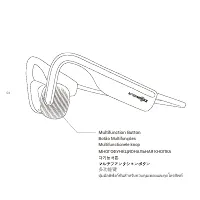
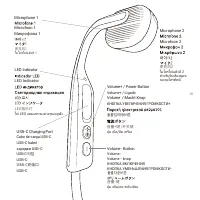
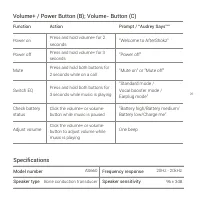
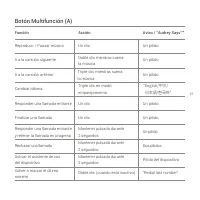
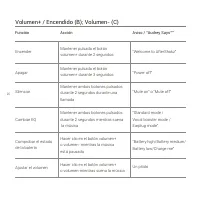
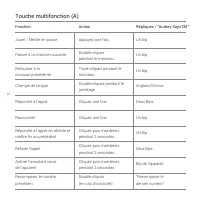
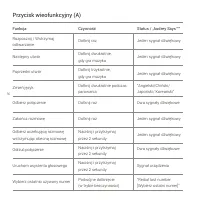
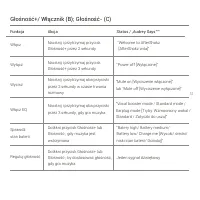
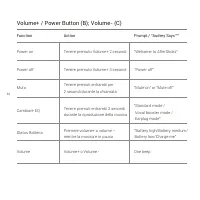
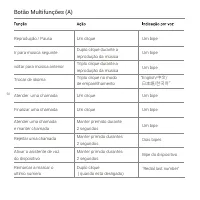
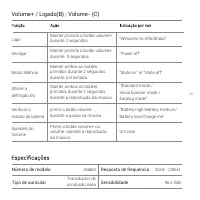
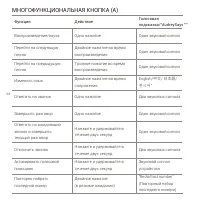
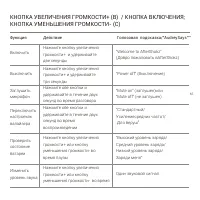
09 Function Action Prompt / “Audrey Says™” “Welcome to AfterShokz” Power on Press and hold volume+ for 2 seconds Power off “Power off” Press and hold volume+ for 3seconds Press and hold both buttons for 2 seconds while on a call Press and hold both buttons for 3 seconds while music is playing Click ...
Page 12 - LED Indicator
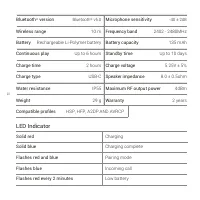
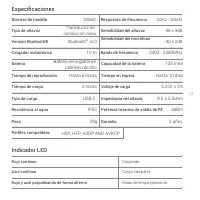
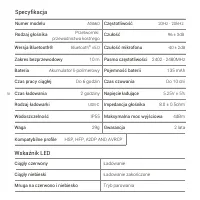
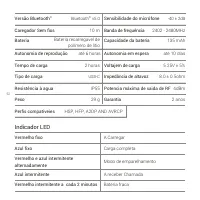
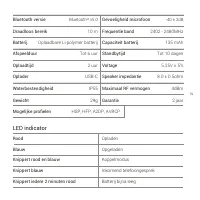
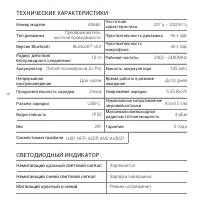
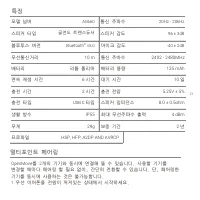
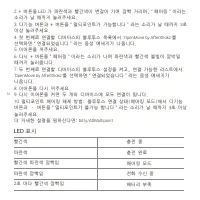
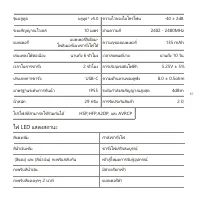
10 LED Indicator Solid red Charging Solid blue Charging complete Flashes red and blue Pairing mode Flashes blue Incoming call Flashes red every 2 minutes Low battery Bluetooth ® version Microphone sensitivity -40 ± 2dB Bluetooth ® v5.0 Warranty Weight Battery 2 years 29 g Up to 10 days 2402 - 2480MH...
Page 13 - Multipoint Pairing
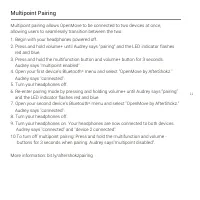
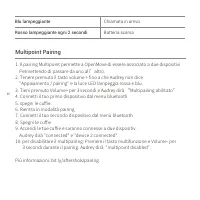
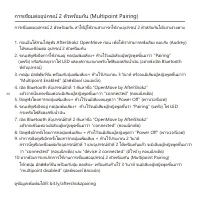
11 Multipoint pairing allows OpenMove to be connected to two devices at once, allowing users to seamlessly transition between the two.1. Begin with your headphones powered off.2. Press and hold volume+ until Audrey says “pairing” and the LED indicator flashes red and blue.3. Press and hold the multi...
Page 14 - Manufacturer
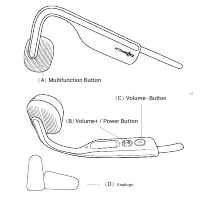
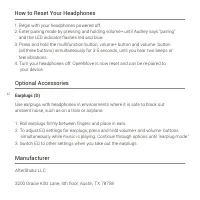
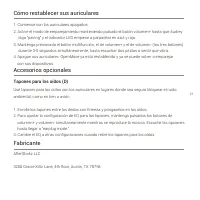
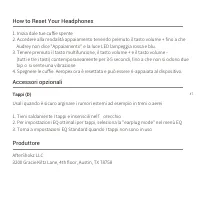
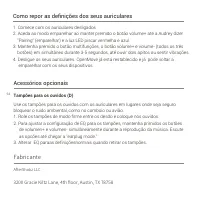
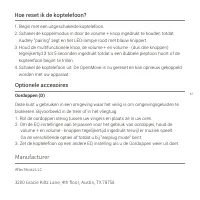
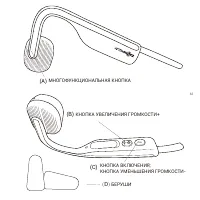
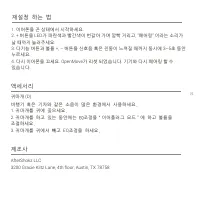
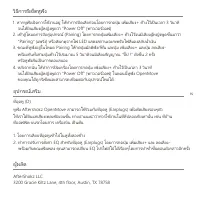
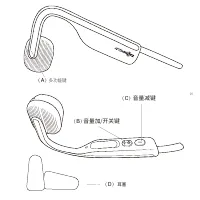
12 AfterShokz LLC 3200 Gracie Kiltz Lane, 4th floor, Austin, TX 78758 Manufacturer Optional Accessories Earplugs (D) Use earplugs with headphones in environments where it is safe to block out ambient noise, such as on a train or airplane. 1. Roll earplugs firmly between fingers and place in ears.2. ...
Page 15 - ESPAÑOL; Cargar; Cómo configurar OpenMove
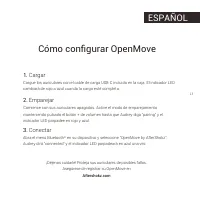
13 ESPAÑOL 1. Cargar 2. Emparejar 3. Conectar Cargue los auriculares con el cable de carga USB-C incluido en la caja. El indicador LED cambiará de rojo a azul cuando la carga esté completa. Comience con sus auriculares apagados. Active el modo de emparejamiento manteniendo pulsado el botón + de volu...
Page 20 - Emparejamiento multipunto
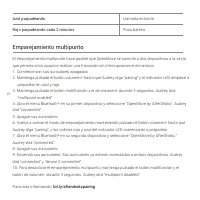
18 Azul parpadeando Llamada entrante Rojo parpadeando cada 2 minutos Poca batería Emparejamiento multipunto El emparejamiento multipunto hace posible que OpenMove se conecte a dos dispositivos a la vez,lo que permite a los usuarios realizar una transición sin interrupciones entre ambos.1. Comience s...
Page 21 - Fabricante
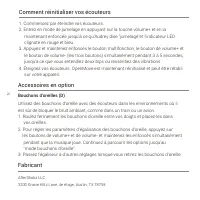
19 AfterShokz LLC 3200 Gracie Kiltz Lane, 4th floor, Austin, TX 78758 Fabricante 1. Comience con los auriculares apagados.2. Active el modo de emparejamiento manteniendo pulsado el botón volumen+ hasta que Audrey diga “pairing” y el indicador LED empiece a parpadear en azul y rojo.3. Mantenga presio...
Page 22 - FRANÇAIS; Comment paramétrer OpenMove
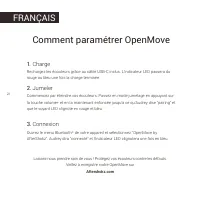
20 FRANÇAIS 1. Charge 2. Jumeler 3. Connexion Rechargez les écouteurs grâce au câble USB-C inclus. L’indicateur LED passera du rouge au bleu une fois la charge terminée. Commencez par éteindre vos écouteurs. Passez en mode jumelage en appuyant sur la touche volume+ et en la maintenant enfoncée jusqu...
Page 26 - Spécificités; Indicateur LED
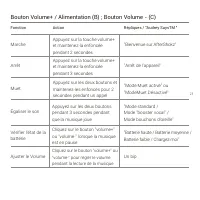
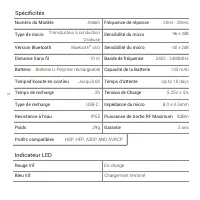
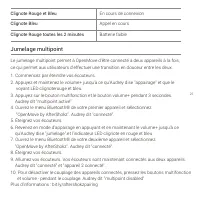
24 Spécificités Numéro du Modèle AS660 20Hz - 20kHz Type de micro Fréquence de réponse Transducteur à conduction Osseuse Sensibilité du micro 96 ± 3dB Indicateur LED Rouge Vif En charge Bleu Vif Chargement terminé Version Bluetooth Sensibilité du micro -40 ± 2dB Bluetooth ® v5.0 Garantie Poids Batter...
Page 27 - Jumelage multipoint
25 Le jumelage multipoint permet à OpenMove d'être connecté à deux appareils à la fois, ce qui permet aux utilisateurs d'effectuer une transition en douceur entre les deux. Jumelage multipoint 1. Commencez par éteindre vos écouteurs.2. Appuyez et maintenez le volume+ jusqu'à ce qu'Audrey dise "a...
Page 29 - DEUTSCH; Laden; OpenMove einrichten
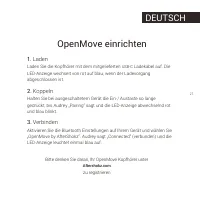
27 DEUTSCH 1. Laden 2. Koppeln 3. Verbinden Laden Sie die Kopfhörer mit dem mitgelieferten USB-C Ladekabel auf. Die LED-Anzeige wechselt von rot auf blau, wenn der Ladevorgang abgeschlossen ist. Halten Sie bei ausgeschaltetem Gerät die Ein-/ Austaste so lange gedrückt, bis Audrey „Pairing“ sagt und ...
Page 32 - Spezifikationen
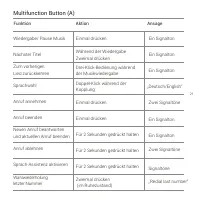
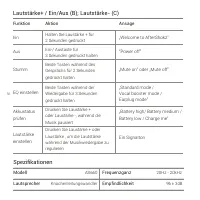
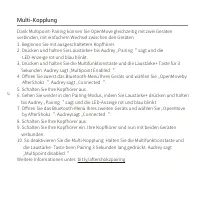
30 Funktion Aktion Ansage „Welcome to AfterShokz“ Ein Halten Sie Laustärke + für 2 Sekunden gedrückt Aus “Power off” Ein-/ Austaste für 3 Sekunden gedrückt halten Beide Tasten während des Gesprächs für 2 Sekunden gedrückt halten Beide Tasten während der Wiedergabe für 3 Sekunden gedrückt halten Drüc...
Page 33 - LED Anzeige
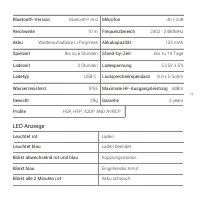
31 LED Anzeige Leuchtet rot Laden Leuchtet blau Laden beendet Blinkt abwechselnd rot und blau Kopplungsmodus Blinkt blau Eingehender Anruf Blinkt alle 2 Minuten rot Akku schwach Bluetooth-Version Mikrofon -40 ± 2dB Bluetooth ® v5.0 Garantie Gewicht Akku 2 years 29g Bis zu 10 Tage 2402 - 2480MHz 4dBm...
Page 35 - Hersteller
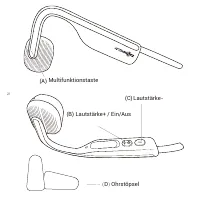
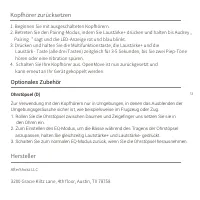
33 AfterShokz LLC 3200 Gracie Kiltz Lane, 4th floor, Austin, TX 78758 Hersteller Optionales Zubehör Ohrstöpsel (D) Zur Verwendung mit den Kopfhörern nur in Umgebungen, in denen das Ausblenden der Umgebungsgeräusche sicher ist, wie beispielsweise im Flugzeug oder Zug. 1. Rollen Sie die Ohrstöpsel zwis...
Page 36 - POLSKI; Ładowanie; Ustawienia OpenMove
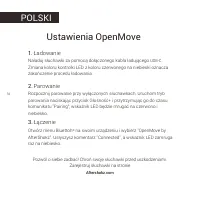
34 POLSKI 1. Ładowanie 2. Parowanie 3. Łączenie Naładuj słuchawki za pomocą dołączonego kabla ładującego USB-C . Zmiana koloru kontrolki LED z koloru czerwonego na niebieski oznacza zakończenie procedu ładowania. Rozpocznij parowanie przy wyłączonych słuchawkach. Uruchom tryb parowania naciskając pr...
Page 37 - Przycisk wielofunkcyjny
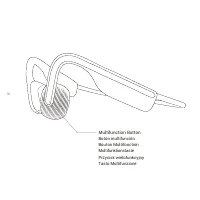
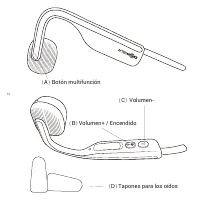
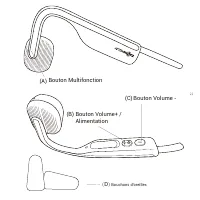
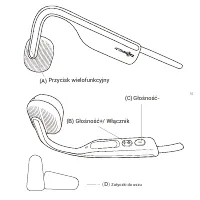
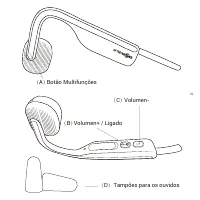
35 ( D ) Zatyczki do uszu Przycisk wielofunkcyjny Głośność+/ Włącznik (B) (C) (A) Głośność-
Page 40 - Specyfikacja
38 Numer modelu AS660 20Hz - 20kHz Specyfikacja Rodzaj głośnika Częstotliwość Przetworniki przewodnictwa kostnego Czułość 96 ± 3dB Wskaźnik LED Ciągły czerwony Ładowanie Ciągły niebieski Ładowanie zakończone Mruga na czerwono i niebiesko Tryb parowania Wersja Bluetooth® Czułość mikrofonu -40 ± 2dB Bl...
Page 41 - Parowanie multipoint
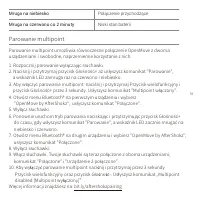
39 Mruga na niebiesko Połączenie przychodzące Mruga na czerwono co 2 minuty Niski stan baterii Parowanie multipoint umo ż liwia równoczesne po łą czenie OpenMove z dwoma urz ą dzeniami i swobodne, naprzemienne korzystanie z nich. 1. Rozpocznij parowanie wy łą czaj ą c s ł uchawki. 2. Naci ś nij i pr...
Page 42 - Wytwórca
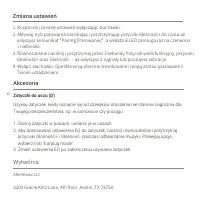
40 AfterShokz LLC 3200 Gracie Kiltz Lane, 4th floor, Austin, TX 78758 Wytwórca Akcesoria Zatyczki do uszu (D) Używaj zatyczek, kiedy odcięcie się od dżwięków otoczenia nie stanowi zagrożnia dla Twojego bezpieczeństwa, np. w samolocie czy pociągu 1. Ściśnij zatyczki w palcach i umieść je w uszach.2. A...
Page 43 - ITALIANO; Ricarica; Come configurare OpenMove
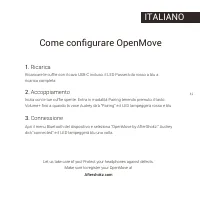
41 ITALIANO 1. Ricarica 2. Accoppiamento 3. Connessione Ricaricare le cuffie con il cavo USB-C incluso. il LED Passerà da rosso a blu a ricarica completa Inizia con le tue cuffie spente. Entra in modalità Pairing tenendo premuto il tasto Volume+ fino a quando la voce Audrey dirà “Pairing” e il LED l...
Page 44 - Bottone Multifunzione
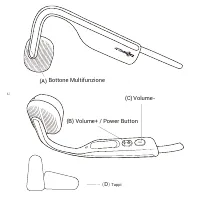
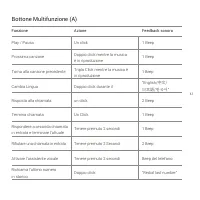
42 ( D ) Tappi Bottone Multifunzione Volume+ / Power Button (B) (C) (A) Volume-
Page 47 - Specifiche; Indicatori LED
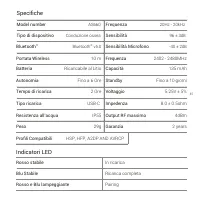
45 Model number AS660 20Hz - 20kHz Specifiche Tipo di dispositivo Frequenza Conduzione ossea Sensibilità 96 ± 3dB Indicatori LED Rosso stabile In ricarica Blu Stabile Ricarica completa Rosso e Blu lampeggiante Pairing Bluetooth ® Sensibilità Microfono -40 ± 2dB Bluetooth ® v5.0 Garanzia Peso Batteria...
Page 50 - PORTUGUÊS; Carga; Como configurar OpenMove
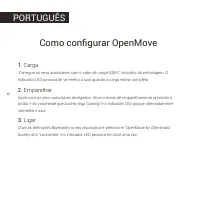
48 PORTUGUÊS 1. Carga 2. Emparelhar 3. Ligar Carregue os seus auriculares com o cabo de carga USB-C incluidos da embalagem. O indicador LED passará de vermelho a azul quando a carga esteja completa. Inicie com os seus auriculares desligados. Ative o modo de emparelhamento primindo o botão + do volum...
Page 54 - Indicador LED
52 Indicador LED Vermelho fixo A Carregar Azul fixo Carga completa Vermelho e azul intermitente alternadamente Modo de emparelhamento Azul intermitente A receber Chamada Vermelho intermitente a cada 2 minutos Bateria fraca Versão Bluetooth ® Sensibilidade do micrófone -40 ± 2dB Bluetooth ® v5.0 Garant...
Page 55 - Emparelhamento multiponto
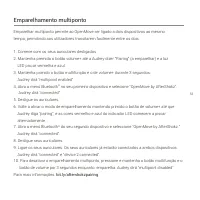
53 Emparelhar multiponto permite ao OpenMove ser ligado a dois dispositivos ao mesmo tempo, permitindo aos utilizadores transitarem facilmente entre os dois. 1. Comece com os seus auriculares desligados.2. Mantenha premido o botão volume+ até a Audrey dizer “Pairing” (a emparelhar) e a luz LED pisca...
Page 57 - NEDERLANDS; Opladen; Configureren van de OpenMove
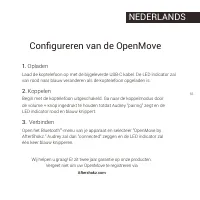
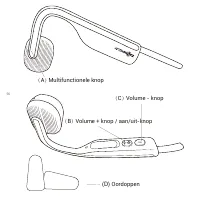
55 NEDERLANDS 1. Opladen 2. Koppelen 3. Verbinden Laad de koptelefoon op met de bijgeleverde USB-C kabel. De LED indicator zal van rood naar blauw veranderen als de koptelefoon opgeladen is. Begin met de koptelefoon uitgeschakeld. Ga naar de koppelmodus door de volume + knop ingedrukt te houden totd...
Page 60 - Specificaties
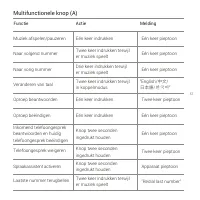
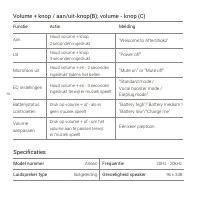
58 Functie Actie Melding "Welcome to AfterShokz" Aan Houd volume + knop 2 seconden ingedrukt Uit “Power off” Houd volume + knop 3 seconden ingedrukt Houd volume + en - 2 seconden ingedrukt tijdens het bellen Houd volume + en - 3 seconden ingedrukt terwijl er muziek speelt Druk op volume + of...
Page 61 - LED indicator
59 LED indicator Rood Opladen Blauw Opgeladen Knippert rood en blauw Koppelmodus Knippert blauw Inkomend telefoongesprek Knippert iedere 2 minuten rood Batterij bijna leeg Bluetooth versie Gevoeligheid microfoon -40 ± 2dB Bluetooth ® v5.0 Garantie Gewicht Batterij 2 jaar 29g Tot 10 dagen 2402 - 2480...
Page 62 - Met meerdere apparaten koppelen
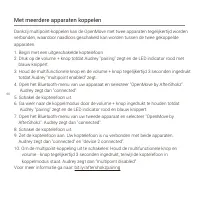
60 Dankzij multipoint-koppelen kan de OpenMove met twee apparaten tegelijkertijd worden verbonden, waardoor naadloos geschakeld kan worden tussen de twee gekoppelde apparaten.1. Begin met een uitgeschakelde koptelefoon2. Druk op de volume + knop totdat Audrey "pairing" zegt en de LED indicat...
Page 64 - РУССКИЙ; Как подготовить OpenMove к работе; Зарядка
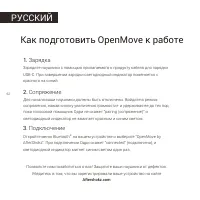
62 РУССКИЙ Как подготовить OpenMove к работе 1. Зарядка 2. Сопряжение 3. Подключение Зарядите наушники с помощью прилагаемого к продукту кабеля для зарядкиUSB-C. При завершении зарядки светодиодный индикатор поменяется скрасного на синий. Для начала ваши наушники должны быть отключены. Войдите в реж...
Page 68 - СВЕТОДИОДНЫЙ ИНДИКАТОР; ТЕХНИЧЕСКИЕ ХАРАКТЕРИСТИКИ
66 СВЕТОДИОДНЫЙ ИНДИКАТОР Немигающий красный световой сигнал Заряжается Немигающий синий световой сигнал Зарядка завершена Мигающий красный и синий Режим сопряжения Версия Bluetooth Чувствительность микрофона -40 ± 2дБ Bluetooth ® v5.0 Гарантия Вес Аккумулятор 2 года 29г До10 дней 2402 - 2480MHz 4 д...
Page 69 - МУЛЬТИПОЙНТ СОПРЯЖЕНИЕ
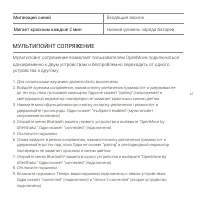
67 Мигающий синий Входящий звонок Мигает красным каждые 2 мин Низкий уровень заряда батареи Мультипойнт сопряжение позволяет пользователям OpenMove подключаться одновременно к двум устройствам и беспроблемно переходить от одного устройства к другому. 1. Для начала ваши наушники должны быть выключены...
Page 70 - ПРОИЗВОДИТЕЛЬ
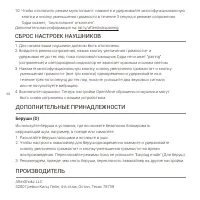
68 AfterShokz LLC 3200 Грейси Килц Лейн, 4-й этаж, Остин, Техас 78758 ПРОИЗВОДИТЕЛЬ ДОПОЛНИТЕЛЬНЫЕ ПРИНАДЛЕЖНОСТИ Беруши (D) Используйте беруши в условиях, где вы можете безопасно блокироватьокружающий шум, например, в поезде или самолете.1. Раскатайте беруши пальцами и вставьте в уши.2. Чтобы настр...
Page 71 - OpenMove 세팅 방법; 충전
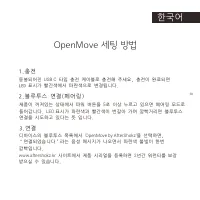
69 OpenMove 세팅 방법 1. 충전 2.블루투스 연결(페어링) 3. 연결 동봉되어진 USB C 타입 충전 케이블로 충전해 주세요, 충전이 완료되면 LED 표시가 빨간색에서 파란색으로 변경됩니다. 제품이 꺼져있는 상태에서 파워 버튼을 5 초 이상 누르고 있으면 페어링 모드로 들어갑니다. LED 표시가 파란색과 빨간색이 번갈아 가며 깜빡거리면 블루투스 연결을 시도하고 있다는 뜻 입니다. 디바이스의 블루투스 목록에서 ‘OpenMove by AfterShokz’ 을 선택하면, “연결되었습니다”라는 음성 메시지가 나오면서 파란색 불빛...
Page 73 - 다기능 버튼
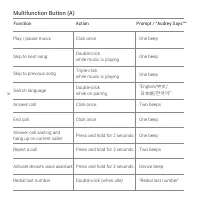
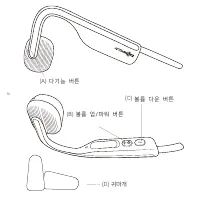
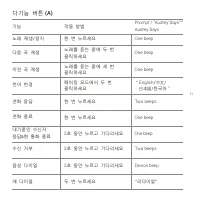
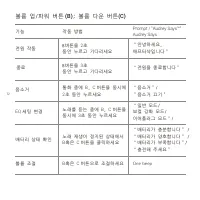
71 One beep One beep One beep “ English / 中文 / 日本語 /한국어” One beep One beep Two beeps Device beep "리다이얼" Prompt / “Audrey Says™”Audrey Says 다기능 버튼 (A) 기능 작동 방법 노래 재생/정지 한 번 누르세요 노래를 듣는 중에 세 번 클릭하세요 한 번 누르세요 2 초 동안 누르고 기다리세요 2 초 동안 누르고 기다리세요 2 초 동안 누르고 기다리세요 두 번 누르세요 다음 곡 재생 이전 곡 재생 대기중인 수신자응답...
Page 78 - OpenMoveの設定方法
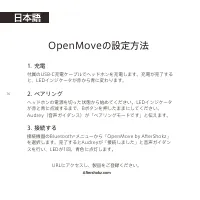
76 1. 充電 2. ペアリング 3. 接続する 付属のUSB-C充電ケーブルでヘッドホンを充電します。充電が完了すると、LEDインジケータが赤から青に変わります。 ヘッドホンの電源を切った状態から始めてください。LEDインジケータが赤と青に点滅するまで、Bボタンを押したままにしてください。Audrey(音声ガイダンス)が「ペアリングモードです」と伝えます。 接続機器のBluetooth ® メニューから「OpenMove by AfterShokz」 を選択します。完了するとAudreyが「接続しました」と音声ガイダンスを行い、LEDが1回、青色に点灯します。 URLにアクセスし、製品...
Page 80 - マルチファンクションボタン
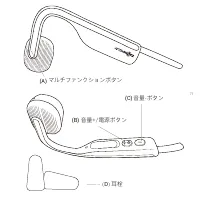
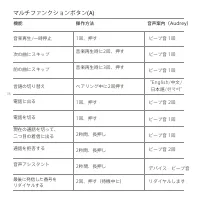
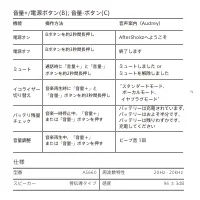
78 マルチファンクションボタン (A) 音楽再生/一時停止 1回、押す ビープ音 1回 次の曲にスキップ 音楽再生時に2回、押す ビープ音 1回 前の曲にスキップ 音楽再生時に3回、押す ビープ音 1回 電話に出る 電話を切る 1回、押す ビープ音 2回 言語の切り替え ペアリング中に2回押す English/中文/ 日本語/ 한국어 現在の通話を切って、二つ目の着信に出る 通話を拒否する 1回、押す ビープ音 1回 2秒間、長押し ビープ音 1回 音声アシスタント 2秒間、長押し ビープ音 2回 デバイス・ビープ音 リダイヤルします 最後に発信した番号をリダイヤルする 2秒間、長押し...
Page 81 - 仕様
79 機能 操作方法 音声案内(Audrey) AfterShokzへようこそ 電源オン Bボタンを約2秒間長押し 電源オフ 終了します Bボタンを約3秒間長押し 通話時に「音量+」と「音量-」ボタンを約2秒間長押し 音楽再生時に「音量+」と「音量-」ボタンを約3秒間長押し 音楽一時停止中、「音量+」または「音量-」ボタンを押す 音楽再生中、「音量+」または「音量-」ボタンを押す ミュート ミュートしました or ミュートを解除しました イコライザー切り替え スタンダードモード、 ボーカルモード、 イヤプラグモード バッテリーは充電されています、 バッテリーはおよそ半分です、 バッ...
Page 82 - LEDインジケータ
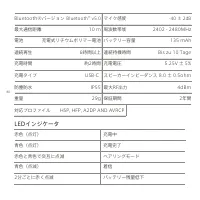
80 LEDインジケータ 赤色(点灯) 充電中 青色(点灯) 充電完了 赤色と青色で交互に点滅 ペアリングモード 青色(点滅) 着信 2分ごとに赤く点滅 バッテリー残量低下 Bluetooth®バージョン マイク感度 -40 ± 2dB Bluetooth ® v5.0 保証期間 重量 電池 2年間 29g Bis zu 10 Tage 2402 - 2480MHz 4dBm HSP, HFP, A2DP AND AVRCP 周波数帯域 最大RF出力 連続再生 連続待機時間 充電時間 対応プロファイル バッテリー容量 充電電圧 スピーカーインピーダンス 5.25V ± 5% 8.0 ±...
Page 83 - マルチペアリング
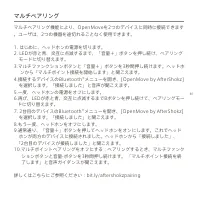
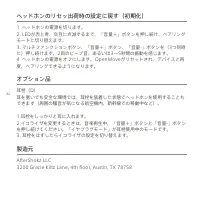
81 マルチペアリング マルチペアリング機能により、OpenMoveを2つのデバイスに同時に接続できます。ユーザは、2つの機器を途切れることなく使用できます。 1. はじめに、ヘッドホンの電源を切ります。2. LEDが赤と青、交互に点滅するまで、「音量+」ボタンを押し続け、ペアリング モードに切り替えます。3.マルチファンクションボタンと「音量+」ボタンを3秒間押し続けます。ヘッドホ ンから「マルチポイント接続を開始します」と聞こえます。4.接続するデバイスのBluetooth ® メニューを開き、[OpenMove by AfterShokz] を選択します。「接続し...
Page 85 - ภาษาไทย; การชาร ์จหูฟัง; วิธีการตั�งค่าหูฟัง OpenMove
ภาษาไทย 1. การชาร ์จหูฟัง 2. การจ ับคู่อุปกรณ์ (Pairing) 3. การเช ื�อมต่อ ทําการชาร ์จหูฟังโดยใช ้สายชาร ์จ USB-C ที�อยู่ในกล่อง ไฟ LED แสดงสถานะจะเปลี�ยนจาก (สีแดง) เป็น (สีนํ�าเงิน) หากการชาร ์จเสร็จสมบูรณ.์ ก่อนอื�นให ้สวมใส่ AfterShokz OpenMove เพื�อให ้เราสามารถได ้ยินเสียง ตอบร ับ (Audrey) การ...
Page 88 - ข ้อมูลจําเพาะ
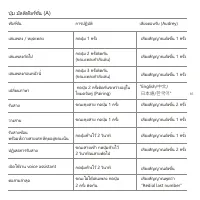
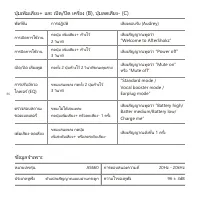
ฟังก ์ช ั�น การปฏิบัติ เสียงตอบร ับ (Audrey) เสียงสัญญาณพูดว่า “Welcome to AfterShokz” การเปิดการใช ้งาน กดปุ่ม เพิ�มเสียง+ ค ้างไว ้ 2 วินาที การปิดการใช ้งาน เสียงสัญญาณพูดว่า “Power off” กดปุ่ม เพิ�มเสียง+ ค ้างไว ้3 วินาที กดทั�ง 2 ปุ่มค ้างไว ้ 2 วินาทีขณะคุยสาย ขณะเล่นเพลง กดทั�ง 2 ปุ่มค ้างไว...
Page 89 - ไฟ LED แสดงสถานะ
ไฟ LED แสดงสถานะ สีแดงเข ้ม กําลังชาร ์จไฟ สีนํ�าเงินเข ้ม ชาร ์จไฟเสร็จสมบูรณ์ (สีแดง) และ (สีนํ�าเงิน) กะพร ิบสลับก ัน เข ้าสู่โหมดการจ ับคู่อุปกรณ์ กะพร ิบสีนํ�าเงิน มีสายเร ียกเข ้า กะพร ิบสีแดงทุกๆ 2 นาที แบตเตอร ี�ตํ�า รุ่นบลูทูธ ความไวของไมโครโฟน -40 ± 2dB บลูทูธ ® v5.0 การร ับประก ันสินค ้า ...
Page 90 - การเช ื�อมต่ออุปกรณ์ 2 ตัวพร ้อมก ัน (Multipoint Pairing)
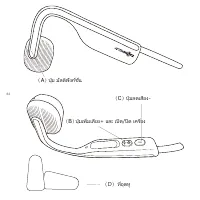
การเช ื�อมต่ออุปกรณ์ 2 ตัวพร ้อมก ัน ทําให ้ผู ้ใช ้งานสามารถใช ้งานอุปกรณ์ 2 ตัวสลับก ันได ้อย่างง่ายดาย 1. ก่อนอื�นให ้สวมใส่หูฟัง AfterShokz OpenMove ก่อน เพื�อให ้เราสามารถฟังเสียง ตอบร ับ (Audrey) ได ้ขณะเช ื�อมต่อ อุปกรณ์ 2 ตัวพร ้อมก ัน2. ขณะที�หูฟังปิดการใช ้งานอยู่ กดปุ่มเพิ�มเสียง+ ค ้างไว...
Page 92 - 简体中文; 设置你的 OpenMove
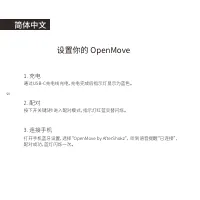
简体中文 设置你的 OpenMove 1. 充电 2. 配对 3. 连接手机 通过USB-C充电线充电,充电完成后指示灯显示为蓝色。 按下开关键5秒进入配对模式,指示灯红蓝交替闪烁。 打开手机蓝牙设置,选择“OpenMove by AfterShokz”, 听到语音提醒“已连接”, 配对成功,蓝灯闪烁一次。 90
Page 93 - 音量减键
Page 94 - 多功能键(A)
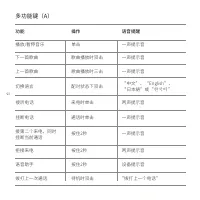
一声提示音 一声提示音 一声提示音 两声提示音 一声提示音 两声提示音 设备提示音 “拨打上一个电话” 语音提醒 多功能键(A) 功能 操作 播放/暂停音乐 单击 歌曲播放时三击 按住2秒 按住2秒 按住2秒 待机时双击 下一首歌曲 上一首歌曲 “中文”、“English”、 “日本語”或“ 한국어 ” 配对状态下双击 切换语言 拒接来电 拨打上一次通话 语音助手 接听电话 接第二个来电,同时 挂断当前通话 来电时单击 一声提示音 挂断电话 通话时单击 歌曲播放时双击 92
Page 95 - 耳机规格
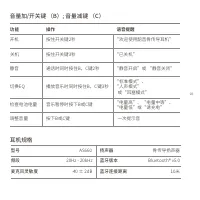
语音提醒 功能 操作 音量加/开关键 (B); 音量减键 (C) 开机 静音 切换EQ 检查电池电量 调整音量 按下B或C键 通话时同时按住B,C键2秒 播放音乐时同时按住B,C键3秒 音乐暂停时按下B或C键 按住开关键2秒 按住开关键3秒 “电量高”、“电量中等”、 “电量低”或“请充电” 一次提示音 “标准模式”、 “人声模式” 或“耳塞模式” “静音开启”或 “静音关闭” “欢迎使用韶音骨传导耳机” 耳机规格 型号 扬声器 频段 麦克风灵敏度 蓝牙版本 AS660 20Hz - 20kHz -40 ± 2dB Bluetooth® v5.0 骨传导扬声器 蓝牙连接距离 10米 关机 “已...
Page 96 - 多点连接
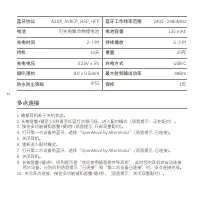
蓝牙协议 A2DP, AVRCP, HSP, HFP 电池 持续播放 待机 充电时间 重量 保修 可充电聚合物锂电池 6 小时 10天 2 小时 1年 29克 多点连接 1. 确保耳机处于关机状态。 2. 长按音量+键至少5秒直至红蓝灯交替闪烁,进入配对模式(语音提示:正在配对)。 3. 按住多功能键和音量+键3秒 (语音提示: 开启双重配对)。 4. 打开第一台设备的蓝牙,选择“OpenMove by AfterShokz” (语音提示: 已连接)。 5. 关闭耳机。 6. 重新进入配对模式。 7. 打开第二台设备的蓝牙,选择“OpenMove by AfterShokz” (语音提示: 已...
Page 98 - 恢复出厂设置; 如何联系我们
进入配对模式,按住多功能键、音量+键和音量-键3秒,直至听到两声提示音并 感受到振动。 恢复出厂设置 可选配件 耳塞 (D) 在飞机或者列车上,可配合耳塞使用以隔绝外界噪音,体验更好的骨传导传音。 1. 将耳塞揉小,并塞入耳朵中。 2. 播放音乐时,同时按住音量加减键,调整到佩戴耳塞时专用的EQ“耳塞模式”, 感受最佳听音体验。 3. 不用耳塞时,用同样的方式将EQ切换到正常状态。 如何联系我们 3200 Gracie Kiltz Lane, 4th floor, Austin, TX 78758 [email protected] www.aftershokz.com.cn 制造商:深圳市韶...