Bosch PXX975KW1E - User Manual
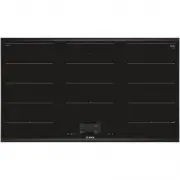
This guide explains how to pair your wireless temperature sensor with the hob control panel. It covers the step-by-step connection process, status codes for troubleshooting, and common fixes for Bluetooth or battery issues. The sensor reset procedure is also included to help resolve persistent problems.
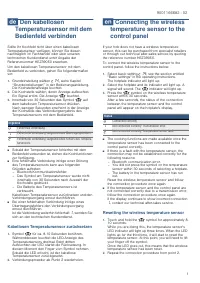
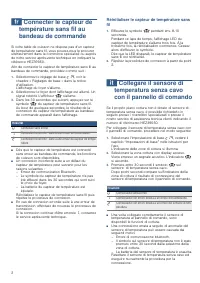
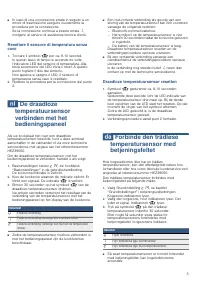

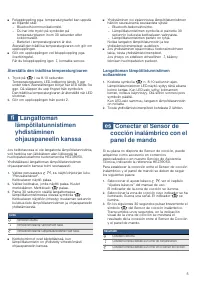

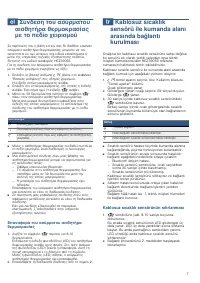

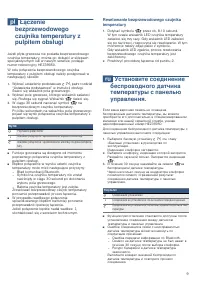

Table of Contents:
- Page 1 – Connecting Wireless Temperature Sensor to Control Panel
- Page 2 – Connecting Wireless Temperature Sensor to Control Panel
- Page 3 – Connecting Wireless Temperature Sensor to Control Panel
- Page 4 – Connecting Wireless Temperature Sensor to Control Panel
- Page 5 – Connecting Wireless Temperature Sensor to Control Panel
- Page 6 – Connecting Wireless Temperature Sensor to Control Panel
- Page 7 – Connecting Wireless Temperature Sensor to Control Panel
- Page 8 – Connecting Wireless Temperature Sensor to Control Panel
- Page 9 – Connecting Wireless Temperature Sensor to Control Panel
- Page 10 – Connecting Wireless Temperature Sensor to Control Panel
de Den kabellosen
Temperatursensor mit dem
Bedienfeld verbinden
Sollte Ihr Kochfeld nicht über einen kabellosen
Temperatursensor verfügen, können Sie diesen
nachträglich im Fachhandel oder über unseren
technischen Kundendienst unter Angabe der
Referenznummer HEZ39050 erwerben.
Um den kabellosen Temperarursensor mit dem
Bedienfeld zu verbinden, gehen Sie folgendermaßen vor:
1. Grundeinstellung wählen ¹⁴; siehe Kapitel
"Grundeinstellungen" in der Bedienungsanleitung.
Die Kochstellenanzeige leuchtet.
2. Die Kochstelle wählen, deren Anzeige aufleuchtet.
Ein Signal ertönt. Die Anzeige ¹⁷ leuchtet.
3. Innerhalb von 30 Sekunden das Symbol ¹⁷ auf
dem kabellosen Temperatursensor drücken.
Nach wenigen Sekunden erscheint in der Anzeige
der Kochstelle das Verbindungsergebnis des
Temperatursensors mit dem Bedienfeld.
Ergebnis
0 Fehlerfreie Verbindung
1 Fehlerhafte Verbindung: aufgrund eines Übertragungsfehlers.
2 Fehlerhafte Verbindung: aufgrund eines Fehlers des Tempera-
tursensors.
■ Sobald der Temperatursensor fehlerfrei mit dem
Bedienfeld verbunden ist, stehen die Kochfunktionen
zur Verfügung.
■ Eine fehlerhafte Verbindung infolge einer Störung
des Temperatursensors kann aus folgenden
Gründen auftreten:
- Bluetooth-Kommunikationsfehler.
- Das Symbol am Temperatursensor wurde nicht
innerhalb von 30 Sekunden nach Auswahl der
Kochstelle gedrückt.
- Die Batterie des Temperatursensors ist
verbraucht.
Kabellosen Temperatursensor zurücksetzen
1. Symbol ¹⁷ für ca. 8-10 Sekunden berühren.
Währenddessen leuchtet die LED-Anzeige des
Temperatursensors dreimal. Beim dritten
Aufleuchten der LED startet die Rücksetzung. In
diesem Moment den Finger vom Symbol nehmen.
Sobald die LED erlischt, ist der kabellose
Temperatursensor zurückgesetzt.
2. Verbindungsprozedur ab Punkt 2 wiederholen.
en Connecting the wireless
temperature sensor to the
control panel
If your hob does not have a wireless temperature
sensor, this can be purchased from specialist retailers
or through our technical after-sales service by quoting
the reference number HEZ39050.
To connect the wireless temperature sensor to the
control panel, follow the instructions below:
1. Select basic setting ¹⁴; see the section entitled
"Basic settings" in the operating instructions.
The hotplate indicator will light up.
2. Select the hotplate and its indicator will light up. A
signal will sound. The ¹⁷ indicator will light up.
3. Press the ¹⁷ symbol on the wireless temperature
sensor within 30 seconds.
After a few seconds, the status of the connection
between the temperature sensor and the control
panel will appear on the hotplate's display.
Status
0 Connected correctly
1 Not connected correctly: Transmission error.
2 Not connected correctly: Temperature sensor fault.
■ The cooking functions are made available once the
temperature sensor has been connected to the
control panel correctly.
■ If there is a fault with the temperature sensor, the
connection may not be established correctly for the
following reasons:
- Bluetooth communication error.
- You did not press the symbol on the temperature
sensor within 30 seconds of selecting a hotplate.
- The battery in the temperature sensor has run
out.
Reset the wireless temperature sensor and follow
the connection procedure once again.
■ If the temperature sensor and the control panel are
not connected correctly due to a transmission error,
follow the connection procedure once again.
If the display continues to show incorrect connection
¹, contact our technical after-sales service.
Resetting the wireless temperature sensor
1. Touch and hold the ¹⁷ symbol for approximately 8-
10 seconds.
While you are doing this, the temperature sensor's
LED indicator will light up three times. When the LED
lights up for the third time, it will start to reset the
temperature sensor. At this point, you will need to lift
your finger off the symbol.
Once the LED goes out, this means that the wireless
temperature sensor has been reset.
2. Repeat the connection procedure from point 2.
"Loading the manual" means you need to wait until the file loads and becomes available for online reading. Some manuals are very large, and the time they take to appear depends on your internet speed.
Was this manual helpful?
About this manual
- Brand
- Bosch
- Model
- PXX975KW1E
- Document type
- User Manual
- Category
- Hob
- Language(s)
- German, English, Spanish, French, Italian, Dutch, Polish, Russian, Swedish
- Pages
- 10
- File size
- 460.8 KB
- Format
Other Manuals for Bosch PXX975KW1E
Summary
Step-by-step connection instructions, status codes (0: success, 1: transmission error, 2: sensor fault), and troubleshooting tips for Bluetooth, timing, and battery issues. Includes reset procedure.
French and Italian versions of the connection guide, covering the same steps, status codes, troubleshooting, and reset process as on page 1.
Italian, Dutch, and Danish instructions for pairing the sensor, including status codes, troubleshooting advice, and reset steps.
Tips
- Ensure the temperature sensor is within Bluetooth range of the hob for best results.
- Press the sensor symbol within 30 seconds of selecting the hotplate to initiate pairing.
- If connection fails, check the battery and replace if needed.
- Reset the sensor by holding the symbol for 8-10 seconds until the LED flashes three times, then repeat the connection procedure.
- Persistent issues may require contacting technical support.
Ask a question
Related manuals


More Bosch Hobs models
 Bosch PXE875DC1E User Manual
 Bosch PXV851FC1E Manual
 Bosch PXV890DV5E User Manual
 Bosch PXV975DC1E User Manual
 Bosch PXV975DV1E User Manual
 Bosch PXX675DV1E Manual
 Bosch PXX995KX5E User Manual
 Bosch PXY898DX6E User Manual
 Bosch RGM8658UC User Manual
 Bosch NEM5066UC User Manual
 Bosch NEM5466UC User Manual
 Bosch NET8068SUC User Manual
 Bosch NET8069SUC User Manual
 Bosch NET8069UC User Manual
 Bosch NETP069SUC User Manual
 Bosch NGM5058UC User Manual
 Bosch NGM8056UC User Manual