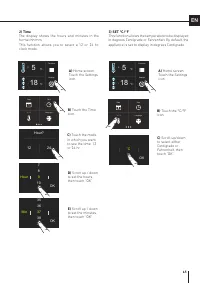
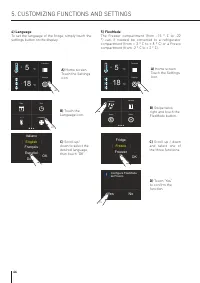
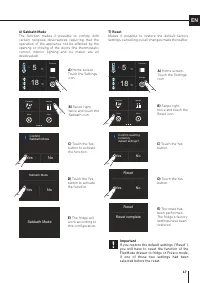
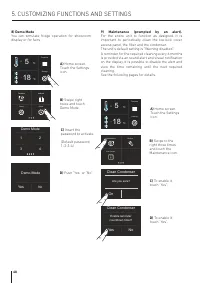
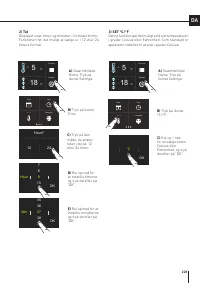
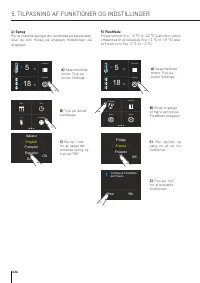
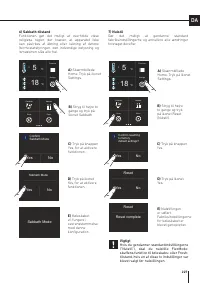
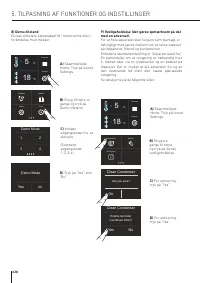
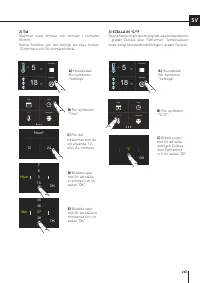
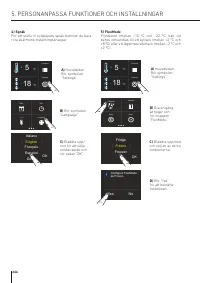
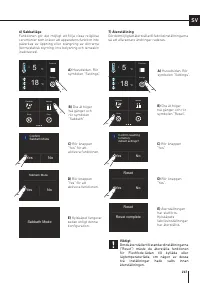
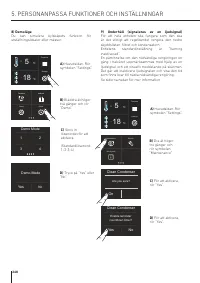
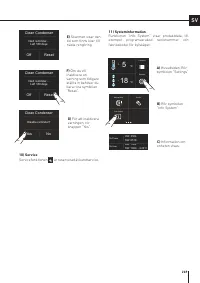
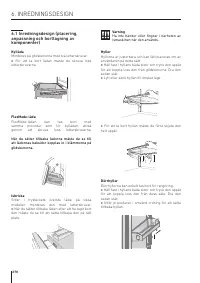
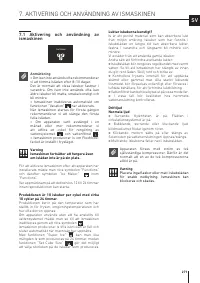
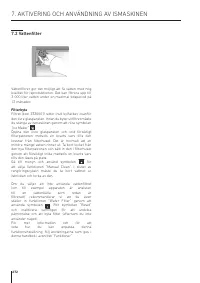
Page 3 - INDICE
3 IT 1 1.1 1.2 1.3 1.4 1.5 1.6 INDICAZIONI IMPORTANTI PER LA SICUREZZA E PER L’AMBIENTE Avvertenze di sicurezza e potenziale pericolo ...................................................................................................... Nell’impiego quotidiano ..........................................
Page 4 - libere da ostruzioni; INDICAZIONI IMPORTANTI PER LA SICUREZZA E PER L’AMBIENTE
4 1.1 Avvertenze di sicurezza e potenziale pericolo > Se questa apparecchiatura sostituisce un’altra già esistente che deve essere messa da parte o smaltita, assicurarsi che essa non diventi una pericolosa trap-pola per i bambini. > Questa apparecchiatura è progettata per raffred- dare bevande...
Page 5 - Nell’impiego quotidiano
5 IT essere ben chiuse e in posizione verticale. > Le sostanze organiche, acide e gli oli eterei possono corrodere le superfici in plastica e le guarnizioni se a contatto per lungo tempo. > Non tirare mai il cavo per staccare la spina. 1.2 Nell’impiego quotidiano > Le operazioni di pulizia ...
Page 6 - Nota; Rispetto per l’ambiente; Tensione elettrica; Pulizia, sanificazione e manutenzione
6 1. INDICAZIONI IMPORTANTI PER LA SICUREZZA E PER L’AMBIENTE Simbologia utilizzata nel manuale: Nota suggerimenti per un corretto utilizzo dell’apparecchiatura Importante Indicazioni per evitare danni all’apparecchiatura Attenzione indicazioni per evitare lesioni alla persona 1.3 Rispetto per l’amb...
Page 7 - Attenzione; Informazioni per gli enti di controllo
7 IT Attenzione Per evitare la contaminazione del cibo, rispettare le seguenti istruzioni: > Aprire la porta per un lungo periodo può causare un elevarsi della temperatura nei compartimenti dell'apparecchiatura. > Pulire regolarmente le superfici che possono entrare in contatto con cibo e acce...
Page 8 - Collegamento alla rete idrica
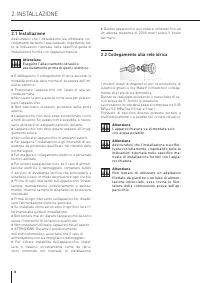
8 2.1 Installazione Assicuratevi che l’installazione sia effettuata cor-rettamente da tecnici specializzati, rispettando tut-te le indicazioni riportate nella specifica guida di installazione fornita con l’apparecchiatura. Attenzione Eseguire l’allacciamento idraulico assolutamente prima di quello e...
Page 9 - Collegamento alla rete elettrica; Importante; Fare attenzione a non danneggiare il circuito refri-
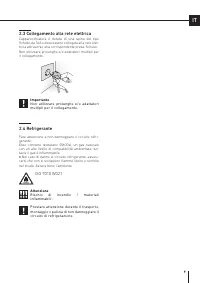
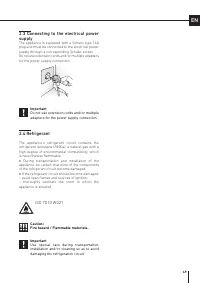
9 IT 2.3 Collegamento alla rete elettrica L’apparecchiatura è dotata di una spina del tipo Schuko da 16A e deve essere collegata alla rete elet-trica attraverso una corrispondente presa Schuko. Non utilizzare prolunghe e/o adattatori multipli per il collegamento. Importante Non utilizzare prolunghe ...
Page 10 - in Spagna
10 3.1 Per conoscere bene il vostro frigorifero Congratulazioni per aver acquistato il vostro nuovo frigorifero: da oggi potrete utilizzare il nostro inno- vativo sistema di conservazione, che vi permetterà di preservare nel migliore dei modi gli alimenti che desiderate. Questo Manuale Utente rispon...
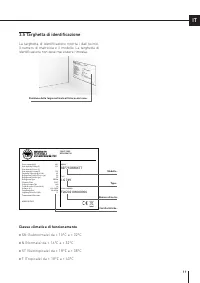
Page 11 - Targhetta di identificazione; La targhetta di identificazione riporta i dati tecnici,; Classe climatica di funzionamento
Gross capacity (l) Net capacity Fridge (l) Net capacity Fresco (l) Net capacity Freezer(l) Freezing Capacity (kg/12h) Refrigerant Fridge/Fresco (gr) Refrigerant Freezer (gr) Refrigerant Type Climatic Class Defrost Heater (W) Total Absorbed Current (A) Voltage (V~) Frequenzy (Hz) Lighting Neon/Led (W...
Page 12 - Descrizione Generale; Frigo
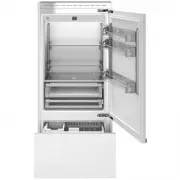
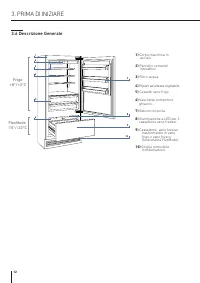
12 3.6 Descrizione Generale 1) Corpo macchina in acciaio. 2) Pannello comandi interattivo. 3) Filtro acqua. 4) Ripiani ad altezza regolabile. 5) Cassetti vano frigo. 6) Vaschetta contenitore ghiaccio. 7) Balconcini porta. 8) Illuminazione a LED per il cassettone vano freezer. 9) Cassettone vano free...
Page 13 - Home
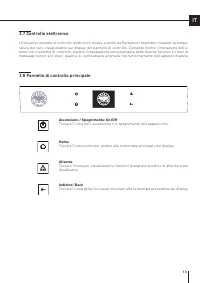
13 IT 3.7 Controllo elettronico L’innovativo sistema di controllo elettronico messo a punto da Bertazzoni mantiene costante la tempe-ratura dei vani, visualizzabile sul display del pannello di controllo. Consente inoltre l’interazione dell’u- tente con il sistema di controllo, tramite l’impostazione...
Page 14 - Accensione e spegnimento; Prima accensione; ACCENSIONE DELL’ APPARECCHIATURA; Con il frigo spento non vi sono spie che ne
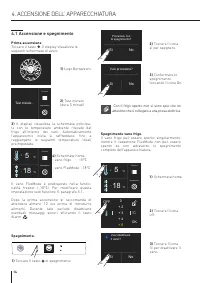
Funzioni Impostazioni Test iniziale… Procedere con lo spegnimento? Si No Vuoi procedere? Si No Vuoi disattivare il vano? Si No Funzioni Impostazioni 5 + °C 18 - °C Funzioni Impostazioni 5 + °C 18 - °C °C + 3 + 5 + 4 0 + 2 OK OFF 14 4.1 Accensione e spegnimento Prima accensione Toccare il tasto . Il ...
Page 15 - Spegnimento per lunghi periodi
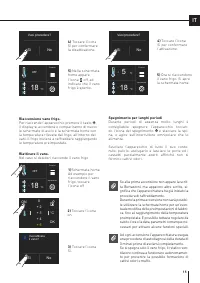
Vuoi attivare il vano? Si No Vuoi procedere? Si No Vuoi procedere? Si No °C + 3 + 5 + 4 0 + 2 OK ON Funzioni Impostazioni 5 + °C 18 - °C Funzioni Impostazioni OFF 18 - °C Funzioni Impostazioni OFF 18 - °C 15 IT Se alla prima accensione non appare la scrit-ta Bertazzoni, ma appaiono altre scritte, si...
Page 16 - Come regolare la temperatura dei; Modificare la temperatura dei vani.
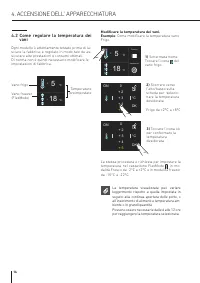
Funzioni Impostazioni 5 + °C 18 - °C Funzioni Impostazioni 5 + °C 18 - °C °C + 3 + 5 + 4 0 + 2 OK ON °C + 3 + 5 + 4 0 + 2 OK ON 16 3) Toccare l’icona ok per confermare la temperatura desiderata. 4.2 Come regolare la temperatura dei vani Ogni modello è attentamente testato prima di la- sciare la fabb...
Page 17 - Segnali informativi e di anomalia
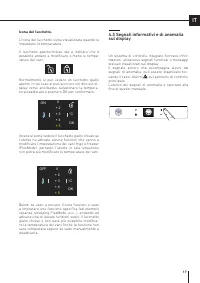
°C + 3 + 5 + 4 0 + 2 OK ON °C + 3 + 5 + 4 0 + 2 OK OFF 17 IT Un sistema di controllo integrato fornisce infor- mazioni, attraverso segnali luminosi o messaggi testuali visualizzati sul display. Il segnale sonoro che accompagna alcuni dei segnali di anomalia, può essere disattivato toc- cando il tast...
Page 18 - PERSONALIZZARE FUNZIONI E IMPOSTAZIONI; INFORMAZIONI PER L’UTILIZZO DEL DISPLAY
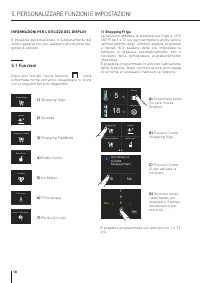
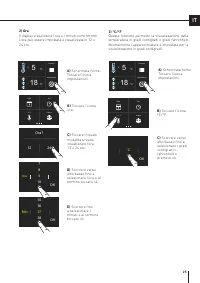
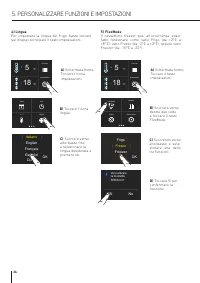
Bottle Cooler Vacanza Shopping FlexMode Shopping Frigo Bottle Cooler Vacanza Shopping FlexMode Shopping Frigo Ice Maker Filtro Acqua Pulizia Circuito Acqua Ice Maker Filtro Acqua Pulizia Circuito Acqua Bottle Cooler Vacanza Shopping FlexMode Shopping Frigo Ice Maker Filtro Acqua Pulizia Circuito Acq...
Page 19 - Sì; On
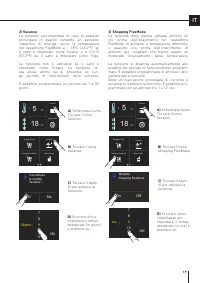
Bottle Cooler Vacanza Shopping FlexMode Shopping Frigo Bottle Cooler Vacanza Shopping FlexMode Shopping Frigo Funzioni Impostazioni 5 + °C 18 - °C Funzioni Impostazioni 5 + °C 18 - °C 9 Giorno 11 10 78 OK Vuoi attivare la modlità Vacanza? Sì No Modalità Shopping FlexMode On Off 9 Ora 11 10 78 OK 19 ...
Page 20 - ) Attivazione dell’Ice Maker
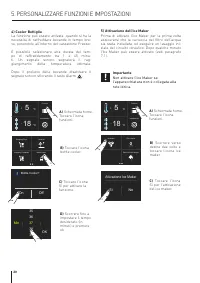
37 Min 39 38 3536 OK Bottle Cooler? On Off Attivazione Ice Maker Si No Ice Maker Filtro Acqua Pulizia Circuito Acqua Bottle Cooler Vacanza Shopping FlexMode Shopping Frigo Funzioni Impostazioni 5 + °C 18 - °C Funzioni Impostazioni 5 + °C 18 - °C 20 4) Cooler Bottiglie La funzione può essere attivata...
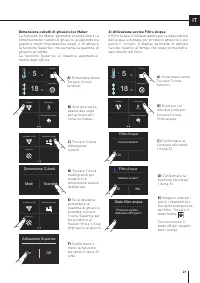
Page 21 - Stato filtro acqua; ) Attivazione avviso Filtro Acqua
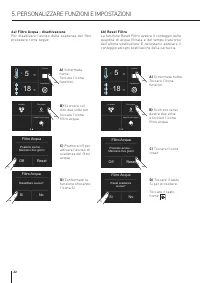
Ice Maker Filtro Acqua Pulizia Circuito Acqua Ice Maker Filtro Acqua Pulizia Circuito Acqua Funzioni Impostazioni 5 + °C 18 - °C Funzioni Impostazioni 5 + °C 18 - °C Ice Maker On/Off Dimesione Cubetti Super Ice Ice Maker On/Off Dimesione Cubetti Super Ice Dimensione Cubetti Medi Grandi Abilitare avv...
Page 23 - Fine lavaggio; ) Pulizia Manuale Circuito
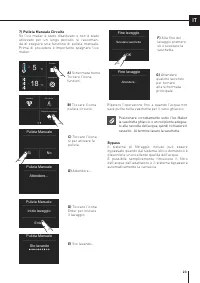
Ice Maker Filtro Acqua Pulizia Circuito Acqua Funzioni Impostazioni 5 + °C 18 - °C Svuotare vaschetta OK Fine lavaggio Attendere... Fine lavaggio Enter Inizio lavaggio Pulizia Manuale Pulizia Manuale Attendere... Sto lavando Pulizia Manuale Si No Pulizia Manuale 23 IT C) Toccare l’icona sì per attiv...
Page 24 - Mese
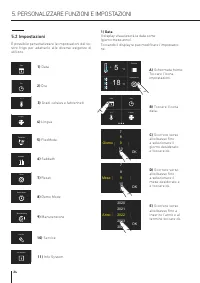
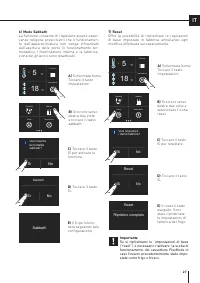
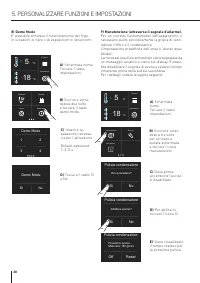
5. PERSONALIZZARE FUNZIONI E IMPOSTAZIONI 9 Mese 11 10 78 OK Sabbath Reset Demo Mode FlexMode Sabbath Reset Demo Mode FlexMode Sabbath Reset Demo Mode FlexMode Sabbath Reset Demo Mode FlexMode Manutenzione Service Info System Manutenzione Service Info System Data Ora °c / °f Lingua Data Ora °c / °f ...
Page 27 - Se si ripristinano le impostazioni di base
Sabbath Vuoi inserire la modalità sabbath? Si No Sabbath Si No Sabbath Reset Demo Mode FlexMode Sabbath Reset Demo Mode FlexMode Funzioni Impostazioni 5 + °C 18 - °C Funzioni Impostazioni 5 + °C 18 - °C Vuoi rimpostare i dati di fabbrica? Si No Reset Si No Reset complete Reset Ripristino completo Re...
Page 28 - Pulizia condensatore
5. PERSONALIZZARE FUNZIONI E IMPOSTAZIONI Funzioni Impostazioni 5 + °C 18 - °C Funzioni Impostazioni 5 + °C 18 - °C Sabbath Reset Demo Mode FlexMode Demo Mode 1 3 2 4 Demo Mode Si No Prossimo avviso… Mancano 180 giorni Pulizia condensatore Off Reset Abilitare avviso? Si No Pulizia condensatore Manut...
Page 30 - rimozione casetti interni; ALLESTIMENTO INTERNO; Non mettere mani o dita nelle prossimità
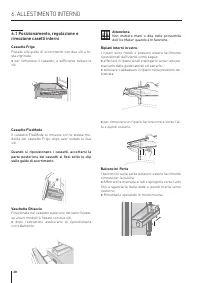
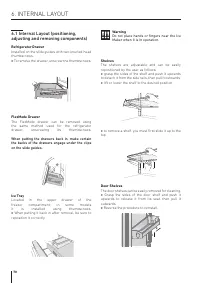
1 2 30 6.1 Posizionamento, regolazione e rimozione casetti interni Cassetto Frigo Fissato alle guide di scorrimento con due viti a te-sta zigrinata. > per rimuovere il cassetto, è sufficiente svitare le viti. Cassetto FlexMode Il cassetto FlexMode si rimuove con le stesse mo-dalità del cassetto F...
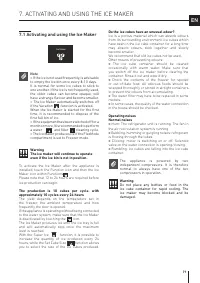
Page 31 - Il ghiaccio emette un odore insolito?; Non porre assolutamente bottiglie o ali-; Attivazione ed utilizzo dell’Ice Maker; Note; L’Ice Maker continuerà a funzionare anche; La produzione è di 10 cubetti per ciclo per 10 cicli; ATTIVAZIONE ED UTILIZZO DELL’ICE MAKER
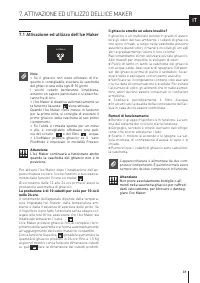
Ice Maker Water Filter Water System Purge 31 IT Il ghiaccio emette un odore insolito? Il ghiaccio è un materiale poroso in grado di assor- bire gli odori del suo ambiente. I cubetti di ghiaccio che sono rimasti a lungo nella vaschetta possono assorbire questi odori, rimanere incollati gli uni agli a...
Page 32 - Sostituzione filtro
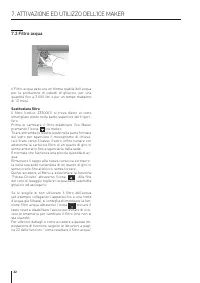
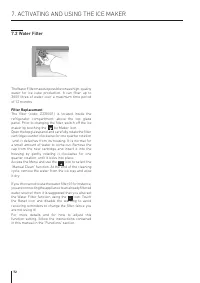
32 7.2 Filtro acqua Il Filtro acqua assicura un’ottima qualità dell’acqua per la produzione di cubetti di ghiaccio, per una quantità fino a 3.000 litri e per un tempo massimo di 12 mesi. Sostituzione filtro Il filtro (codice: Z330001) si trova dietro al vetro smerigliato posto nella parte superiore ...
Page 33 - CONSERVAZIONE DEI CIBI
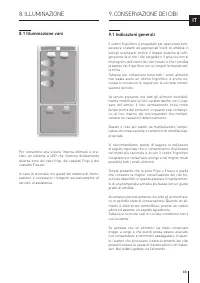
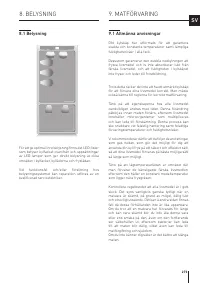
33 IT 8.1 Illuminazione vani Per consentire una visione interna ottimale è pre-visto un sistema a LED che illumina direttamente diverse zone del vano frigo, dei cassetti Frigo e del cassetto Freezer. In caso di anomalie e/o guasti del sistema di illumi-nazione è necessario rivolgersi esclusivamente ...
Page 35 - Consigli per la conservazione; Temperatura
35 IT Cella congelatore: conservazione> Gli alimenti devono essere conservati in recipien- ti chiusi o imballati adeguatamente e non devono emanare o assorbire odori e umidità. > Seguire le raccomandazioni riguardanti i tempi e le temperatura di conservazione riportate nella tabella a seguito....
Page 36 - Carni crude
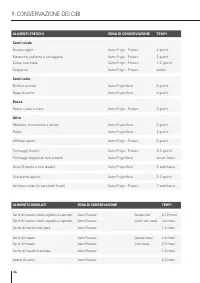
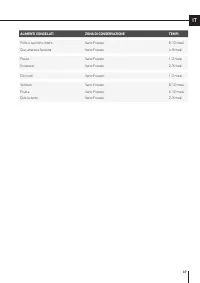
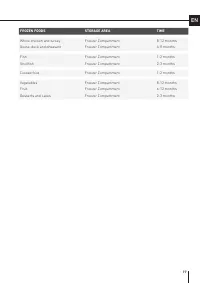
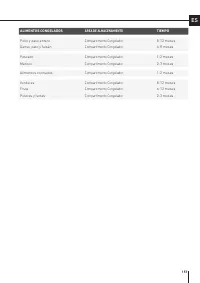
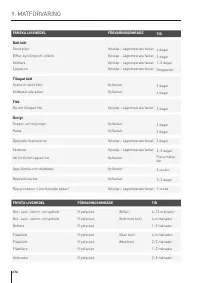
36 9. CONSERVAZIONE DEI CIBI ALIMENTI FRESCHI ZONA DI CONSERVAZIONE TEMPI Carni crude Grosso taglio Vano Frigo - Fresco 4 giorni Bistecche, pollame e selvaggina Vano Frigo - Fresco 3 giorni Carne macinata Vano Frigo - Fresco 1-2 giorni Carpaccio Vano Frigo - Fresco subito Carni cotte Bolliti e arros...
Page 38 - Risciacquate ed asciugate subito.; Non usare acqua sulle parti elettriche, sulle
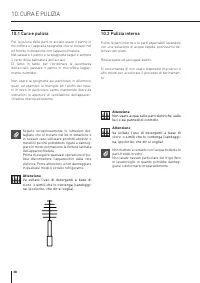
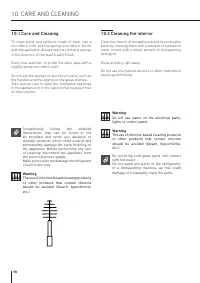
38 10.1 Cura e pulizia Per la pulizia delle parti in acciaio usare il panno in microfibra e l’apposita spugnetta che si trovano nel kit fornito in dotazione con l’apparecchiatura.Nel passare il panno e la spugnetta seguire sempre il verso della satinatura dell’acciaio.Di tanto in tanto, per ripristi...
Page 39 - Pulizia griglia di ventilazione, filtro; Sulle impostazioni di manutenzioni, dopo; Le alette del condensatore sono taglienti,
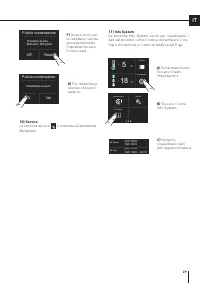
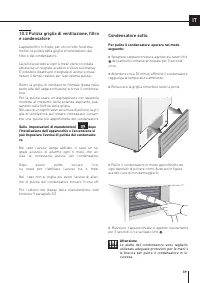
Manutenzione Service Info System 39 IT 10.3 Pulizia griglia di ventilazione, filtro e condensatore L'apparecchio richiede, per un corretto funziona-mento, la pulizia della griglia di ventilazione, del filtro e del condensatore. La pulizia periodica (ogni 6 mesi) viene ricordata attraverso un segnale...
Page 40 - Guida alla risoluzione dei problemi; GUIDA ALLA RISOLUZIONE DEI PROBLEMI
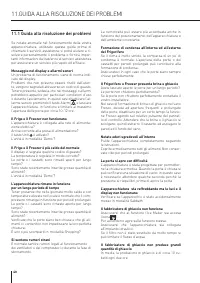
40 11.1 Guida alla risoluzione dei problemi Se notate anomalie nel funzionamento della vostra apparecchiatura, utilizzate questa guida prima di chiamare il servizio assistenza: vi potrà aiutare a ri- solvere personalmente il problema o fornirà impor- tanti informazioni da trasferire al servizio assi...
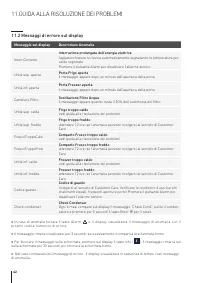
Page 42 - Messaggi di errore sul display; Messaggio sul display
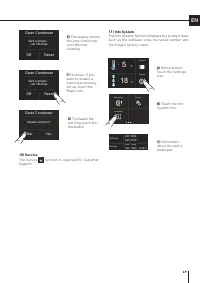
42 > In caso di anomalia toccare il tasto Alarm e il display visualizzerà il messaggio di anomalia con il proprio codice numerico di errore. > Il messaggio rimane visualizzato per 3 secondi, successivamente ricomparirà la schermata home. > Per bloccare il messaggio sulla schermata, premere ...
Page 43 - CONTENTS
43 EN 1 1.1 1.2 1.3 1.4 1.5 1.6 IMPORTANT SAFETY AND ENVIRONMENTAL INFORMATION For your safety ................................................................................................................................................................ Important information when using the applian...
Page 44 - Particular; IMPORTANT SAFETY AND ENVIRONMENTAL INFORMATION
44 1.1 For your safety > If this appliance is replacing an existing appliance which must be removed or disposed of, cut the old appliance's power supply cable. This will make it impossible to close the door and ensure that it does not become a dangerous trap for children. Take the same precaution...
Page 46 - Information to prevent injury; Caring for the environment; This appliance conforms to the European WEEE; Cleaning, sanitising and maintaining
46 Symbols used in the Guide: Note Recommendations for correct use of the appliance Important Information to prevent damage to the appliance Warning Information to prevent injury 1.3 Caring for the environment > This appliance conforms to the European WEEE Directive (2012/19/EU) and must be dispo...
Page 47 - Warning; Information for regulatory; For Ecodesign tests, the installation and set-up
47 EN Warning To avoid contamination of food, please heed the following information and instructions: > Opening the door for long periods can cause a significant increase in temperature inside the appliance compartments. > Perform regular cleaning of surfaces that may come in contact with food...
Page 48 - Connecting to the water system
48 2. INSTALLATION 2.2 Connecting to the water system Models equipped with an Ice Maker require a connection to the domestic water supply system. This can be established solely by using the provided ¼” water line.The system pressure must be between 0.05 MPa and 0.5 MPa (between 0.5 bar and 5 bar).An...
Page 49 - During transportation and installation of the; Important
49 EN 2.3 Connecting to the electrical power supply The appliance is equipped with a Schuko type 16A plug and must be connected to the electrical power supply through a corresponding Schuko socket. Do not use extension cords and/or multiple adapters for the power supply connection. Important Do not ...
Page 51 - Climate classes
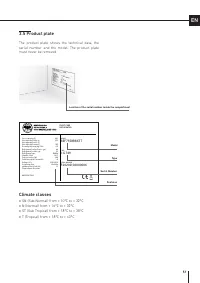
Gross capacity (l) Net capacity Fridge (l) Net capacity Fresco (l) Net capacity Freezer(l) Freezing Capacity (kg/12h) Refrigerant Fridge/Fresco (gr) Refrigerant Freezer (gr) Refrigerant Type Climatic Class Defrost Heater (W) Total Absorbed Current (A) Voltage (V~) Frequenzy (Hz) Lighting Neon/Led (W...
Page 52 - Overview of main components; Fridge
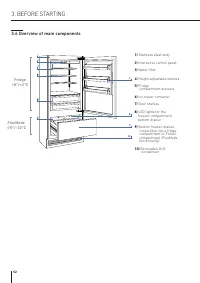
52 1) Stainless steel body 2) Interactive control panel 3) Water filter 4) Height-adjustable shelves 5) Fridge compartment drawers. 6) Ice maker container 7) Door shelves 8) LED lights for the freezer compartment, bottom drawer 9) Bottom freezer drawer, convertible into a fridge compartment or F...
Page 53 - Touch the icon to turn the unit on or off.; Touch the Home icon to go back to the home screen.; Alarm; Touch the arrow icon to go back to the previous screen.
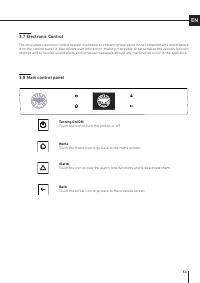
53 EN 3.8 Main control panel 3.7 Electronic Control The innovative electronic control system maintains a constant temperature in the compartments and displays it on the control panel. It also allows user interaction, making it possible to personalize the various function settings and to receive soun...
Page 54 - Yes; Switching on and off; First time starting the unit; SWITCHING THE APPLIANCE ON AND OFF; Switching off the fridge only; When the unit is off there are no warning; Switching off the unit
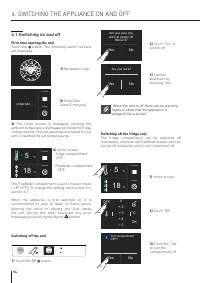
Functions Settings 5 + °C 18 - °C Functions Settings 5 + °C 18 - °C Functions Settings Initial test… Are you sure you want to power off this unit? Yes No Are you sure? Yes No °C + 3 + 5 + 4 0 + 2 OK OFF Turn compartment OFF? Yes No 54 4.1 Switching on and off First time starting the unit Touch the b...
Page 55 - Turning the compartment back on.
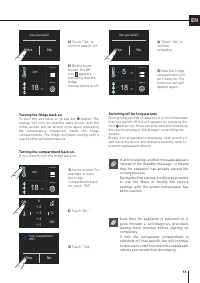
Functions Settings OFF 18 - °C Functions Settings OFF 18 - °C Functions Settings 5 + °C 18 - °C Are you sure? Yes No Are you sure? Yes No Turn compartment ON? Yes No °C + 3 + 5 + 4 0 + 2 OK ON 55 EN Turning the compartment back on. If you wish to turn the fridge back on: Turning the fridge back on T...
Page 56 - How to adjust the temperature to; Modifying the compartment temperatures; SWITCHING THE APPLIANCE ON
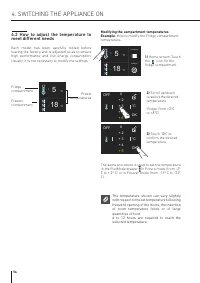
Functions Settings 5 + °C 18 - °C °C + 3 + 5 + 4 0 + 2 OK OFF °C + 3 + 5 + 4 0 + 2 OK OFF Functions Settings 5 + °C 18 - °C 56 4.2 How to adjust the temperature to meet different needs Each model has been carefully tested before leaving the factory and is adjusted so as to ensure high performance an...
Page 57 - Padlock icon; Warning notifications on the
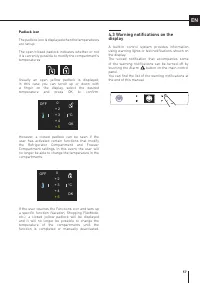
°C + 3 + 5 + 4 0 + 2 OK OFF °C + 3 + 5 + 4 0 + 2 OK OFF 57 EN Padlock icon The padlock icon is displayed when the temperatures are set up. The open/closed padlock indicates whether or not it is currently possible to modify the compartment's temperatures. Usually an open yellow padlock is displayed; ...
Page 58 - CUSTOMIZING FUNCTIONS AND SETTINGS; TIPS FOR USINGTHE DISPLAY
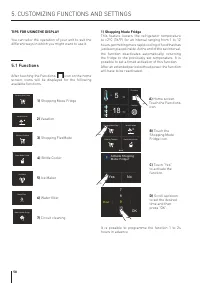
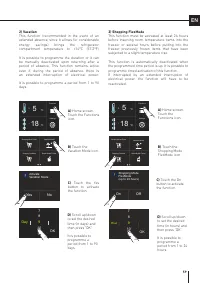
Functions Settings 5 + °C 18 - °C Activate Shopping Mode: Fridge? Yes No 9 Hour 11 10 78 OK Rapid Bottle Cooler Vacation Mode Shopping FlexMode Shopping Mode Fridge Ice Maker Water Filter Water System Purge Ice Maker Water Filter Water System Purge Ice Maker Water Filter Water System Purge Rapid Bot...
Page 60 - ) Rapid Bottle Cooler
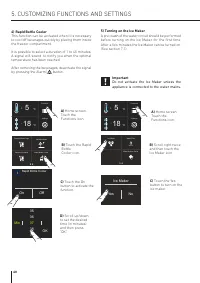
Rapid Bottle Cooler Vacation Mode Shopping FlexMode Shopping Mode Fridge Functions Settings 5 + °C 18 - °C Functions Settings 5 + °C 18 - °C 37 Min 39 38 3536 OK Rapid Bottle Cooler On Off Ice Maker Water Filter Water System Purge Ice Maker Yes No 60 4) Rapid Bottle Cooler This function can be activ...
Page 61 - Water Filter Status
Functions Settings 5 + °C 18 - °C Functions Settings 5 + °C 18 - °C Superice Mode (24hrs) On Off Ice Maker Water Filter Water System Purge Ice Maker Water Filter Water System Purge Ice Maker On/Off Set Cube Size Superice Ice Maker On/Off Set Cube Size Superice Set Cube Size Medium Large Enable remin...
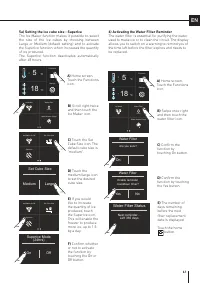
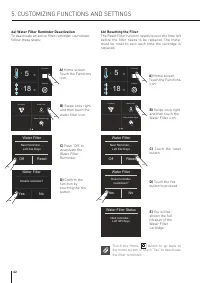
Page 62 - Touch the Home; a) Water Filter Reminder Deactivation
Ice Maker Water Filter Water System Purge Functions Settings 5 + °C 18 - °C Ice Maker Water Filter Water System Purge Functions Settings 5 + °C 18 - °C Disable reminder? Yes No Water Filter Next Reminder… Left Xxx Days Off Reset Water Filter Next Reminder… Left Xxx Days Off Reset Water Filter Reset ...
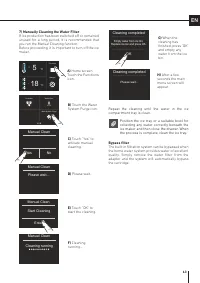
Page 63 - Cleaning completed; ) Manually Cleaning the Water Filter; Position the ice tray or a suitable bowl for; Bypass filter
Functions Settings 5 + °C 18 - °C Ice Maker Water Filter Water System Purge Yes No Manual Clean Enter Start Cleaning Manual Clean Manual Clean Please wait... Cleaning running Manual Clean Empty water from ice bin. Replace ice bin and press OK. OK Cleaning completed Please wait... Cleaning completed ...
Page 67 - you will have to reset the function of the
Functions Settings 5 + °C 18 - °C Functions Settings 5 + °C 18 - °C Sabbath Reset Demo FlexMode Sabbath Mode Confirm Sabbath Mode Yes No Sabbath Mode Yes No Sabbath Reset Demo FlexMode Confirm resetting to factory default settings? Yes No Reset Yes No Reset complete Reset 67 EN 7) Reset Makes it pos...
Page 70 - adjusting and removing components)
1 2 70 Warning Do not place hands or fingers near the Ice Maker when it is in operation. Shelves The shelves are adjustable and can be easily repositioned by the user as follows: > grasp the sides of the shelf and push it upwards to detach it from the side rails, then pull it outwards. > lift ...
Page 71 - ACTIVATING AND USING THE ICE MAKER; Activating and using the Ice Maker; Do not place any bottles or food in the
Ice Maker Water Filter Water System Purge 71 EN 7. ACTIVATING AND USING THE ICE MAKER 7.1 Activating and using the Ice Maker Note > If the ice is not used frequently, is advisable to empty the ice bin once every 8-10 days. It is normal for some ice cubes to stick to one another. If the ice is not...
Page 72 - Filter Replacement
72 7.2 Water Filter The Water Filter makes it possible to have high-quality water for ice cube production. It can filter up to 3000 litres of water over a maximum time period of 12 months. Filter Replacement The filter (code: Z330001) is located inside the refrigerator compartment, above the top gla...
Page 73 - General instructions
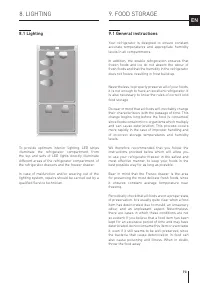
73 EN 8. LIGHTING 9. FOOD STORAGE 8.1 Lighting To provide optimum interior lighting, LED strips illuminate the refrigerator compartment from the top and sets of LED lights directly illuminate different areas of the refrigerator compartment, of the refrigerator drawers and the freezer drawer. In case...
Page 74 - How to best preserve food quality; When buying groceries; When the place where the unit is located; button to display the
74 9.2 How to best preserve food quality When buying groceries Always take the following precautions: > Place any packages of raw meat, fish or poultry in plastic bags so that they do not drip onto other foods. > Purchase meat, poultry and fish last. Do not leave your groceries in a warm car a...
Page 75 - Temperatures; Refrigerator compartment door
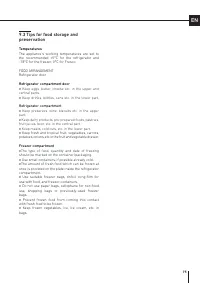
75 EN 9.3 Tips for food storage and preservation Temperatures The appliance's working temperatures are set to the recommended +5°C for the refrigerator and -18°C for the freezer, 0°C for Fresco. FOOD ARRANGEMENTRefrigerator door Refrigerator compartment door > Keep eggs, butter, cheese etc. in th...
Page 78 - Care and Cleaning; Cleaning the interior; Clean the interior of the appliance and its removable; CARE AND CLEANING
78 10.1 Care and Cleaning To clean parts and surfaces made of steel, use a microfibre cloth and the sponge provided in the kit with the appliance. Always use the cloth and sponge in the direction of the steel’s satin finish. Every now and then, to polish the steel, wipe with a slightly damp microfib...
Page 79 - filter and condenser; After the unit has been installed and turned on,; The lower condenser; To clean the condenser, follow these instructions:
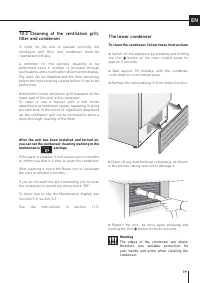
79 EN 10.3 Cleaning of the ventilation grill, filter and condenser In order for the unit to operate correctly, the ventilation grill, filter and condenser must be cleaned periodically. A reminder for this periodic cleaning, to be performed every 6 months, is provided through sound alerts and a notif...
Page 80 - Troubleshooting Guide; TROUBLESHOOTING GUIDE
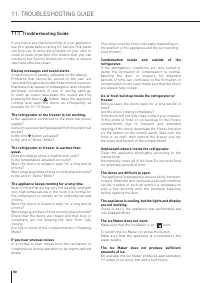
80 11.1 Troubleshooting Guide If you notice any malfunctioning of your appliance, use this guide before calling for service.This guide can help you to solve the problem on your own or could provide important information that you can convey to the Service technician in order to ensure rapid and effec...
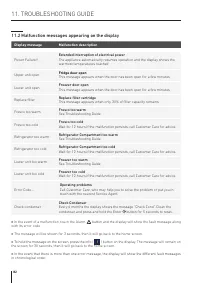
Page 82 - Malfunction messages appearing on the display; Display message
82 > In the event of a malfunction, touch the Alarm button and the display will show the fault message along with its error code. > The message will be shown for 3 seconds, then it will go back to the home screen. > To hold the message on the screen, press the info ( ) button on the display...
Page 83 - TABLE DES MATIÈRES
FR 1 1.1 1.2 1.3 1.4 1.5 1.6 INFORMATIONS IMPORTANTES EN MATIÈRE DE SÉCURITÉ ET POUR L’ENVIRONNEMENT Pour votre sécurité ........................................................................................................................................................ Informations importantes l...
Page 84 - Pour votre sécurité; Cet appareil n’est pas conçu pour fonctionner avec; Veiller tout
1.1 Pour votre sécurité > Si cet appareil remplace un appareil existant devant être retiré ou mis au rebut, couper le câble d’alimentation de l’ancien appareil. Cela rendra la fermeture de la porte impossible et évitera que l’appareil ne devienne dangereux pour les enfants. Adopter les mêmes mesu...
Page 86 - Informations visant à éviter toute blessure; Protection de l’environnement; Cet appareil, conforme à la directive européenne; Nettoyage, désinfection et entretien
1. INFORMATIONS IMPORTANTES EN MATIÈRE DE SÉCURITÉ ET POUR L’ENVIRONNEMENT Symboles utilisés dans le manuel : Remarque Recommandations relatives à la bonne utilisation de l’appareil Important Informations visant à éviter tout dommage de l’appareil Attention Informations visant à éviter toute blessur...
Page 87 - Attention; Informations pour les autorités de; Pour les vérifications EcoDesign, l’installation et; Économies d’énergie; Une utilisation correcte de l’appareil, un emballage
FR Attention Pour éviter la contamination des aliments, veuillez respecter les consignes suivantes : > Ouvrir la porte pendant un long moment peut faire monter la température de façon conséquente dans les compartiments de l’appareil. > Nettoyer régulièrement les surfaces en contact avec la nou...
Page 88 - Raccordement à l’alimentation en eau
2. INSTALLATION coincé ou endommagé. > Pour garantir la stabilité de l’appareil, installer et fixer ce dernier correctement, conformément aux instructions figurant dans le présent manuel. 2.2 Raccordement à l’alimentation en eau Les modèles équipés d’une machine à glaçons doivent être raccordés a...
Page 89 - Lors du transport et de l’installation de l’appareil,; Risque d’incendie / Matériaux
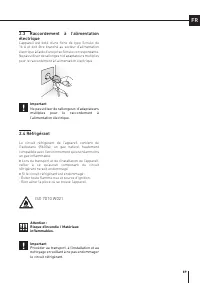
FR 2.3 Raccordement à l’alimentation électrique L’appareil est doté d’une fiche de type Schuko de 16 A et doit être branché au secteur d’alimentation électrique à l’aide d’une prise Schuko correspondante. Ne pas utiliser de rallonges ni d’adaptateurs multiples pour le raccordement à l’alimentation ...
Page 90 - AVANT DE COMMENCER; Bien connaître son réfrigérateur; Données techniques
3. AVANT DE COMMENCER 3.1 Bien connaître son réfrigérateur Nous vous félicitons d’avoir acheté votre nouveau réfrigérateur ! Vous pouvez dès à présent utiliser notre système de conservation innovant qui vous permettra de préserver au mieux tous vos aliments. Ce manuel répondra à la plupart de vos q...
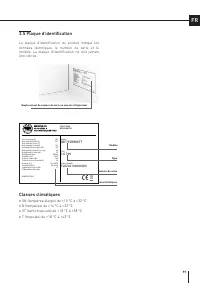
Page 91 - Plaque d’identification; Classes climatiques
Gross capacity (l) Net capacity Fridge (l) Net capacity Fresco (l) Net capacity Freezer(l) Freezing Capacity (kg/12h) Refrigerant Fridge/Fresco (gr) Refrigerant Freezer (gr) Refrigerant Type Climatic Class Defrost Heater (W) Total Absorbed Current (A) Voltage (V~) Frequenzy (Hz) Lighting Neon/Led (W...
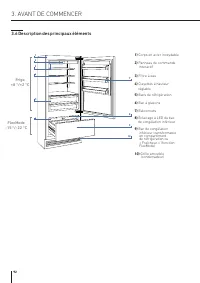
Page 92 - Description des principaux éléments
1) Corps en acier inoxydable 2) Panneau de commande interactif 3) Filtre à eau 4) Clayettes à hauteur réglable 5) Bacs de réfrigération 6) Bac à glaçons 7) Balconnets 8) Éclairage à LED du bac de congélation inférieur 9) Bac de congélation inférieur transformable en compartiment de réfrigération ou ...
Page 93 - Toucher le symbole pour allumer ou arrêter l’appareil.; Accueil; Toucher le symbole pour revenir à l’écran d’accueil.; Alarme; l’alarme et pour les désactiver.; Retour; Toucher le symbole de la flèche pour revenir à l’écran précédent.
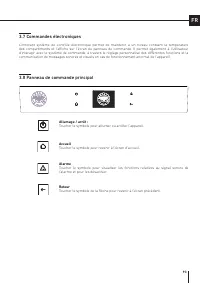
FR 3.8 Panneau de commande principal 3.7 Commandes électroniques L’innovant système de contrôle électronique permet de maintenir à un niveau constant la température des compartiments et l’affiche sur l’écran du panneau de commande. Il permet également à l’utilisateur d’interagir avec le système de c...
Page 94 - Oui; Mise en marche et arrêt; Premier allumage de l’appareil; MISE EN MARCHE ET ARRÊT DE L’APPAREIL; Arrêt du compartiment de réfrigération; Lorsque l’appareil est arrêté, aucun; Arrêt de l’appareil
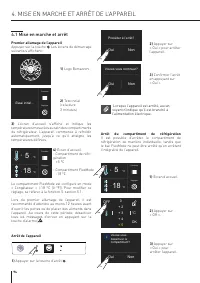
Fonctions Réglages Essai initial… Procéder à l’arrêt? Oui Non Voulez-vous continuer? Oui Non Voulez-vous désactiver le compartiment? Oui Non Fonctions Réglages 5 + °C 18 - °C Fonctions Réglages 5 + °C 18 - °C °C + 3 + 5 + 4 0 + 2 OK OFF 4.1 Mise en marche et arrêt Premier allumage de l’appareil Appu...
Page 95 - Rallumage du compartiment
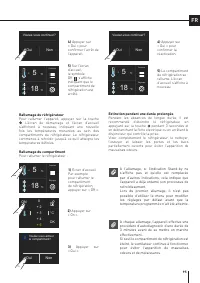
Voulez-vous activer le compartiment? Oui Non Voulez-vous continuer? Oui Non Voulez-vous continuer? Oui Non °C + 3 + 5 + 4 0 + 2 OK ON Fonctions Réglages 5 + °C 18 - °C Fonctions Réglages 5 + °C 18 - °C Fonctions Réglages 5 + °C 18 - °C FR Rallumage du compartiment Pour rallumer le réfrigérateur : Ra...
Page 96 - MISE EN MARCHE DE L’APPAREIL; Comment régler la température des; Modifier la température des compartiments
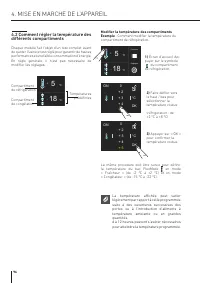
Fonctions Réglages 5 + °C 18 - °C Fonctions Réglages 5 + °C 18 - °C °C + 3 + 5 + 4 0 + 2 OK ON °C + 3 + 5 + 4 0 + 2 OK ON 4. MISE EN MARCHE DE L’APPAREIL 4.2 Comment régler la température des différents compartiments Chaque modèle fait l’objet d’un test complet avant de quitter l’usine et est réglé ...
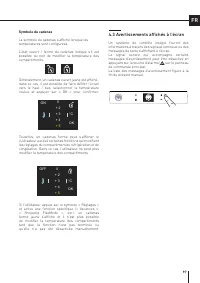
Page 97 - Symbole du cadenas; Avertissements affichés à l’écran
°C + 3 + 5 + 4 0 + 2 OK ON °C + 3 + 5 + 4 0 + 2 OK OFF FR Symbole du cadenas Le symbole du cadenas s’affiche lorsque les températures sont configurées. L’état ouvert / fermé du cadenas indique s’il est possible ou non de modifier la température des compartiments. Généralement, un cadenas ouvert jau...
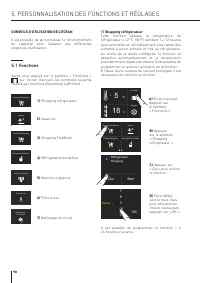
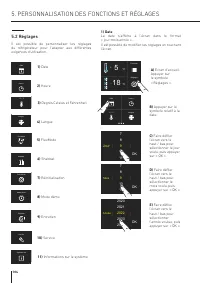
Page 98 - Qui; PERSONNALISATION DES FONCTIONS ET RÉGLAGES; CONSEILS D’UTILISATION DE L’ÉCRAN; ) Shopping réfrigérateur
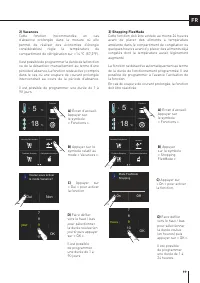
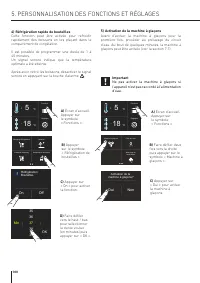
Réfrigération Bouteilles Vacance FlexMode Shopping Shopping Réfrigérateur Réfrigération Bouteilles Vacance FlexMode Shopping Shopping Réfrigérateur Machine à glaçons Filtre de l’eau Nettoyage du circuit d’eau Machine à glaçons Filtre de l’eau Nettoyage du circuit d’eau Réfrigération Bouteilles Vacan...
Page 100 - ) Réfrigération rapide de bouteilles
37 Min 39 38 3536 OK Réfrigération Bouteilles On Off Activation de la machine à glaçons? Oui Non Machine à glaçons Filtre de l’eau Nettoyage du circuit d’eau Réfrigération Bouteilles Vacance FlexMode Shopping Shopping Réfrigérateur Fonctions Réglages 5 + °C 18 - °C Fonctions Réglages 5 + °C 18 - °C ...
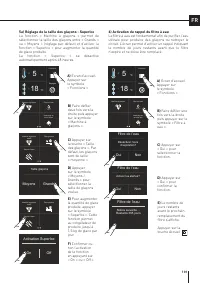
Page 101 - Filtre de l’eau; ) Activation du rappel du filtre à eau
Machine à glaçons Filtre de l’eau Nettoyage du circuit d’eau Machine à glaçons Filtre de l’eau Nettoyage du circuit d’eau Fonctions Réglages 5 + °C 18 - °C Fonctions Réglages 5 + °C 18 - °C Machine à glaçons on/off Taille glaçons Glaçons Super Machine à glaçons on/off Taille glaçons Glaçons Super Ta...
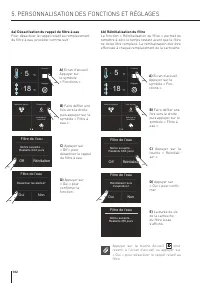
Page 102 - Appuyer sur la touche Accueil; a) Désactivation du rappel du filtre à eau
Machine à glaçons Filtre de l’eau Nettoyage du circuit d’eau Machine à glaçons Filtre de l’eau Nettoyage du circuit d’eau Fonctions Réglages 5 + °C 18 - °C Fonctions Réglages 5 + °C 18 - °C Désactiver les alertes? Oui Non Filtre de l’eau Notice suivante… Restants XXX jours Off Réinitialiser Filtre d...
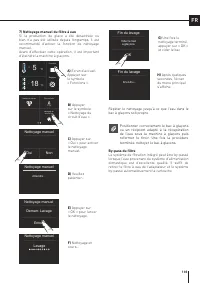
Page 103 - Fin du lavage; ) Nettoyage manuel du filtre à eau; Positionner correctement le bac à glaçons
Machine à glaçons Filtre de l’eau Nettoyage du circuit d’eau Fonctions Réglages 5 + °C 18 - °C Vider le bac a glaçons. OK Fin du lavage Attendre... Fin du lavage Entrer Demarr. Lavage Nettoyage manuel Nettoyage manuel Attendre... Nettoyage manuel Lavage Oui Non Nettoyage manuel FR C) Appuyer sur « O...
Page 107 - Si les réglages par défaut sont rétablis
Sabbath Confirmez Mode Sabbath Oui Non Mode Sabbath Oui Non Sabbath Réinitialiser Mode Démo FlexMode Sabbath Réinitialiser Mode Démo FlexMode Fonctions Réglages 5 + °C 18 - °C Fonctions Réglages 5 + °C 18 - °C Voulez-vous rétablir les paramètres d’usine? Oui Non Réinitialiser Oui Non Réinitialiser e...
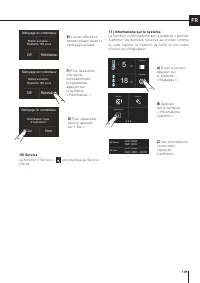
Page 109 - 1) Informations sur le système
Réinitialiser l’avis d’expiration? Oui Non Nettoyage du condenseur Sk Power Sk User HW: 0504 SW: 0518HW: 1002 SW: 1069 - G1011 Entretien Service Systéme Info Fonctions Réglages 5 + °C 18 - °C Notice suivante… Restants 180 jours Nettoyage du condenseur Off Réinitialiser Notice suivante… Restants 180 ...
Page 110 - Configuration interne; CONFIGURATION INTERNE
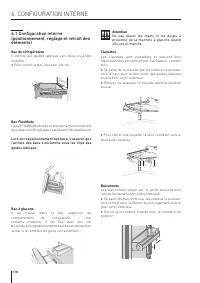
1 2 Attention Ne pas placer les mains ni les doigts à proximité de la machine à glaçons quand elle est en marche. Clayettes Les clayettes sont ajustables et peuvent être repositionnées facilement par l’utilisateur, comme suit : > Se saisir de la clayette par les côtés et la pousser vers le haut p...
Page 111 - ACTIVATION ET UTILISATION DE LA MACHINE À GLAÇONS; Activation et utilisation de la; Remarque; Ne jamais placer de bouteilles ni d’aliments
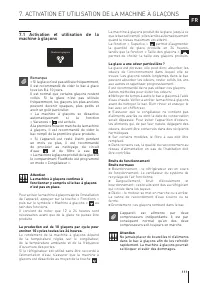
Machine à glaçons Filtre de l’eau Nettoyage du circuit d’eau FR 7. ACTIVATION ET UTILISATION DE LA MACHINE À GLAÇONS 7.1 Activation et utilisation de la machine à glaçons Remarque > Si la glace n’est pas utilisée fréquemment, il est recommandé de vider le bac à glace tous les 8 à 10 jours. Il est...
Page 112 - Remplacement du filtre; pour sélectionner la fonction « Nettoyage
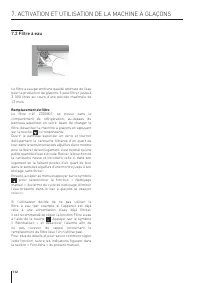
7.2 Filtre à eau Le filtre à eau garantit une qualité optimale de l’eau pour la production de glaçons. Il peut filtrer jusqu’à 3 000 litres au cours d’une période maximale de 12 mois. Remplacement du filtre Le filtre (réf. Z330001) se trouve dans le compartiment de réfrigération, au-dessus du pann...
Page 113 - CONSERVATION DES ALIMENTS; Consignes générales
FR 8. ÉCLAIRAGE 9. CONSERVATION DES ALIMENTS 8.1 Éclairage Pour garantir une vision interne optimale, des bandes LED éclairent le compartiment de réfrigération depuis la partie supérieure, tandis que des ampoules LED éclairent différentes zones du compartiment de réfrigération, des bacs de réfrigéra...
Page 114 - En faisant ses courses; Lorsqu’un taux d’humidité élevé est présent; continue à clignoter.
9. CONSERVATION DES ALIMENTS 9.2 Comment préserver au mieux la qualité des aliments En faisant ses courses Veiller à toujours respecter les précautions suivantes : > Placer les emballages contenant de la viande (volaille comprise) ou du poisson cru(e) dans des sachets plastique afin qu’ils ne se ...
Page 115 - Conseils de conservation; Températures; Porte du compartiment de réfrigération
FR 9.3 Conseils de conservation Températures Les températures de fonctionnement de l’appareil sont configurées sur les valeurs recommandées, à savoir +5 °C pour le réfrigérateur, 0 °C pour le compartiment « Fraîcheur » et -18 °C pour le congélateur. RANGEMENT DES ALIMENTSPorte du réfrigérateur ...
Page 116 - Viandes crues
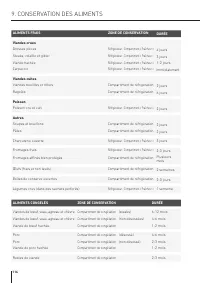
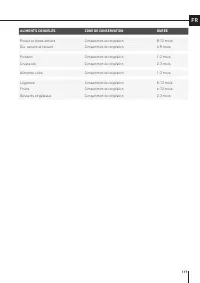
9. CONSERVATION DES ALIMENTS ALIMENTS CONGELÉS ZONE DE CONSERVATION DURÉE Viandes de bœuf, veau, agneau et chèvre Compartiment de congélation (steaks) 6-12 mois Viandes de bœuf, veau, agneau et chèvre Compartiment de congélation (non désossées) 4-6 mois Viande de bœuf hachée Compartiment de congélat...
Page 118 - Entretien et nettoyage; Nettoyage interne; ENTRETIEN ET NETTOYAGE
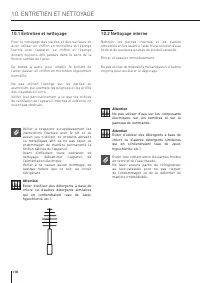
10.1 Entretien et nettoyage Pour le nettoyage des parties et des surfaces en acier, utiliser un chiffon en microfibre et l’éponge fournie avec l’appareil. Le chiffon et l’éponge doivent toujours être passés dans le sens de la finition satinée de l’acier. De temps à autre, pour rétablir le brillant d...
Page 119 - Condensateur inférieur
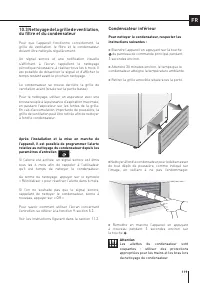
FR 10.3 Nettoyage de la grille de ventilation, du filtre et du condensateur Pour que l’appareil fonctionne correctement, la grille de ventilation, le filtre et le condensateur doivent être nettoyés régulièrement. Un signal sonore et une notification visuelle s’affichant à l’écran rappellent le netto...
Page 120 - GUIDE DE RÉSOLUTION DES PROBLÈMES; Guide de résolution des problèmes
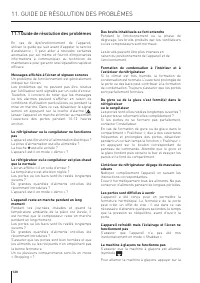
11. GUIDE DE RÉSOLUTION DES PROBLÈMES 11.1 Guide de résolution des problèmes En cas de dysfonctionnement de l’appareil, utiliser le guide qui suit avant d’appeler le service d’assistance : il peut aider à résoudre certaines anomalies par soi-même et fournit d’importantes informations à communiquer ...
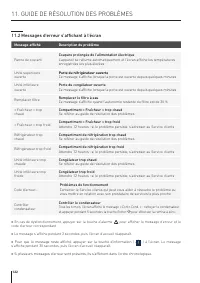
Page 122 - Messages d’erreur s’affichant à l’écran; Message affiché
> En cas de dysfonctionnement, appuyer sur la touche d’alarme pour afficher le message d’erreur et le code d’erreur correspondant. > Le message s’affiche pendant 3 secondes, puis l’écran d’accueil réapparaît. > Pour que le message reste affiché, appuyer sur la touche d’information ( Bottle...
Page 123 - ÍNDICE
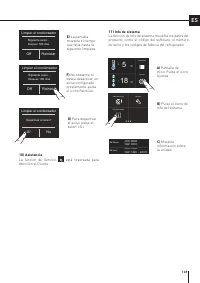
123 ES 1 1.1 1.2 1.3 1.4 1.5 1.6 INFORMACIÓN IMPORTANTE SOBRE SEGURIDAD Y MEDIO AMBIENTE Para su seguridad .......................................................................................................................................................... Información importante al usar el apar...
Page 124 - Para su seguridad; Este aparato no está diseñado para funcionar con; Se debe; INFORMACIÓN IMPORTANTE SOBRE SEGURIDAD Y MEDIO AMBIENTE
124 1.1 Para su seguridad > Si este aparato sustituye a un aparato existente que deba retirarse o eliminarse, corte el cable de alimentación del aparato obsoleto. Esta acción impedirá que se cierre la puerta y nos aseguraremos de que el aparato no se convierta en una trampa peligrosa para los niñ...
Page 126 - Información para evitar daños al aparato; Advertencia; Información para evitar lesiones; Protección del medio ambiente; Este aparato cumple con la Directiva Europea; mantenimiento del hielo
126 1. INFORMACIÓN IMPORTANTE SOBRE SEGURIDAD Y MEDIO AMBIENTE Símbolos utilizados en esta Guía: Nota Recomendaciones para utilizar correctamente el aparato Importante Información para evitar daños al aparato Advertencia Información para evitar lesiones 1.3 Protección del medio ambiente > Este ap...
Page 127 - Información para las autoridades; Para las pruebas de EcoDesign, la instalación; Para ahorrar energía; Un uso correcto del aparato, un buen embalaje
127 ES Advertencia Para evitar que los alimentos puedan contaminarse, preste atención a la información y las instrucciones que siguen: > Dejar la puerta abierta durante largos periodos de tiempo puede provocar un aumento significativo de la temperatura en los compartimentos del aparato. > Haga...
Page 128 - Conexión a la red de agua
128 2. INSTALACIÓN > Para garantizar que el aparato tenga estabilidad, instálelo y fíjelo correctamente, como se describe en las instrucciones incluidas en este manual. 2.2 Conexión a la red de agua Los modelos equipados con una máquina de hielo requieren una conexión a la red doméstica de sumini...
Page 129 - Conexión a la red eléctrica; Durante el transporte y la instalación del aparato,; Peligro de incendio / Materiales
129 ES 2.3 Conexión a la red eléctrica El aparato va equipado con una clavija tipo Schuko de 16 A y debe conectarse a la toma de corriente eléctrica a través del enchufe Schuko correspondiente. No utilice cables alargadores ni/o adaptadores múltiples para la conexión a la red eléctrica. Importante ...
Page 130 - ANTES DE PONER EN SERVICIO EL APARATO; Conozca su refrigerador
130 3. ANTES DE PONER EN SERVICIO EL APARATO 3.1 Conozca su refrigerador ¡Le felicitamos por haber comprado su nuevo refrigerador! A partir de ahora, podrá utilizar nuestro innovador sistema de conservación en frío, que le permitirá almacenar toda su comida de la mejor manera posible. Este manual re...
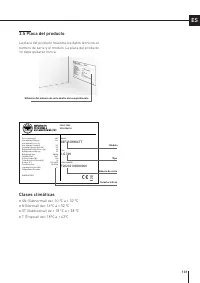
Page 131 - Placa del producto; Clases climáticas
Gross capacity (l) Net capacity Fridge (l) Net capacity Fresco (l) Net capacity Freezer(l) Freezing Capacity (kg/12h) Refrigerant Fridge/Fresco (gr) Refrigerant Freezer (gr) Refrigerant Type Climatic Class Defrost Heater (W) Total Absorbed Current (A) Voltage (V~) Frequenzy (Hz) Lighting Neon/Led (W...
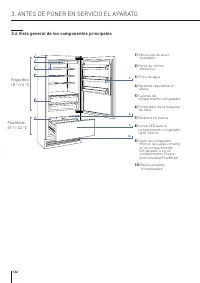
Page 132 - Vista general de los componentes principales; FlexMode
132 3. ANTES DE PONER EN SERVICIO EL APARATO 1) Estructura de acero inoxidable 2) Panel de control interactivo 3) Filtro de agua 4) Estantes regulables en altura 5) Cajones del compartimento refrigerador. 6) Contenedor de la máquina de hielo 7) Estantes en puerta 8) Luces LED para el compartimen...
Page 133 - produzca algún fallo en el funcionamiento del aparato.; Pulse el icono Home para volver a la pantalla de inicio.; Alarma; Pulse el icono de la flecha para volver a la pantalla anterior.
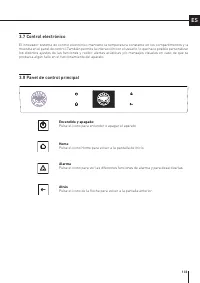
133 ES 3.8 Panel de control principal 3.7 Control electrónico El innovador sistema de control electrónico mantiene la temperatura constante en los compartimentos y la muestra en el panel de control. También permite la interacción con el usuario, lo que hace posible personalizar los distintos ajustes...
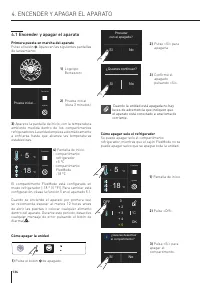
Page 134 - Sí; Encender y apagar el aparato; Primera puesta en marcha del aparato; ENCENDER Y APAGAR EL APARATO; Cómo apagar solo el refrigerador; Cuando la unidad está apagada no hay; Cómo apagar la unidad
Funciones Ajustes Prueba inicial… Proceder con el apagado? Sí No ¿Quieres continuar? Sí No ¿Quieres desactivar el compartimento? Sí No Funciones Ajustes 5 + °C 18 - °C Funciones Ajustes 5 + °C 18 - °C °C + 3 + 5 + 4 0 + 2 OK OFF 134 4.1 Encender y apagar el aparato Primera puesta en marcha del apara...
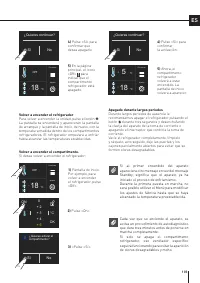
Page 135 - Volver a encender el compartimento.
¿Quieres activar el compartimento? Sí No ¿Quieres continuar? Sí No ¿Quieres continuar? Sí No °C + 3 + 5 + 4 0 + 2 OK ON Funciones Ajustes 5 + °C 18 - °C Funciones Ajustes 18 - °C OFF Funciones Ajustes 18 - °C OFF 135 ES Volver a encender el compartimento. Si desea volver a encender el refrigerador: ...
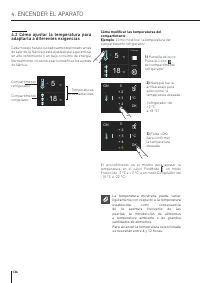
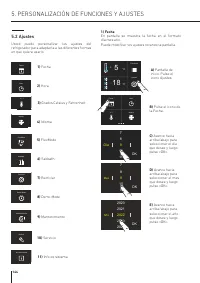
Page 136 - ENCENDER EL APARATO; Cómo ajustar la temperatura para; Cómo modificar las temperaturas del
Funciones Ajustes 5 + °C 18 - °C Funciones Ajustes 5 + °C 18 - °C °C + 3 + 5 + 4 0 + 2 OK ON °C + 3 + 5 + 4 0 + 2 OK ON 136 4. ENCENDER EL APARATO 4.2 Cómo ajustar la temperatura para adaptarla a diferentes exigencias Cada modelo ha sido cuidadosamente probado antes de salir de la fábrica y está aju...
Page 137 - Icono del candado; Notificaciones de advertencia en la
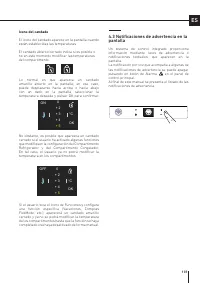
°C + 3 + 5 + 4 0 + 2 OK ON °C + 3 + 5 + 4 0 + 2 OK OFF 137 ES Icono del candado El icono del candado.aparece en la pantalla cuando están establecidas las temperaturas. El candado abierto/cerrado indica si es posible o no en este momento modificar las temperaturas del compartimento. Lo normal es que ...
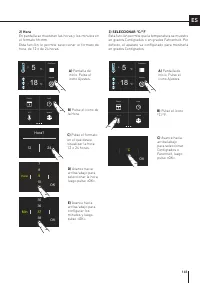
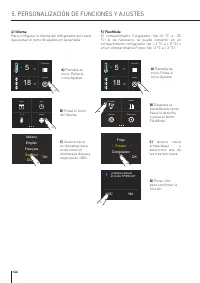
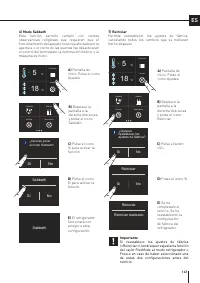
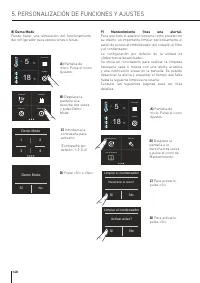
Page 138 - PERSONALIZACIÓN DE FUNCIONES Y AJUSTES; CONSEJOS PARA USAR LA PANTALLA; ) Refrigerador en modo Compras Frigo
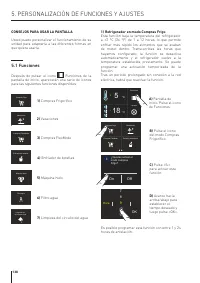
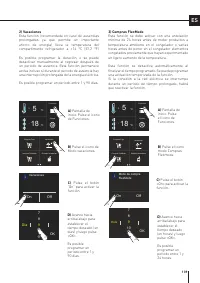
Enfriador de botellas Vacaciones Compras FlexMode Compras Frigo Enfriador de botellas Vacaciones Compras FlexMode Compras Frigo Maquina hielo Filtro agua Limpieza del circuito de agua Maquina hielo Filtro agua Limpieza del circuito de agua Enfriador de botellas Vacaciones Compras FlexMode Compras Fr...
Page 140 - ) Enfriador rápido de botellas
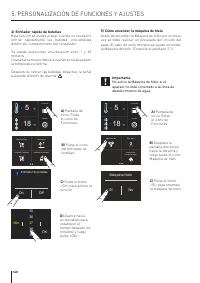
37 Min 39 38 3536 OK Enfriador de botellas On Off Maquina hielo Sí No Maquina hielo Filtro agua Limpieza del circuito de agua Enfriador de botellas Vacaciones Compras FlexMode Compras Frigo Funciones Ajustes 5 + °C 18 - °C Funciones Ajustes 5 + °C 18 - °C 140 4) Enfriador rápido de botellas Esta fun...
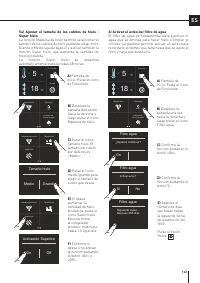
Page 141 - Filtro agua; ) Activar el aviso del filtro de agua
Maquina hielo Filtro agua Limpieza del circuito de agua Maquina hielo Filtro agua Limpieza del circuito de agua Funciones Ajustes 5 + °C 18 - °C Funciones Ajustes 5 + °C 18 - °C Maquina hielo on/off Tamaño hielo Super hielo Maquina hielo on/off Tamaño hielo Super hielo Tamaño hielo Medio Grande Acti...
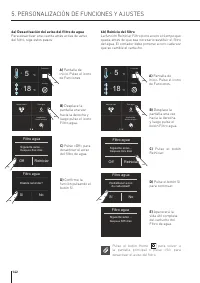
Page 142 - Pulse el botón Home; a) Desactivación del aviso del filtro de agua
Maquina hielo Filtro agua Limpieza del circuito de agua Maquina hielo Filtro agua Limpieza del circuito de agua Funciones Ajustes 5 + °C 18 - °C Funciones Ajustes 5 + °C 18 - °C Disable reminder? Sí No Filtro agua Siguiente aviso… Despues Xxx días Off Reiniciar Filtro agua Restablecer aviso de caduc...
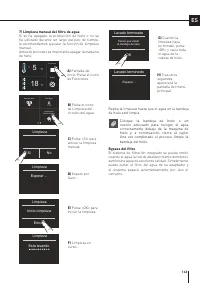
Page 143 - Lavado terminado; ) Limpieza manual del filtro de agua; Coloque la bandeja de hielo o un; Bypass del filtro
Maquina hielo Filtro agua Limpieza del circuito de agua Funciones Ajustes 5 + °C 18 - °C Tienes que vaciar la bandeja de hielo OK Lavado terminado Esperar… Lavado terminado Entrar Inicio Limpieza Limpieza Limpieza Esperar… Esta lavando Limpieza Sí No Limpieza 143 ES C) Pulse «Sí» para activar la lim...
Page 147 - Si reestablece los ajustes de fábrica
Sabbath ¿Quieres poner el modo Sabbath? Sí No Sabbath Sí No Sabbath Reiniciar Demo Mode FlexMode Sabbath Reiniciar Demo Mode FlexMode Funciones Ajustes 5 + °C 18 - °C Funciones Ajustes 5 + °C 18 - °C ¿Quieres restablecer los ajustes de fábrica? Sí No Reiniciar Sí No Reiniciar realizado Reiniciar 147...
Page 149 - Off
Desactivar el aviso? Sí No Limpiar el condensador Sk Power Sk User HW: 0504 SW: 0518HW: 1002 SW: 1069 - G1011 Mantenimiento Servicio Info de sistema Funciones Ajustes 5 + °C 18 - °C Siguiente aviso… Despues 180 días Limpiar el condensador Off Reiniciar Siguiente aviso… Despues 180 días Limpiar el co...
Page 150 - No coloque las manos ni los dedos cerca; Equipamiento interno; EQUIPAMIENTO INTERNO
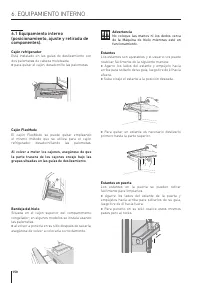
1 2 150 Advertencia No coloque las manos ni los dedos cerca de la Máquina de hielo mientras esté en funcionamiento. Estantes Los estantes son ajustables y el usuario los puede reubicar fácilmente de la siguiente manera: > Agarre los lados del estante y empújelo hacia arriba para soltarlo de su gu...
Page 151 - ACTIVACIÓN Y USO DE LA MÁQUINA DE HIELO; Activación y uso de la máquina de; No coloque en el contenedor de cubitos
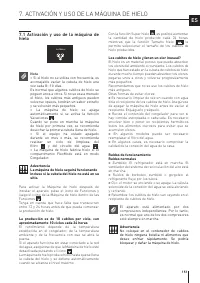
Ice Maker Water Filter Water System Purge 151 ES 7. ACTIVACIÓN Y USO DE LA MÁQUINA DE HIELO 7.1 Activación y uso de la máquina de hielo Nota > Si el hielo no se utiliza con frecuencia, es aconsejable vaciar la cubeta de hielo una vez cada 8--10 días. Es normal que algunos cubitos de hielo se pegu...
Page 152 - Sustitución del filtro; Máquina de hielo; para
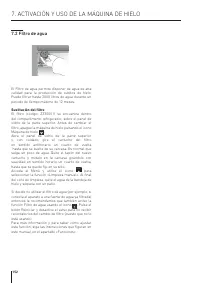
152 7.2 Filtro de agua El Filtro de agua permite disponer de agua de alta calidad para la producción de cubitos de hielo. Puede filtrar hasta 3000 litros de agua durante un periodo de tiempo máximo de 12 meses. Sustitución del filtro El filtro (código: Z330001) se encuentra dentro del compartimento ...
Page 153 - CONSERVACIÓN DE LOS ALIMENTOS; Instrucciones generales
153 ES 8. ILUMINACIÓN 9. CONSERVACIÓN DE LOS ALIMENTOS 8.1 Iluminación Para proporcionar una iluminación interior óptima, unas tiras de LED iluminan el compartimento del refrigerador desde la parte superior y grupos de luces LED iluminan directamente diferentes áreas del compartimento del refrigerad...
Page 154 - Al comprar alimentos; Cuando el lugar donde se encuentra la; seguirá parpadeando.
154 9. CONSERVACIÓN DE LOS ALIMENTOS 9.2 Cómo conservar los alimentos en buen estado Al comprar alimentos Siempre tome las siguientes precauciones: > Coloque la carne, el pescado o las aves de corral crudos en bolsas de plástico para que no goteen sobre otros alimentos. > Compre la carne, las ...
Page 155 - Temperaturas; Puerta del compartimento refrigerador
155 ES 9.3 Consejos para el almacenamiento y la conservación de los alimentos Temperaturas Las temperaturas de funcionamiento del aparato están en los +5 °C recomendados para el refrigerador y a los -18°C para el congelador, 0 °C para el compartimento Fresco. DISPOSICIÓN DE LOS ALIMENTOSPuerta del ...
Page 156 - Carne cruda
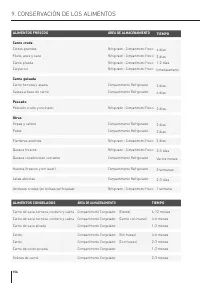
156 9. CONSERVACIÓN DE LOS ALIMENTOS ALIMENTOS CONGELADOS ÁREA DE ALMACENAMIENTO TIEMPO Carne de vaca, ternera, cordero y cabra Compartimento Congelador (filetes) 6-12 meses Carne de vaca, ternera, cordero y cabra Compartimento Congelador (Carne con hueso) 4-6 meses Carne de vaca picada Compartiment...
Page 158 - Mantenimiento y limpieza; Limpieza del interior; MANTENIMIENTO Y LIMPIEZA
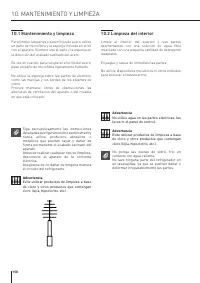
158 10.1 Mantenimiento y limpieza Para limpiar las partes y superficies de acero, utilice un paño de microfibra y la esponja incluida en el kit con el aparato. Siempre use el paño y la esponja en la dirección del acabado satinado del acero. De vez en cuando, para recuperar el brillo del acero, pase ...
Page 159 - Después de instalar y encender la unidad puede; El condensador inferior; Para limpiar el condensador, siga estas
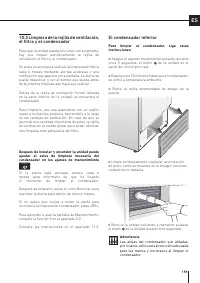
159 ES 10.3 Limpieza de la rejilla de ventilación, el filtro y el condensador Para que la unidad pueda funcionar correctamente, hay que limpiar periódicamente la rejilla de ventilación, el filtro y el condensador. Se envía un aviso para realizar la limpieza periódica cada 6 meses mediante alertas ac...
Page 160 - GUÍA DE RESOLUCIÓN DE PROBLEMAS; Guía de resolución de problemas
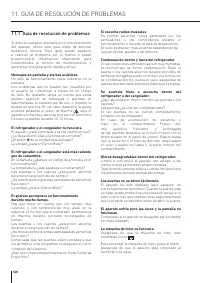
160 11. GUÍA DE RESOLUCIÓN DE PROBLEMAS 11.1 Guía de resolución de problemas Si detecta cualquier anomalía en el funcionamiento del aparato, utilice esta guía antes de solicitar asistencia técnica. Esta guía puede ayudarle a resolver el problema por sí mismo o puede proporcionarle información import...
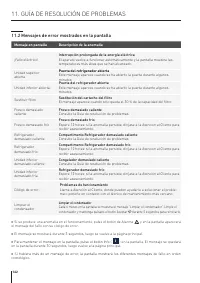
Page 162 - Para mantener el mensaje en la pantalla, pulse el botón Info; Mensajes de error mostrados en la pantalla; Mensaje en pantalla
162 > Si se produce una anomalía en el funcionamiento, pulse el botón de Alarma y en la pantalla aparecerá el mensaje del fallo con su código de error. > El mensaje se mostrará durante 3 segundos, luego se vuelve a la página principal. > Para mantener el mensaje en la pantalla, pulse el bot...
Page 163 - INHOUDSOPGAVE
163 NL 1 1.1 1.2 1.3 1.4 1.5 1.6 BELANGRIJKE INFORMATIE VOOR DE VEILIGHEID EN HET MILIEU Voor uw veiligheid .......................................................................................................................................................... Belangrijke informatie bij het gebrui...
Page 164 - Voor uw veiligheid; Dit apparaat is niet ontworpen om met externe; Let; BELANGRIJKE INFORMATIE VOOR DE VEILIGHEID EN HET MILIEU
164 1.1 Voor uw veiligheid > Indien dit apparaat een bestaand apparaat vervangt dat moet worden verwijderd of weggegooid, moet u de voedingskabel van het oude apparaat doorsnijden. Hierdoor wordt het onmogelijk de deur te sluiten en kunnen kinderen niet worden opgesloten in een werkend toestel. N...
Page 166 - Opmerking; Informatie om letsel te voorkomen; Zorg voor het milieu; Dit apparaat is conform de Europese WEEE-; van de ijsmaker; ontsmettingsmiddel
166 1. BELANGRIJKE INFORMATIE VOOR DE VEILIGHEID EN HET MILIEU Symbolen gebruikt in deze gids: Opmerking Aanbevelingen voor correct gebruik van het apparaat Belangrijk Informatie om schade aan het toestel te voorkomen Waarschuwing Informatie om letsel te voorkomen 1.3 Zorg voor het milieu > Dit a...
Page 167 - Waarschuwing; Informatie voor regelgevende; Voor controles in verband met EcoDesign moeten
167 NL Waarschuwing Neem de volgende instructies in acht om contaminatie van voeding te voorkomen: > Het langdurig open houden van de deur kan aanzienlijke temperatuurverhoging in de compartimenten van het apparaat tot gevolg hebben. > Reinig regelmatig de oppervlakken die in aanraking kunnen ...
Page 168 - Aansluiting op het waterleidingnet
168 2. INSTALLATIE 2.2 Aansluiting op het waterleidingnet De modellen uitgerust met de ijsmaker moeten worden aangesloten op het waterleidingnet van uw woning. Gebruik hiervoor uitsluitend de meegeleverde ¼” waterleiding.De systeemdruk moet tussen 0,05 MPa en 0,5 MPa liggen (tussen 0,5 bar en 5 bar)...
Page 169 - Aansluiting op het elektriciteitsnet; Zorg ervoor dat tijdens het transport en de; Belangrijk
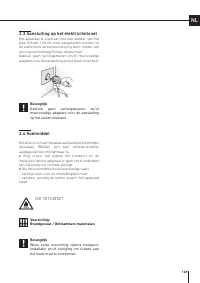
169 NL 2.3 Aansluiting op het elektriciteitsnet Het apparaat is uitgerust met een stekker van het type Schuko 16A en moet aangesloten worden op de elektrische stroomvoorziening door middel van een overeenkomstig Schuko stopcontact. Gebruik geen verlengsnoeren en/of meervoudige adapters voor de aansl...
Page 170 - Technische gegevens
170 3. VÓÓR HET STARTEN 3.1 Ken uw koelkast Gefeliciteerd met de aankoop van uw nieuwe koelkast. Voortaan kunt u dit innovatief koel-en-bewaarsysteem gebruiken om alle soorten voedingsmiddelen optimaal te bewaren. Deze handleiding zal antwoord geven op de meeste vragen over de productkenmerken. Moch...
Page 171 - Klimaatklassen
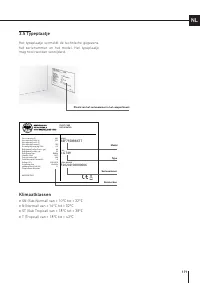
Gross capacity (l) Net capacity Fridge (l) Net capacity Fresco (l) Net capacity Freezer(l) Freezing Capacity (kg/12h) Refrigerant Fridge/Fresco (gr) Refrigerant Freezer (gr) Refrigerant Type Climatic Class Defrost Heater (W) Total Absorbed Current (A) Voltage (V~) Frequenzy (Hz) Lighting Neon/Led (W...
Page 172 - Overzicht van de belangrijkste onderdelen; Koelkast
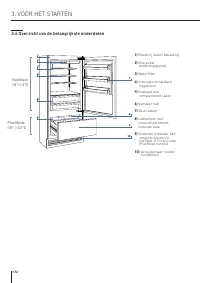
1 4 6 5 10 2 3 8 7 9 172 1) Roestvrij stalen bekasting 2) Interactief bedieningspaneel 3) Waterfilter 4) In hoogte verstelbare legplanken 5) Koelkast met compartiment-laden 6) Ijsmaker-bak 7) Deurvakken 8) Ledlampen voor vriescompartiment, onderste lade 9) Onderste vrieslade, kan omgezet worden ...
Page 173 - bij een storing van het apparaat.; Raak de Home-icoon aan om terug te gaan naar het beginscherm.; Raak de pijl-icoon aan om terug te gaan naar het vorige scherm.
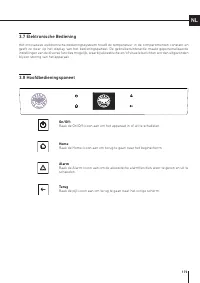
173 NL 3.8 Hoofdbedieningspaneel 3.7 Elektronische Bediening Het innovatieve elektronische bedieningssysteem houdt de temperatuur in de compartimenten constant en geeft ze weer op het display van het bedieningspaneel. De gebruikersinteractie maakt gepersonaliseerde instellingen van de diverse functi...
Page 174 - Eerste maal opstarten; Wanneer de eenheid uitgeschakeld is,; Uitschakelen
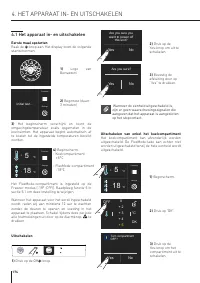
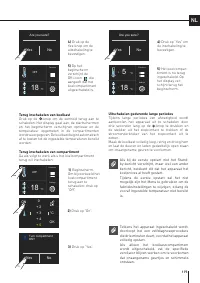
Functions Settings 5 + °C 18 - °C Functions Settings 5 + °C 18 - °C Functions Settings Initial test… Are you sure you want to power off this unit? Yes No Are you sure? Yes No °C + 3 + 5 + 4 0 + 2 OK OFF Turn compartment OFF? Yes No 174 4.1 Het apparaat in- en uitschakelen Eerste maal opstarten Raak ...
Page 175 - Terug inschakelen van compartiment
Functions Settings OFF 18 - °C Functions Settings OFF 18 - °C Functions Settings 5 + °C 18 - °C Are you sure? Yes No Are you sure? Yes No Turn compartment ON? Yes No °C + 3 + 5 + 4 0 + 2 OK ON 175 NL Terug inschakelen van compartiment Ga als volgt te werk als u het koelcompartiment terug wil inschak...
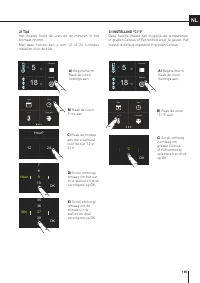
Page 176 - HET APPARAAT INSCHAKELEN; De temperatuur aanpassen aan; De temperaturen van het compartiment wijzigen
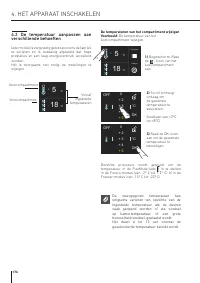
Functions Settings 5 + °C 18 - °C °C + 3 + 5 + 4 0 + 2 OK OFF °C + 3 + 5 + 4 0 + 2 OK OFF Functions Settings 5 + °C 18 - °C 176 4. HET APPARAAT INSCHAKELEN 4.2 De temperatuur aanpassen aan verschillende behoeften Ieder model is zorgvuldig getest alvorens de fabriek te verlaten en is dusdanig afgeste...
Page 177 - Waarschuwingen op het display
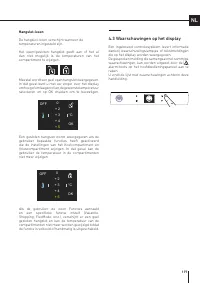
°C + 3 + 5 + 4 0 + 2 OK OFF °C + 3 + 5 + 4 0 + 2 OK OFF 177 NL Hangslot-icoon De hangslot-icoon verschijnt wanneer de temperaturen ingesteld zijn. Het open/gesloten hangslot geeft aan of het al dan niet mogelijk is de temperaturen van het compartiment te wijzigen. Meestal wordt een geel open hangslo...
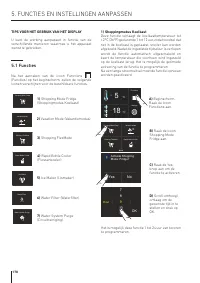
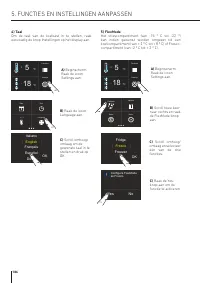
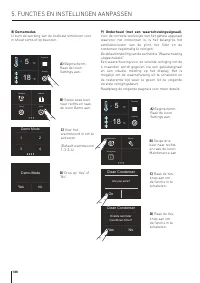
Page 178 - FUNCTIES EN INSTELLINGEN AANPASSEN; TIPS VOOR HET GEBRUIK VAN HET DISPLAY; ) Shoppingmodus Koelkast
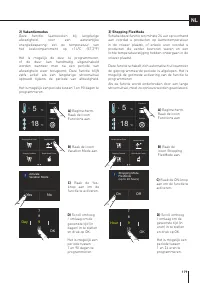
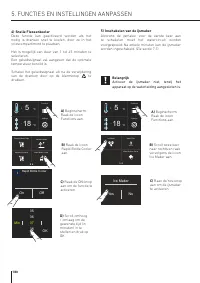
Functions Settings 5 + °C 18 - °C Activate Shopping Mode: Fridge? Yes No 9 Hour 11 10 78 OK Rapid Bottle Cooler Vacation Mode Shopping FlexMode Shopping Mode Fridge Ice Maker Water Filter Water System Purge Ice Maker Water Filter Water System Purge Ice Maker Water Filter Water System Purge Rapid Bot...
Page 180 - ) Snelle Flessenkoeler
Rapid Bottle Cooler Vacation Mode Shopping FlexMode Shopping Mode Fridge Functions Settings 5 + °C 18 - °C Functions Settings 5 + °C 18 - °C 37 Min 39 38 3536 OK Rapid Bottle Cooler On Off Ice Maker Water Filter Water System Purge Ice Maker Yes No 180 4) Snelle Flessenkoeler Deze functie kan geactiv...
Page 182 - Druk op de Homeknop; a) Uitschakelen van Waterfilter-waarschuwing
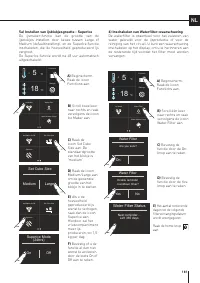
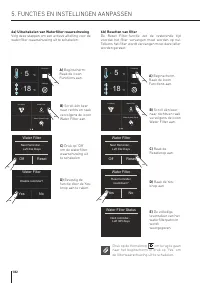
Ice Maker Water Filter Water System Purge Functions Settings 5 + °C 18 - °C Ice Maker Water Filter Water System Purge Functions Settings 5 + °C 18 - °C Disable reminder? Yes No Water Filter Next Reminder… Left Xxx Days Off Reset Water Filter Next Reminder… Left Xxx Days Off Reset Water Filter Reset ...
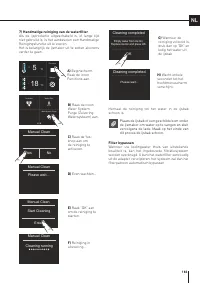
Page 183 - ) Handmatige reiniging van de waterfilter; Plaats de ijsbak of een geschikte kom onder; Filter bypassen
Functions Settings 5 + °C 18 - °C Ice Maker Water Filter Water System Purge Yes No Manual Clean Enter Start Cleaning Manual Clean Manual Clean Please wait... Cleaning running Manual Clean Empty water from ice bin. Replace ice bin and press OK. OK Cleaning completed Please wait... Cleaning completed ...
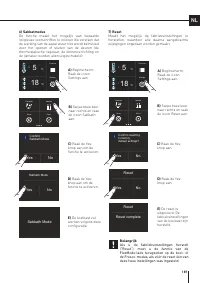
Page 187 - Als u de fabrieksinstellingen herstelt
Functions Settings 5 + °C 18 - °C Functions Settings 5 + °C 18 - °C Sabbath Reset Demo FlexMode Sabbath Mode Confirm Sabbath Mode Yes No Sabbath Mode Yes No Sabbath Reset Demo FlexMode Confirm resetting to factory default settings? Yes No Reset Yes No Reset complete Reset 187 NL 7) Reset Maakt het m...
Page 190 - Houd uw handen of vingers niet vlakbij de; Schappen; afstelling en verwijdering van; Koellade
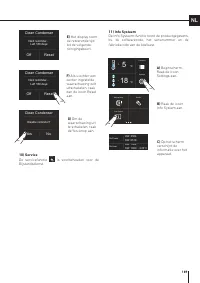
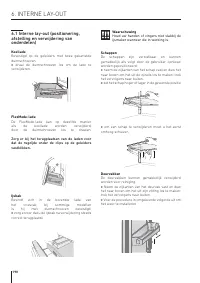
1 2 190 Waarschuwing Houd uw handen of vingers niet vlakbij de ijsmaker wanneer die in werking is. Schappen De schappen zijn verstelbaar en kunnen gemakkelijk als volgt door de gebruiker opnieuw worden gepositioneerd: > neem de zijkanten van het schap vast en duw het naar boven om het uit de zijr...
Page 191 - ACTIVERING EN GEBRUIK VAN DE IJSMAKER; Activering en gebruik van de; Plaats geen flessen of voedsel in de ijsbak
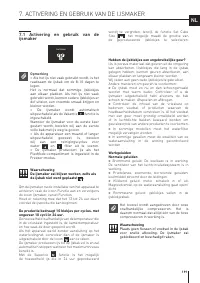
Ice Maker Water Filter Water System Purge 191 NL 7. ACTIVERING EN GEBRUIK VAN DE IJSMAKER 7.1 Activering en gebruik van de ijsmaker Opmerking > Als het ijs niet vaak gebruikt wordt, is het raadzaam de ijsbak om de 8-10 dagen te legen. Het is normaal dat sommige ijsblokjes aan elkaar plakken. Als ...
Page 192 - Vervangen van filter; Ice Maker aan te
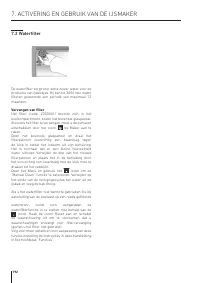
192 7.2 Waterfilter De waterfilter zorgt voor extra zuiver water voor de productie van ijsblokjes. Hij kan tot 3000 liter water filteren gedurende een periode van maximaal 12 maanden. Vervangen van filter Het filter (code: Z330001) bevindt zich in het koelcompartiment, boven het bovenste glaspaneel....
Page 193 - BEWAREN VAN VOEDING; Algemene instructies
193 NL 8. VERLICHTING 9. BEWAREN VAN VOEDING 8.1 Verlichting Voor de optimale interne verlichting zijn ledstroken voorzien bovenaan het koelcompartiment en reeksen ledlampjes die rechtstreeks de verschillende zones van het koelcompartiment, de koellades en vrieslade verlichten. Bij storing en/of sli...
Page 194 - Wanneer u groenten koopt; Als de installatieplaats van het apparaat; zal doorgaan met knipperen.
194 9. BEWAREN VAN VOEDING 9.2 Hoe wordt de voedselkwaliteit het best gewaarborgd Wanneer u groenten koopt Tref altijd de volgende voorzorgsmaatregelen: > Plaats verpakkingen met rauw vlees, rauwe vis of gevogelte in plastic zakken zodat ze niet op andere levensmiddelen kunnen druppelen. > Koo...
Page 195 - Temperaturen; Koelcompartimentdeur
195 NL 9.3 Tips voor het opslaan en bewaren van voeding Temperaturen De bedrijfstemperaturen van het apparaat zijn ingesteld op de aanbevolen waarden +5°C voor de koelkast, -18°C voor de vriezer en 0°C voor de Fresco-lade. POSITIONERING VAN DE LEVENSMIDDELENKoelkastdeur Koelcompartimentdeur > Bew...
Page 196 - Rauw vlees
196 9. BEWAREN VAN VOEDING BEVROREN VOEDING OPSLAGRUIMTE TIJD Rundvlees, kalfsvlees, lamsvlees en geitenvlees Vriescompartiment (steaks) 6-12 maanden Rundvlees, kalfsvlees, lamsvlees en geitenvlees Vriescompartiment (Vlees met bot) 4-6 maanden Rundergehakt Vriescompartiment 1-2 maanden Varkensvlees ...
Page 198 - Zorg en Reiniging; Reiniging van de binnenkant; ZORG EN REINIGING
198 10.1 Zorg en Reiniging Gebruik voor de reiniging van de stalen onderdelen een microvezeldoek en de spons die deel uitmaakt van de bij het apparaat geleverde kit. Gebruik de doek en de spons altijd in de richting van de gesatineerde afwerking van het staal. Veeg het staal af en toe schoon met een...
Page 199 - filter en condensor; De onderste condensor
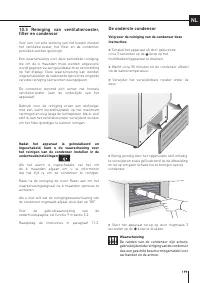
199 NL 10.3 Reiniging van ventilatierooster, filter en condensor Voor een correcte werking van het toestel moeten het ventilatierooster, het filter en de condensor periodiek worden gereinigd. Een waarschuwing voor deze periodieke reiniging, die om de 6 maanden moet worden uitgevoerd, wordt gegeven v...
Page 200 - GIDS VOOR PROBLEEMOPLOSSING; Gids voor probleemoplossing
200 11. GIDS VOOR PROBLEEMOPLOSSING 11.1 Gids voor probleemoplossing Als u storingen in uw apparaat bemerkt, gebruik deze gids dan alvorens om bijstandsdienst te bellen: deze gids kan u helpen om het probleem zelf op te lossen of kan belangrijke informatie verstrekken voor de service-technicus, om e...
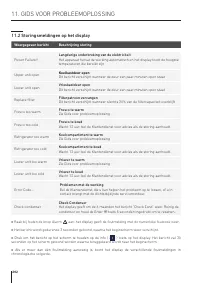
Page 202 - Druk om het bericht op het scherm te houden op de info; chronologische volgorde.; Storingsmeldingen op het display; Weergegeven bericht
202 > Raak bij fouten de knop Alarm aan: het display geeft de foutmelding met de numerieke foutcode weer. > Het bericht wordt gedurende 3 seconden getoond, waarna het beginscherm weer verschijnt. > Druk om het bericht op het scherm te houden op de info ( Bottle Cooler? On Off ) toets op het...
Page 203 - Indhold
1 1.1 1.2 1.3 1.4 1.5 1.6 VIGTIGE OPLYSNINGER OM SIKKERHED OG MILJØ For din sikkerhed ........................................................................................................................................................... Vigtig information når du anvender apparatet ................
Page 204 - For din sikkerhed; Apparatet er ikke designet til at fungere med; Man skal være forsigtig med ikke at blokere; VIGTIGE OPLYSNINGER OM SIKKERHED OG MILJØ
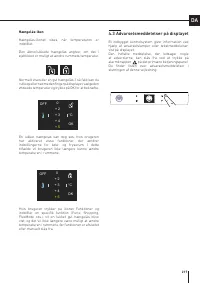
1.1 For din sikkerhed > Hvis dette apparat erstatter et eksisterende apparat, som skal fjernes eller bortskaffes, skal du skære det gamle apparats strømforsyningskabel over. Dette vil gøre det umuligt at lukke døren og sikre, at den ikke bliver en farlig fælde for børn. Tag de samme forholdsregle...
Page 206 - Bemærk; Anbefalinger for korrekt brug af apparatet; Vigtigt; Oplysninger til at forhindre personskade; Vær opmærksom på miljøet; Dette apparat er i overensstemmelse med det; vedligeholdelse af ismaskinen
1. VIGTIGE OPLYSNINGER OM SIKKERHED OG MILJØ Symboler anvendt i guiden: Bemærk Anbefalinger for korrekt brug af apparatet Vigtigt Oplysninger til at forhindre skader på apparatet Advarsel Oplysninger til at forhindre personskade 1.3 Vær opmærksom på miljøet > Dette apparat er i overensstemmelse m...
Page 207 - Advarsel; Information til de tilsynsførende; For test af EcoDesign, skal installationen og; Sådan sparer du på energien; Korrekt brug af apparatet, korrekt indpakning
Advarsel For at undgå kontaminering af fødevarerne skal du overholde følgende oplysninger og instruktioner: > Åbning af døren over længere perioder kan forårsage en betydelig stigning i temperaturen i apparatets forskellige rum. > Rengør regelmæssigt overflader, der kan komme i kontakt med fød...
Page 208 - Tilslutning til vandforsyningen; Tilslut altid vandet før strømmen tilsluttes.
2. INSTALLATION 2.2 Tilslutning til vandforsyningen Modeller, der er udstyret med en ismaskine, kræver tilslutning til vandforsyningssystemet i huset hvor apparatet er placeret. Denne forbindelse kan kun ske via den indbyggede ¼” vandledning.Systemtrykket skal være på mellem 0.05 Mpa og 0.5 Mpa (mel...
Page 209 - Under transport og installation af apparatet skal
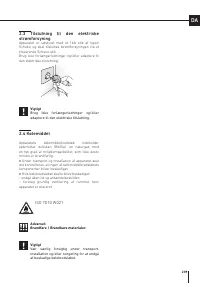
2.3 Tilslutning til den elektriske strømforsyning Apparatet er udstyret med et 16A stik af typen Schuko, og skal tilsluttes strømforsyningen via et tilsvarende Schuko-stik. Brug ikke forlængerledninger og/eller adaptere til den elektriske tilslutning. Vigtigt Brug ikke forlængerledninger og/eller ad...
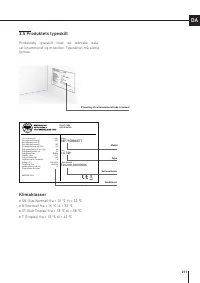
Page 211 - Produktets typeskilt; Klimaklasser
Gross capacity (l) Net capacity Fridge (l) Net capacity Fresco (l) Net capacity Freezer(l) Freezing Capacity (kg/12h) Refrigerant Fridge/Fresco (gr) Refrigerant Freezer (gr) Refrigerant Type Climatic Class Defrost Heater (W) Total Absorbed Current (A) Voltage (V~) Frequenzy (Hz) Lighting Neon/Led (W...
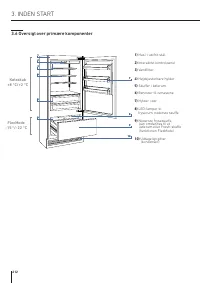
Page 212 - Oversigt over primære komponenter; Køleskab
1 4 6 5 10 2 3 8 7 9 1) Hus i rustfrit stål. 2) Interaktivt kontrolpanel 3) Vandfilter 4) Højdejusterbare hylder 5) Skuffer i kølerum 6) Beholder til ismaskine 7) Hylder i dør 8) LED-lamper til fryserum, nederste skuffe 9) Nederste fryseskuffe, kan omdannes til et kølerum eller Fresh-skuffe (fun...
Page 213 - funktionsfejl på apparatet.; Tryk på ikonet Home for at gå tilbage til Home-skærmbilledet.; Tryk på pileikonet for at gå tilbage til det forrige skærmbillede.
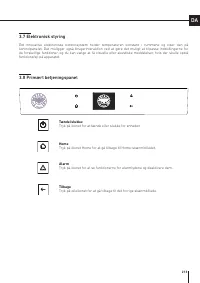
3.8 Primært betjeningspanel 3.7 Elektronisk styring Det innovative elektroniske kontrolsystem holder temperaturen konstant i rummene og viser den på kontrolpanelet. Det muliggør også brugerinteraktion ved at gøre det muligt at tilpasse indstillingerne for de forskellige funktioner, og du kan vælge a...
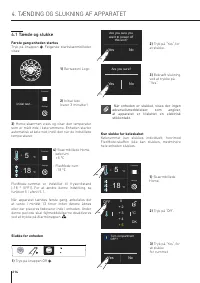
Page 214 - Første gang enheden startes; TÆNDING OG SLUKNING AF APPARATET; Kun slukke for køleskabet; Når enheden er slukket, vises der ingen; Slukke for enheden
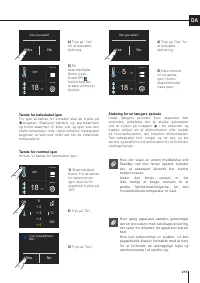
Functions Settings 5 + °C 18 - °C Functions Settings 5 + °C 18 - °C Functions Settings Initial test… Are you sure you want to power off this unit? Yes No Are you sure? Yes No °C + 3 + 5 + 4 0 + 2 OK OFF Turn compartment OFF? Yes No 4.1 Tænde og slukke Første gang enheden startes Tryk på knappen . Fø...
Page 215 - Tænde for rummet igen
Functions Settings OFF 18 - °C Functions Settings OFF 18 - °C Functions Settings 5 + °C 18 - °C Are you sure? Yes No Are you sure? Yes No Turn compartment ON? Yes No °C + 3 + 5 + 4 0 + 2 OK ON Tænde for rummet igen Hvis du vil tænde for køleskabet igen: Tænde for køleskabet igen For igen at tænde fo...
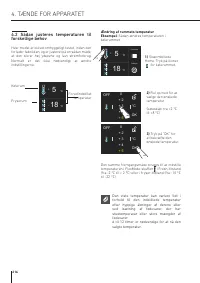
Page 216 - TÆNDE FOR APPARATET; Sådan justeres temperaturen til; Ændring af rummets temperatur
Functions Settings 5 + °C 18 - °C °C + 3 + 5 + 4 0 + 2 OK OFF °C + 3 + 5 + 4 0 + 2 OK OFF Functions Settings 5 + °C 18 - °C 4. TÆNDE FOR APPARATET 4.2 Sådan justeres temperaturen til forskellige behov Hver model er blevet omhyggeligt testet, inden den forlader fabrikken, og er justeret på en sådan m...
Page 217 - Advarselsmeddelelser på displayet
°C + 3 + 5 + 4 0 + 2 OK OFF °C + 3 + 5 + 4 0 + 2 OK OFF Hængelås-ikon Hængelås-ikonet vises, når temperaturen er indstillet. Den åbne/lukkede hængelås angiver, om det i øjeblikket er muligt at ændre rummets temperatur. Normalt vises der en gul hængelås. I så fald kan du rulle op eller ned med en fin...
Page 218 - TILPASNING AF FUNKTIONER OG INDSTILLINGER; TIPS TIL BRUG AF DISPLAYET
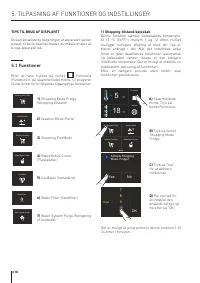
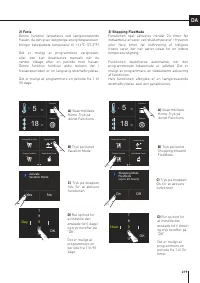
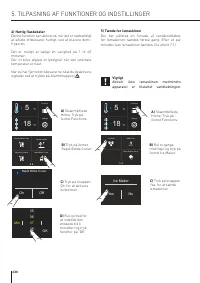
Functions Settings 5 + °C 18 - °C Activate Shopping Mode: Fridge? Yes No 9 Hour 11 10 78 OK Rapid Bottle Cooler Vacation Mode Shopping FlexMode Shopping Mode Fridge Ice Maker Water Filter Water System Purge Ice Maker Water Filter Water System Purge Ice Maker Water Filter Water System Purge Rapid Bot...
Page 220 - ) Hurtig flaskekøler
Rapid Bottle Cooler Vacation Mode Shopping FlexMode Shopping Mode Fridge Functions Settings 5 + °C 18 - °C Functions Settings 5 + °C 18 - °C 37 Min 39 38 3536 OK Rapid Bottle Cooler On Off Ice Maker Water Filter Water System Purge Ice Maker Yes No 4) Hurtig flaskekøler Denne funktion kan aktiveres, ...
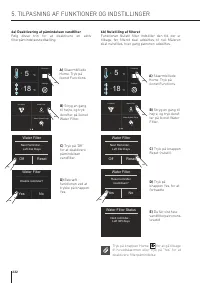
Page 222 - Tryk på knappen Home; a) Deaktivering af påmindelsen vandfilter
Ice Maker Water Filter Water System Purge Functions Settings 5 + °C 18 - °C Ice Maker Water Filter Water System Purge Functions Settings 5 + °C 18 - °C Disable reminder? Yes No Water Filter Next Reminder… Left Xxx Days Off Reset Water Filter Next Reminder… Left Xxx Days Off Reset Water Filter Reset ...
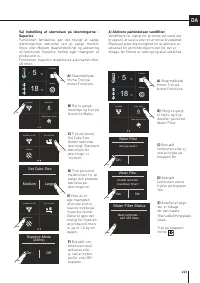
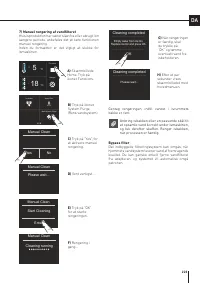
Page 223 - ) Manuel rengøring af vandfilteret; Anbring isbakken eller en passende skål til
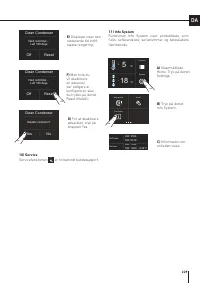
Functions Settings 5 + °C 18 - °C Ice Maker Water Filter Water System Purge Yes No Manual Clean Enter Start Cleaning Manual Clean Manual Clean Please wait... Cleaning running Manual Clean Empty water from ice bin. Replace ice bin and press OK. OK Cleaning completed Please wait... Cleaning completed ...
Page 227 - Hvis du gendanner standardindstillingerne
Functions Settings 5 + °C 18 - °C Functions Settings 5 + °C 18 - °C Sabbath Reset Demo FlexMode Sabbath Mode Confirm Sabbath Mode Yes No Sabbath Mode Yes No Sabbath Reset Demo FlexMode Confirm resetting to factory default settings? Yes No Reset Yes No Reset complete Reset 7) Nulstil Gør det muligt a...
Page 230 - Placer ikke hænder eller fingre i nærheden; Hylder; justering og fjernelse af komponenter); Køleskabsskuffe; INDVENDIGT UDSEENDE
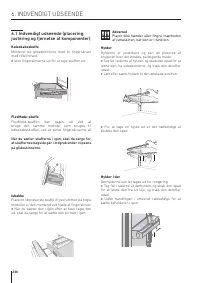
1 2 Advarsel Placer ikke hænder eller fingre i nærheden af ismaskinen, når den er i funktion. Hylder Hylderne er justerbare og kan let placeres af brugeren hvor det ønskes, på følgende måde: > Tag fat i siderne af hylden, og skub den opad for at løsne den fra sideskinnerne, og træk den derefter u...
Page 231 - AKTIVERING OG BRUG AF ISMASKINEN; Aktivering og brug af ismaskinen; Anbring ikke flasker eller mad i
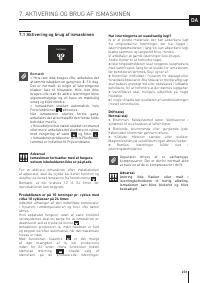
Ice Maker Water Filter Water System Purge 7. AKTIVERING OG BRUG AF ISMASKINEN 7.1 Aktivering og brug af ismaskinen Bemærk > Hvis isen ikke bruges ofte, anbefales det at tømme isbakken en gang hver 8.-10. dag. Det er normalt, at nogle af isterningerne klæber fast til hinanden. Hvis isen ikke bruge...
Page 232 - Filterudskiftning; ikonet til at vælge funktionen
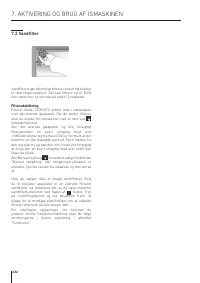
7.2 Vandfilter Vandfilteret gør det muligt at have vand af høj kvalitet til isterningproduktion. Det kan filtrere op til 3000 liter vand over en periode på højst 12 måneder. Filterudskiftning Filteret (kode: Z330001) sidder inde i køleskabet, over det øverste glaspanel. Før du skifter filteret, skal...
Page 233 - OPBEVARING AF FØDEVARER; Generelle anvisninger
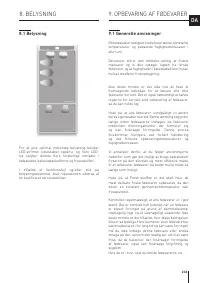
8. BELYSNING 9. OPBEVARING AF FØDEVARER 8.1 Belysning For at give optimal indvendig belysning belyser LED-strimler køleskabet oppefra, og flere LED-lys oplyser direkte flere forskellige områder i køleskabet, køleskabsskufferne og fryseskuffen. I tilfælde af funktionsfejl og/eller slid på belysningss...
Page 234 - Når du køber ind; Når stedet, hvor enheden er placeret, er; for at få vist de
9. OPBEVARING AF FØDEVARER 9.2 Sådan garanterer du bedst fødevarekvaliteten Når du køber ind Tag altid følgende forholdsregler: > Læg pakker med råt kød, fisk eller fjerkræ i plastposer, så de ikke drypper på andre fødevarer. > Køb kød, fjerkræ og fisk sidst. Efterlad ikke dine dagligvarer i e...
Page 235 - Temperaturer; Dør i køleskab
9.3 Tips til opbevaring og konservering af fødevarer Temperaturer Apparatets arbejdstemperatur er indstillet til de anbefalede +5 °C for køleskabet, -18 °C for fryseren og 0 °C for Fresh-rummet. PLACERING AF FØDEVARERKøleskabsdør Dør i køleskab > Opbevar æg, smør, ost osv. i de øvre og centrale d...
Page 236 - Råt kød
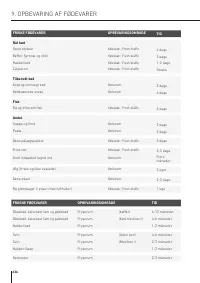
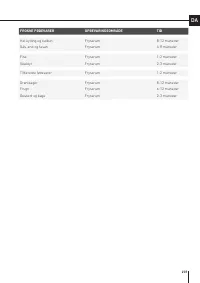
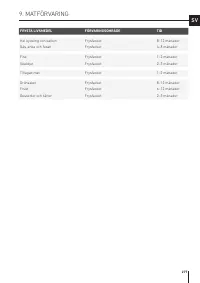
9. OPBEVARING AF FØDEVARER FROSNE FØDEVARER OPBEVARINGSOMRÅDE TID Oksekød, kalvekød, lam og gedekød Fryserum (bøffer) 6-12 måneder Oksekød, kalvekød, lam og gedekød Fryserum (Kød med ben i) 4-6 måneder Hakket kød Fryserum 1-2 måneder Svin Fryserum (Uden ben) 4-6 måneder Svin Fryserum (Med ben i) 2-3...
Page 238 - Pleje og rengøring; Indvendig rengøring; PLEJE OG RENGØRING
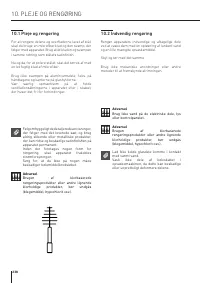
10.1 Pleje og rengøring For at rengøre delene og overfladerne lavet af stål, skal du bruge en mikrofiberklud og den svamp, der følger med apparatet. Brug altid kluden og svampen i samme retning som stålets satinfinish. Nu og da, for at polere stålet, skal det tørres af med en let fugtig klud af mikr...
Page 239 - filter og kondensor; Efter at enheden er blevet installeret og tændt, kan; Den nederste kondenser; Følg disse anvisninger for at rengøre kondensoren:
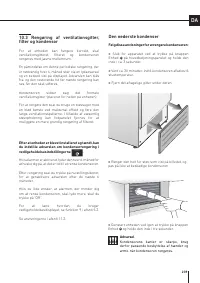
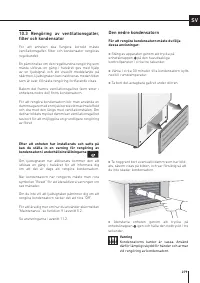
10.3 Rengøring af ventilationsgitter, filter og kondensor For at enheden kan fungere korrekt, skal ventilationsgitteret, filteret og kondensoren rengøres med jævne mellemrum. En påmindelse om denne periodiske rengøring, der er nødvendig hver 6. måned sker via en lydadvarsel og en besked vist på disp...
Page 240 - FEJLFINDINGSVEJLEDNING; Fejlfindingsvejledning
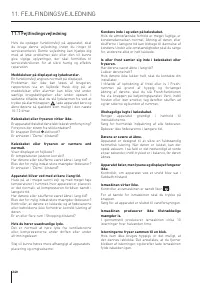
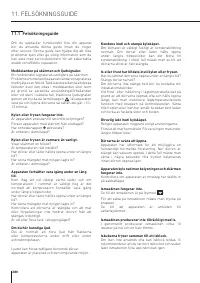
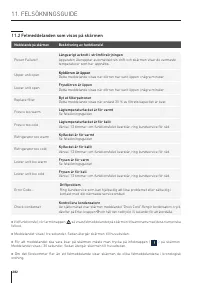
11. FEJLFINDINGSVEJLEDNING 11.1 Fejlfindingsvejledning Hvis du opdager funktionsfejl på apparatet, skal du bruge denne vejledning, inden du ringer til servicecenteret. Denne vejledning kan hjælpe dig med at løse problemet selv eller den vil kunne give vigtige oplysninger, der skal formidles til serv...
Page 241 - Isen har en usædvanlig smag eller farve
Isen har en usædvanlig smag eller farve . Når ismaskinen startes første gang, anbefales det at bortskaffe den første fulde beholder med is. Hvis køleskabet har været slukket i mere end en måned, eller hvis patronen ikke blev skiftet i mere end seks måneder, kan det være nødvendigt at udskifte filter...
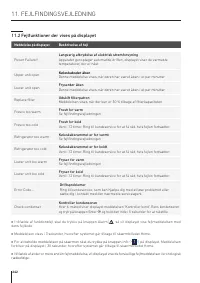
Page 242 - Fejlfunktioner der vises på displayet; Meddelelse på displayet
> I tilfælde af funktionsfejl skal du trykke på knappen Alarm , så vil displayet vise fejlmeddelelsen med dens fejlkode. > Meddelelsen vises i 3 sekunder, hvorefter systemet går tilbage til skærmbilledet Home. > For at beholde meddelelsen på skærmen skal du trykke på knappen info ( Bottle C...
Page 243 - INNEHÅLLSFÖRTECKNING
SV 1 1.1 1.2 1.3 1.4 1.5 1.6 VIKTIG SÄKERHETS- OCH MILJÖINFORMATION För din säkerhet ............................................................................................................................................................. Viktig information för användning av apparaten .............
Page 244 - Man bör vara; VIKTIG SÄKERHETS- OCH MILJÖINFORMATION
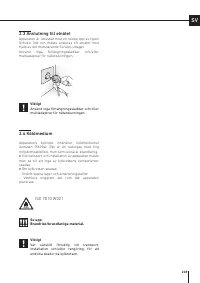
1.1 För din säkerhet > Om apparaten ersätter en befintlig apparat som ska tas bort eller bortskaffas måste man klippa av den gamla apparatens nätkabel. Detta gör det omöjligt att stänga dörren och ser till att den inte utgör en farlig fälla för barn. Vidta samma försiktighetsåtgärder för den nya ...
Page 246 - Anmärkning; Information för att förhindra personskador; av is
1. VIKTIG SÄKERHETS- OCH MILJÖINFORMATION Symboler som används i guiden: Anmärkning Rekommendationer för en korrekt användning av apparaten Viktigt Information för att förhindra skador på apparaten Varning Information för att förhindra personskador 1.3 Miljöskydd > Denna apparat överensstämmer me...
Page 247 - Varning; Information för tillsynsmyndigheter; Ventilationskrav, mått och
SV Varning För att undvika förorening av maten måste denna information och dessa anvisningar följas: > Om man öppnar dörren under längre tidsperioder kan det leda till en märkbar temperaturökning i apparatens fack. > Rengör ytor som kan komma i kontakt med maten och åtkomliga dräneringssystem ...
Page 248 - Anslutning till vattensystemet
2. INSTALLATION 2.2 Anslutning till vattensystemet Modeller som är försedda med ismaskin kräver en anslutning till vattenförsörjningssystemet. Detta kan endast göras genom att använda den medföljande ¼” vattenledningen.Systemets tryck måste vara mellan 0,05 MPa och 0,5 MPa (mellan 0,5 bar och 5 bar)...
Page 249 - Anslutning till elnätet; Vid transport och installation av apparaten måste; Viktigt
SV 2.3 Anslutning till elnätet Apparaten är utrustad med en stickpropp av typen Schuko 16A och måste anslutas till elnätet med hjälp av det motsvarande Schuko-uttaget. Använd inga förlängningssladdar och/eller multiadaptrar för nätanslutningen. Viktigt Använd inga förlängningssladdar och/eller multi...
Page 251 - Klimatklasser
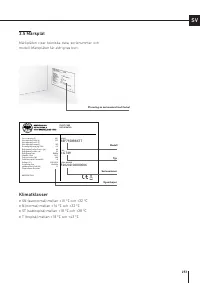
Gross capacity (l) Net capacity Fridge (l) Net capacity Fresco (l) Net capacity Freezer(l) Freezing Capacity (kg/12h) Refrigerant Fridge/Fresco (gr) Refrigerant Freezer (gr) Refrigerant Type Climatic Class Defrost Heater (W) Total Absorbed Current (A) Voltage (V~) Frequenzy (Hz) Lighting Neon/Led (W...
Page 252 - Översikt över huvudkomponenter; Kylskåp
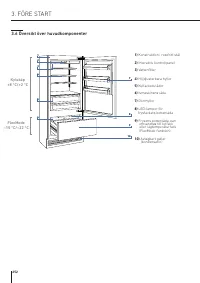
1 4 6 5 10 2 3 8 7 9 1) Konstruktion i rostfritt stål 2) Interaktiv kontrollpanel 3) Vattenfilter 4) Höjdjusterbara hyllor 5) Kylfackets lådor 6) Ismaskinens låda 7) Dörrhyllor 8) LED-lampor för frysfackets bottenlåda 9) Frysens bottenlåda, kan omvandlas till kylfack eller lågtemperaturfack (Fle...
Page 253 - meddelanden om det uppstår funktionsfel hos apparaten.; Hem; Rör symbolen Hem för att gå tillbaka till huvudsidan.; Larm
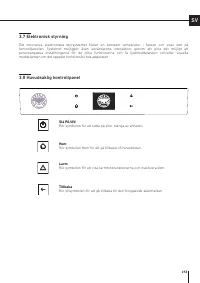
SV 3.8 Huvudsaklig kontrollpanel 3.7 Elektronisk styrning Det innovativa elektroniska styrsystemet håller en konstant temperatur i facken och visar den på kontrollpanelen. Systemet möjliggör även användarens interaktion, genom att göra det möjligt att personanpassa inställningarna för de olika funkt...
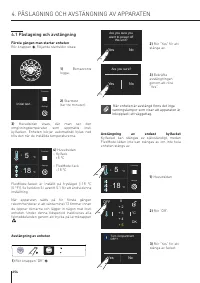
Page 254 - Påslagning och avstängning; Första gången man startar enheten; PÅSLAGNING OCH AVSTÄNGNING AV APPARATEN; Avstängning av endast kylfacket; När enheten är avstängd finns det inga; Avstängning av enheten
Functions Settings 5 + °C 18 - °C Functions Settings 5 + °C 18 - °C Functions Settings Initial test… Are you sure you want to power off this unit? Yes No Are you sure? Yes No °C + 3 + 5 + 4 0 + 2 OK OFF Turn compartment OFF? Yes No 4.1 Påslagning och avstängning Första gången man startar enheten Rör...
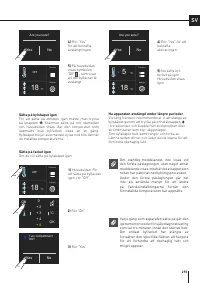
Page 255 - Sätta på facket igen
Functions Settings OFF 18 - °C Functions Settings OFF 18 - °C Functions Settings 5 + °C 18 - °C Are you sure? Yes No Are you sure? Yes No Turn compartment ON? Yes No °C + 3 + 5 + 4 0 + 2 OK ON SV Sätta på facket igen Om du vill sätta på kylskåpet igen: Sätta på kylskåpet igen För att sätta på enhete...
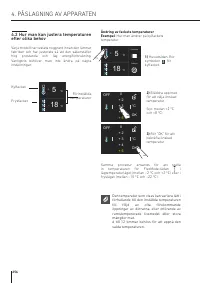
Page 256 - PÅSLAGNING AV APPARATEN; Hur man kan justera temperaturen; Ändring av fackets temperaturer
Functions Settings 5 + °C 18 - °C °C + 3 + 5 + 4 0 + 2 OK OFF °C + 3 + 5 + 4 0 + 2 OK OFF Functions Settings 5 + °C 18 - °C 4. PÅSLAGNING AV APPARATEN 4.2 Hur man kan justera temperaturen efter olika behov Varje modell har testats noggrant innan den lämnar fabriken och har justerats så att den säker...
Page 257 - Symbolen hänglås; Varningsmeddelanden på skärmen
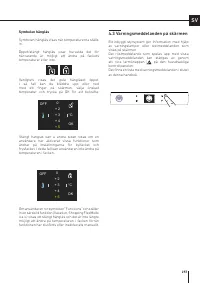
°C + 3 + 5 + 4 0 + 2 OK OFF °C + 3 + 5 + 4 0 + 2 OK OFF SV Symbolen hänglås Symbolen hänglås visas när temperaturerna ställs in. Öppet/stängt hänglås visar huruvida det för närvarande är möjligt att ändra på fackets temperaturer eller inte. Vanligtvis visas det gula hänglåset öppet. I så fall kan du...
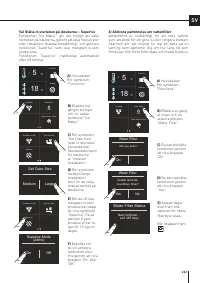
Page 258 - PERSONANPASSA FUNKTIONER OCH INSTÄLLNINGAR; TIPS FÖR ANVÄNDNING AV SKÄRMEN
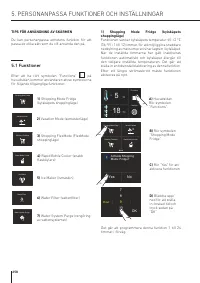
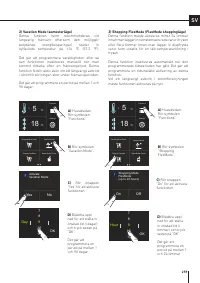
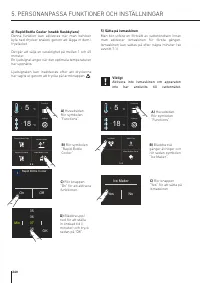
Functions Settings 5 + °C 18 - °C Activate Shopping Mode: Fridge? Yes No 9 Hour 11 10 78 OK Rapid Bottle Cooler Vacation Mode Shopping FlexMode Shopping Mode Fridge Ice Maker Water Filter Water System Purge Ice Maker Water Filter Water System Purge Ice Maker Water Filter Water System Purge Rapid Bot...
Page 260 - ) Sätta på ismaskinen
Rapid Bottle Cooler Vacation Mode Shopping FlexMode Shopping Mode Fridge Functions Settings 5 + °C 18 - °C Functions Settings 5 + °C 18 - °C 37 Min 39 38 3536 OK Rapid Bottle Cooler On Off Ice Maker Water Filter Water System Purge Ice Maker Yes No 4) Rapid Bottle Cooler (snabb flaskkylare) Denna fun...
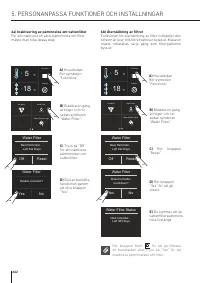
Page 262 - Rör knappen Hem; a) Inaktivering av påminnelse om vattenfilter
Ice Maker Water Filter Water System Purge Functions Settings 5 + °C 18 - °C Ice Maker Water Filter Water System Purge Functions Settings 5 + °C 18 - °C Disable reminder? Yes No Water Filter Next Reminder… Left Xxx Days Off Reset Water Filter Next Reminder… Left Xxx Days Off Reset Water Filter Reset ...
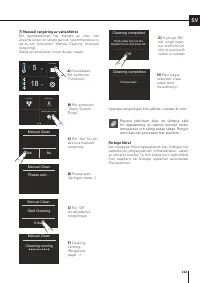
Page 263 - ) Manuell rengöring av vattenfiltret; Placera isbrickan eller en lämplig skål; Förbigå filtret
Functions Settings 5 + °C 18 - °C Ice Maker Water Filter Water System Purge Yes No Manual Clean Enter Start Cleaning Manual Clean Manual Clean Please wait... Cleaning running Manual Clean Empty water from ice bin. Replace ice bin and press OK. OK Cleaning completed Please wait... Cleaning completed ...
Page 267 - Om du återställer till standardinställningarna
Functions Settings 5 + °C 18 - °C Functions Settings 5 + °C 18 - °C Sabbath Reset Demo FlexMode Sabbath Mode Confirm Sabbath Mode Yes No Sabbath Mode Yes No Sabbath Reset Demo FlexMode Confirm resetting to factory default settings? Yes No Reset Yes No Reset complete Reset SV 7) Återställning Gör det...
Page 269 - 1) Systeminformation
Functions Settings 5 + °C 18 - °C Sk Power Sk User HW: 0504 SW: 0518HW: 1002 SW: 1069 - G1011 Disable reminder? Yes No Clean Condenser Maintenance Service Info System Next reminder… Left 180 days Clean Condenser Off Reset Next reminder… Left 180 days Clean Condenser Off Reset SV E) Skärmen visar den...
Page 270 - Ha inte händer eller fingrar i närheten av; Hyllor; anpassning och borttagning av; Kyllåda
1 2 Varning Ha inte händer eller fingrar i närheten av ismaskinen när den används. Hyllor Hyllorna är justerbara och kan lätt placeras om av användaren på detta sätt: > Håll fast i hyllans båda sidor och tryck den uppåt för att koppla loss den från glidskenorna. Dra den sedan utåt. > Lyft elle...
Page 271 - AKTIVERING OCH ANVÄNDNING AV ISMASKINEN; Aktivering och användning av; Placera inga flaskor eller mat i iskubslådan
Ice Maker Water Filter Water System Purge SV 7. AKTIVERING OCH ANVÄNDNING AV ISMASKINEN 7.1 Aktivering och användning av ismaskinen Anmärkning > Om isen inte används ofta rekommenderar vi att tömma islådan efter 8–10 dagar. Det är normalt att vissa iskuber fastnar i varandra. Om isen inte används...
Page 272 - Filterbyte; för
7.2 Vattenfilter Vattenfiltret gör det möjligt att få vatten med hög kvalitet för isproduktionen. Det kan filtrera upp till 3 000 liter vatten under en maximal tidsperiod på 12 månader. Filterbyte Filtret (kod: Z330001) sitter inuti kylfacket, ovanför den övre glaspanelen. Innan du byter ut filtret...
Page 273 - Allmänna anvisningar
SV 8. BELYSNING 9. MATFÖRVARING 8.1 Belysning För att ge optimal inre belysning finns det LED-lister som belyser kylfacket ovanifrån och uppsättningar av LED-lampor som ger direkt belysning åt olika områden i kylfacket, kyllådorna och fryslådan. Vid funktionsfel och/eller förslitning hos belysningss...
Page 274 - När platsen där enheten placeras är väldigt; för att visa de
9. MATFÖRVARING 9.2 Hur du kan bibehålla matens kvalitet på bästa sätt När du handlar mat Vidta alltid följande försiktighetsåtgärder: > Lägg alla förpackningar med rått kött, fisk eller kyckling i plastpåsar, så att de inte droppar på andra livsmedel. > Köp kött, kyckling och fisk sist. Lämna...
Page 275 - Kylfackets dörr
SV 9.3 Tips för matförvaring och -konservering Temperaturer Apparatens arbetstemperaturer har ställts in på rekommenderad temperatur: +5 °C för kylfack, –18 °C för frysfack och 0 °C för lågtemperaturfack. PLACERING AV MATENKylskåpsdörren Kylfackets dörr > Förvara ägg, smör, ost o.s.v. i de övre ...
Page 278 - Skötsel och rengöring; Invändig rengöring; SKÖTSEL OCH RENGÖRING
10.1 Skötsel och rengöring För att rengöra ståldelarna och -ytorna bör man använda en mikrofiberduk och den svamp som medföljer i apparatens tillbehörssats. Använd alltid duken och svampen i samma riktning som stålets ytstruktur. Då och då måste man polera stålet genom att torka av det med en fuktig...
Page 279 - filter och kondensator; Efter att enheten har installerats och satts på; Den nedre kondensatorn; För att rengöra kondensatorn måste du följa
SV 10.3 Rengöring av ventilationsgaller, filter och kondensator För att enheten ska fungera korrekt måste ventilationsgaller, filter och kondensator rengöras regelbundet. En påminnelse om den regelbundna rengöring som måste utföras en gång i halvåret ges med hjälp av en ljudsignal och ett visuellt m...
Page 280 - Felsökningsguide
11. FELSÖKNINGSGUIDE 11.1 Felsökningsguide Om du upptäcker funktionsfel hos din apparat bör du använda denna guide innan du ringer efter service. Denna guide kan hjälpa dig att lösa problemet själv eller ge viktig information som du kan dela med serviceteknikern för att säkerställa snabb och effekti...
Page 281 - Isen har en ovanlig smak eller färg
SV Isen har en ovanlig smak eller färg . När ismaskinen startas för första gången rekommenderar vi att tömma ut den första fulla isbrickan. Om frysen har varit avstängd i över en månad, eller om filterpatronen inte har bytts ut på över sex månader, kan det vara nödvändigt att byta ut filterpatronen....
Page 282 - Felmeddelanden som visas på skärmen; Meddelande på skärmen
> Vid funktionsfel, rör larmknappen så visas felmeddelandet på skärmen tillsammans med dess numeriska felkod. > Meddelandet visas i tre sekunder. Sedan återgår skärmen till huvudsidan. > För att meddelandet ska vara kvar på skärmen måste man trycka på infoknappen ( Bottle Cooler? On Off ) p...