Page 3 - INDEX
INDEX EN 1 IMPORTANT SAFETY AND ENVIRONMENTAL HANDLING DIRECTIONS 4 1.1 For your safety ..................................................................................................................................................................... 4 1.2 Important information when using the app...
Page 4 - IMPORTANT SAFETY AND ENVIRONMENTAL HANDLING DIRECTIONS
4 1.1 For your safety > If this appliance is replacing an existing appliance which must be removed or disposed of, make surethat it does not become a dangerous trap for chil-dren by cutting its power supply cable and render-ing it impossible to close the door. Use the samecaution at the end of th...
Page 5 - Caring for the environment; Warning; Risk of Fire or Explosion
5 EN Symbols used in the Guide: Note Recommendations for correct use of the appliance Important Directions for avoiding appliance damage Warning Indications for avoiding injury to people 1.3 Caring for the environment > Pay special attention to correct disposal proce- dure for all the packaging m...
Page 6 - Warning and danger; SAVE THESE INSTRUCTIONS!; including the following:; IMPORTANT INSTRUCTIONS FOR SAFETY AND THE ENVIRONMENT
1. 5 Warning and danger This is the safety alert symbol. This symbol alerts you to potential hazards that can kill or hurt you and others. All safety messages will follow the safety alert symbol and either the word “DANGER” or “WARNING.” These words mean: You can be killed or seriously injured if yo...
Page 7 - Child entrapment and suffocation are
EN IMPORTANT SAFETY INSTRUCTIONS FOR PROPER DISPOSAL OF YOUR OLD REFRIGERATOR Suffocation Hazard Remove doors or lid from your old appliance. Failure to do so can result in death or brain damage. Risk of child entrapment. Before you throw away your old refrigerator or freezer: > Take off the door...
Page 8 - Important; Connection to the water system
8 2. INSTALLATION 2.3 Connection to the electrical power supply The appliance operates at 115 V AC, 60 Hz and is equipped with a power supply cord with a 3-prong grounded plug, which must be connected to a cor- responding 3-prong (15 Amp) grounding-type wall receptacle. Important Do not use extensio...
Page 9 - Know your appliance
9 MODEL REF24FCIPIXL/23 CODE KS240FZ3IU TECHNICAL CODE HKJCLECFUG.UA SER.NO./N° SERIE F20200101000006 3186660 ETL LISTEDConforms toUL 60335-1 andUL 60335-2-24Certified toCSA C22.2#60335-1CSA C22.2#60335-2-24 BERTAZZONI SPA VIA PALAZZINA, 8 - 42016 GUSTALLA (RE) - ITALY Fridge Gas Fill Charge Quantit...
Page 10 - Freezer; Stainless steel body.
10 Freezer 1) Stainless steel body. 2) Interactive control panel. 3) Adjustable height shelf. 4) Ice maker container. 5) Door bins. 6) LED illuminations. 7) Stainless drawers. 8) Removable toe kick. 3.2 Main components 3. BEFORE STARTING Fr eezer 8 1 2 5 3 6 7 4
Page 11 - sages should any malfunction occur in the appliance.; Home; Touch the Home icon for going back to the main display screen.; Alarm; Touch the arrow icon for going back to the previous display screen.
11 EN 3.4 Main control panel 3.3 Eletronic Control The innovative electronic control system designed by Bertazzoni maintains constant temperature in the entire compartment and visualizes it on the control panel display. It also allows user interaction mak- ing it possible to personalize settings of ...
Page 12 - Yes; BASIC OPERATIONAL OF THE APPLIANCE; Turning the appliance on and off; First time starting the unit; When the freezer is off there are no warning; Switching off for longer periods
12 Functions Settings 18 - °C Functions Settings Initial test… Are you sure you want to power off this unit? Yes No Are you sure? Yes No 4. BASIC OPERATIONAL OF THE APPLIANCE 4.1 Turning the appliance on and off First time starting the unit Touch the button . The display shows the following launch s...
Page 13 - How to adjust the temperature for; Modify the temperatures compartment
13 18 - °C - 14 °C - 16 - 15 0 - 13 OK - 14 °C - 16 - 15 0 - 13 OK Functions Settings 18 - °C - 14 °C - 16 - 15 0 - 13 OK EN 4.2 How to adjust the temperature for different requirements. Each model has been carefully tested before leaving the factory and is adjusted in such a way to ensure high perf...
Page 14 - Information signals of warning
14 - 14 °C - 16 - 15 0 - 13 OK 4. BASIC OPERATIONAL OF THE APPLIANCE If the icon function is touched and a specific function is set (for example holiday, ect...), the yellow padlock will be seen closed and it won't be possible to change the temperature of the compartments as long as the function won...
Page 15 - On; CUSTOMIZE FUNCTIONS AND SETTINGS; INFORMATION FOR THE USE OF THE DISPLAY.
15 Shopping Mode Freezer (up to 24 hours) On Off Functions Settings 18 - °C Rapid Bottle Cooler Vacation Mode Shopping Mode Freezer Rapid Bottle Cooler Vacation Mode Shopping Mode Freezer Rapid Bottle Cooler Vacation Mode Shopping Mode Freezer 9 Hour 11 10 78 OK Ice Maker Water Filter Water System P...
Page 16 - ) Rapid Bottle Cooler
16 9 Day 11 10 78 OK Rapid Bottle Cooler Vacation Mode Shopping Mode Freezer Functions Settings 18 - °C Vacation Mode On Off Rapid Bottle Cooler Vacation Mode Shopping Mode Freezer 37 Min 39 38 3536 OK Functions Settings 18 - °C Rapid Bottle Cooler On Off 3) Rapid Bottle Cooler This function can be ...
Page 17 - ) Ice Maker activation
17 Functions Settings 18 - °C Ice Maker Yes No Ice Maker Water Filter Water System Purge Functions Settings 18 - °C Ice Maker On/Off Set Cube Size Superice Set Cube Size Superice Set Cube Size Medium Large Set Cube Size Superice Ice Maker Water Filter Water System Purge EN 4) Ice Maker activation A ...
Page 18 - Off; Water Filter Status
18 Functions Settings 18 - °C Enable reminder countdown timer? Yes No Water Filter Ice Maker Water Filter Water System Purge Ice Maker Water Filter Water System Purge Disable reminder? Yes No Water Filter Functions Settings 18 - °C Next Reminder… Left Xxx Days Off Reset Water Filter Are you sure? On...
Page 19 - Push Home button to go back to the main
19 Ice Maker Water Filter Water System Purge Functions Settings 18 - °C Reset reminder countdown? Yes No Water Filter Next reminder… Left 365 days Water Filter Status Next Reminder… Left Xxx Days Off Reset Water Filter Yes No Manual Clean Functions Settings 18 - °C Ice Maker Water Filter Water Syste...
Page 20 - Cleaning completed; Place a water container or vessel under the; Bypass filter
20 Sabbath Reset Demo Sabbath Reset Demo Sabbath Reset Demo Maintenance Service Info System Maintenance Service Info System Date Time °c / °f Language Date Time °c / °f Language Date Time °c / °f Language Date Time °c / °f Language Maintenance Service Info System Empty water from ice bin. Replace ic...
Page 22 - to select either
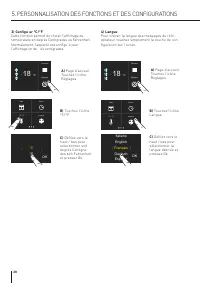
22 OK °C °F Functions Settings 18 - °C Date Time °c / °f Language Functions Settings 18 - °C Français Español Deutsch Italiano English OK Date Time °c / °f Language 5. CUSTOMIZE FUNCTIONS AND SETTINGS C) Scroll up / down to select either centigrade or Fahrenheit degre- es and press Ok. B) Touch the ...
Page 24 - For details see following pages.
24 Functions Settings 18 - °C Sabbath Reset Demo Demo Mode 1 3 2 4 Turn Demo Mode On? (no cooling) Passcode required Yes No Maintenance Service Info System Functions Settings 18 - °C Demo Mode Yes No 5. CUSTOMIZE FUNCTIONS AND SETTINGS 7) Demo Mode It is possbile to simulate the functioning of the f...
Page 26 - Do not place hands or fingers near the Ice-; Shelves
26 1 2 6.1 Internal Layout (positioning, adjust- ment, removal). Ice Tray Located in the upper drawer of the freezer com-partment. > after removal, make sure to reposition it cor- rectly. Warning Do not place hands or fingers near the Ice- maker when in function. Shelves The shelves are sliding a...
Page 27 - ACTIVATION AND USE OF THE ICE MAKER; Do not place any bottles or food for rapid; Water filter for freezer column; Note
27 Ice Maker Water Filter Water System Purge Ice Maker On/Off Set Cube Size Superice Ice Maker On/Off Set Cube Size Superice Ice Maker Water Filter Water System Purge Rapid Bottle Cooler Vacation Mode Shopping Mode Freezer Ice Maker Water Filter Water System Purge Ice Maker Water Filter Water System...
Page 28 - water source) then it is suggested to also set the; Filter Cartridge Replacement; AP2 FILTER CARTRIDGE REPLACEMENT; IMPORTANT: The disposable filter cartridge
28 Ice Maker Water Filter Water System Purge The filter kit should be installed in an accessible location (such as an adjacent cabinet) to allow for the water filter cartridge to be changed annually. If you choose not to use the water filter (such as connecting the appliance to an already filtered w...
Page 29 - General directions
29 Freezer from -13° C to -23° C (from 9° F to -11° F) EN 8. LIGHTING 8.1 Lighting To provide optimum interior lighting, LED strips illu-minate the freezer compartment from the side and sets of LED lights directly illuminate different areas of the compartment. In case of malfunction and/or wearing o...
Page 30 - CARE AND CLEANING; How to best preserve food quality; When buying groceries; will continue to blink.; Care and Cleaning
30 10. CARE AND CLEANING 9.2 How to best preserve food quality When buying groceries Always take the following precautions: > Place any packages of raw meat, fish or poultry in plastic bags so that they do not drip on other foods. > Purchase meat, poultry and fish last. Do not leave your groce...
Page 31 - Internal cleaning; Clean the internal and removable parts by washing; Do not bring cold glass parts into contact with; Cleaning of the toe kick cover, filter; On the mantenience settings, after the
31 Maintenance Service Info System EN 10.2 Internal cleaning Clean the internal and removable parts by washing them with a solution of lukewarm water, a small amount of dishwashing detergent. Rinse and dry right away. Do not use mechanical devices or other methods to speed up defrosting. Warning Do ...
Page 32 - Troubleshooting Guide
32 10. CARE AND CLEANING 11. TROUBLESHOOTING GUIDE Lower condenser. For cleaning the condenser follow the instruc- tions: > Switch off the appliance by pressing the Unit button on the main control panel for approx 3 seconds. > Wait approx 30 minutes, until the finned condens- er cools down to ...
Page 34 - TROUBLESHOOTING GUIDE; Error messages appearing on the display; Display message; Prolonged interruption of electrical power; Unit door open; Replace filter cartridge; Sì
34 11. TROUBLESHOOTING GUIDE > In case of errors, touch the button Alarm and the display will show the error message with its error number code. > The message will be shown for 3 seconds, then it will go back to the home screen. > For blocking the message on the screen, press on the display...
Page 35 - If located in the USA; . LIMITED WARRANTY STATEMENT
EN Limited two-year warranty The Warranty coverage provided by Bertazzoni SpA (“Bertazzoni”) in this statement applies exclusively to the original Bertazzoni appliance (“Product”) sold to the consumer (“Purchaser”) by an authorized Bertazzoni dealer/distributor/retailer, purchased and installed in t...
Page 36 - Some; If located in the USA:
EN PURCHASER AND PURCHASER’S PROPERTY AND TO OTHERS AND THEIR PROPERTY ARISING OUT OF THE USE, MISUSE OR INABILITY TO USE THIS PRODUCT SOLD BY BERTAZZONI NOT CAUSED DIRECTLY BY THE NEGLIGENCE OF BERTAZZONI. THIS LIMITED WARRANTY SHALL NOT EXTEND TO ANYONE OTHER THAN THE ORIGINAL PURCHASER OF THIS PR...
Page 37 - SOMMAIRE
1 FR SOMMAIRE 4 4.1 4.2 4.3 MISE EN MARCHE DE L’APPAREIL Mise en marche et arrêt................................................................................................................................................ Comment régler la température pour diffé entes exigences......................
Page 38 - INDICATIONS IMPORTANTES CONCERNANT LA SÉCURITÉ
2 1.1 Pour votre sécurité > Si cet appareil remplace un autre appareil déjà existant qui doit être mis de côté ou éliminé, veiller à ce que celui-ci ne devienne pas un dan-gereux piège pour les enfants, en coupant le câble d’alimentation et en rendant impossible la ferme- ture de la porte. Prêter...
Page 39 - Respect de l’environnement; Avertissement; Afin d’éviter toute contamination des; Mise en garde
3 FR Symboles utilisés dans le Guide: Note Conseils pour une correcte utilisation del’appareil. Important Indications afin d’éviter tout endommagement de l’appareil Attention Indications afin d’éviter toute lésion auxpersonnes 1.3 Respect de l’environnement > Faire très attention aux correctes mo...
Page 40 - Avertissement et danger; CONSERVER SOIGNEUSEMENT; DANGER
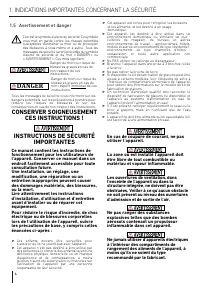
1. 5 Avertissement et danger Ceci est le symbole d’alerte de sécurité. Ce symbole vous met en garde contre les risques potentiels susceptibles d’entraîner la mort ou de provoquer des blessures à vous-même et à autrui. Tous les messages de sécurité seront précédés du symbole d'alerte de sécurité et d...
Page 41 - REMARQUE IMPORTANTE :
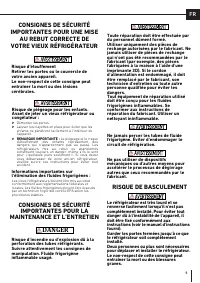
CONSIGNES DE SÉCURITÉ IMPORTANTES POUR UNE MISE AU REBUT CORRECTE DE VOTRE VIEUX RÉFRIGÉRATEUR Risque d ’é touffement Retirer les portes ou le couvercle de votre ancien appareil. Le non-respect de cette consigne peut entra î ner la mort ou des l é sions c é r é brales. Risque de piégeage pour les en...
Page 42 - ff; Attention; Branchement au réseau électrique
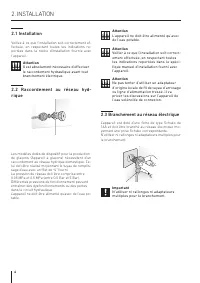
6 2. INSTALLATION Les modèles dotés de dispositif pour la production de glaçons (Appareil à glaçons) nécessitent d’un raccordement au réseau hydrique domestique. Ce- lui doit être réalisé moyennant le tuyau de remplis- sage d’eau avec un fi let de ¾” fourni. La pression du réseau doit être comprise ...
Page 43 - AVANT L’UTILISATION; Pour bien connaître l’appareil
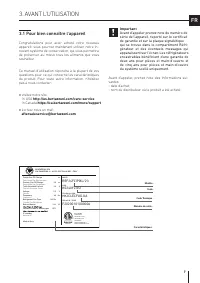
7 FR 3. AVANT L’UTILISATION 3.1 Pour bien connaître l’appareil Congratulations pour avoir acheté votre nouveau appareil: vous pourrez maintenant utiliser notre in- novant système de conservation, qui vous permettra de préserver au mieux tous les aliments que vous souhaitez. Ce manuel d’utilisation r...
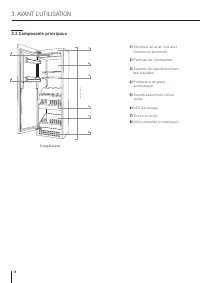
Page 44 - Composants principaux
8 Congélateur 1) Structure en acier inox avec finitions en alumnium 2) Panneau de commandes. 3) Système de repositionnment des clayettes. 4) Producteur de glace automatique. 5) Grands balconnets contre porte. 6) LED d’éclairage. 7) Tiroirs en acier. 8) Grille amovible (condenseur). 3.2 Composants pr...
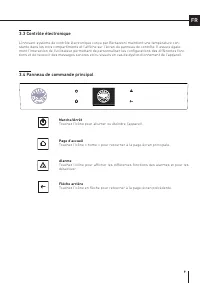
Page 45 - Page d’accueil; Touchez l’icône « home » pour retourner à la page-écran principale.; Alarme; Touchez l’icône pour allumer ou éteindre l’appareil.
9 FR 3.4 Panneau de commande principal 3.3 Contrôle électronique L’innovant système de contrôle électronique conçu par Bertazzoni maintient une température con- stante dans les trois compartiments et l’affiche sur l’écran du panneau de contrôle. Il assure égale- ment l’interaction de l’utilisateur p...
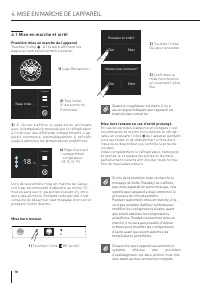
Page 46 - Oui; MISE EN MARCHE DE L’APPAREIL; Mise en marche et arrêt; Première mise en marche de l’appareil; Quand le congélateur est éteint, il n’y a; Mise hors tension en cas d’arrêt prolongé
10 Fonctions Réglages 18 - °C Fonctions Réglages Essai initial… Procéder à l’arrêt? Oui Non Voulez-vous continuer? Oui Non Chaque fois que l’appareil est actionné lesystème effectue une procédure d’autodiagnostic qui dure environ trois min-utes avant sa mise en marche complète. 4. MISE EN MARCHE DE ...
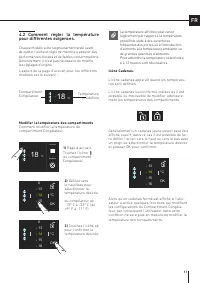
Page 47 - Comment régler la température; Modifier la température des compartiments
11 18 - °C - 14 °C - 16 - 15 0 - 13 OK - 14 °C - 16 - 15 0 - 13 OK Fonctions Réglages 18 - °C - 14 °C - 16 - 15 0 - 13 OK FR La température affichée peut varierlégèrement par rapport à la températureprédéfinie suite à des ouverturesfréquentes des portes ou à l’introductiond’aliments à la température...
Page 48 - Signaux d’information d’anomalies
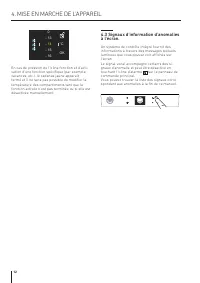
12 - 14 °C - 16 - 15 0 - 13 OK 4. MISE EN MARCHE DE L’APPAREIL En cas de pression de l’icône fonction et d’acti- vation d’une fonction spécifique (par exemple, vacances, etc.), le cadenas jaune apparaît fermé et il ne sera pas possible de modifier la température des compartiments tant que la fonctio...
Page 49 - Qui; PERSONNALISATION DES FONCTIONS ET DES CONFIGURATIONS; INFORMATIONS
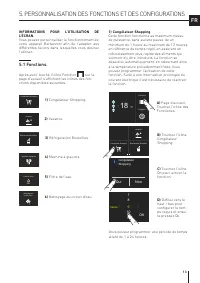
13 Congélateur Shopping Qui Non Fonctions Réglages 18 - °C Réfrigération Bouteilles Vacance Congélateur Shopping Réfrigération Bouteilles Vacance Congélateur Shopping Réfrigération Bouteilles Vacance Congélateur Shopping 9 heure 11 10 78 OK Machine à glaçons Filtre de l’eau Nettoyage du circuit d’ea...
Page 50 - ) Réfrigération Bouteilles
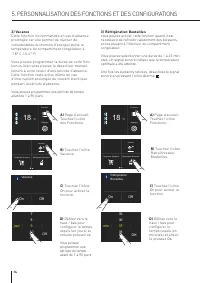
14 9 jour 11 10 78 OK Réfrigération Bouteilles Vacance Congélateur Shopping Fonctions Réglages 18 - °C Vacance On Off 3) Réfrigération Bouteilles Vous pouvez activer cette fonction quand il est nécessaire de refroidir rapidement des boissons, en les plaçant à l’intérieur du compartiment congélateur....
Page 51 - ) Activation de la machine à glaçons
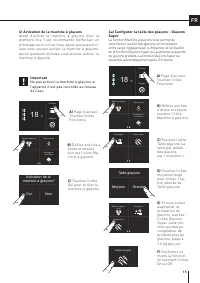
15 Fonctions Réglages 18 - °C Activation de la machine à glaçons? Oui Non Machine à glaçons Filtre de l’eau Nettoyage du circuit d’eau Fonctions Réglages 18 - °C Machine à glaçons on/off Taille glaçons Glaçons Super Taille glaçons Glaçons Super Taille glaçons Moyens Grands Taille glaçons Moyens Gran...
Page 52 - Filtre de l’eau
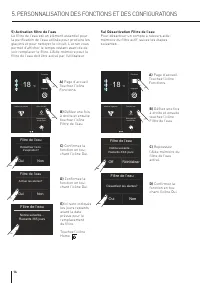
16 Fonctions Réglages 18 - °C Activer les alertes? Oui Non Filtre de l’eau Machine à glaçons Filtre de l’eau Nettoyage du circuit d’eau Machine à glaçons Filtre de l’eau Nettoyage du circuit d’eau Désactiver les alertes? Oui Non Filtre de l’eau Fonctions Réglages 18 - °C Notice suivante… Restants XX...
Page 53 - b) Rétablissement filtre
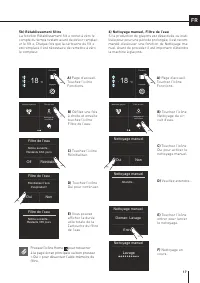
17 Machine à glaçons Filtre de l’eau Nettoyage du circuit d’eau Fonctions Réglages 18 - °C Réinitialiser l’avis d’expiration? Oui Non Filtre de l’eau Notice suivante… Restants 365 jours Filtre de l’eau Notice suivante… Restants XXX jours Off Réinitialiser Filtre de l’eau Oui Non Nettoyage manuel Fon...
Page 54 - Fin du lavage; Placez correctement le bac à glace ou une; Bypass du filtre
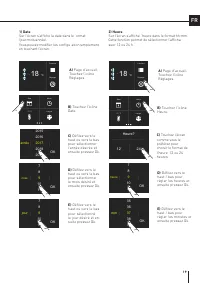
18 Sabbath Réinitialiser Mode Démo Sabbath Réinitialiser Mode Démo Sabbath Réinitialiser Mode Démo Entretien Service Systéme Info Maintenance Service Info System Date Heure °C / °F Langue Date Heure °C / °F Langue Date Heure °C / °F Langue Date Heure °C / °F Langue Entretien Service Systéme Info Vid...
Page 58 - Pour plus de détails
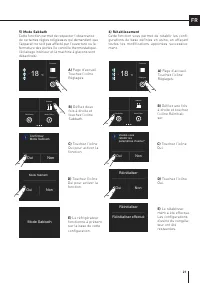
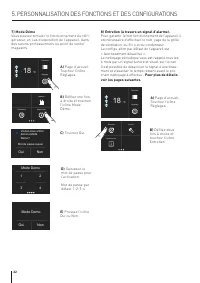
22 Fonctions Réglages 18 - °C Sabbath Réinitialiser Mode Démo Mode Demo 1 3 2 4 Voulez-vous entrer dans le Mode Demo? Mot de passe requis Oui Non Entretien Service Systéme Info Fonctions Réglages 18 - °C Mode Demo Oui Non 5. PERSONNALISATION DES FONCTIONS ET DES CONFIGURATIONS 7) Mode Démo Vous pouv...
Page 60 - Ne pas approcher les mains ou les doigts de; Clayettes; ÉQUIPEMENT INTERNE; Étagères de la Porte
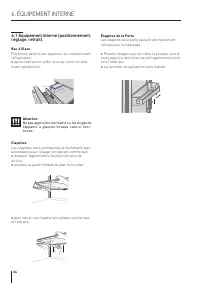
24 1 2 6.1 Équipement interne (positionnement, réglage, retrait). Bac à Glace Positionné dans le bac supérieur du compartimentréfrigérateur > après l’extraction veiller à ce qu’il soit correcte- ment repositionné. Attention Ne pas approcher les mains ou les doigts de l’appareil à glaçons lorsque ...
Page 61 - ACTIVATION ET UTILISATION DE L’APPAREIL À GLAÇONS; Ne placez jamais de bouteilles ou; Activation et utilisation de la Machi-
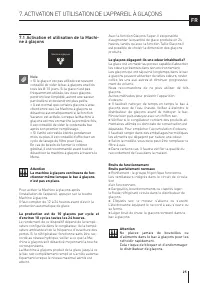
25 Machine à glaçons Filtre de l’eau Nettoyage du circuit d’eau FR 7. ACTIVATION ET UTILISATION DE L’APPAREIL À GLAÇONS Avec la fonction Glaçons Super, il est possible d’augmenter la quantité de glace produite en 24 heures, tandis qu’avec la fonction Taille Glaçons il est possible de choisir la dime...
Page 62 - ACTIVATION ET UTILISATION DE LA MACHINE À GLAÇONS; Remplacement de la cartouche du filtre; REMPLACEMENT DE L A CARTOUCHE AP2; COMMENT REMPLACER LA CARTOUCHE FILTRANT
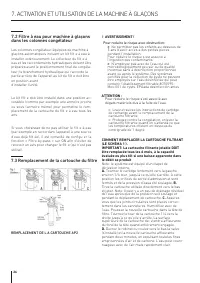
26 7.2 Filtre à eau pour machine à glaçons dans les colonnes congélateur Les colonnes congélateur équipées de machine àglaçons automatiques incluent un kit filt e à eau àinstaller extérieurement. Le collecteur du filt e àeau et les raccordements hydrauliques doivent êtrepréparés avant le positionnem...
Page 63 - CONSERVATION DES ALIMENTS; Indications générales
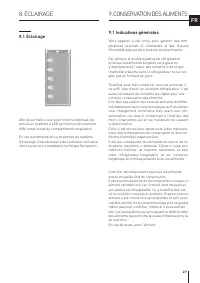
27 FR 8. ÉCLAIRAGE 8.1 Éclairage Afin de permett e une vision interne optimale estprévue un système à LED qui illumine directementdiffé entes zones du compartiment congélateur. En cas d’anomalies et/ou de pannes du systèmed’éclairage, il est nécessaire de s’adresser exclusive-ment au service d’assis...
Page 64 - Comment maintenir une bonne; Lorsque vous faites les courses
28 Congélateur de -13° C à -23° C (de 9° F à -11° F) 9.2 Comment maintenir une bonne qualité des aliments Lorsque vous faites les courses Observez toujours les précautions suivantes: > Mettez tous les paquets contenant de la viande crue, du poisson ou de la volaille dans des sacsen plastique afin...
Page 65 - ENTRETIEN ET NETTOYAGE; Entretien et Nettoyage; Nettoyage interne; Ne pas utiliser d’eau sur les parties élec-; Nettoyage de la grille de ventilation,
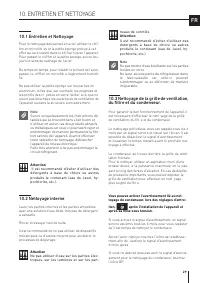
29 Entretien Service Systéme Info FR 10. ENTRETIEN ET NETTOYAGE 10.1 Entretien et Nettoyage Pour le nettoyage des parties en acier, utiliser le chif-fon en microfib es et la petite éponge prévue à ceteffet qui se trouvent dans le kit fourni avec l’appareil.Pour passer le chiffon et la petite éponge,...
Page 66 - Condenseur inférieur.; apide et effic
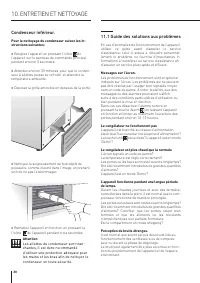
30 10. ENTRETIEN ET NETTOYAGE Condenseur inférieur. Pour le nettoyage du condenseur suivez les in- structions suivantes: > Éteignez l’appareil en pressant l’icône de l’appareil sur le panneau de commande principalpendant environ 3 secondes. > Attendez environ 30 minutes, pour que le conden- se...
Page 67 - GUIDE DES SOLUTIONS AUX PROBLÈMES
31 Machine à glaçons Filtre de l’eau Nettoyage du circuit d’eau FR 11. GUIDE DES SOLUTIONS AUX PROBLÈMES Formation de condensation à l’intérieur et à l’extérieur du congélateur. Si le climat est très humide, l’apparition d’un peu de condensation est normale. L’ouverture de la porte ou des bacs de ma...
Page 68 - Pour bloquer le message sur l’écran, pressez l’icône Info sur l’écran; Indications d’anomalie pouvant apparaître sur l’écran; Message sur l’écran; Interruption prolongée de l’énergie électrique; Porte du congélateur ouverte; Remplacement du Filtre pour l’Eau
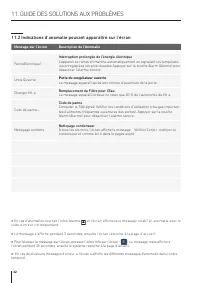
32 11. GUIDE DES SOLUTIONS AUX PROBLÈMES > En cas d’anomalies, touchez l’icône Alarme et l’écran affichera le message relatif à l’anomalie avec le code d’erreur correspondant. > Le message s’affiche pendant 3 secondes, ensuite l’écran retourne à la page d’accueil. > Pour bloquer le message ...
Page 69 - DÉCLARATION DE LIMITATION DE LA GARANTIE
33 FR Garantie limitée de deux ans La couverture de la garantie fournie par Bertazzoni SpA (“Bertazzoni”) dans la présente déclaration s’applique exclusivement à l’ appareil Bertazzoni d’origine (“Produit”) vendu au consommateur (“Acheteur”) par un revendeur/distributeur/détaillant Bertazzoni autori...
Page 72 - ÍNDICE; DECLARACIÓN DE GARANTÍA LIMITADA
1 ÍNDICE 1 1.1 1.2 1.3 1.4 INSTRUCCIONES IMPORTANTES REFERENTES A LA SEGURIDAD Y EL MEDIOAMBIENTE Para su seguridad........................................................................................................................................................... Información importante al usa...
Page 73 - Para su seguridad; se debe; nformación importante al usar el; INSTRUCCIONES IMPORTANTES REFERENTES A LA
1.1 Para su seguridad > Si este aparato sustituye a un aparato existente que debe ser retirado o eliminado, asegúrese de que no se convierta en una trampa peligrosa para los niños, con tal fin corte su able de alimentación e impida que la puerta pueda cerrarse. Tenga las mismas precauciones al fi...
Page 74 - Protección del medioambiente; Advertencia
3 Símbolos utilizados en esta Guía: Nota Recomendaciones para utilizar correctamente el aparato Importante Indicaciones para evitar dañar el aparato Advertencia Indicaciones para evitar lesiones personales 1.3 Protección del medioambiente > Preste especial atención a las modalidades correctas de ...
Page 75 - ¡GUARDE ESTAS; PELIGRO; INSTRUCCIONES IMPORTANTES REFERENTES A LA SEGURIDAD Y
1. 5 Advertencia y peligro Este es el símbolo de alerta de seguridad. Este símbolo le advierte de los peligros potenciales que pueden causar lesiones o la muerte. Todos los mensajes de seguridad irán seguidos del símbolo de alerta de seguridad y de la palabra “PELIGRO” o “ADVERTENCIA”. Estas palabra...
Page 77 - Conexión a la red eléctrica; Importante; Conexión a la red del agua
6 2. INSTALACIÓN 2.3 Conexión a la red eléctrica El aparato funciona a 115 V CA, 60 Hz y está equipado con un cable de alimentación con una clavija de 3 polos con conexión a tierra, que debe enchufarse en una toma de corriente correspondiente de 3 polos (15 Amp) con conexión a tierra situada en la p...
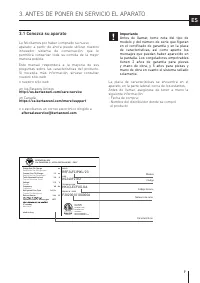
Page 78 - ANTES DE PONER EN SERVICIO EL APARATO; Conozca su aparato
7 3186660 ETL LISTEDConforms toUL 60335-1 andUL 60335-2-24Certified toCSA C22.2#60335-1CSA C22.2#60335-2-24 BERTAZZONI SPA VIA PALAZZINA, 8 - 42016 GUSTALLA (RE) - ITALY Fridge Gas Fill Charge Quantité de Gaz Réfrigerateur Freezer Gas Fill Charge Quantité de Gaz Congélateur Total Absorbed Current Cou...
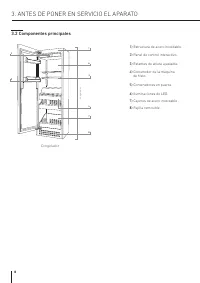
Page 79 - Componentes principales
8 Congelador 1) Estructura de acero inoxidable. 2) Panel de control interactivo. 3) Estantes de altura ajustable. 4) Contenedor de la máquina de hielo. 5) Contenedores en puerta. 6) Iluminaciones de LED. 7) Cajones de acero inoxidable . 8) Rejilla removible. 3.2 Componentes principales 3. ANTES DE P...
Page 80 - Página Home principal; Pulse el icono Home para volver a la página principal.; Alarma; Pulse el icono flecha at ás para regresar a la página precedente.; Encendido y Apagado; Pulse el icono para encender o apagar el aparato.
9 ES 3.4 Panel de control principal 3.3 Control Electrónico El innovador sistema de control electrónico diseñado por Bertazzoni mantiene la temperatura constante en todo el compartimento y la muestra en la pantalla del panel de control. También permite la interacción con el usuario, lo que hace posi...
Page 81 - Sí; Cómo encender y apagar el aparato; Primera puesta en marcha del aparato; PUESTA EN MARCHA DEL APARATO; Cuando el congelador está apagado no hay
10 18 - °C Funciones Ajustes Funciones Ajustes Prueba inicial… Proceder con el apagado? Sí No ¿Quieres continuar? Sí No 4.1 Cómo encender y apagar el aparato Primera puesta en marcha del aparato Pulse el icono . La pantalla muestra las siguientes páginas de lanzamiento: 4. PUESTA EN MARCHA DEL APARA...
Page 82 - Cómo ajustar la temperatura para; Para modificar las temperaturas del
11 18 - °C - 14 °C - 16 - 15 0 - 13 OK - 14 °C - 16 - 15 0 - 13 OK 18 - °C Funciones Ajustes - 14 °C - 16 - 15 0 - 13 OK ES 4.2 Cómo ajustar la temperatura para diferentes exigencias. Cada modelo ha sido cuidadosamente probado antes de salir de la fábrica y está ajustado de tal manera que asegura un...
Page 83 - Señales de información de
12 - 14 °C - 16 - 15 0 - 13 OK 4. PUESTA EN MARCHA DEL APARATO Si se toca el icono de función y se ajusta una función específi a (por ejemplo, vacaciones, etc....), el candado amarillo aparecerá cerrado y no será posible cambiar la temperatura de los compartimentos mientras no se complete la función...
Page 84 - PERSONALIZACIÓN DE FUNCIONES Y AJUSTES; INFORMACIÓN PARA EL USO DE LA PANTALLA.
13 On Off ¿Quieres activar el modo compras Freezer? 18 - °C Funciones Ajustes Enfriador de botellas Vacaciones Compras Freezer Enfriador de botellas Vacaciones Compras Freezer Enfriador de botellas Vacaciones Compras Freezer 9 Hora 11 10 78 OK Maquina hielo Filtro agua Limpieza del circuito de agua ...
Page 85 - ) Enfriador rápido de botellas
14 9 Día 11 10 78 OK Enfriador de botellas Vacaciones Compras Freezer 18 - °C Funciones Ajustes Vacaciones On Off Enfriador de botellas Vacaciones Compras Freezer 37 Min 39 38 3536 OK 18 - °C Funciones Ajustes Enfriador de botellas On Off 3) Enfriador rápido de botellas Esta función se puede activar...
Page 86 - ) Activación de la máquina de hielo
15 18 - °C Funciones Ajustes Maquina hielo Sí No Maquina hielo Filtro agua Limpieza del circuito de agua 18 - °C Funciones Ajustes Maquina hielo on/off Tamaño hielo Super hielo Tamaño hielo Super hielo Tamaño hielo Medio Grande Tamaño hielo Super hielo Maquina hielo Filtro agua Limpieza del circuito...
Page 87 - Filtro agua; Pulse Off; a) Desactivación del fi tro del agua
16 18 - °C Funciones Ajustes Activar aviso? Sí No Filtro agua Maquina hielo Filtro agua Limpieza del circuito de agua Maquina hielo Filtro agua Limpieza del circuito de agua Disable reminder? Sí No Filtro agua 18 - °C Funciones Ajustes Siguiente aviso… Despues Xxx días Off Reiniciar Filtro agua ¿Qui...
Page 88 - Pulse el icono Home para volver a la
17 Maquina hielo Filtro agua Limpieza del circuito de agua 18 - °C Funciones Ajustes Restablecer aviso de caducidad? Sí No Filtro agua Siguiente aviso… Despues 365 días Filtro agua Siguiente aviso… Despues Xxx días Off Reiniciar Filtro agua Sí No Limpieza 18 - °C Funciones Ajustes Maquina hielo Filt...
Page 89 - Lavado terminado; Coloque un recipiente o una vasija para el; Bypass del fi tro
18 Sabbath Reiniciar Demo Mode Sabbath Reiniciar Demo Mode Sabbath Reiniciar Demo Mode Mantenimiento Servicio Info de sistema Mantenimiento Servicio Info de sistema Fecha Hora °c / °f Idioma Fecha Hora °c / °f Idioma Fecha Hora °c / °f Idioma Fecha Hora °c / °f Idioma Mantenimiento Servicio Info de ...
Page 93 - Para más detalles véanse las páginas siguientes.
22 18 - °C Funciones Ajustes Sabbath Reiniciar Demo Mode Demo Mode 1 3 2 4 ¿Quieres poner el modo Demo? Sí No Contraseña requerida Mantenimiento Servicio Info de sistema 18 - °C Funciones Ajustes Demo Mode Sí No 5. PERSONALIZACIÓN DE FUNCIONES Y AJUSTES 7) Modo Demo Es posible simular el funcionamie...
Page 95 - Estantes; EQUIPAMIENTO INTERNO; Contenedores en puerta
24 1 2 6.1 Disposición interna (colocación, ajuste, retirada). Bandeja del hielo Situada en el cajón superior del compartimento del congelador. > Después de sacarla, asegúrese de volver a ponerla correctamente en su sitio. Advertencia No coloque las manos ni los dedos cerca de la máquina de hielo...
Page 96 - ACTIVACIÓN Y USO DE LA MÁQUINA DE HIELO; No coloque en el contenedor de cubitos de; Filtro del agua para la máquina de; Nota
25 ES Maquina hielo Filtro agua Limpieza del circuito de agua Maquina hielo on/off Tamaño hielo Super hielo Maquina hielo on/off Tamaño hielo Super hielo Maquina hielo Filtro agua Limpieza del circuito de agua Maquina hielo Filtro agua Limpieza del circuito de agua 7. ACTIVACIÓN Y USO DE LA MÁQUINA ...
Page 97 - Reemplazo del cartucho de filtro; SUSTITUCIÓN DEL CARTUCHO FILTRANTE AP2; CÓMO SUSTITUIR EL CARTUCHO FILTRANTE
26 Maquina hielo Filtro agua Limpieza del circuito de agua El kit del filt o se debe instalar en un lugar accesible (por ejemplo, un mueble adyacente) para poder cambiar cada año el cartucho del filt o del agua. Si decide no utilizar el filt o del agua (conectando el aparato a un suministro de agua ...
Page 98 - CONSERVACIÓN DE LOS; Indicaciones generales
27 Congelador desde -13° C a -23° C (desde 9° F a -11° F) ES 8. ILUMINACIÓN 8.1 Iluminación Para proporcionar una iluminación interior óptima, unas tiras de LED iluminan lateralmente el compartimento del congelador y grupos de luces LED iluminan directamente diferentes áreas del compartimento del co...
Page 99 - CUIDADOS Y LIMPIEZA; Cómo conservar los alimentos; Al comprar alimentos; Cuidados y limpieza; LOS ALIMENTOS
28 10. CUIDADOS Y LIMPIEZA 9.2 Cómo conservar los alimentos en buen estado Al comprar alimentos Siempre tome las siguientes precauciones: > Coloque la carne, el pescado o las aves de corral crudos en bolsas de plástico paraque no goteen sobre otros alimentos. > Compre la carne, las aves y el p...
Page 100 - Limpieza interna; No ponga las piezas de vidrio frío en; Limpieza de la rejilla de ventilación,
29 Mantenimiento Servicio Info de sistema ES 10.2 Limpieza interna Limpie las partes internas y desmontables lavándolas con una solución de agua tibia y una pequeña cantidad de detergente para lavar platos. Enjuague y seque de inmediato las partes. No utilice dispositivos mecánicos ni otros métodos ...
Page 101 - Condensador inferior.
30 10. CUIDADOS Y LIMPIEZA Condensador inferior. Para limpiar el condensador, siga estas instrucciones: > Apague el aparato pulsando, durante unos 3 segundos, el icono de On/Off en el panel decontrol principal. > Espere unos 30 minutos, hasta que el condensador con aletas se enfríe a temperatu...
Page 102 - GUÍA DE SOLUCIÓN DE PROBLEMAS; El aparato enfría pero las luces y la pantalla no
31 Maquina hielo Filtro agua Limpieza del circuito de agua ES 11. GUÍA DE SOLUCIÓN DE PROBLEMAS Si escucha ruidos inusuales. Es normal escuchar ruidos generados por los ventiladores o los compresores durante el funcionamiento o durante la fase de desescarche. El ruido podría ser más fuerte dependien...
Page 103 - Para bloquear el mensaje en la pantalla, pulse el icono de info; Mensajes de error mostrados en la pantalla; Mensaje en pantalla; Interrupción prolongada de la energía eléctrica
32 11. GUÍA DE SOLUCIÓN DE PROBLEMAS > En caso de errores, pulse el icono Alarma y en la pantalla se mostrará el mensaje de error con su código numérico de error. > El mensaje se mostrará durante 3 segundos, luego se vuelve a la página principal. > Para bloquear el mensaje en la pantalla, p...
Page 104 - DECLARACIÓN DE GARANTÍA LIMITADA
33 ES Garantía limitada de dos años La cobertura de garantía proporcionada por Bertazzoni SpA (“Bertazzoni”) en esta declaración se aplica exclusivamente al electrodoméstico original de Bertazzoni (“Producto”) vendido al consumidor (“Comprador”) por un vendedor/distribuidor minorista autorizado de B...
Page 105 - Si se encuentra en CANADÁ
34 IMPORTANTE: conserve el comprobante de compra original para establecer el periodo de garantía. Si se encuentra en EE.UU. 866 905 0010 https://us.bertazzoni.com/more/support Si se encuentra en CANADÁ 800 561 7265 https://ca.bertazzoni.com/more/support Exclusiones de la garantía: lo que no está cub...
Page 106 - Si se encuentra en CANADÁ:
35 ES logística y manipulación del Producto. La inspección del producto debe hacerse en el momento de la entrega. Cualquier problema derivado de la manipulación, transporte y logística debe ser notifi ado al distribuidor/empresa de entrega tras su recepción e inspección. > Los defectos y daños de...