Page 2 - BERTAZZONI SERVICE; FOR CUSTOMER ASSISTANCE
PRECAUTIONS TO AVOID POSSIBLE EXPOSURE TO EXCESSIVE MICROWAVE ENERGY • Do not attempt to operate this oven with the door open since open-door operation can result in harmful exposure to microwave energy. It is important not to defeat or tamper with the safety interlocks. • Do not place any object be...
Page 3 - CONTENTS
CONTENTS FOR CUSTOMER ASSISTANCE .............................................2PRECAUTIONS TO AVOID POSSIBLE EXPOSURE TO EXCESSIVE MICROWAVE ENERGY ......................................2TWO YEAR LIMITED WARRANTY .........................................4IMPORTANT SAFETY INSTRUCTIONS ..................
Page 4 - TWO YEAR LIMITED WARRANTY
TWO YEAR LIMITED WARRANTY Cod. 3070333 rev.3 The warranties provided by Bertazzoni Spa in this statement apply exclusively to Bertazzoni appliances and accessories sold as new products to the original owner by a Bertazzoni authorized distributor, retailer, dealer or service center and installed in...
Page 5 - IMPORTANT SAFETY INSTRUCTIONS
When using electrical appliances, basic safety precau- tions should be followed, including the following:WARNING - To reduce the risk of burns, electric shock, fire, injury to persons or exposure to excessive micro- wave energy: 1. Read all instructions before using the appliance.2. Read and follow ...
Page 6 - IMPORTANT –; PLEASE READ AND FOLLOW; ABOUT UNPACKING AND EXAMINING YOUR; ELECTRICAL GROUNDING; RADIO OR TV INTERFERENCE; ALWAYS; COOKWARE SAFETY
IMPORTANT – PLEASE READ AND FOLLOW ABOUT UNPACKING AND EXAMINING YOUR DRAWER MICROWAVE 1. Remove all packing materials from inside the Drawer Microwave. DO NOT REMOVE THE WAVEGUIDE COVER, which is located on the top of the Drawer Microwave. 2. Remove the feature sticker, if there is one. Check the d...
Page 7 - ACCESSORIES
IMPORTANT – PLEASE READ AND FOLLOW Use these utensils for safe microwave cooking and reheating: • glass ceramic (Pyroceram®), such as Corningware®.• heat-resistant glass (Pyrex®)• microwave-safe plastics• microwave-safe paper plates• microwave-safe pottery, stoneware and porcelain• browning dish (Do...
Page 8 - COOKING SAFETY; ABOUT FOODS
IMPORTANT – PLEASE READ AND FOLLOW Doneness signs include:• Food steams throughout, not just at edge.• Center bottom of dish is very hot to the touch.• Poultry thigh joints move easily.• Meat and poultry show no pinkness.• Fish is opaque and flakes easily with a fork. COOKING SAFETY Check foods to s...
Page 9 - BEFORE OPERATING; TO SET THE CLOCK
BEFORE OPERATING Before operating your new Drawer Microwave make sure you read and understand this Use and Care Guide completely.The following steps MUST be taken before any functions can be used. Before you use the Drawer Microwave: 1. Plug in the Drawer Microwave. ENJOY YOUR MICRO- WAVE TOUCH CLEA...
Page 10 - FEATURES AND CONTROL PANEL
FEATURES AND CONTROL PANEL 1 Control panel2 Waveguide cover DO NOT REMOVE 3 Drawer Microwave Menu Label 4 Drawer sealing surfaces5 Drawer light 6 Drawer Microwave guides7 Vent8 Nameplate: open the Drawer Microwave fully. The label is beyond the back wall of the microwave cavity facing up from the fl...
Page 11 - SETTINGS; TIME COOKING; COVERING FOODS
SETTINGS TIME COOKING Your Drawer Microwave can be programmed for 99 minutes 99 seconds (99.99). Always enter the seconds after the minutes, even if they are both zeros.• Cook for 5 minutes at 100%1. Enter cooking time 500 . 2. Touch Start/Add-A-Minute pad. TO SET POWER LEVEL There are eleven preset...
Page 12 - SENSOR POPCORN / SENSOR REHEAT
SETTINGS SENSOR POPCORN / SENSOR REHEAT You can pop popcorn and reheat many foods and don’t need to calculate cooking time or power level.Touch Sensor Reheat or Sensor Popcorn and Start/Add-A- Minute pad. When the sensor detects the vapor emitted from the food, the remainder of cooking/reheating tim...
Page 13 - SENSOR COOK; Sensor Cook Chart
SETTINGS SENSOR COOK 1. Touch Sensor Cook pad once. SEE LABEL SELECT FOOD NUMBER 2. See Menu Label. Select desired food by touching number pad. Ex: Touch 5 for baked potatoes. 3. Touch Start/Add-A-Minute pad. NOTE: • To heat or cook other foods or foods above or below the quantity allowed on the Sen...
Page 14 - Defrost Chart; DEFROST
SETTINGS Defrost Chart FOOD AMOUNT PROCEDURE 1. Ground Meat .5 - 2.0 lb. Pull apart and remove any thawed pieces after each stage. Let stand, covered, for 5 to 10 minutes. 2. Steaks/ chops .5 - 3.0 lb. After each stage, rearrange and if there are warm or thawed portions, shield with small flat piece...
Page 15 - REHEAT
SETTINGS REHEAT Reheat automatically computes the correct warming time and microwave power level for foods shown in the chart below.1. Touch Reheat pad once. SEE LABEL SELECT FOOD NUMBER 2. See Menu Label. Select desired food by touching number pad. Ex: Touch 2 for frozen rolls or muffins. 3. Touch ...
Page 18 - AUDIBLE SIGNAL ELIMINATION; TIMER
SETTINGS SETUP/HELP If the electrical power supply to your Drawer Microwave should be interrupted, the display will intermittently show ENJOY YOUR MICRO- WAVE TOUCH CLEAR AND TOUCH CLOCK after the power is reinstated. If this occurs, the Setup/ Help option you input will be erased. Simply touch Stop...
Page 19 - CLEANING AND MAINTENANCE
CLEANING AND MAINTENANCE Any piece of equipment works better and lasts longer when maintained properly and kept clean. Cooking equipment is no exception. Your Drawer Microwave must be kept clean and maintained properly.Disconnect the power cord before cleaning or leave the door open to inactivate th...
Page 20 - BEFORE YOU CALL FOR SERVICE
BEFORE YOU CALL FOR SERVICE Please check the following before calling for service. It may save you time and expense. PROBLEM POSSIBLE CAUSE SOLUTION 1. Part or all of Drawer Microwave does not operate. • Power cord of Drawer Microwave is not completely connected to the electrical outlet. • Power out...
Page 21 - FOUR À MICRO-ONDES MONTÉ AU DESSUS D’UNE CUISINIÈRE; MANUEL D’UTILISATION ET D’ENTRETIEN
FOUR À MICRO-ONDES MONTÉ AU DESSUS D’UNE CUISINIÈRE MANUEL D’UTILISATION ET D’ENTRETIEN Modèle MD24X F
Page 22 - ASSISTANCE À LA CLIENTÈLE; COMMENT FAIRE APPLIQUER LA GARANTIE
MESURES POUR ÉVITER UNE EXPOSITION POSSIBLE À UNE ÉNERGIE MICRO-ONDE EXCESSIVE • Ne pas essayer de faire fonctionner ce four avec la porte ouverte puisque le fonctionnement avec la porte ouverte peut entraîner une exposition dangereuse à l’énergie micro-onde. Il est important de ne pas enlever ou mo...
Page 23 - TABLE DES MATIÈRES
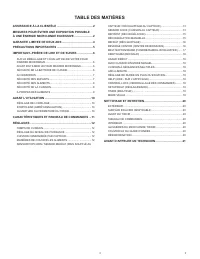
TABLE DES MATIÈRES ASSISTANCE À LA CLIENTÈLE ............................................2MESURES POUR ÉVITER UNE EXPOSITION POSSIBLE À UNE ÉNERGIE MICRO-ONDE EXCESSIVE .......................2GARANTIE LIMITEE DE DEUX ANS ......................................4PRÉCAUTIONS IMPORTANTES ..................
Page 24 - GARANTIE LIMITEE DE DEUX ANS
Nous Vous prions de bien vouloir vous enregistrer sur notre site web www.bertazzoni.com pour valid er votre garantie du nouveau produit et nous aider a Vous aider dans le cas de dommages. GARANTIE LIMITEE DE DEUX ANS Les garanties offertes par Bertazzoni Spa dans cette declaration s ’ appliquent exc...
Page 25 - AVERTISSEMENT; PRÉCAUTIONS IMPORTANTES
Certaines précautions de sécurité devraient toujours être prises lorsqu’on se sert d’appareils électriques : AVERTISSEMENT - Pour réduire les risques de brûlures, de chocs électriques, de feu, de blessures ou d’exposition aux micro-ondes : 1. Lire toutes les instructions avant de se servir de l’appa...
Page 26 - IMPORTANT–; PRIÈRE DE LIRE ET DE SUIVRE; SUR LE DÉBALLAGE ET L’ÉVALUATION DE; INSTRUCTIONS DE MISE À; NE PAS UTILISER UNE RALLONGE. SI LE CORDON; Interférence radio ou télévision; AVANT D'UTILISER LE FOUR DRAWER; SÉCURITÉ DE LA BATTERIE DE CUISINE
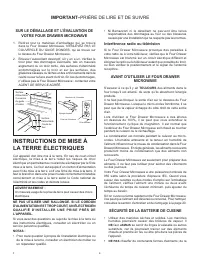
IMPORTANT– PRIÈRE DE LIRE ET DE SUIVRE SUR LE DÉBALLAGE ET L’ÉVALUATION DE VOTRE FOUR DRAWER MICROWAVE 1. Retirez tout le matériau d’emballage qui se trouve dans le Four Drawer Microwave. N’ENLEVEZ PAS LE COUVERCLE DU GUIDE D’ONDES, qui se trouve sur le dessus du Four Drawer Microwave. 2. Enlevez l’...
Page 27 - ACCESSOIRES
IMPORTANT– PRIÈRE DE LIRE ET DE SUIVRE pression pourrait s'accumuler, faire exploser le contenant et causer des blessures. • Faire attention en ouvrant la porte du four à micro-ondes. Laisser l'air chaud ou la vapeur s'échapper avant de retirer ou de remettre des aliments. • AVERTISSEMENT RELATIF AU...
Page 28 - SÉCURITÉ DES ALIMENTS; SÉCURITÉ DE LA CUISSON
IMPORTANT– PRIÈRE DE LIRE ET DE SUIVRE SÉCURITÉ DES ALIMENTS • Coloque el alimento en el centro de la cavidad de horno. Posez l’aliment au centre de la cavité du four. Disposer les aliments avec soin. Placer la partie la plus épaisse des aliments vers l’extérieur du plat. • Surveiller le temps de cu...
Page 29 - À PROPOS DES ALIMENTS
À PROPOS DES ALIMENTS ALIMENT A FAIRE A NE PAS FAIRE Œufs, saucissesnoix, graines, fruits et légumes • Percer les jaunes pour éviter qu’ils n’éclatent pendant la cuisson. • Piquer la pelure des pommes de terre, des pommes, des courges ainsi que les saucisses afin de permettre à la vapeur de s’échapp...
Page 30 - AVANT L’UTILISATION; RÉGLAGE DE L’HORLOGE
AVANT L’UTILISATION Avant d’utiliser ce four, prendre la peine de lire intégralement ce mode d’emploi.Les étapes suivantes doivent être prises avant que les fonctions peuvent être utilisées. Avant d’utiliser le four, procéder ainsi :1. Brancher la fiche du cordon d’alimentation. Fermer la porte. L’i...
Page 31 - CARACTÉRISTIQUES ET PANNEAU DE COMMANDES
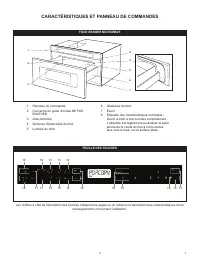
CARACTÉRISTIQUES ET PANNEAU DE COMMANDES 1 Panneau de commande2 Couvercle du guide d’ondes NE PAS ENLEVER 3 Aide-mémoire4 Surfaces d’étanchéité du tiroir5 Lumière du tiroir 6 Glissières du tiroir7 Évent8 Étiquette des caractéristiques nominales : Ouvrir le tiroir à micro-ondes complètement. L’étique...
Page 32 - RÉGLAGES; TEMPS DE CUISSON; RÉGLAGE DU NIVEAU DE PUISSANCE; MANIÈRES DE COUVRIR LES ALIMENTS
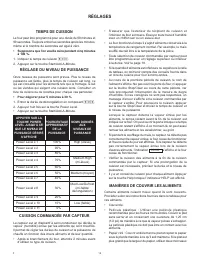
RÉGLAGES TEMPS DE CUISSON Le four peut être programmé pour une durée de 99 minutes et 99 secondes. Toujours entrer les secondes après les minutes, même si le nombre de secondes est égal à zéro. • Supposons que l’on veuille cuire pendant cinq minutes à 100 %. 1. Indiquer le temps de cuisson 500 . 2. ...
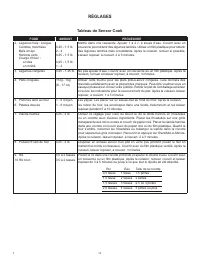
Page 33 - Tableau de Sensor Cook
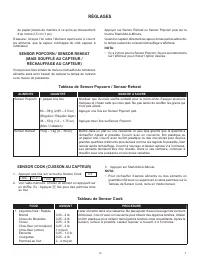
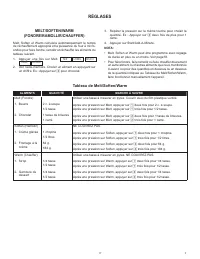
RÉGLAGES de papier placés de manière à ce qu’ils se chevauchent d’au moins 2,5 cm (1 po). S’assurer, lorsque l’on retire l’élément ayant servi à couvrir les aliments, que la vapeur s’échappe du côté opposé à l’utilisateur. SENSOR POPCORN / SENSOR REHEAT (MAIS SOUFFLÉ AU CAPTEUR / RÉCHAUFFAGE AU CAPT...
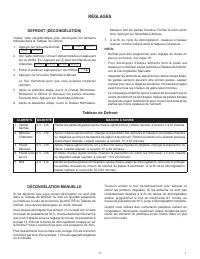
Page 35 - Tableau de Defrost; DÉCONGÉLATION MANUELLE
RÉGLAGES Tableau de Defrost ALIMENTS QUANTITÉ MARCHE À SUIVRE 1. Viande hachée 0,5 - 2 lb Retirer les parties dégelées après chaque signal sonore. Laisser reposer, à couvert, 5 à 10 minutes. 2. Biftecks/ Côtelettes 0,5 - 3 lb Après chaque signal sonore, changer la disposition des aliments et masquer...
Page 36 - Tableau de Reheat
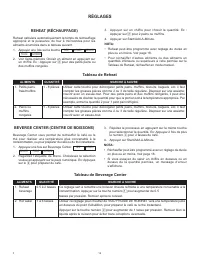
RÉGLAGES REHEAT (RÉCHAUFFAGE) Reheat calculera automatiquement le temps de réchauffage approprié et la puissance du four à microondes pour les aliments énumérés dans le tableau suivant.1. Appuyer une fois sur la touche SEE LABEL SELECT FOOD NUMBER . 2. Voir l’aide-mémoire Choisir un aliment en appuy...
Page 38 - USAGE DIRECT
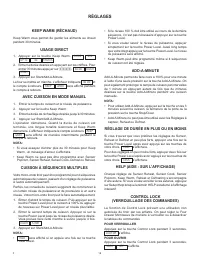
RÉGLAGES KEEP WARM (RÉCHAUD) Keep Warm vous permet de garder les aliments au chaud pendant 30 minutes. USAGE DIRECT 1. Appuyer sur la touche Keep Warm. ENTER TIME UP TO 30 MINUTES 2. Entrer la durée désirée en appuyant sur les chiffres. Pour entrer 30 minutes appuyer sur 3000 . 30.00 TOUCH START 3. ...
Page 39 - ÉLIMINAT ION DE SIGNAL SONORE; MODE VEILLE
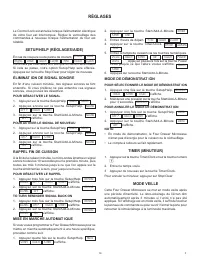
RÉGLAGES Le Control Lock est annulée lorsque l'alimentation électrique de votre four est interrompue. Réglez le verrouillage des commandes à nouveau lorsque l'alimentation du four est rétablie. SETUP/HELP (RÉGLAGES/AIDE) En cas de coupure ou de panne de courant, ENJOY YOUR MICRO- WAVE TOUCH CLEAR AN...
Page 40 - NETTOYAGE ET ENTRETIEN
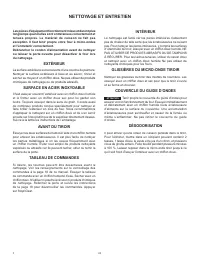
NETTOYAGE ET ENTRETIEN Les pièces d'équipement fonctionnent mieux et durent plus longtemps quand elles sont entretenues correctement et tenues propres. Le matériel de cuisson ne fait pas exception. Il faut tenir propre votre four à micro-ondes et l'entretenir correctement.Débrancher le cordon d’alim...
Page 41 - AVANT D’APPELER UN TECHNICIEN
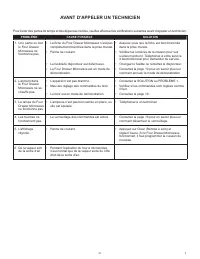
AVANT D’APPELER UN TECHNICIEN Pour éviter des pertes de temps et des dépenses inutiles, veuillez effectuer les vérifications suivantes avant d’appeler un technicien. PROBLÈME CAUSE POSSIBLE SOLUTION 1. Une partie ou tout le Four Drawer Microwave ne fonctionne pas. • La fiche du Four Drawer Microwave...






 Bertazzoni C36500X (Z36500X), C36600X (Z36600X) Manual
 Bertazzoni C36600X, Z36600X Manual
 Bertazzoni CTYK..U7X(2,5)A Manual
 Bertazzoni F457PROMWTX User Manual
 Bertazzoni F609PROESX User Manual
 Bertazzoni F909PROEKX User Manual
 Bertazzoni F6011PROELN User Manual
 Bertazzoni HER90 6 MFE D NET User Manual
 Bertazzoni KIN86MOD1XB User Manual
 Bertazzoni KT60P1AXT User Manual
 Bertazzoni KT90P1AXT User Manual
 Bertazzoni KTI90PRO1XA User Manual
 Bertazzoni KTI120P1AXT User Manual
 Bertazzoni KTI120PRO1XA User Manual
 Bertazzoni KU30PRO1XV User Manual