Page 2 - INDICE
2 IT / Indice INDICE AVVERTENZE __________________________ _________________________________________ RESPONSABILITÀ DEL PRODUTTORE _____________________________________________ TUTELA DELL’AMBIENTE ________________________________________________________ IMBALLI IN PLASTICA _________________________...
Page 3 - DALLA SCRIVANIA DEL PRESIDENTE; Spero che sia di tuo completo gradimento!
3 IT / Dalla scrivania del presidente DALLA SCRIVANIA DEL PRESIDENTE Gentile Cliente, grazie per aver scelto per la tua casa la qualità degli elettrodomestici Bertazzoni. E’ dal lontano 1882 che la mia famiglia costruisce cucine e si è dunque conquistata una solida reputazione per l’eccellenza della...
Page 4 - AVVERTENZE; RESPONSABILITA’ DEL PRODUTTORE; Pericolo di soff ocamento; TARGHETTA DI IDENTIFICAZIONE
4 IT / Avvertenze AVVERTENZE LEGGERE IL LIBRETTO D’ISTRUZIONI PRIMA DI INSTALLARE ED UTILIZZARE L’APPARECCHIO. Queste istruzioni sono valide solamente per i paesi di destinazione i cui simboli di identifi cazione fi gurano sulla copertina del libretto istruzione e sull’etichetta dell’apparecchio.Il co...
Page 5 - AVVERTENZE GENERALI DI SICUREZZA
5 IT / Avvertenze AVVERTENZE AVVERTENZE GENERALI DI SICUREZZA • Questo apparecchio e le sue parti accessibili diventano molto calde durante l’uso. • Non mettere in funzione l’apparecchio con le mani umide o quando c’è contatto con l’acqua. • Non toccare gli elementi riscaldanti durante l’uso. • Tene...
Page 6 - AVVERTENZE PER L’UTILIZZO
6 IT / Avvertenze AVVERTENZE AVVERTENZE PER L’UTILIZZO • Prestare particolare attenzione quando si cucinano cibi con elevate quantità di alcool, perchè potrebbero incendiarsi. • Rimuovere residui di cibo dall’interno del forno prima di utilizzare l’apparecchio, per evitare che prendano fuoco. • Non ...
Page 7 - MANUALE TECNICO PER L’INSTALLATORE
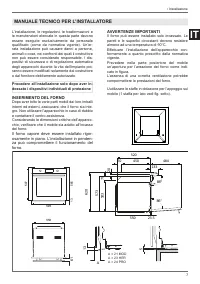
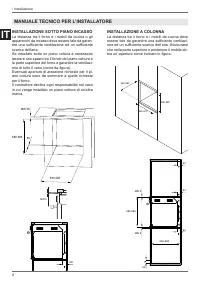
7 IT / Installazione L’installazione, le regolazioni, le trasformazioni e le manutenzioni elencate in questa parte devono essere eseguite esclusivamente da personale qualifi cato (come da normativa vigente). Un’er-rata installazione può causare danni a persone, animali o cose, nei confronti dei quali...
Page 9 - Collegamento alla rete di alimentazione è e; Tensione; FISSAGGIO FORNO
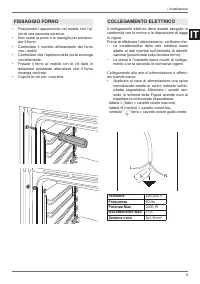
9 IT / Installazione • Posizionare l’apparecchio nel mobile con l’ai- uto di una seconda persona. • Non usare la porta o la maniglia per posizion- are il forno. • Controllare il corretto allineamento del forno con i mobili. • Controllare che l’apertura della porta avvenga correttamente. • Fissare il...
Page 10 - SOSTITUZIONE DEI COMPONENTI; MANUTENZIONE
10 IT • Posizionare il cavo di alimentazione in modo che non sia appoggato al posteriore del forno, che non sia a contatto con bordi taglienti e che non raggiunga in nessun punto una temper-atura di 90°C. • Non utilizzare per il collegamento riduzioni, adattatori o derivatori in quanto potrebbero pr...
Page 11 - Display con touch control; PANNELLO COMANDI
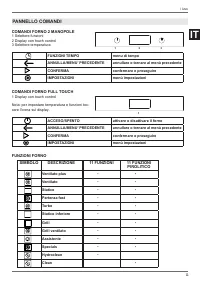
11 IT / Uso COMANDI FORNO 2 MANOPOLE 1 Selettore funzioni2 Display con touch control3 Selettore temperatura FUNZIONI TEMPO menu di tempo ANNULLA/MENU’ PRECEDENTE annullare o tornare al menù precedente CONFERMA confermare o proseguire IMPOSTAZIONI menù impostazioni COMANDI FORNO FULL TOUCH 1 Display ...
Page 12 - • Rimuovere pellicole ed eventuali residui di im-; POSIZIONAMENTO GRIGLIE; RAFFREDDAMENTO; • Se l’acqua della propria zona è molto calcar-; USO
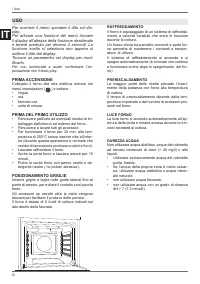
12 IT Per scorrere il menù spostare il dito sul dis- play. Per attivare una funzione del menù toccare il display all’altezza della funzione desiderata e tenere premuto per almeno 2 secondi. La funzione scelta si seleziona non appena si solleva il dito dal display. Toccare un paramentro sul display p...
Page 13 - Calore dall’alto e dal basso.
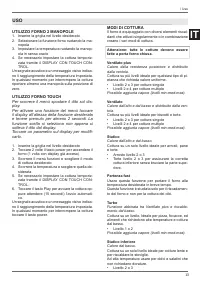
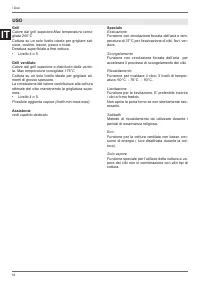
13 IT / Uso UTILIZZO FORNO 2 MANOPOLE 1. Inserire la griglia nel livello desiderato2. Selezionare la funzione forno ruotando la ma- nopola 3. Impostare la temperatura ruotando la manop- ola in senso orario 4. Se necessario impostare la cottura temporiz- zata tramite il DISPLAY CON TOUCH CON-TROL. Un...
Page 15 - Pulizia (solo forno 11 funzioni con pirolisi); Pirolisi; Rimuovere il tappo in sili-; Eco pirolisi
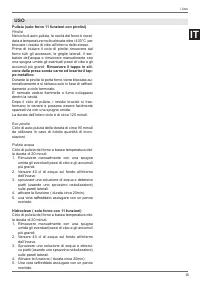
15 IT / Uso Pulizia (solo forno 11 funzioni con pirolisi) Pirolisi Nel ciclo di auto-pulizia, la cavità del forno è riscal-data a temperature molto elevate oltre i 400°C per bruciare i residui di cibo all’interno dello stesso.Prima di iniziare il ciclo di pirolisi rimuovere dal forno tutti gli acces...
Page 16 - VAPORE; • MAX. Ideale pietanze delicate quali creme,
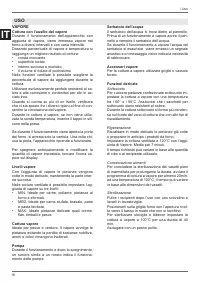
16 IT / Uso VAPORE Cottura con l’ausilio del vapore Durante il funzionamento dell’apparecchio con aggiunta di vapore, viene immesso vapore nel forno a diversi intervalli e con varia intensità.Dosando percentuale di vapore e temperatura si raggiunge un migliore risultato di cottura:• crosta croccante...
Page 17 - Il serbatoio dell’acqua si trova dietro il pannel-
17 IT CONDENSA E’ normale che durante la cottura di cibi partico-larmente ricchi di acqua o durante la cottura a vapore si formi condensa sul vetro interno della porta forno e sul pannello di controllo. Durante la cottura ad alta temperatura la condensa evap-orerà autonomamente.I programmi con contr...
Page 18 - SALVAGOCCIA
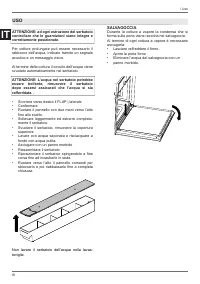
18 IT / Uso ATTENZIONE: ad ogni estrazione del serbatoio controllare che le guarnizioni siano integre e correttamente posizionate. Per cotture prolungate può essere necessario il rabbocco dell’acqua, indicato tramite un segnale acustico e un messaggio visivo. Al termine della cottura il circuito del...
Page 19 - Pietanze
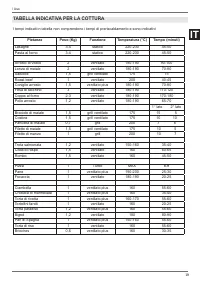
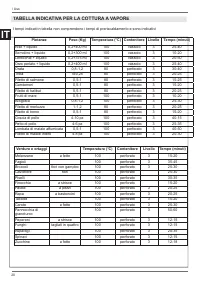
19 IT / Uso TABELLA INDICATIVA PER LA COTTURA TABELLA INDICATIVA PER LA COTTURA Pietanze Peso (Kg) Funzione Temperatura (°C) Tempo (minuti) Lasagne 3-4 statico 220-230 45-50 Pasta al forno 3-4 statico 220-230 45-50 Arrosto di vitello 2 ventilato 180-190 90-100 Lonza di maiale 2 ventilato 180-190 70-...
Page 21 - Menu impostazioni; UTILIZZO DEL DISPLAY TOUCH
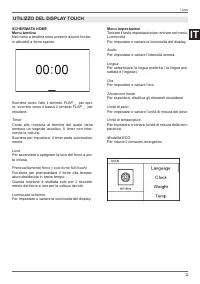
21 IT / Uso SCHERMATA HOMEMenu tendina Nel menù a tendina sono presenti alcune funzio-ni attivabili a forno spento. Scorrere verso l’alto il simbolo FLAP _ per apri-re, scorrere verso il basso il simbolo FLAP _ per chiudere. Timer Conto alla rovescia al termine del quale viene emesso un segnale acus...
Page 22 - GESTIONE DELLE FUNZIONI TEMPO; Timer
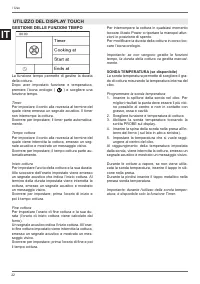
22 IT / Uso GESTIONE DELLE FUNZIONI TEMPO La funzione tempo permette di gestire la durata della cottura. Dopo aver impostato funzione e temperatura, premere l’icona orologio ( ) e scegliere una funzione tempo. Timer Per impostare il conto alla rovescia al termine del quale viene emesso un segnale ac...
Page 23 - ASSISTANT; Gestione ricette
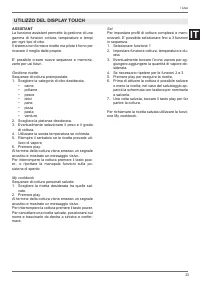
23 IT / Uso ASSISTANT La funzione assistant permette la gestione di una gamma di funzioni cottura, temperature e tempi per ogni tipo di cibo.Il sistema non fornisce ricette ma pilota il forno per ricavare il meglio dalle proprie. E’ possibile creare nuove sequenze e memoriz-zarle per usi futuri. Ges...
Page 24 - GUIDE TELESCOPICHE; Rimozione guide telescopiche
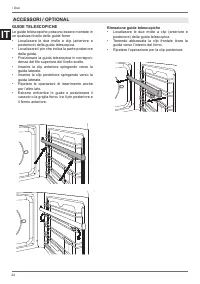
24 IT GUIDE TELESCOPICHE Le guide telescopiche possono essere montate in un qualsiasi livello delle guide forno• Localizzare le due molle a clip (anteriore e posteriore) della guida telescopica. • Localizzare il pin che indica la parte posteriore della guida. • Posizionare la guida telescopica in co...
Page 25 - PULIZIA DELL’APPARECCHIO
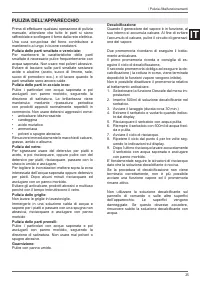
25 IT / Pulizia /Malfunzionamenti Prima di eff ettuare qualsiasi operazione di pulizia manuale, attendere che tutte le parti si siano raff reddate e scollegare il forno dalla rete elettrica.Una cura scrupolosa del forno contribuisce a mantenerlo a lungo in buone condizioni. Pulizia delle parti smaltat...
Page 26 - SEMPLICI MANUTENZIONI; RIMOZIONE GUIDE LATERALI; SOSTITUZIONE GUARNIZIONI SERBATOIO
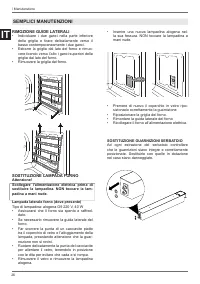
26 IT SEMPLICI MANUTENZIONI RIMOZIONE GUIDE LATERALI • Individuare i due ganci nella parte inferiore della griglia e tirare delicatamente verso il basso contemporaneamente i due ganci. • Estrarre la griglia dal lato del forno e rimuo- vere tirando verso l’alto i ganci superiori della griglia dal lat...
Page 27 - PULIZIA VETRI INTERNI PORTA FORNO; entrambe le cerniere.
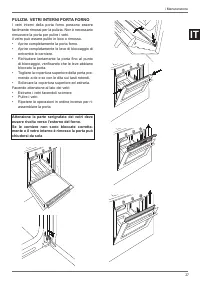
27 IT PULIZIA VETRI INTERNI PORTA FORNO I vetri interni della porta forno possono essere facilmente rimossi per la pulizia. Non è necessario rimuovere la porta per pulire i vetri.il vetro può essere pulito in loco o rimosso.• Aprire completamente la porta forno.• Aprire completamente le leve di bloc...
Page 28 - GARANZIA; Il forno non funziona; MALFUNZIONAMENTO
28 IT GARANZIA Il forno non funziona Al forno arriva corrente? controllare l’interruttore o il fusibile. Staccare per 1 minuto circa il forno dalla rete elettrica disinserendo la spina o l’interruttore. Il forno non scalda Verifi care che non sia attiva la showroom mode.Verifi care che non sia attiva ...
Page 30 - CONTENTS; WATER HARDNESS
2 EN / Contents CONTENTS INTRODUCTION AND WARNINGS __________________________________________________ MANUFACTURER LIABILITY _____________________________________________________ ENVIRONMENTAL PROTECTION __________________________________________________ PLASTIC PACKAGING ___________________________...
Page 31 - FROM THE DESK OF OUR PRESIDENT; I really hope you like it!
3 EN / From the desk of our president FROM THE DESK OF OUR PRESIDENT Dear Customer, Thank you for choosing a quality Bertazzoni appliance for your home. It was way back in 1882 that my family began manufacturing cookers, and our company has since built up a solid reputation for the excellence of its...
Page 32 - INTRODUCTION; MANUFACTURER LIABILITY; Danger of suff ocation; APPLIANCE DATA PLATE
4 EN / Introduction INTRODUCTION READ THESE INSTRUCTIONS CAREFULLY BEFORE INSTALLING AND USING THE APPLIANCE. These instructions are valid only for the countries whose identifying symbols are included on the cover of this manual and on the appliance label.The manufacturer shall not be held liable fo...
Page 33 - GENERAL SAFETY INSTRUCTIONS
5 EN / Introduction INTRODUCTION GENERAL SAFETY INSTRUCTIONS • During use, the appliance and its accessible parts become very hot. • Do not operate the appliance with wet hands or when it is in contact with water. • Never touch the heating elements during use.• Keep children under the age of eight a...
Page 34 - INSTRUCTIONS FOR USE
6 EN / Introduction INTRODUCTION INSTRUCTIONS FOR USE • Take great care when cooking food with a high alcohol content, as this could cause a fi re. • Remove any food residue from inside the oven before using the appliance in order to prevent fi res and smoking. • Do not place any objects or baking pap...
Page 35 - TECHNICAL INSTALLATION INSTRUCTIONS
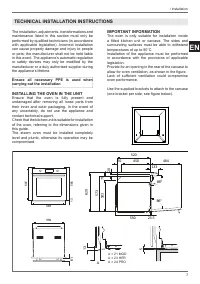
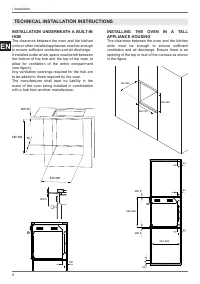
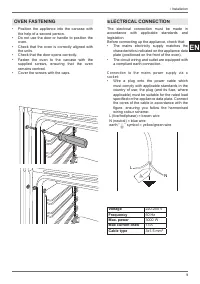
7 EN / Installation The installation, adjustments, transformations and maintenance listed in this section must only be performed by qualifi ed technicians (in accordance with applicable legislation). Incorrect installation can cause property damage and injury to people or pets; the manufacturer shall...
Page 37 - OVEN FASTENING
9 EN / Installation • Position the appliance into the carcase with the help of a second person. • Do not use the door or handle to position the oven. • Check that the oven is correctly aligned with the units. • Check that the door opens correctly.• Fasten the oven to the carcase with the supplied sc...
Page 38 - REPLACING COMPONENTS; the; MAINTENANCE
10 EN • Position the power supply cable in such a way that it is not resting against the rear of the oven, that it is not in contact with sharp edges and will not reach a temperature of 90°C at any point. • Do not use adapters, extension leads, gang sockets etc. as these could cause loose contacts a...
Page 39 - Touchscreen display; CONTROL PANEL
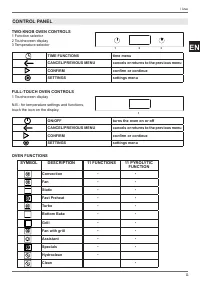
11 EN / Use TWO-KNOB OVEN CONTROLS 1 Function selector2 Touchscreen display3 Temperature selector TIME FUNCTIONS time menu CANCEL/PREVIOUS MENU cancels or returns to the previous menu CONFIRM confi rm or continue SETTINGS settings menu FULL-TOUCH OVEN CONTROLS 1 Touchscreen display N.B.: for temperat...
Page 40 - • Remove any fi lm and other packaging residue; RACK POSITIONING; COOLING; softened water or mineral water.; USE
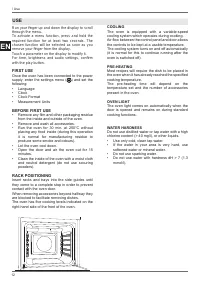
12 EN Run your fi nger up and down the display to scroll through the menu. To activate a menu function, press and hold the required function for at least two seconds. The chosen function will be selected as soon as you remove your fi nger from the display. Touch a parameter on the display to modify ...
Page 41 - If necessary, set timed cooking via the; USING TOUCHSCREEN OVENS; Scroll through the functions menu and choose; COOKING MODES; Heat from the rear element with fan assist.
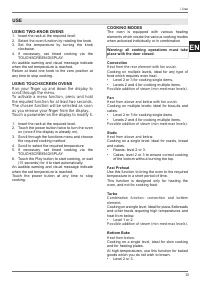
13 EN / Use USING TWO-KNOB OVENS 1. Insert the rack at the required level.2. Select the oven function by rotating the knob.3. Set the temperature by turning the knob clockwise. 4. If necessary, set timed cooking via the TOUCHSCREEN DISPLAY. An audible warning and visual message indicate when the set...
Page 44 - STEAM; and other leavened dishes.
16 EN / Use STEAM During steam-assisted cooking During operation of the appliance with the addition of steam, steam is dispensed inside the oven at diff erent intervals and with various intensities.Adjusting the steam percentage and temperature will achieve improved cooking results:• Crunchy crust• S...
Page 45 - The water reservoir is located behind the
17 EN CONDENSATION When cooking foods with a high water content, or during steam cooking, it is normal for condensation to form on the inside of the oven door and on the control panel. This condensation will evaporate by itself during high temperature cooking.Programs with steam, due to their nature...
Page 46 - DRIP TRAY
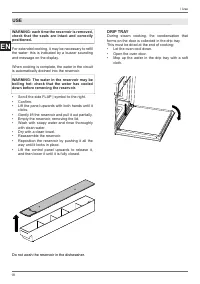
18 EN / Use WARNING: each time the reservoir is removed, check that the seals are intact and correctly positioned. For extended cooking, it may be necessary to refi ll the water: this is indicated by a buzzer sounding and message on the display. When cooking is complete, the water in the circuit is a...
Page 47 - Food
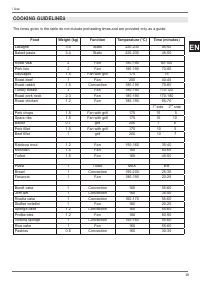
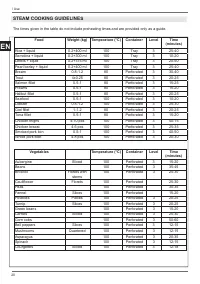
19 EN / Use COOKING GUIDELINES COOKING GUIDELINES Food Weight (kg) Function Temperature (°C) Time (minutes) Lasagne 3-4 Static 220-230 45-50 Baked pasta 3-4 Static 220-230 45-50 Roast veal 2 Fan 180-190 90-100 Pork loin 2 Fan 180-190 70-80 Sausages 1.5 Fan with grill 175 15 Roast beef 1 Fan 200 40-4...
Page 49 - Settings Menu; USING THE TOUCHSCREEN DISPLAY
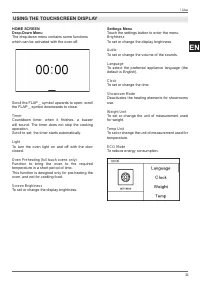
21 EN / Use HOME SCREENDrop-Down Menu The drop-down menu contains some functions which can be activated with the oven off . Scroll the FLAP _ symbol upwards to open; scroll the FLAP _ symbol downwards to close. Timer Countdown timer: when it fi nishes, a buzzer will sound. The timer does not stop the ...
Page 50 - MANAGING THE TIME FUNCTIONS
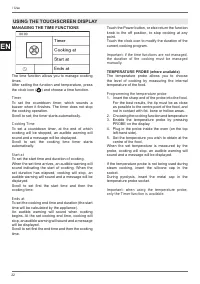
22 EN / Use MANAGING THE TIME FUNCTIONS The time function allows you to manage cooking times. After setting the function and temperature, press the clock icon ( ) and choose a time function. Timer To set the countdown timer, which sounds a buzzer when it fi nishes. The timer does not stop the cooking...
Page 51 - Recipe Management
23 EN / Use ASSISTANT The assistant function helps you manage a range of cooking, temperature and time functions for each type of food.The system does not provide recipes, but helps the oven get the best out of yours. It is possible to create new sequences and store them for future use. Recipe Manag...
Page 52 - TELESCOPIC RAILS; Removing the Telescopic Rails; ACCESSORIES / OPTIONAL EXTRAS
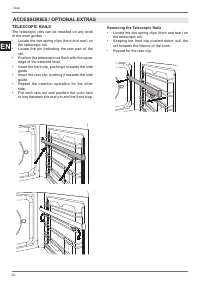
24 EN TELESCOPIC RAILS The telescopic rails can be installed on any level of the oven guides• Locate the two spring clips (front and rear) on the telescopic rail. • Locate the pin indicating the rear part of the rail. • Position the telescopic rail fl ush with the upper edge of the selected level. • ...
Page 53 - Wipe with a damp cloth.; Descaling; Insert 500 ml of descaling solution in the; CLEANING THE APPLIANCE
25 EN / Cleaning / Troubleshooting Before performing any manual cleaning operation, wait for all parts to cool down and isolate the oven from the electrical supply.Scrupulous care of your oven will help keep it in excellent condition for many years to come. Cleaning enamelled or painted parts: To ma...
Page 54 - BASIC MAINTENANCE; REMOVING THE SIDE GUIDES; REPLACING RESERVOIR SEAL
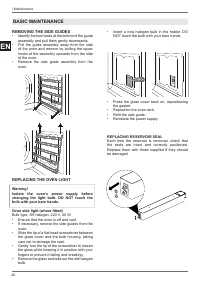
26 EN BASIC MAINTENANCE REMOVING THE SIDE GUIDES • Identify the two hooks at the bottom of the guide assembly and pull them gently downwards. • Pull the guide assembly away from the side of the oven and remove by pulling the upper hooks of the assembly upwards from the side of the oven. • Remove the...
Page 55 - CLEANING THE INTERNAL DOOR GLASS; that the levers have blocked the door.
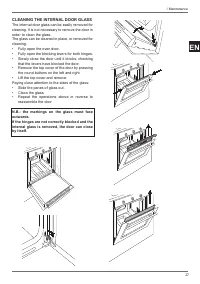
27 EN CLEANING THE INTERNAL DOOR GLASS The internal door glass can be easily removed for cleaning. It is not necessary to remove the door in order to clean the glass.The glass can be cleaned in place, or removed for cleaning.• Fully open the oven door.• Fully open the blocking levers for both hinges...
Page 56 - WARRANTY; The oven is not working.; TROUBLESHOOTING
28 EN WARRANTY The oven is not working. Is the oven power supply active? Check the circuit breaker, switch or fuse. Disconnect the oven from the power supply for around one minute by unplugging it or turning it off at the circuit breaker. The oven does not heat up. Check that showroom mode is not ena...