Page 2 - Introduction
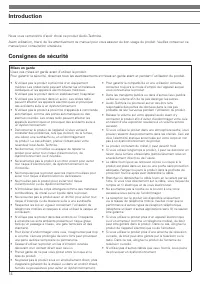
2 Thank you for purchasing the Audio-Technica product. Before using the product, read through this user manual to ensure that you will use the product correctly. Please keep this manual for future reference. Caution Read these cautions before using the product. To ensure safety, observe all warnings...
Page 3 - Safety precaution
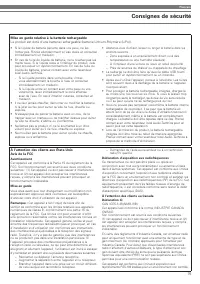
English 3 Safety precaution Caution for rechargeable battery The product is equipped with a rechargeable battery (lithium polymer battery). • If battery fluid gets into eyes, do not rub them. Rinse thoroughly with clean water such as tap water and consult a doctor immediately. • If battery fluid lea...
Page 4 - Part names and functions; cable for smartphones with in-line
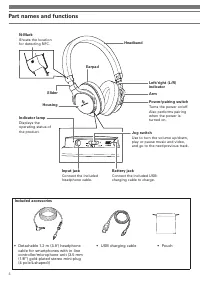
4 Part names and functions Included accessories • Detachable 1.2 m (3.9’) headphone cable for smartphones with in-line controller/microphone unit (3.5 mm (1/8”) gold-plated stereo mini-plug (4 pole/L-shaped)) • USB charging cable • Pouch Battery jack Connect the included USB charging cable to char...
Page 5 - How to charge
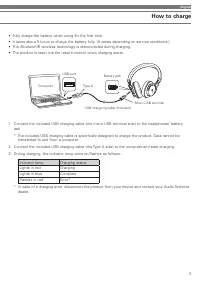
English 5 How to charge • Fully charge the battery when using for the first time.• It takes about 5 hours to charge the battery fully. (It varies depending on service conditions.)• The Bluetooth ® wireless technology is disconnected during charging. • The product is reset (via the reset function) wh...
Page 6 - How to connect; About pairing
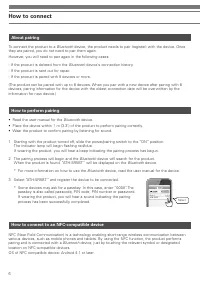
6 How to connect About pairing How to connect to an NFC-compatible device How to perform pairing To connect the product to a Bluetooth device, the product needs to pair (register) with the device. Once they are paired, you do not need to pair them again.However, you will need to pair again in the fo...
Page 7 - Connect; About indicator lamp display
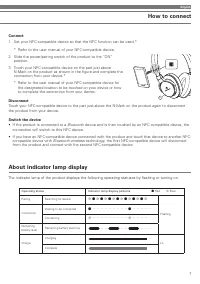
English 7 How to connect Connect 1 Set your NFC-compatible device so that the NFC function can be used.* * Refer to the user manual of your NFC-compatible device. 2 Slide the power/pairing switch of the product to the “ON” position. 3 Touch your NFC-compatible device on the part just above N-Mark on...
Page 8 - How to use; Power supply
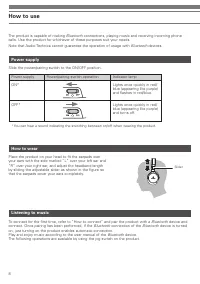
8 How to use The product is capable of making Bluetooth connections, playing music and receiving incoming phone calls. Use the product for whichever of these purposes suit your needs.Note that Audio-Technica cannot guarantee the operation of usage with Bluetooth devices. Power supply Listening to mu...
Page 9 - Taking a phone call; Compatible codecs
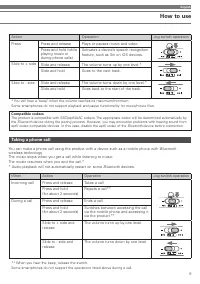
English 9 Taking a phone call You can make a phone call using the product with a device such as a mobile phone with Bluetooth wireless technology. The music stops when you get a call while listening to music. The music resumes when you end the call.** Audio playback will not automatically restart on...
Page 10 - Other functions; Play-through function; • Some smartphones do not support playback and pause; Using the headphone cable for smartphones
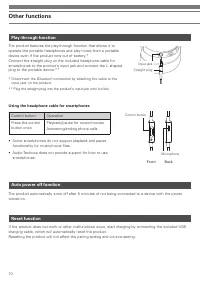
10 Other functions Play-through function Auto power off function Reset function The product features the play-through function that allows it to operate like portable headphones and play music from a portable device even if the product runs out of battery.*Connect the straight plug on the included h...
Page 11 - Cleaning; sound skipping or distortion.
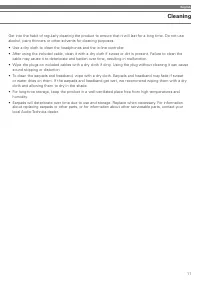
English 11 Cleaning Get into the habit of regularly cleaning the product to ensure that it will last for a long time. Do not use alcohol, paint thinners or other solvents for cleaning purposes. • Use a dry cloth to clean the headphones and the in-line controller.• After using the included cable, cle...
Page 12 - Troubleshooting; Problem
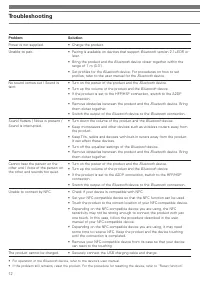
12 Troubleshooting Problem Solution Power is not supplied. • Charge the product. Unable to pair. • Pairing is available on devices that support Bluetooth version 2.1+EDR or later. • Bring the product and the Bluetooth device closer together within the range of 1 m (3.3'). • Set profiles for the Blue...
Page 13 - Communication specifications; Specifications
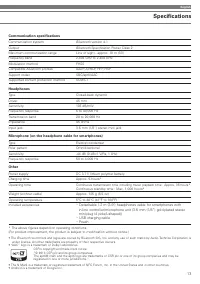
English 13 Communication specifications Communication system Bluetooth version 4.1 Output Bluetooth Specification Power Class 2 Maximum communication range Line of sight - approx. 10 m (33’) Frequency band 2.402 GHz to 2.480 GHz Modulation method FHSS Compatible Bluetooth profiles A2DP, AVRCP, HFP, ...
Page 15 - Consignes de sécurité
Français 15 Consignes de sécurité Mise en garde relative à la batterie rechargeable Le produit est doté d’une batterie rechargeable (batterie Lithium-Polymère (LiPo)). • Si le liquide de batterie pénètre dans vos yeux, ne les frottez pas. Rincez abondamment à l’eau claire et consultez immédiatement ...
Page 16 - Noms des pièces et fonctions
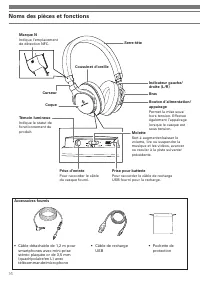
16 Noms des pièces et fonctions Accessoires fournis • Câble détachable de 1,2 m pour smartphones avec mini-prise stéréo plaquée or de 3,5 mm (quadripolaire/en L) avec télécommande/microphone • Câble de recharge USB • Pochette de protection Prise pour batterie Pour raccorder le câble de recharge USB ...
Page 17 - Comment procéder à la recharge
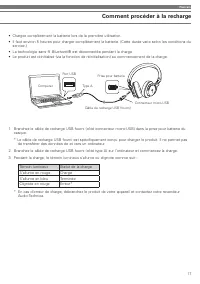
Français 17 Comment procéder à la recharge • Chargez complètement la batterie lors de la première utilisation.• Il faut environ 5 heures pour charger complètement la batterie. (Cette durée varie selon les conditions du service.) • La technologie sans fil Bluetooth® est déconnectée pendant la charge....
Page 18 - Comment procéder à la connexion; À propos de l'appairage
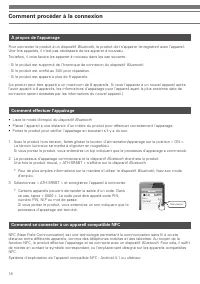
18 Comment procéder à la connexion À propos de l'appairage Comment se connecter à un appareil compatible NFC Comment effectuer l'appairage Pour connecter le produit à un dispositif Bluetooth, le produit doit s’appairer (enregistrer) avec l’appareil. Une fois appairés, il n’est pas nécessaire de les ...
Page 19 - Connexion; À propos des indications du témoin lumineux
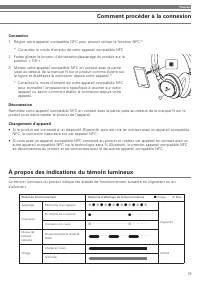
Français 19 Comment procéder à la connexion Connexion 1 Réglez votre appareil compatible NFC pour pouvoir utiliser la fonction NFC.* * Consultez le mode d’emploi de votre appareil compatible NFC. 2 Faites glisser le bouton d’alimentation/appairage du produit sur la position « ON ». 3 Mettez votre ap...
Page 20 - Méthode d’utilisation; Alimentation
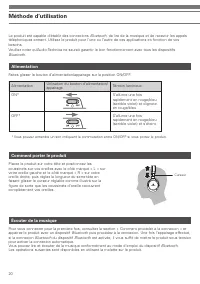
20 Méthode d’utilisation Le produit est capable d’établir des connexions Bluetooth, de lire de la musique et de recevoir les appels téléphoniques entrant. Utilisez le produit pour l’une ou l’autre de ces applications en fonction de vos besoins.Veuillez noter qu’Audio-Technica ne saurait garantir le ...
Page 21 - Répondre à un appel; mobile avec la technologie sans fil
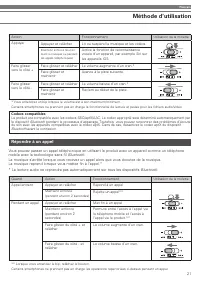
Français 21 Répondre à un appel Vous pouvez passer un appel téléphonique en utilisant le produit avec un appareil comme un téléphone mobile avec la technologie sans fil Bluetooth. La musique s’arrête lorsque vous recevez un appel alors que vous écoutez de la musique. La musique reprend lorsque vous ...
Page 22 - Autres fonctions; Fonction play-through; Utilisation du câble du casque pour smartphones
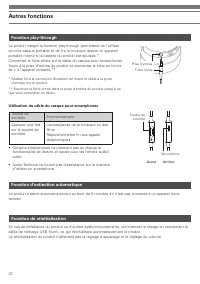
22 Autres fonctions Fonction play-through Fonction d’extinction automatique Fonction de réinitialisation Le produit intègre la fonction play-through permettant de l’utiliser comme casque portable et de lire la musique depuis un appareil portable même si la batterie du produit est épuisée.*Connectez ...
Page 23 - Nettoyage; sans la nettoyer, le son peut être saccadé ou déformé.
Français 23 Nettoyage Prenez l’habitude de nettoyer régulièrement le produit pour garantir qu’il durera longtemps. N’utilisez pas d’alcool, de diluant à peinture ou d’autres solvants pour le nettoyage. • Utilisez un chiffon sec pour nettoyer le casque et la télécommande.• Après avoir utilisé le câbl...
Page 24 - Guide de dépannage; Problème
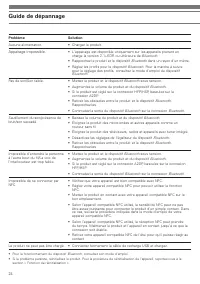
24 Guide de dépannage Problème Solution Aucune alimentation. • Chargez le produit. Appairage impossible. • L'appairage est disponible uniquement sur les appareils prenant en charge la version 2.1+EDR ou ultérieure de Bluetooth. • Rapprochez le produit et le dispositif Bluetooth dans un rayon d’un mè...
Page 25 - Spécifications pour la communication; Casque; Caractéristiques techniques
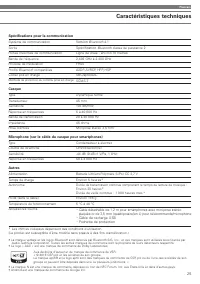
Français 25 Spécifications pour la communication Système de communication Version Bluetooth 4.1 Sortie Spécification Bluetooth classe de puissance 2 Portée maximale de communication Ligne de visée : environ 10 mètres Bande de fréquence 2,402 GHz à 2,480 GHz Procédé de modulation FHSS Profils Bluetoo...
Page 26 - Einleitung
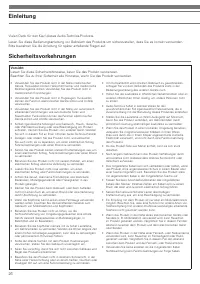
26 Vielen Dank für den Kauf dieses Audio-Technica-Produkts. Lesen Sie diese Bedienungsanleitung vor Gebrauch des Produkts um sicherzustellen, dass Sie es korrekt verwenden. Bitte bewahren Sie die Anleitung für später anfallende Fragen auf. Vorsicht Lesen Sie diese Sicherheitshinweise, bevor Sie das ...
Page 27 - Sicherheitsvorkehrungen
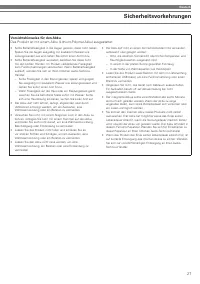
Deutsch 27 Sicherheitsvorkehrungen Vorsichtshinweise für den Akku Das Produkt ist mit einem Akku (Lithium-Polymer-Akku) ausgestattet. • Sollte Batterieflüssigkeit in die Augen geraten, diese nicht reiben. Spülen Sie die Augen ausgiebig mit sauberem Wasser wie Leitungswasser aus und ziehen Sie sofort...
Page 28 - Teilebezeichnungen und Funktionen; Kopfhörerkabel für Smartphones
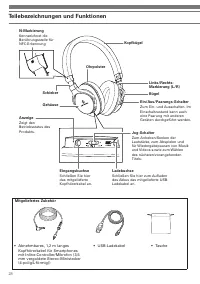
28 Teilebezeichnungen und Funktionen Mitgeliefertes Zubehör • Abnehmbares, 1,2 m langes Kopfhörerkabel für Smartphones mit Inline-Controller/Mikrofon (3,5 mm vergoldete Stereo-Ministecker (4-polig/L-förmig)) • USB-Ladekabel • Tasche Ladebuchse Schließen Sie hier zum Aufladen des Akkus das mitgeliefe...
Page 29 - Laden des Akkus
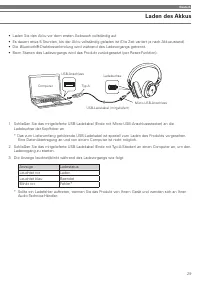
Deutsch 29 Laden des Akkus • Laden Sie den Akku vor dem ersten Gebrauch vollständig auf.• Es dauert etwa 5 Stunden, bis der Akku vollständig geladen ist (Die Zeit variiert je nach Akkuzustand).• Die Bluetooth®-Drahtlosverbindung wird während des Ladevorgangs getrennt. • Beim Starten des Ladevorgangs...
Page 30 - Verbindung; Anmerkungen zur Paarungsfunktion
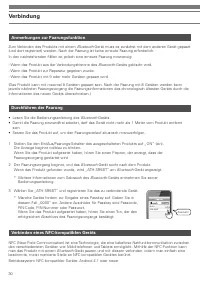
30 Verbindung Anmerkungen zur Paarungsfunktion Verbinden eines NFC-kompatiblen Geräts Durchführen der Paarung Zum Verbinden des Produkts mit einem Bluetooth-Gerät muss es zunächst mit dem anderen Gerät gepaart (und dort registriert) werden. Nach der Paarung ist keine erneute Paarung erforderlich.In ...
Page 31 - Verbinden; Anzeigefunktionen
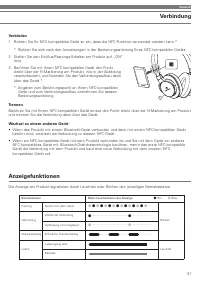
Deutsch 31 Verbindung Verbinden 1 Richten Sie Ihr NFC-kompatibles Gerät so ein, dass die NFC-Funktion verwendet werden kann.* * Richten Sie sich nach den Anweisungen in der Bedienungsanleitung Ihres NFC-kompatiblen Geräts. 2 Stellen Sie den Ein/Aus/Paarungs-Schalter am Produkt auf „ON“ (ein). 3 Berü...
Page 32 - Verwendung; Hören von Musik
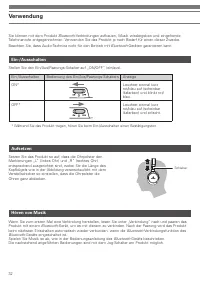
32 Verwendung Sie können mit dem Produkt Bluetooth-Verbindungen aufbauen, Musik wiedergeben und eingehende Telefonanrufe entgegennehmen. Verwenden Sie das Produkt je nach Bedarf für einen dieser Zwecke.Beachten Sie, dass Audio-Technica nicht für den Betrieb mit Bluetooth-Geräten garantieren kann. Ei...
Page 33 - Entgegennehmen eines Telefonanrufs; verbundenen Gerät, beispielsweise einem Mobiltelefon mit
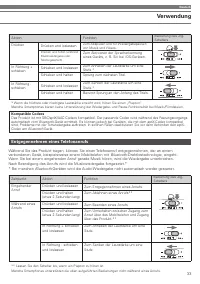
Deutsch 33 Entgegennehmen eines Telefonanrufs Während Sie das Produkt tragen, können Sie einen Telefonanruf entgegennehmen, der an einem verbundenen Gerät, beispielsweise einem Mobiltelefon mit Bluetooth-Drahtlostechnologie, eingeht. Wenn Sie bei einem eingehenden Anruf gerade Musik hören, wird die ...
Page 34 - Andere Funktionen; Durchspielfunktion; Verwendung des Kopfhörerkabels für Smartphones
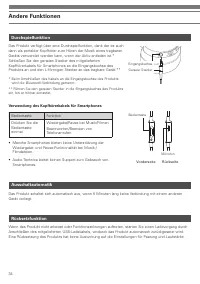
34 Andere Funktionen Durchspielfunktion Ausschaltautomatik Rücksetzfunktion Das Produkt verfügt über eine Durchspielfunktion, dank der es auch dann als portabler Kopfhörer zum Hören der Musik eines tragbaren Geräts verwendet werden kann, wenn der Akku entladen ist.*Schließen Sie den geraden Stecker ...
Page 35 - Reinigung; an Steckern kann Tonaussetzer oder Verzerrungen verursachen.
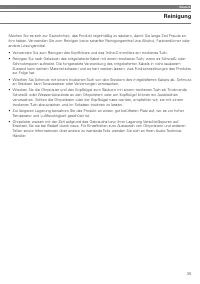
Deutsch 35 Reinigung Machen Sie es sich zur Gewohnheit, das Produkt regelmäßig zu säubern, damit Sie lange Zeit Freude an ihm haben. Verwenden Sie zum Reinigen keine scharfen Reinigungsmittel wie Alkohol, Farbverdünner oder andere Lösungsmittel. • Verwenden Sie zum Reinigen des Kopfhörers und des In...
Page 36 - Fehlersuche
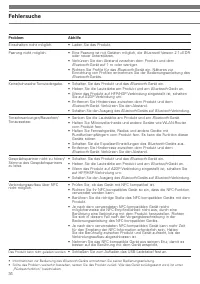
36 Fehlersuche Problem Abhilfe Einschalten nicht möglich. • Laden Sie das Produkt. Paarung nicht möglich. • Eine Paarung ist mit Geräten möglich, die Bluetooth Version 2.1+EDR oder neuer unterstützen. • Verkürzen Sie den Abstand zwischen dem Produkt und dem Bluetooth-Gerät auf 1 m oder weniger. • Ri...
Page 37 - Kommunikationsdaten; Technische Daten
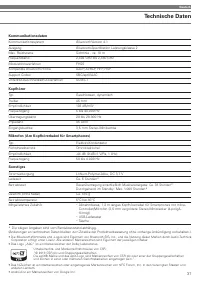
Deutsch 37 Kommunikationsdaten Kommunikationssystem Bluetooth Version 4.1 Ausgang Bluetooth-Spezifikation Leistungsklasse 2 Max. Reichweite Sichtlinie - ca. 10 m Frequenzband 2,402 GHz bis 2,480 GHz Modulationsverfahren FHSS Kompatible Bluetooth-Profile A2DP, AVRCP, HFP, HSP Support Codec SBC/aptX/A...
Page 38 - Introduzione
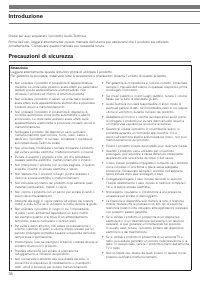
38 Grazie per aver acquistato il prodotto Audio-Technica. Prima dell'uso, leggere attentamente questo manuale dell'utente per assicurarsi che il prodotto sia utilizzato correttamente. Conservare questo manuale per necessità future. Attenzione Leggere attentamente queste istruzioni prima di utilizzar...
Page 39 - Precauzioni di sicurezza
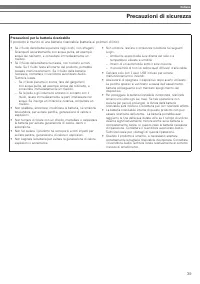
Italiano 39 Precauzioni di sicurezza Precauzioni per la batteria ricaricabile Il prodotto è munito di una batteria ricaricabile (batteria ai polimeri di litio). • Se il fluido della batteria penetra negli occhi, non sfregarli. Sciacquarli accuratamente con acqua pulita, ad esempio acqua del rubinett...
Page 40 - Nomi e funzioni dei componenti
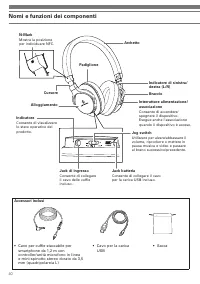
40 Nomi e funzioni dei componenti Accessori inclusi • Cavo per cuffie staccabile per smartphone da 1,2 m con controller/unità microfono in linea e mini-spinotto stereo dorato da 3,5 mm (quadripolare/a L) • Cavo per la carica USB • Sacca Jack batteria Consente di collegare il cavo per la carica USB i...
Page 41 - Come caricare il dispositivo
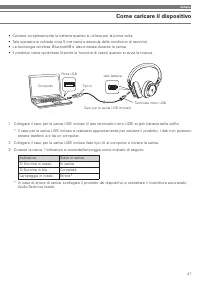
Italiano 41 Come caricare il dispositivo • Caricare completamente la batteria quando si utilizza per la prima volta.• Tale operazione richiede circa 5 ore (varia a seconda delle condizioni di servizio).• La tecnologia wireless Bluetooth® è disconnessa durante la carica. • Il prodotto viene ripristin...
Page 42 - Come collegarlo; Informazioni sull'associazione
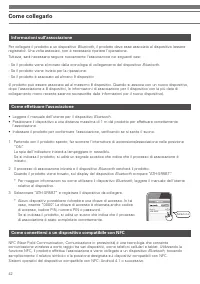
42 Come collegarlo Informazioni sull'associazione Come connettersi a un dispositivo compatibile con NFC Come effettuare l'associazione Per collegare il prodotto a un dispositivo Bluetooth, il prodotto deve esse associato al dispositivo (essere registrato). Una volta associati, non è necessario ripet...
Page 43 - Collegamento; Informazioni sulla visualizzazione dell'indicatore
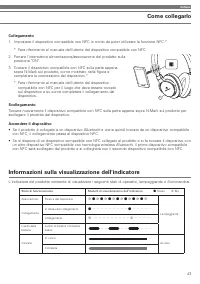
Italiano 43 Come collegarlo Collegamento 1 Impostare il dispositivo compatibile con NFC in modo da poter utilizzare la funzione NFC.* * Fare riferimento al manuale dell'utente del dispositivo compatibile con NFC. 2 Portare l'interruttore alimentazione/associazione del prodotto sulla posizione "O...
Page 44 - Modalità d’utilizzo; Alimentazione elettrica
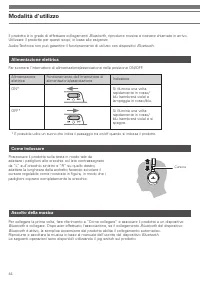
44 Modalità d’utilizzo Il prodotto è in grado di effettuare collegamenti Bluetooth, riprodurre musica e ricevere chiamate in arrivo. Utilizzare il prodotto per questi scopi, in base alle esigenze.Audio-Technica non può garantire il funzionamento di utilizzo con dispositivi Bluetooth. Alimentazione e...
Page 45 - Effettuare una chiamata; tecnologia wireless; Modalità di utilizzo
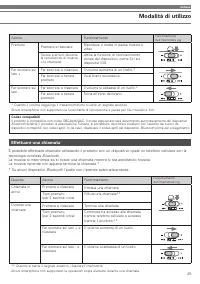
Italiano 45 Effettuare una chiamata È possibile effettuare chiamate utilizzando il prodotto con un dispositivo quale un telefono cellulare con la tecnologia wireless Bluetooth. La musica si interrompe se si riceve una chiamata mentre si sta ascoltando musica. La musica riprende non appena termina la...
Page 46 - Altre funzioni; Funzione di riproduzione continua; Utilizzo del cavo delle cuffie per smartphone
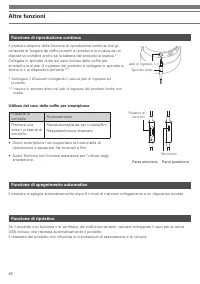
46 Altre funzioni Funzione di riproduzione continua Funzione di spegnimento automatico Funzione di ripristino Il prodotto dispone della funzione di riproduzione continua che gli consente di fungere da cuffie portatili e riprodurre la musica da un dispositivo portatile anche se la batteria del prodot...
Page 47 - Pulizia; umido e non a temperature elevate.
Italiano 47 Pulizia Pulire regolarmente il prodotto per garantirne una lunga durata. Non utilizzare alcool, diluenti o altri solventi per la pulizia. • Utilizzare un panno asciutto per pulire le cuffie e il controller integrato.• Dopo aver utilizzato il cavo incluso, pulirlo con un panno asciutto se...
Page 48 - Risoluzione dei problemi; Problema
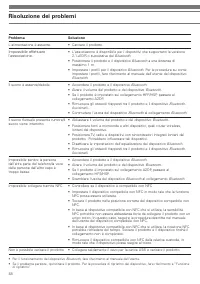
48 Risoluzione dei problemi Problema Soluzione L'alimentazione è assente. • Caricare il prodotto. Impossibile effettuare l'associazione. • L'associazione è disponibile per i dispositivi che supportano la versione 2.1+EDR o successiva del Bluetooth. • Posizionare il prodotto e il dispositivo Bluetoot...
Page 49 - Specifiche di comunicazione; Cuffie; Specifiche tecniche
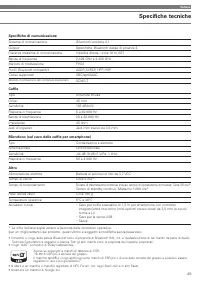
Italiano 49 Specifiche di comunicazione Sistema di comunicazione Bluetooth versione 4.1 Output Specifiche Bluetooth classe di potenza 2 Distanza massima di comunicazione Visibilità diretta - circa 10 m (33") Banda di frequenza 2,402 GHz a 2,480 GHz Metodo di modulazione FHSS Profili Bluetooth co...
Page 50 - Introducción
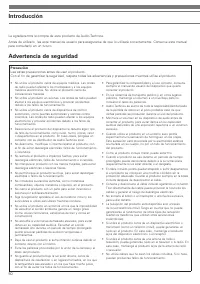
50 Le agradecemos la compra de este producto de Audio-Technica. Antes de utilizarlo, lea este manual de usuario para asegurarse de que lo utilizará correctamente. Conserve este manual para consultarlo en un futuro. Precaución Lea estas precauciones antes de usar el producto. Con el fin de garantizar...
Page 51 - Advertencia de seguridad
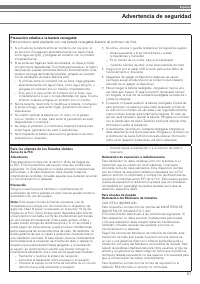
Español 51 Advertencia de seguridad Precaución relativa a la batería recargable Este producto está equipado con una batería recargable (batería de polímero de litio). • Si el fluido de la batería entra en contacto con los ojos, no se los frote. Enjuáguelos abundantemente con agua limpia, como agua d...
Page 52 - Nombres de las piezas y funciones
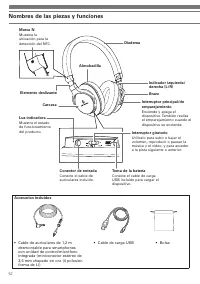
52 Nombres de las piezas y funciones Accesorios incluidos • Cable de auriculares de 1,2 m desmontable para smartphones con unidad de control/micrófono integrada (miniconector estéreo de 3,5 mm chapado en oro (4 polos/en forma de L)) • Cable de carga USB • Bolsa Toma de la batería Conecte el cable de...
Page 53 - Cómo realizar la carga
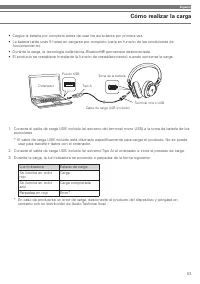
Español 53 Cómo realizar la carga • Cargue la batería por completo antes de usar los auriculares por primera vez.• La batería tarda unas 5 horas en cargarse por completo (varía en función de las condiciones de funcionamiento). • Durante la carga, la tecnología inalámbrica Bluetooth® permanece descon...
Page 54 - Cómo realizar la conexión; Acerca del emparejamiento
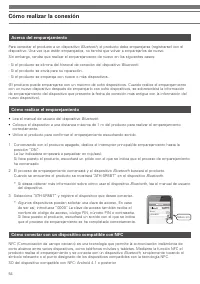
54 Cómo realizar la conexión Acerca del emparejamiento Cómo conectar con un dispositivo compatible con NFC Cómo realizar el emparejamiento Para conectar el producto a un dispositivo Bluetooth, el producto debe emparejarse (registrarse) con el dispositivo. Una vez que estén emparejados, no tendrá que...
Page 55 - Conexión; Acerca de la visualización de la luz indicadora
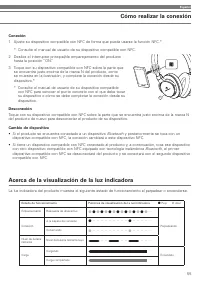
Español 55 Cómo realizar la conexión Conexión 1 Ajuste su dispositivo compatible con NFC de forma que pueda usarse la función NFC.* * Consulte el manual de usuario de su dispositivo compatible con NFC. 2 Deslice el interruptor principal/de emparejamiento del producto hasta la posición “ON”. 3 Toque ...
Page 56 - Instrucciones de uso; Suministro eléctrico
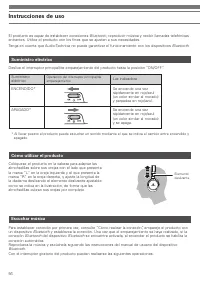
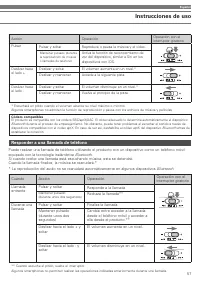
56 Instrucciones de uso El producto es capaz de establecer conexiones Bluetooth, reproducir música y recibir llamadas telefónicas entrantes. Utilice el producto con los fines que se ajusten a sus necesidades.Tenga en cuenta que Audio-Technica no puede garantizar el funcionamiento con los dispositivo...
Page 57 - Responder a una llamada de teléfono
Español 57 Responder a una llamada de teléfono Puede realizar una llamada de teléfono utilizando el producto con un dispositivo como un teléfono móvil equipado con la tecnología inalámbrica Bluetooth. Si cuando recibe una llamada está escuchando música, esta se detendrá. Cuando la llamada finalice, ...
Page 58 - Otras funciones; Función de preescucha; Utilizar el cable de auriculares para smartphones
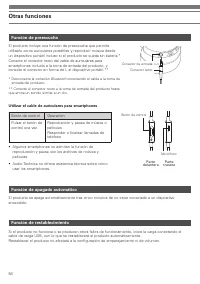
58 Otras funciones Función de preescucha Función de apagado automático Función de restablecimiento El producto incluye una función de preescucha que permite utilizarlo como auriculares portátiles y reproducir música desde un dispositivo portátil incluso si el producto se queda sin batería.*Conecte e...
Page 59 - Limpieza; limpiarlo puede provocar saltos de sonido o distorsión.
Español 59 Limpieza Adopte el hábito de limpiar el producto de forma habitual para asegurarse de que tendrá una vida útil muy prolongada. No utilice alcohol, disolventes de pintura ni otros disolventes para realizar las tareas de limpieza. • Utilice un paño seco para limpiar los auriculares y el con...
Page 60 - Solución de problemas
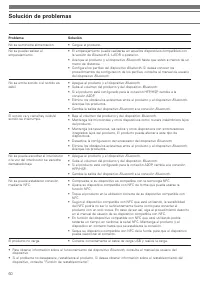
60 Solución de problemas Problema Solución No se suministra alimentación. • Cargue el producto. No se puede realizar el emparejamiento. • El emparejamiento puede realizarse en aquellos dispositivos compatibles con la versión de Bluetooth 2.1+EDR o posterior. • Acerque el producto y el dispositivo Bl...
Page 61 - Especificaciones de comunicación; Auriculares; Especificaciones
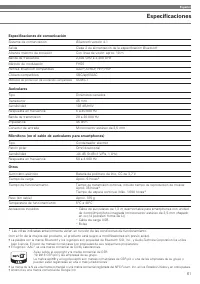
Español 61 Especificaciones de comunicación Sistema de comunicación Bluetooth versión 4.1 Salida Clase 2 de alimentación de la especificación Bluetooth Alcance máximo de conexión Con línea de visión: aprox. 10 m Banda de frecuencia 2,402 GHz a 2,480 GHz Método de modulación FHSS Perfiles Bluetooth c...
Page 62 - Introdução
62 Obrigado por comprar este produto da Audio-Technica. Antes de usar o produto, leia atentamente este manual do usuário para assegurar o uso correto do produto. Guarde este manual para futuras consultas. Atenção Leia estas precauções antes de usar o produto. Para garantir a segurança, observe todas...
Page 63 - Precauções de segurança
Português 63 Precauções de segurança Cuidados com a bateria recarregável O produto é equipado com uma bateria recarregável (bateria de polímero de lítio). • Se o fluido de bateria entrar nos seus olhos, não os esfregue. Lave bem os olhos com água limpa, como água de torneira, e consulte um médico im...
Page 64 - Nomes dos componentes e funções
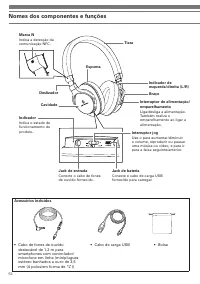
64 Nomes dos componentes e funções Acessórios incluídos • Cabo de fones de ouvido destacável de 1,2 m para smartphones com controlador/ microfone em linha (miniplugues estéreo banhados a ouro de 3,5 mm (4 polos/em forma de “L”)) • Cabo de carga USB • Bolsa Jack de bateria Conecte o cabo de carga USB...
Page 65 - Como carregar
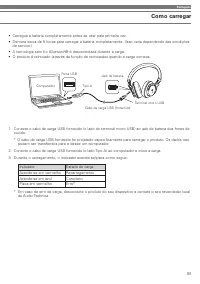
Português 65 Como carregar • Carregue a bateria completamente antes de usar pela primeira vez.• Demora cerca de 5 horas para carregar a bateria completamente. (Isso varia dependendo das condições de serviço.) • A tecnologia sem fio Bluetooth® é desconectada durante a carga. • O produto é reiniciado ...
Page 66 - Como conectar; Sobre o emparelhamento
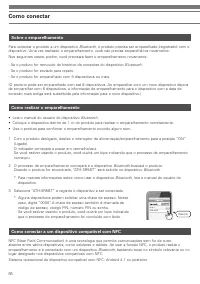
66 Como conectar Sobre o emparelhamento Como conectar a um dispositivo compatível com NFC Como realizar o emparelhamento Para conectar o produto a um dispositivo Bluetooth, o produto precisa ser emparelhado (registrado) com o dispositivo. Uma vez realizado o emparelhamento, você não precisa emparelh...
Page 67 - Conexão; Sobre a exibição do indicador
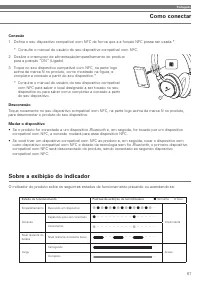
Português 67 Como conectar Conexão 1 Defina o seu dispositivo compatível com NFC de forma que a a função NFC possa ser usada.* * Consulte o manual do usuário do seu dispositivo compatível com NFC. 2 Deslize o interruptor de alimentação/emparelhamento do produto para a posição “ON” (Ligado). 3 Toque ...
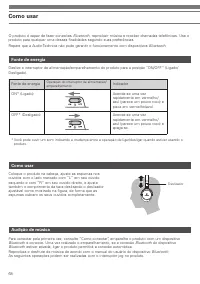
Page 68 - Como usar; Fonte de energia
68 Como usar O produto é capaz de fazer conexões Bluetooth, reproduzir música e receber chamadas telefônicas. Use o produto para qualquer uma dessas finalidades segundo suas preferências.Repare que a Audio-Technica não pode garantir o funcionamento com dispositivos Bluetooth. Fonte de energia Audiçã...
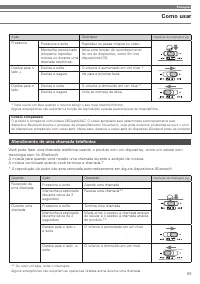
Page 69 - Atendimento de uma chamada telefônica; tecnologia sem fio
Português 69 Atendimento de uma chamada telefônica Você pode fazer uma chamada telefônica usando o produto com um dispositivo, como um celular com tecnologia sem fio Bluetooth. A música para quando você recebe uma chamada durante a audição de música. A música continuará quando você terminar a chamad...
Page 70 - Outras funções; Função de bypass; Uso do cabo de fones de ouvido para smartphones
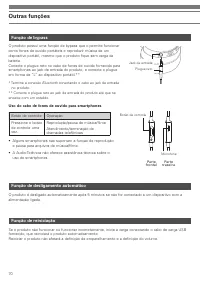
70 Outras funções Função de bypass Função de desligamento automático Função de reiniciação O produto possui uma função de bypass que o permite funcionar como fones de ouvido portáteis e reproduzir música de um dispositivo portátil, mesmo que o produto fique sem carga da bateria.Conecte o plugue reto...
Page 71 - Limpeza; sujo pode causar o salto ou distorção do som.
Português 71 Limpeza Adquira o hábito de limpar o produto regularmente para garantir que ele dure um longo período de tempo. Não use álcool, diluentes de tinta ou outros solventes para a limpeza. • Use um pano seco para limpar os fones de ouvido e o controlador em linha.• Depois de usar o cabo forne...
Page 72 - Detecção e solução de problemas
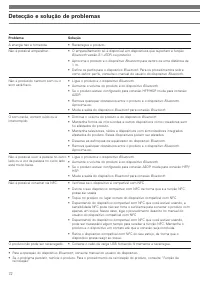
72 Detecção e solução de problemas Problema Solução A energia não é fornecida. • Recarregue o produto. Não é possível emparelhar. • O emparelhamento só é disponível em dispositivos que suportam a função Bluetooth versão 2.1+EDR ou posterior. • Aproxime o produto e o dispositivo Bluetooth para dentro...
Page 73 - Especificações de comunicação; Fones de ouvido; Especificações
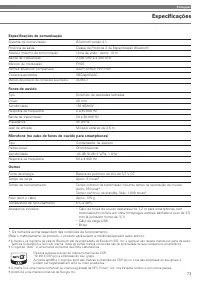
Português 73 Especificações de comunicação Sistema de comunicação Bluetooth versão 4.1 Potência de saída Classe de Potência 2 de Especificação Bluetooth Alcance máximo de comunicação Linha de visão - aprox. 10 m Banda de frequências 2,402 GHz a 2,480 GHz Método de modulação FHSS Perfiles Bluetooth c...
Page 74 - Введение
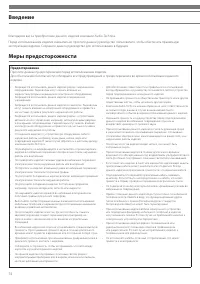
74 Благодарим вас за приобретение данного изделия компании Audio-Technica. Перед использованием изделия внимательно прочтите данное руководство пользователя, чтобы обеспечить правильную эксплуатацию изделия. Сохраните данное руководство для использования в будущем. Предостережение Прочтите данные пр...
Page 75 - Меры предосторожности
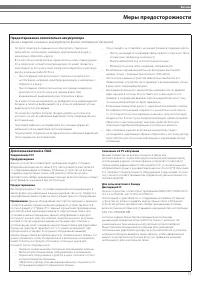
Russian 75 Меры предосторожности Предостережения относительно аккумулятора Данное изделие оснащено аккумулятором (литий-полимерной батареей). • Не трите глаза при попадании в них электролита. Тщательно промойте их чистой водой, например, водопроводной водой, и немедленно обратитесь к врачу. • В случ...
Page 76 - Наименования деталей и функции
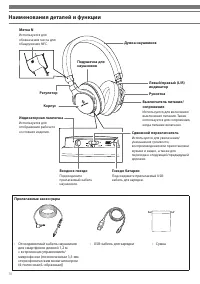
76 Наименования деталей и функции Прилагаемые аксессуары • Отсоединяемый кабель наушников для смартфонов длиной 1,2 м с встроенным управлением/ микрофоном (позолоченным 3,5-мм стереофоническим мини-штекером (4-полюсным/L-образным)) • USB-кабель для зарядки • Сумка Гнездо батареи Подсоедините прилага...
Page 77 - Зарядка
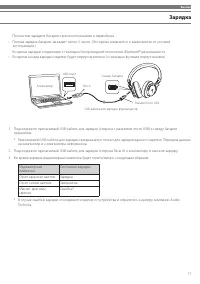
Russian 77 Зарядка • Полностью зарядите батарею при использовании в первый раз.• Полная зарядка батареи занимает около 5 часов. (Это время изменяется в зависимости от условий эксплуатации.) • Во время зарядки соединение с помощью беспроводной технологии Bluetooth® разъединяется. • Во время начала за...
Page 78 - Соединение; Информация о сопряжении
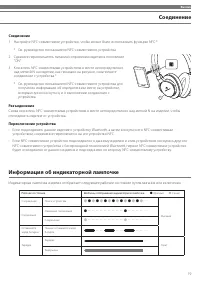
78 Соединение Информация о сопряжении Подсоединение к NFC-совместимому устройству Выполнение сопряжения Для подсоединения изделия к устройству Bluetooth необходимо выполнить сопряжение (регистрацию) изделия с данным устройством. После выполнения сопряжения в их повторном сопряжении нет необходимости...
Page 79 - Информация об индикаторной лампочке
Russian 79 Соединение Соединение 1 Настройте NFC-совместимое устройство, чтобы можно было использовать функцию NFC.* * См. руководство пользователя NFC-совместимого устройства. 2 Сдвиньте переключатель питания/сопряжения изделия в положение “ON”. 3 Коснитесь NFC-совместимым устройством в месте непос...
Page 80 - Использование; Источник питания
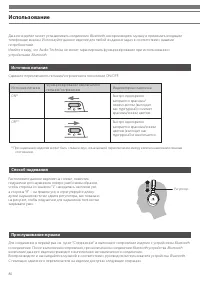
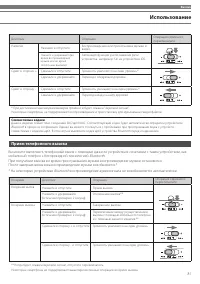
80 Использование Данное изделие может устанавливать соединения Bluetooth, воспроизводить музыку и принимать входящие телефонные вызовы. Используйте данное изделие для любой из данных задач в соответствии с вашими потребностями.Имейте в виду, что Audio-Technica не может гарантировать функционирование...
Page 81 - Прием телефонного вызова; мобильный телефон с беспроводной технологией
Russian 81 Прием телефонного вызова Вы можете выполнить телефонный вызов с помощью данного устройства в сочетании с таким устройством, как мобильный телефон с беспроводной технологией Bluetooth. При получении вызова во время прослушивания музыки воспроизведение музыки остановится. После завершения в...
Page 82 - Другие функции; Функция сквозного воспроизведения; Использование кабеля наушников для смартфонов
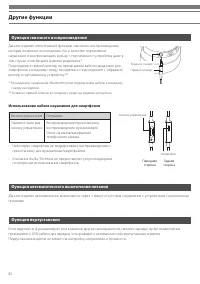
82 Другие функции Функция сквозного воспроизведения Функция автоматического выключения питания Функция переустановки Данное изделие обеспечивает функцию сквозного воспроизведения, которая позволяет использовать его в качестве портативных наушников и воспроизводить музыку с портативного устройства да...
Page 83 - Очистка; штекера может привести к прерыванию или искажению звука.
Russian 83 Очистка Выработайте привычку регулярно очищать изделие для обеспечения длительного срока его эксплуатации. Не используйте для очистки спирт, разбавители для краски или другие растворители. • Используйте сухую ткань для очистки наушников и встроенного блока управления.• После использования...
Page 84 - Поиск и устранение неисправностей
84 Поиск и устранение неисправностей Возможная неисправность Метод устранения Не подается питание. • Зарядите изделие. Не выполняется сопряжение. • Сопряжение доступно на устройствах, поддерживающих Bluetooth версии 2.1+EDR или более поздней. • Расположите изделие и устройство Bluetooth ближе друг к...
Page 85 - Технические характеристики связи; Наушники; Технические характеристики
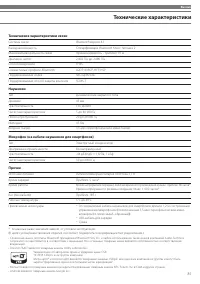
Russian 85 Технические характеристики связи Система связи Bluetooth версия 4.1 Выходная мощность Спецификация Bluetooth Класс питания 2 Максимальная дальность связи Прямая видимость - приблиз. 10 м Диапазон частот 2,402 ГГц до 2,480 ГГц Способ модуляции FHSS Совместимые профили Bluetooth A2DP, AVRCP...
Page 86 - 소개
86 Audio-Technica 제품을 구매해 주셔서 감사합니다. 본 제품을 올바르게 사용할 수 있도록 제품을 사용하기 전에 사용설명서를 빠짐없이 읽으십시오 . 나중에 참조할 수 있도록 이 설명서를 보관하십시오. 주의 본 제품을 사용하기 전에 이러한 주의사항을 읽으십시오. 안전을 보장하기 위해 제품을 사용하는 동안 모든 경고 및 주의사항을 준수하십시오. • 의료 장비 근처에서 제품을 사용하지 마십시오. 무선파가 심장박동기와 전자 의료 장비에 영향을 미칠 수 있습니다. 의료 시설 내에서 제품을 사용하지 마십시오. • 항공기 안에서 제...
Page 87 - 안전 주의사항
한국어 87 안전 주의사항 충전지에 대한 주의사항 본 제품에는 충전지(리튬 폴리머 전지)가 내장되어 있습니다. • 전지액이 눈에 들어간 경우 눈을 비비지 마십시오 . 수돗물과 같은 깨끗한 물로 완전히 헹구고 즉시 의사의 진료를 받으십시오 . • 전지액이 누출된 경우 맨손으로 전지액을 만지지 마십시오 . 전지액이 제품 안에 남아 있으면 고장의 원인이 될 수 있습니다 . 전지액이 누출된 경우 지역 Audio-Technica 판매점에 문의하십시오 . – 전지액을 삼킨 경우 수돗물과 같은 깨끗한 물로 입 안을 완전히 헹구고 즉시 의사의 진...
Page 88 - 부품 이름 및 기능; • 스마트폰용 탈착형 1.2m 헤드폰
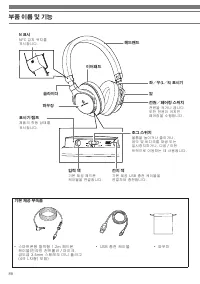
88 부품 이름 및 기능 기본 제공 부속품 • 스마트폰용 탈착형 1.2m 헤드폰 케이블(인라인 컨트롤러/마이크, 금도금 3.5mm 스테레오 미니 플러그(4극 L자형) 포함) • USB 충전 케이블 • 파우치 전지 잭 기본 제공 USB 충전 케이블을 연결하여 충전합니다. 입력 잭 기본 제공 헤드폰 케이블을 연결합니다. 조그 스위치 볼륨을 높이거나 줄이거나, 음악 및 비디오를 재생 또는 일시정지하거나, 다음/이전 트랙으로 이동하는 데 사용됩니다. 표시기 램프 제품의 작동 상태를 표시합니다. 하우징 슬라이더 좌/우(L/R) 표시기 암...
Page 89 - 충전 방법
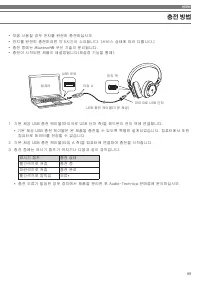
한국어 89 충전 방법 • 처음 사용할 경우 전지를 완전히 충전하십시오.• 전지를 완전히 충전하려면 약 5시간이 소요됩니다. (서비스 상태에 따라 다릅니다.)• 충전 중에는 Bluetooth® 무선 기술이 분리됩니다. • 충전이 시작되면 제품이 재설정됩니다(재설정 기능을 통해). 1 기본 제공 USB 충전 케이블(마이크로 USB 단자 측)을 헤드폰의 전지 잭에 연결합니다. * 기본 제공 USB 충전 케이블은 본 제품을 충전할 수 있도록 특별히 설계되었습니다. 컴퓨터에서 또한 컴퓨터로 데이터를 전송할 수 없습니다. 2 기본 제공 US...
Page 90 - 연결 방법; 페어링 정보
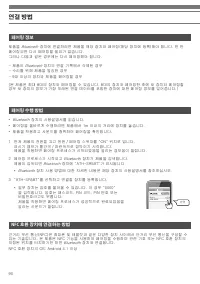
90 연결 방법 페어링 정보 NFC 호환 장치에 연결하는 방법 페어링 수행 방법 제품을 Bluetooth 장치에 연결하려면 제품을 해당 장치와 페어링(해당 장치에 등록)해야 합니다. 한 번 페어링되면 다시 페어링할 필요가 없습니다.그러나 다음과 같은 경우에는 다시 페어링해야 합니다. - 제품이 Bluetooth 장치의 연결 기록에서 삭제된 경우 - 수리를 위해 제품을 발송한 경우- 9대 이상의 장치와 제품을 페어링할 경우 (본 제품은 최대 8대의 장치와 페어링할 수 있습니다. 8대의 장치와 페어링한 후에 새 장치와 페어링할 경우 새...
Page 91 - 연결; 표시기 램프 표시 정보
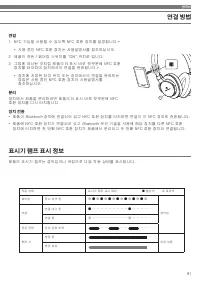
한국어 91 연결 방법 연결 1 NFC 기능을 사용할 수 있도록 NFC 호환 장치를 설정합니다.* * 사용 중인 NFC 호환 장치는 사용설명서를 참조하십시오. 2 제품의 전원/페어링 스위치를 “ON” 위치로 밉니다. 3 그림에 표시된 것처럼 제품의 N 표시 바로 윗부분에 NFC 호환 장치를 터치하여 장치에서의 연결을 완료합니다.* * 장치에 지정된 터치 위치 또는 장치에서의 연결을 완료하는 방법은 사용 중인 NFC 호환 장치의 사용설명서를 참조하십시오. 분리 장치에서 제품을 분리하려면 제품의 N 표시 바로 윗부분에 NFC 호환 장치...
Page 92 - 사용 방법; 전원 공급
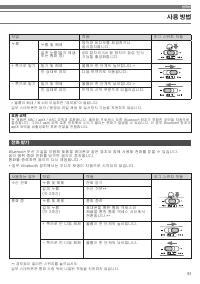
92 사용 방법 본 제품은 Bluetooth 연결을 구성하고, 음악을 재생하고, 수신 전화를 받을 수 있습니다. 사용자의 요구에 맞춰 이러한 목적 중 하나로 제품을 사용할 수 있습니다.Audio-Technica는 Bluetooth 장치와 함께 사용할 경우 작동을 보장할 수 없습니다. 전원 공급 음악 청취 착용 방법 전원/페어링 스위치를 ON/OFF 위치로 밉니다. 처음으로 연결할 경우 “연결 방법”을 참조하여 Bluetooth 장치와 제품을 페어링한 다음 연결합니다. 일단 페어링이 수행되면 Bluetooth 장치의 Bluetooth...
Page 93 - 전화 받기; 호환 코텍
한국어 93 전화 받기 Bluetooth 무선 기술을 이용해 제품을 휴대폰과 같은 장치와 함께 사용해 전화를 받을 수 있습니다.음악 청취 중에 전화를 받으면 음악이 중지됩니다.통화를 종료하면 음악이 다시 재생됩니다.** 일부 Bluetooth 장치에서는 오디오 재생이 자동으로 시작되지 않습니다. * 볼륨이 최대/최소에 도달하면 "경보음"이 들립니다.일부 스마트폰은 음악/동영상 파일 재생 및 일시정지 기능을 지원하지 않습니다. ** 경보음이 들리면 스위치를 놓으십시오.일부 스마트폰은 통화 도중 위에 나열된 작동을 지원하...
Page 94 - 기타 기능; 플레이쓰루 기능; 이 제품은 전원을 켠 상태에서 장치에 연결하지 않으면 5분 후에 자동으로 꺼집니다.; 스마트폰용 헤드폰 케이블 사용; 제어 버튼
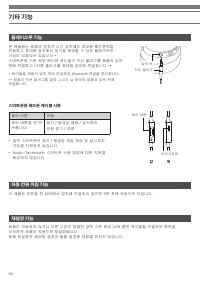
94 기타 기능 플레이쓰루 기능 자동 전원 꺼짐 기능 재설정 기능 본 제품에는 제품의 전지가 나간 경우에도 휴대용 헤드폰처럼 작동하고 휴대용 장치에서 음악을 재생할 수 있는 플레이쓰루 기능이 내장되어 있습니다.*스마트폰용 기본 제공 헤드폰 케이블의 직선 플러그를 제품의 입력 잭에 연결하고 L자형 플러그를 휴대용 장치에 연결합니다.** * 케이블을 제품의 입력 잭에 연결하여 Bluetooth 연결을 분리합니다. ** 제품의 직선 플러그를 딸깍 소리가 날 때까지 제품의 입력 잭에 연결합니다. 이 제품은 전원을 켠 상태에서 장치에 연결하...
Page 95 - 청소
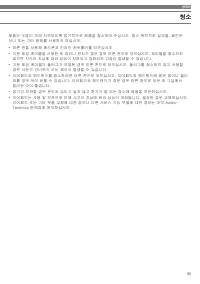
한국어 95 청소 제품의 수명이 오래 지속되도록 정기적으로 제품을 청소하여 주십시오. 청소 목적으로 알코올, 페인트 신나 또는 기타 용제를 사용하지 마십시오. • 마른 천을 사용해 헤드폰과 인라인 컨트롤러를 닦으십시오. • 기본 제공 케이블을 사용한 후 땀이나 먼지가 묻은 경우 마른 천으로 닦으십시오. 케이블을 청소하지 않으면 시간이 지남에 따라 성능이 저하되고 경화되어 고장이 발생할 수 있습니다. • 기본 제공 케이블의 플러그가 오염된 경우 마른 천으로 닦으십시오. 플러그를 청소하지 않고 사용할 경우 사운드 건너뛰기 또는 왜곡이 ...
Page 96 - 문제 해결; 문제
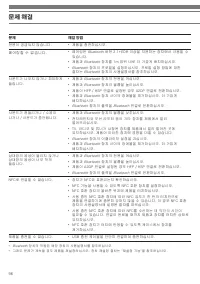
96 문제 해결 문제 해결 방법 전원이 공급되지 않습니다. • 제품을 충전하십시오. 페어링할 수 없습니다. • 페어링은 Bluetooth 버전 2.1+EDR 이상을 지원하는 장치에서 사용할 수 있습니다. • 제품과 Bluetooth 장치를 1m 범위 내로 더 가깝게 배치하십시오. • Bluetooth 장치의 프로필을 설정하십시오. 프로필 설정 방법에 대한 절차는 Bluetooth 장치의 사용설명서를 참조하십시오. 사운드가 나오지 않거나 희미하게 들립니다. • 제품과 Bluetooth 장치의 전원을 켜십시오. • 제품과 Bluetoo...
Page 97 - 통신 사양; 사양
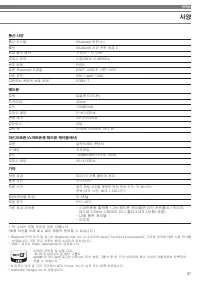
한국어 97 통신 사양 통신 시스템 Bluetooth 버전 4.1 출력 Bluetooth 사양 전력 등급 2 최대 통신 범위 가시선 - 약 10m 주파수 대역 2.402GHz~2.480GHz 변조 방법 FHSS 호환 Bluetooth 프로필 A2DP, AVRCP, HFP, HSP 지원 코덱 SBC/aptX/AAC 지원되는 콘텐츠 보호 방법 SCMS-T 헤드폰 유형 밀폐형 다이내믹 드라이버 45mm 감도 103dB/mW 주파수 응답 5~40,000Hz 전송 대역 20~20,000Hz 임피던스 45Ω 입력 잭 3.5mm 스테레오 미니 ...
Page 98 - 说明
98 感谢您购买“鐵三角”产品。在使用产品之前,请全文浏览这本用户手册以确保您将正确地使用本产品。请妥善保管本手册以供将来参考。 注意 请在使用产品之前阅读这些注意。 为了确保安全,使用产品时请注意全部警告和提醒。 • 请勿在医疗设备附近使用本产品。无线电波可能会影响心脏 起搏器和医疗电子设备。请勿在医疗设施内使用本产品。 • 请勿在飞机上使用本产品。无线电波可能会导致电子设备发 生故障而引发严重事故。 • 请勿在自动门、火警报警器等自动控制装置附近使用本产 品。无线电波可能会导致电子设备发生故障而引发严重事 故。 • 如果您遇到本产品的任何故障如噪音、冒烟、气味、发热或损 坏,请断开其与设备...
Page 99 - 安全预防措施
简体中文 99 安全预防措施 可充电电池注意事项 本产品配备有一块可充电电池(锂聚合物电池)。 • 如果电池液进入眼睛,请勿揉搓。应用洁净的水(如自来水) 彻底冲洗并立即就医。 • 如果电池液泄漏,请勿用手接触液体。如果液体留在产品 内,可能会导致故障。如果电池液泄漏,请联系当地“鐵三 角”经销商。 – 如果电池液进入您的口中,应用洁净的水(如自来水)反 复漱洗并立即就医。 – 如果您的皮肤或衣服沾到了液体,立即用水清洗受到影响 的皮肤或衣服。如果您感到皮肤刺激,请就医。 • 请勿加热、拆卸或改装电池,也不要将其靠近火源,以避免泄 漏,产生热量会发生爆炸。 • 请勿试图用钉子刺穿,用锤子打或踩...
Page 100 - 结构名称及功能; • USB 充电线
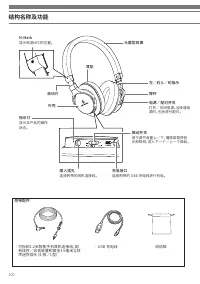
100 结构名称及功能 附带配件 • 可拆卸1.2米智能手机耳机连接线,配 有线控/收音装置和镀金3.5毫米立体 声迷你插头(4-极/L型) • USB 充电线 • 收纳袋 充电接口 连接附带的 USB 充电线进行充电。 输入插孔 连接附带的耳机连接线。 微动开关 用于调节音量上/下、播放或暂停音 乐和视频、进入下一个/上一个曲目。 指示灯 显示本产品的操作 状态。 外壳 滑动片 左/右(L/R)指示 臂杆 耳垫 电源/配对开关 打开/关闭电源。当接通电 源时,也会进行配对。 头戴型耳罩 N-Mark 显示检测NFC的位置。
Page 101 - 如何充电
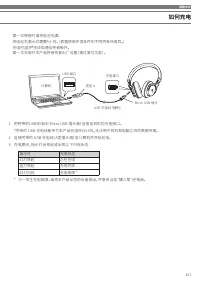
简体中文 101 如何充电 • 第一次使用时请将电池充满。• 将电池充满大约需要5小时。 (根据使用环境条件的不同而有所差异。) • 充电时 蓝牙®无线电通信将被断开。 • 第一次充电时本产品将被恢复出厂设置(通过复位功能)。 1 把附带的USB充电线(Micro USB 插头端)连接至耳机的充电接口。 *附带的 USB 充电线是专为本产品充电所设计的。无法用于耳机和电脑之间的数据传输。 2 连接附带的 USB 充电线(A型插头端)至计算机并开始充电。3 充电期间,指示灯会亮起或出现以下闪烁状态: 指示灯 充电状态 红灯亮起 正在充电 蓝灯亮起 充电完成 红灯闪烁 充电故障* * 万一发生充电...
Page 102 - 如何连接; 关于配对
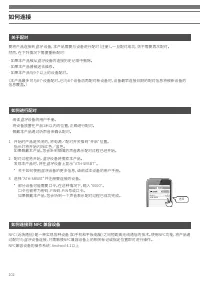
102 如何连接 关于配对 如何连接到 NFC 兼容设备 如何进行配对 要将产品连接到 蓝牙 设备,本产品需要与设备进行配对(注册)。一旦配对成功,则不需要再次配对。 然而,在下列情况下需要重新配对: - 如果本产品被从 蓝牙设备的连接历史记录中删除。 - 如果本产品曾被送去维修。- 如果本产品与9个以上的设备配对。 (本产品最多可与8个设备配对。已与8个设备后再配对新设备时,设备最早连接日期的配对信息将被新设备的 信息覆盖。) NFC(近场通信)是一种实现各种设备(如手机和平板电脑)之间短距离无线通信的技术。使用NFC功能,将产品通 过配对与 蓝牙设备连接,只需触摸NFC兼容设备上的相关标记...
Page 103 - 连接; 关于指示灯显示
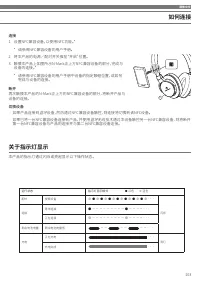
简体中文 103 如何连接 连接 1 设置NFC兼容设备,以使用NFC功能。* * 请参阅NFC兼容设备的用户手册。 2 将本产品的电源/配对开关推至“开启”位置。3 触摸本产品上如图所示N-Mark正上方NFC兼容设备的部分,完成与 设备的连接。** 请参阅NFC兼容设备的用户手册中设备的指定触碰位置,或如何 完成与设备的连接。 断开 再次触摸本产品的N-Mark正上方的NFC兼容设备的部分,将断开产品与 设备的连接。 切换设备 • 如果产品连接到 蓝牙设备,然后通过NFC兼容设备触控,则连接将切换到该NFC设备。 • 如果已将一台NFC兼容设备连接到产品,并使用 蓝牙无线技术通过本设备触控...
Page 104 - 如何使用; 电源
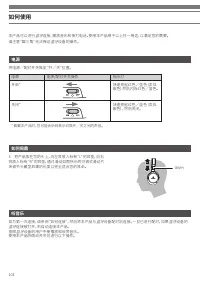
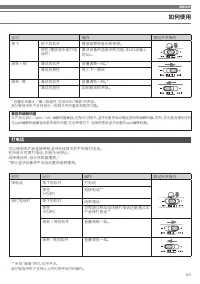
104 如何使用 本产品可以进行 蓝牙连接、播放音乐和接打电话。使用本产品用于以上任一用途,以满足您的需要。 请注意“鐵三角”无法保证 蓝牙设备的操作。 电源 听音乐 如何佩戴 将电源/配对开关推至“开/关”位置。 如为第一次连接,请参阅“如何连接”,然后将本产品与 蓝牙设备配对后连接。一旦已进行配对,如果蓝牙设备的 蓝牙连接被打开,则自动连接本产品。 按照 蓝牙设备的用户手册播放和欣赏音乐。 使用本产品的微动开关可进行以下操作。 3 把产品放在您的头上,向左耳放入标有“L”的耳垫,向右 耳放入标有“R”的耳垫,通过滑动如图所示的可调式滑动片 来调节头戴型耳罩的长度以完全适合您的耳朵。 * 佩...
Page 105 - 打电话; 兼容的编解码器
简体中文 105 打电话 可以使用本产品连接带有 蓝牙无线技术的手机接打电话。 在听音乐时拨打电话,则音乐会停止。 结束通话时,音乐将恢复播放。**部分 蓝牙设备将不会自动重启音频播放。 * 音量达到最大/最小限度时,您会听到“嘀嘀”的声音。 部分智能手机不支持音乐/视频文件的重放和暂停功能。 ** 听到“嘀嘀”声时,松开开关。 部分智能手机不支持以上所列的呼叫时的操作。 兼容的编解码器 本产品与SBC/aptX/AAC 编解码器兼容。在配对过程中, 蓝牙设备将自动确定适用的编解码器。然而,您可能会遇到可听 见aptX编解码器兼容设备声音的问题。在这种情况下,连接前禁用 蓝牙设备的aptX编解...
Page 106 - 其他功能; 连播功能; 使用智能手机耳机连接线
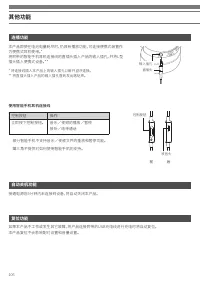
106 其他功能 连播功能 自动关机功能 复位功能 本产品即使在电池电量耗尽时,仍具有播放功能,可连接便携式装置作 为便携式耳机使用。* 将附带的智能手机耳机连接线的直插头插入产品的输入插孔,并将L型 插头插入便携式设备。** * 将连接线插入本产品上的输入插孔以断开 蓝牙连接。 ** 将直插头插入产品的输入插孔直到发出喀哒声。 接通电源后5分钟内未连接到设备,将自动关闭本产品。 如果本产品不工作或发生其它故障,将产品连接附带的USB充电线进行充电时将自动复位。 本产品复位不会影响配对设置和音量设置。 • 部分智能手机不支持音乐/视频文件的重放和暂停功能。• 鐵三角不提供对如何使用智能手机的支...
Page 107 - 清洁; 移逐渐硬化,导致发生故障。
简体中文 107 清洁 养成定期清洁本产品的习惯,以确保产品可长时期使用。请勿使用酒精,油漆稀释剂或其他溶剂来清洁耳机。• 用一块干布清洁耳机和线控/收音装置。• 使用附带的连接线后,如有汗水或脏污,请用干布擦拭。连接线如未清洁干净可能会导致劣化,并随着时间的推 移逐渐硬化,导致发生故障。 • 如果发现随附的连接线的插头有污垢,请用干布擦拭。使用未清洁的插头会造成断声或失真。• 用一块干布擦拭以清洁耳垫和头戴型耳罩。如果汗或水在上面干掉,耳垫和头戴型耳罩可能会褪色。如果耳垫 和头戴型耳罩受潮,我们建议您用一块干布擦拭它们,并让它们在阴凉处晾干。 • 针对长期储存,请将本产品放在一个通风良好,远...
Page 108 - 故障排解; 无法配对。
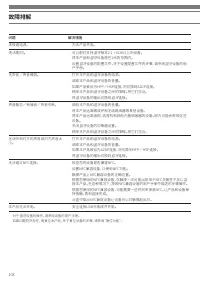
108 故障排解 问题 解决措施 未接通电源。 • 为本产品充电。 无法配对。 • 可以配对支持 蓝牙版本2.1 + EDR以上的设备。 • 将本产品和 蓝牙设备放在1米的范围内。 • 设置 蓝牙设备的配置文件。关于设置配置文件的步骤,请参阅蓝牙设备的用 户手册。 无声音/声音微弱。 • 打开本产品和 蓝牙设备的电源。 • 调高本产品和 蓝牙设备的音量。 • 如果产品被设为HFP/HSP连接,则切换到A2DP连接。• 移除本产品和 蓝牙设备之间的障碍。将它们拉近。 • 将 蓝牙设备的输出切换到蓝牙连接。 声音飘忽/有噪音/声音中断。 • 调低本产品和 蓝牙设备的音量。 • 将本产品远离微波炉和...
Page 109 - 规格
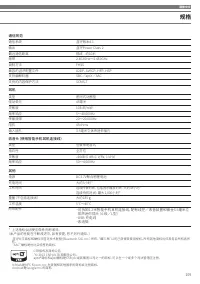
简体中文 109 通信规范 通信系统 蓝牙版本4.1 输出 蓝牙Power Class 2 最远通信距离 视线 - 约10米 频带 2.402GHz~2.480GHz 调制方法 FHSS 兼容的 蓝牙配置文件 A2DP、AVRCP、HFP、HSP 支持编解码器 SBC/aptX/AAC 支持的内容保护方法 SCMS-T 耳机 类型 密闭式动圈型 驱动单元 45毫米 灵敏度 103dB/mW 频率响应 5~40,000Hz 传输频带 20~20,000Hz 阻抗 45ohms 输入插孔 3.5毫米立体声迷你插孔 收音头(使用智能手机耳机连接线) 类型 驻极体电容式 指向性 全方位 灵敏度 -44...
Page 110 - 說明
110 感謝您購買鐵三角產品。使用前,請務必詳閱本使用說明書,確保以正確的方式使用本產品。請妥善保管本使用說明書以備日後參閱。 注意 使用本產品前請詳閱注意事項。 為防範事故於未然,請務必遵守下記事項。 • 請勿在醫療設備附近使用本產品。無線電波可能會影響心律 調節器和醫療電子設備。請勿在醫療設施內使用本產品。 • 請勿在飛機上使用本產品。無線電波可能會影響電子設備, 並因電子設備故障而引起意外事故。 • 請勿在自動門和火災警報器等的自動控制裝置附近使用本 產品。無線電波可能會影響電子設備,並因電子設備故障而 引起意外事故。 • 若發覺本產品有任何異常狀況如噪音、煙霧、氣味,或是發 熱、破損等...
Page 111 - 安全上的注意事項
繁體中文 111 安全上的注意事項 充電電池注意事項 本產品配備有一只充電電池(鋰聚合物電池)。 • 電池液不慎誤入眼睛時,請勿搓揉眼睛。應立刻以清水 (自來水等)充分沖洗,並儘速就醫診療。 • 電池液外漏時,請勿直接用手接觸液體。若液體殘留在產品 內部,可能會導致故障。 電池液外漏時,請聯繫當地的「鐵三角」經銷商。 – 若不慎誤食電池液,請立刻以清水(自來水等)充分漱 洗,並儘速就醫診療。 – 若電池液附著於皮膚或衣類,請立刻以清水沖洗。若皮膚 感到任何不適,請儘速就醫診療。 • 切勿加熱、拆解或改造電池,或丟棄至火中,以避免洩漏、發 熱或爆炸。 • 請勿以釘子刺插、以鐵鎚敲打或踩踏電池,以...
Page 112 - 結構名稱及其功能; 附屬零配件
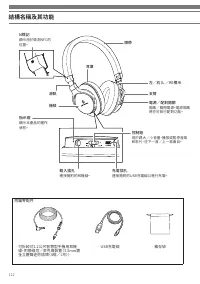
112 結構名稱及其功能 附屬零配件 • 可拆卸式1.2公尺智慧型手機用耳機 線,附帶線控/麥克風裝置(3.5mm鍍 金立體聲迷你插頭(4極/L形)) • USB充電線 • 攜存袋 充電插孔 連接隨附的USB充電線以進行充電。 輸入插孔 連接隨附的耳機線。 控制鈕 用於調大/小音量、播放或暫停音樂 和影片、往下一首/上一首曲目。 指示燈 顯示本產品的運作 狀態。 機殼 滑軌 左/右(L/R)標示 支臂 耳罩 電源/配對開關 開啟/關閉電源。電源開啟 時亦可執行配對功能。 頭帶 N標記 顯示用於檢測NFC的 位置。
Page 113 - 如何充電
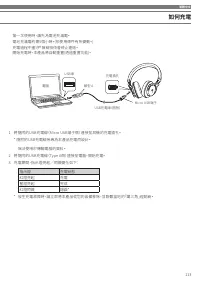
繁體中文 113 如何充電 • 第一次使用時,請先為電池充滿電。• 電池充滿電約需5個小時。(依使用條件有所變動。)• 充電過程中 藍牙® 無線技術會終止連結。 • 開始充電時,本產品將自動重置(透過重置功能)。 1 將隨附的USB充電線(Micro USB端子側)連接至耳機的充電插孔。 * 隨附的USB充電線係專為本產品充電而設計。 無法使用於傳輸電腦的資料。 2 將隨附的USB充電線(Type A側)連接至電腦,開始充電。3 充電期間,指示燈亮起/閃爍變化如下: 指示燈 充電狀態 紅燈亮起 充電 藍燈亮起 完成 紅燈閃爍 錯誤* * 發生充電故障時,請立即將本產品從您的設備移除,並聯繫當地...
Page 114 - 如何連接; 關於配對
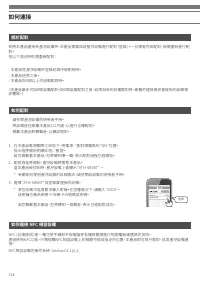
114 如何連接 關於配對 如何連接 NFC 相容設備 如何配對 欲將本產品連接到 藍牙設備時,本產品需要與該藍牙設備進行配對(登錄)。一旦兩者完成配對,無需重新進行配 對。但以下情況時則需重新配對: - 本產品從 藍牙設備的登錄紀錄中被刪除時。 - 本產品送修之後。- 本產品與9個以上的設備配對時。 (本產品最多可與8個設備配對。與8個設備配對之後,若再與新的設備配對時,最舊的連接資訊會被新的設備資 訊覆寫。) NFC(近場通訊)是一種可使手機和平板電腦等各種裝置間進行短距離無線通訊的技術。 透過使用NFC功能,只需碰觸NFC相容設備上的相關符號或指定的位置,本產品即可執行配對,並與 藍牙設...
Page 115 - 連接; 關於指示燈顯示
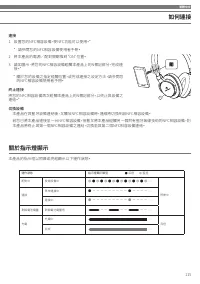
繁體中文 115 如何連接 連接 1 設置您的NFC相容設備,使NFC功能可以使用。* * 請參閱您的NFC相容設備使用者手冊。 2 將本產品的電源/配對開關推到“ON”位置。 3 請如圖示,將您的NFC相容設備碰觸本產品上的N標記部分,完成連 接。* * 關於您的設備之指定碰觸位置,或完成連接之設定方法,請參閱您 的NFC相容設備使用者手冊。 終止連接 將您的NFC相容設備再次碰觸本產品上的N標記部分,以終止與設備之 連結。* 切換設備 • 本產品在與藍牙設備連結後,又觸及NFC相容設備時,連線將切換到該NFC相容設備。• 若您已將本產品連接至一台NFC相容設備,接著又將本產品碰觸另一個附有...
Page 116 - 使用方法; 電源供應
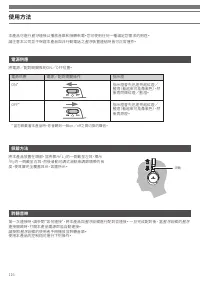
116 使用方法 本產品可進行 藍牙連接以播放音樂和接聽來電。您可使用任何一種滿足您需求的用途。 請注意本公司並不保證本產品與非行動電話之 藍牙裝置連結時皆可正常運作。 電源供應 聆聽音樂 佩戴方法 將電源/配對開關推到ON/OFF位置。 第一次連接時,請參閱“如何連接” ,將本產品與 藍牙設備進行配對並連接。 一旦完成配對後, 當藍牙設備的藍牙 連接開啟時,打開本產品電源即能自動連接。 請按照 藍牙設備的使用者手冊播放並聆聽音樂。 使用本產品的控制鈕可進行下列操作。 將本產品放置在頭部,並將標示「L」的一側戴至左耳,標示 「R」的一側戴至右耳,然後滑動可調式滑軌來調節頭帶的長 度,使耳罩完全...
Page 117 - 接聽電話
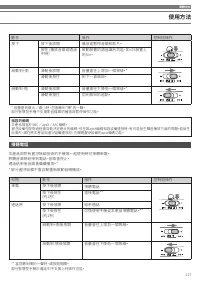
繁體中文 117 接聽電話 本產品與附有 藍牙無線技術的手機等一起使用時可接聽來電。 聆聽音樂時若接到電話,音樂會停止。 通話結束後音樂會繼續播放。** 部分 藍牙設備不會自動重新啟動音頻播放。 * 音量達到最大/最小時,您會聽到“嗶”的一聲。 部分智慧型手機不支援影音檔案的播放與暫停操作功能。 ** 當您聽到嗶的一聲時,請放開開關。 部分智慧型手機於通話中不支援上列操作功能。 相容的編碼 本產品相容於SBC/aptX/AAC編碼。 藍牙設備在配對過程會自動決定適合的編碼,但在與aptX編碼相容設備連接時,有可能發生聲音播放方面的問題。若發生 此情形,請在將本產品與 藍牙設備連接前,先關閉藍芽...
Page 118 - 直通聆賞功能; 智慧型手機用導線使用說明
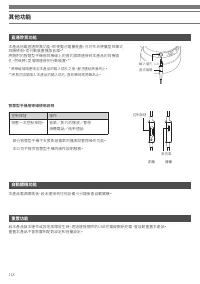
118 其他功能 直通聆賞功能 自動關機功能 重置功能 本產品搭載直通聆賞功能,即使電池電量耗盡,亦可作為便攜型耳罩式 耳機使用,從行動裝置播放音樂。* 將隨附的智慧型手機用耳機線上的直式插頭連接到本產品的耳機插 孔,然後將L型插頭連接到行動裝置。** * 將導線插頭連接至本產品的輸入插孔之後, 藍牙連結將會終止。 **將直式插頭插入本產品的輸入插孔,直到聽到喀嗒聲為止。 本產品電源開啟後,若未連接到任何設備,5分鐘後會自動關機。 若本產品無法運作或其他故障發生時,透過連接隨附的USB充電線開始充電,會自動重置本產品。 重置本產品不會影響到配對設定和音量設定。 • 部分智慧型手機不支援影音檔案...
Page 119 - 清潔保養方法; 化而變硬,並造成故障。
繁體中文 119 清潔保養方法 為了能夠長久使用,請養成定期清潔本產品的習慣。清潔保養時,請勿使用酒精、油漆稀釋劑或其他有機溶劑。• 請用乾布擦拭耳機和導線的控制器。• 隨附的導線使用後若有汗水或灰塵等,請用乾布擦淨。如果在髒污的狀態下使用,可能會導致耳機線隨時間劣 化而變硬,並造成故障。 • 隨附導線的插頭若有髒汙,請以清潔的乾布擦拭。在髒污狀態下持續使用插頭,會導致聲音不穩定或失真。• 請以清潔的乾布擦拭耳罩和頭帶。若不擦拭汗水而留下汗漬,可能導致耳罩、頭帶褪色。如果受潮,建議用乾布 擦拭去除污垢後在陰涼處風乾。 • 長期不使用時,請避開高溫、潮濕處,存放於通風良好的地方。• 耳罩為消耗品...
Page 120 - 故障排除; 無法配對。
120 故障排除 問題 解決措施 電源未供電。 • 請為產品充電。 無法配對。 • 支援 藍牙版本2.1+ EDR或更新版本的設備才可進行配對。 • 本產品和 藍牙設備之間的距離應在1公尺以內。 • 設定 藍牙設備的規範。有關設定藍牙規範的步驟,請參閱該設備的使用者手 冊。 無聲音/聲音微弱。 • 將本產品和 藍牙設備的電源打開。 • 將本產品和 藍牙設備的音量調高。 • 若產品被設定為HFP/HSP連接,請切換到A2DP連接。• 將本產品和 藍牙設備之間的障礙物移開。使兩者更加靠近。 • 將 藍牙設備的輸出切換到藍牙連接。 聲音顫動/有噪聲/聲音中斷。 • 將本產品和 藍牙設備的音量調低。 ...
Page 121 - 產品規格
繁體中文 121 通訊規格 通訊系統 藍牙版本4.1 輸出 藍牙 規格功率Class2 最大通訊範圍 視線 - 約10公尺 使用頻率範圍 2.402 GHz〜2.480 GHz 調頻方式 FHSS 支援 藍牙通訊協定 A2DP, AVRCP, HFP, HSP 支援編碼 SBC/aptX/AAC 支援內容保護 SCMS-T 耳機組件 型式 密閉式動圈型 驅動單元 45mm 輸出感度 103 dB/mW 頻率響應 5〜40,000 Hz 傳輸頻率 20〜20,000 Hz 阻抗 45ohms 輸入插孔 3.5mm立體聲迷你插孔 麥克風組件(在智慧型手機用導線上) 型式 駐極體電容型 指向特性 全...