Asus RP-N12 - Manual
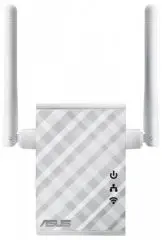
Asus RP-N12 Router – Manual, read for free online in PDF format. We hope this helps you resolve any issues you may have. If you have further questions, please contact us through the contact form.


Quick Start Guide
RP-N12
Wireless-N300 Range Extender
Q10205
First Edition
March 2015
1. Power LED
On
: RP-N12 is on
Off
: RP-N12 is off
2. Ethernet LED
On
: Device is connected to the
Ethernet port.
Off
: Device is not connected to the
Ethernet port.
3. Wi-Fi LED
Green
: RP-N12 provides the best
Wi-Fi extender performance.
Red
: RP-N12 provides poor Wi-Fi
extender performance.
Off
: RP-N12 is not connected to a
router/AP.
Quick Setup with WPS (Wi-Fi Protected Setup)
For router/Access Point(AP) with WPS support
Power On
Place your RP-N12 near your router/AP and plug it to
a power outlet.
Wait until the Wi-Fi LED starts
to blink green.
Connect via WPS (Wi-Fi Protected Setup)
1. Press the WPS button on your Router/AP. 2. Press the WPS button on your RP-
N12.
NOTE:
Ensure that your router/AP supports WPS. Otherwise, use Method TWO.
The Wi-Fi LED flashs for
about two (2) minutes and
then turns solid green or
red. The color of the LED
indicates the Wi-Fi signal
strength.
3
Place in an ideal location
After placing your RP-N12 in an ideal location, RP-N12 connects to your router/AP in about one (1) minute.
NOTES:
• Place your RP-N12 between your router/AP
and wireless device to get the best extender
performance.
• Place your RP-N12 in a location where you can
get green Wi-Fi LED.
IMPORTANT!
• To minimize interference, keep RP-N12 away from devices like cordless phones, Bluetooth devices and microwave ovens.
• We recommend that you place your RP-N12 in open or spacious location.
Enjoy!
1
2
Frequently Asked Questions (FAQ)
Q1: What should I do if my router does not support WPS?
A1:
You can use Method Two to set up RP-N12.
Q3: Why is it that I cannot see the login page after entering http://
repeater.asus.com in the browser?
A3:
Ensure that your computer is connected to the extender network only, and
set your computer to
Obtain an IP address automatically
.
Q2: Why is that the Wi-Fi LED does not light up after completing Method
Two?
A2: You may have entered the wrong router SSID and password. Reset your RP-N12,
double check your router SSID/password, and set up RP-N12 again.
Q4: How do I reset RP-N12?
A4: Using a pin, press the RESET button for about two (2) seconds. Wait for
about five (5) seconds until the Wi-Fi LED flashs red.
Method One
Reset
Your RP-N12’s wireless network name (SSID) changes
to your existing Wi-Fi network name, ending with
_RPT
and shares your router/AP’s Wireless Password.
NOTE:
Please refer to step 3 in Method
One for the best Wi-Fi performance.
Q10205_RP-N12_QSG_Special_second.indd 1
2015/4/13 15:27:34
"Loading the manual" means you need to wait until the file loads and becomes available for online reading. Some manuals are very large, and the time they take to appear depends on your internet speed.
Was this manual helpful?
About this manual
- Brand
- Asus
- Model
- RP-N12
- Document type
- Manual
- Category
- Router
- Language(s)
- English
- Pages
- 2
- File size
- 684.8 KB
- Format
Ask a question
Related manuals
More Asus Routers models
 Asus 4G-AC53U Manual
 Asus BRT-AC828 Manual
 Asus GT-AX6000 User Manual
 Asus RT-AC53 Manual
 Asus RT-AC55U Manual
 Asus RT-AC1200 Manual
 Asus RT-AX53U AX1800 User Manual
 Asus RT-AX58U v2 User Manual
 Asus RT-AX86U User Manual
 Asus RT-AX89X AX6000 User Manual
 Asus RT-AX1800S User Manual
 Asus RT-N19 Manual
 Asus RTAX3000 User Manual
 Asus WL-520GC Manual
 Asus ZenWiFi XD6 1PK AX5400 (XD6-1PK) User Manual
-User-Manual/webp/1.webp)


