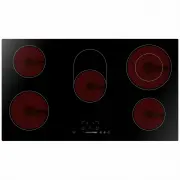
Page 10 - Congratulations; Product Overview; Top View
9 Congratulations on the purchase of your new Ceramic Hob. We recommend that you spend some time to read this Instruction / Installation Manual in order to fully understand how to install correctly and operate it. For installation, please read the installation section. Read all the safety instructio...
Page 12 - Using your Ceramic Hob; To start cooking
11 Make sure that the base of your pan is smooth, sits flat against the glass, and is the same size as the cooking zone. Always centre your pan on the cooking zone. Always lift pans off the ceramic hob – do not slide, or they may scratch the glass. Using your Ceramic Hob To start cooking • After pow...
Page 13 - When you have finished cooking
12 3. Touching the heating zone selection control, and a indicator next to the key will flash. 4. Ajust heat setting by touching the the slider control. • If you don’t choose a heat setting within 1 minute, the ceramic hob will automatically switch off. You will need to start again at step 1. • You ...
Page 14 - Double Zone Function
13 3. Turn the whole cooktop off by touching the ON/OFF control. 4. Beware of hot surfaces “H” will show which cooking zone is hot to touch. It will disappear when the surface has cooled down to a safe temperature. It can also be used as an energy saving function if you want to heat further pans, us...
Page 15 - Locking the Controls
14 2. the power level indicator flash, then press ” ◎ ” , after 5 seconds, the indicator stop flash, the double loop function is activate, and power level shows “6” and “=” alternately. Deactivate the double zone 1.Press the heating zone selection control of the double loop heating zone, the power l...
Page 16 - Using the Timer; Using the Timer as a Minute Minder
15 When the hob is in the lock mode, all the controls are disable except the ON/OFF , you can always turn the ceramic hob off with the ON/OFF control in an emergency, but you shall unlock the hob first in the next operation Over-Temperature Protection A temperature sensor equipped can monitor the te...
Page 18 - If the timer is set on one zone:
17 Setting the timer to turn one or more cooking zones off If the timer is set on one zone: 1. Touching the heating zone selection control that you want to set the timer for. 2. Touch timer control , the “10” will show in the timer display. and the “0” fiashes? 3. Set the time by touching the slider...
Page 19 - Cooking Guidelines; Cooking Tips
18 5. When the time is set, it will begin to count down immediately. The display will show the remaining time NOTE: The red dot next to power level indicator will illuminate indicating that zone is selected. 6. When cooking timer expires, the corresponding cooking zone will be switch off automatical...
Page 20 - Heat Settings
19 2. Heat up a heavy-based frying pan. 3. Brush both sides of the steak with oil. Drizzle a small amount of oil into the hot pan and then lower the meat onto the hot pan. 4. Turn the steak only once during cooking. The exact cooking time will depend on the thickness of the steak and how cooked you ...
Page 21 - Care and Cleaning
20 Care and Cleaning What? How? Important! Everyday soiling on glass (fingerprints, marks, stains left by food or non-sugary spillovers on the glass) 1. Switch the power to the cooktop off. 2. Apply a cooktop cleaner while the glass is still warm (but not hot!) 3. Rinse and wipe dry with a clean clo...
Page 22 - Hints and Tips; Technical Specification; Zones; Installation
21 Hints and Tips Problem Possible causes What to do The cooktop cannot Be turned on. No power. Make sure the cooktop is connected to the power supply and that it is switched on. Check whether there is a power outage in your home or area. If you’ve checked everything and the problem persists, call a...
Page 23 - Selection of installation equipment
22 Selection of installation equipment Cut out the work surface according to the sizes shown in the drawing. For the purpose of installation and use, a minimum of 50mm space shall be preserved around the hole. Be sure the thickness of the work surface is at least 30mm. Please select heat-resistant w...
Page 24 - Before locating the fixing brackets; Cautions
23 A(mm) B(mm) C(mm) D E Before locating the fixing brackets The unit should be placed on a stable, smooth surface (use the packaging). Do not apply force onto the controls protruding from the hob. Fix the hob on the work surface by screw four brackets on the bottom of hob (see picture) after instal...
Page 25 - Connecting the hob to the mains power supply
24 heat. 5. To avoid any damage, the sandwich layer and adhesive must be resistant to heat. 6. A steam cleaner is not to be used. 7. This ceramic can be connected only to a supply with system impedance no more than 0.427 ohm. In case necessary, please consult your supply authority for system impedan...
Page 27 - Warranty Card; ffi
Warranty Card Worldwide Appliances Pty Limited A.B.N. 45868077422O ffi ce: 48-50 Moore Street, Leichhardt N.S.W 2040 Post:Locked Bag 3000, Annandale, N.S.W 2038 P: 1300 694 583WARRANTY REGISTRATION Your ongoing satisfaction with your artusi product is important to us. We ask that you complete the en...
Page 28 - MODEL NUMBER; (a) These terms and conditions do not affect your; continued
4 Please complete and send to ARTUSI at: REPLY PAID 83617 LEICHHARDT NSW 2040 Last Name: First Name: Address: State: Postcode: Email: Home Phone: Mobile: Purchase Date: / / (Please attach proof of purchase to validate warranty) MODEL NUMBER SERIAL NUMBER (if you cannot locate the serial number pleas...