Amana AH183G35AX - User Manual
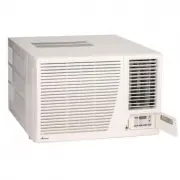
A user manual for room air conditioners covers essential operational controls, including temperature regulation, fan modes, cooling/heating settings, timers, and remote functionality. The guide highlights key features like multi-mode operation (cooling, heating, fan-only), swing adjustments, power recovery after outages, and troubleshooting common issues such as performance failures or malfunctions. Safety considerations–including high-voltage warnings–are also addressed in the documentation.


Table of Contents:
- Page 1 – Air Conditioner Operating Controls
- Page 2 – Cooling, Heating Modes, and Features
- Page 3 – Troubleshooting and Safety Precautions
- Page 4 – Service Requirements and Support Information
- Page 5 – Limited Warranty Terms for Consumers
- Page 6 – Commercial Warranty Terms
15
Operating Controls
Operating your air conditioner properly helps you to obtain the
best possible results.
This section explains proper air conditioner operation.
IMPORTANT:
•
If you turn off the air conditioner, wait at least 3 minutes
before turning it back on. This prevents the air condi-
tioner from blowing a fuse or tripping a circuit breaker.
•
Do not try to operate your air conditioner in the cooling
mode when outside temperature is below 61°F (16°C).
Do not try to operate your air conditioner in the heating
mode when outside temperature is over 86°F (30°C).
NOTES:
1.
NOTE:
Factory default setting is for °F. To convert to
°C, press the
INCREASE
S
S
S
S
S
/ DECREASE
T
T
T
T
T
buttons
simultaneously for approximately 5 seconds. To return
to °F, repeat the procedure.
2.
In the event of a power failure, your air conditioner will
operate at the previous settings when the power is
restored.
Controls
n
Power Pad (Button)
Turns air conditioner on and off. When turned on, the
display will show the room temperature.
o
Display
Shows the Set temperature when in
HEAT, COOL
or
ENERGY SAVER
mode; shows the time remaining on
the Delay Timer; shows the room temperature when in
Fan Only
mode. The
SET
light will turn on while set-
ting.
p
Temp Increase
S
/ Decrease
T
Pads
Use to set temperature when in
HEAT
(on some mod-
els),
COOL
or
ENERGY SAVER
mode. The
SET
light
will turn on while setting.
q
Delay Timer Increase
S
(+) / Decrease
T
(-) Pads
Each touch of the
INCREASE
S
S
S
S
S
/ DECREASE
T
T
T
T
T
pads
on the unit or the
INCREASE (+) / DECREASE (-)
pads
on the remote control will set the delay time when using
the
TIMER 0.5-24 hr.
The
SET
light will turn on while setting.
r
Fan Speed Pads
Use to set the fan speed to
LOW, MED, HIGH
or
AUTO
,
on the unit.
NOTE:
On the remote control, use the fan speed
IN-
CREASE (+) / DECREASE (-)
pads to set the fan speeds
to
LOW, MED
or
HIGH.
Use the
AUTO
pad to turn Auto
fan on.
s
Mode Pad
Use to set the air conditioner to
COOL, ENERGY SAVER,
FAN ONLY
or
HEAT
(on some models) mode.
t
Timer Pads
TIMER ON -
When the air conditioner is off, it can be set
to automatically come on in 0.5 (1/2 hr.) to 24 hours at
its previous mode and fan settings.
TIMER OFF
-
When the air conditioner is on, it can be
set to automatically turn off in 0.5 (1/2 hr.) to 24 hours.
Lights next to the touch pads on the air conditioner control
p a n e l i n d i c a t e t h e s e l e c t e d s e t t i n g s .
7
Timer 0.5-24 hr
4
Delay timer
Decrease
5
Mode select
6
5
Fan speed
Decrease
5
5
Temperature
set Increase
and Decrease
3
TIM ER
The display shows the Set temperature
when in
HEAT, COOL or ENERGY SAVER
mode. It also shows the time remaining on
the Delay timer and the room temperature
when in
Fan Only
mode
.
"Loading the manual" means you need to wait until the file loads and becomes available for online reading. Some manuals are very large, and the time they take to appear depends on your internet speed.
Was this manual helpful?
About this manual
- Brand
- Amana
- Model
- AH183G35AX
- Document type
- User Manual
- Category
- Air Conditioner
- Language(s)
- English
- Pages
- 6
- File size
- 293.9 KB
- Format
Summary
Explanation of operating controls for the unit, detailing functions of control panel buttons and remote functions for power, temperature, fan speed, mode, timer settings, and display indicators.
Instructions for setting timers, various cooling and heating modes (including Cool, Maximum Cooling, Quieter & Nighttime Cooling, Heat, Fan Only, Auto Fan Speed), Swing Pad operation, remote control usage tips, and Power Outage Recovery Feature.
Guide for troubleshooting common issues such as unit failure, insufficient cooling or heating, noise, frost formation, and odors, along with suggested remedies. Includes warnings regarding high voltage and safety precautions before servicing.
Ask a question
Related manuals
Popular Amana Air Conditioners


More Amana Air Conditioners models
 Amana PTH153G50AXXX User Manual
 Amana AE093G35AX User Manual
 Amana AE123G35AX User Manual
 Amana AE183G35AX User Manual
 Amana AH123G35AX User Manual
 Amana AMAP061BW User Manual
 Amana AMAP061CW User Manual
 Amana AMAP101AW-2 User Manual
 Amana AMAP101BW User Manual
 Amana AMAP182CW User Manual
 Amana DHP123A35AA User Manual
- Amana DHP153A35AA User Manual