ZOSI 84U2-1864W4-US-A2 - User Manual
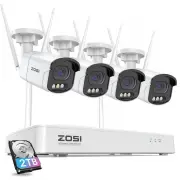
ZOSI 84U2-1864W4-US-A2 Security Camera – User Manual, read for free online in PDF format. We hope this helps you resolve any issues you may have. If you have further questions, please contact us through the contact form.


Table of Contents:
- Page 2 – Contents
- Page 4 – Connection Diagram
- Page 5 – View on Smartphone
- Page 7 – System Time Setting
- Page 8 – Plug a USB flash drive into the USB port of the NVR.
- Page 9 – Q: Failed to Remotely Access the Camera via Mobile Phone or
- Page 10 – Notification of Compliance; This device complies with Part 15 of FCC Rules.
WiFi NVR
Quick Start Guide
This guide will get you going with your product. For more details and
information of the product, please contact us or your dealer
F92101400008200
"Loading the manual" means you need to wait until the file loads and becomes available for online reading. Some manuals are very large, and the time they take to appear depends on your internet speed.
Summary
Note: The picture is for reference only, please prevail in kind. Before installation, please power on to test the product. ② Connect Monitor to the NVR with HDMI, or VGA Port (VGA cable is not included) ③ Plug the Mouse to the USB port ④ Connect the NVR to a power source (12V 2A power adapter) ⑤ Aft...
Access the NVR from your smartphone System Setting View on Smartphone Search VSees in App store or scan the QR Code to download the App.Follow the prompts to install, register and log in to the APP. When configuring and using the device, please update the APP to the latest. Note: During APP installat...


