Page 2 - Contents
Page 3 - Package Content
1 Package Content 01 Please check and ensure that the product is in good condition and the accessories are complete. Reset Needle *1 Mounting Screw Bag *1 Quick Start Guide *1 Quick Start Guide Camera *1 5V 1A Power Adapter *1 Mounting Template *1
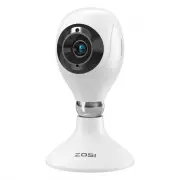
Page 4 - Camera Structure Diagram; Power On the Camera
2 02 Camera Structure Diagram Power On the Camera Connect the camera to the power outlet via USB cable, and the light will be on after the camera is powered on. State Red Light Flashing Blue Light On Red Light Flashing DefinitionThe device is waiting to connect.The device is connected successfully.Th...
Page 7 - Installation Notes
5 1. Please confirm that the device has been added to the App before installation. 2. The camera can be installed flat, ceiling or wall mounted, it is recommended to place it in a place with a wide viewing angle. Ceiling/Wall-mounted Notes 1. Drill holes in the wall according the mounting hole templat...
Page 8 - AVSS; Diagram of Wall-mounted/Ceiling Installation
6 Download and install Zosi AVSS Client, and following this guide to complete installation. Official download link: https://www.zosi- tech.com/app/, double-click “AVSS” icon, choose language and click log in. Note: It is recommended to log in with the account of Zosi Smart App to avoid multiple accoun...
Page 9 - FAQs
7 1.Q: Why can’t I add the device by local search? Please make sure the device and mobile phone are in the same LAN. If you can’t make both of them in the same LAN, please enter the device UID manually to add the device. 2.Q: Why is the device disconnected? Please check whether the device is connect...
Page 10 - Lista de empaque
8 Lista de empaque 01 Asegúrese de que la cámara esté en buenas condiciones y los accesorios estén completos después de abrir la caja. Aguja de reinicio *1 Bolsa de tornillos *1 Manual de instrucciones *1 Quick Start Guide Cámara *1 Fuente de alimentación 5V 1A *1 Plantilla de perforación *1
Page 11 - Estructura de la cámara; Conectar la cámara a la corriente
9 02 Estructura de la cámara Conectar la cámara a la corriente Conecte la cámara a la toma de corriente. Cuando la luz indicadora de la cámara está en azul, significa que la cámara está encendida. Estado de la luz indicadora Luz roja parpadeada Luz azul siempre encendida Luz roja parpadeada Definición...
Page 14 - Nota de instalación
12 1. Confirme que la cámara se haya agregado a la aplicación antes de la instalación. 2. Se puede colocar la cámara en una superficie plana, o montar en pared/techo. Se recomienda colocarla en un lugar con visión amplio. Instrucciones del montaje en pared/techo (1) Taladre agujeros en la pared de acu...
Page 15 - Descripción de AVSS; Diagrama de instalación en pared/techo
13 Descargue e instale el programa "AVSS" en PC y siga las instrucciones para agregar el dispositivo al programa. Enlace de descarga oficial: https://www.zositech.com/app/ Instalar el programa en PC, haga doble clic en el icono "AVSS" para abrirlo, seleccione el idioma y haga clic en ...
Page 16 - Preguntas frecuentes
14 1. ¿Por qué no se puede agregar el dispositivo utilizando la búsqueda local? Asegúrese de que el móvil y el dispositivo estén en una misma red LAN. Si los dos no pueden estar en la misma red LAN, ingrese manualmente el UID del dispositivo para completar la adición. 2. ¿Por qué mi dispositivo no e...