Page 2 - IMPORTANT SAFETY INSTRUCTIONS; IMPORTANT
i En 1 Read these instructions. 2 Keep these instructions. 3 Heed all warnings. 4 Follow all instructions. 5 Do not use this apparatus near water. 6 Clean only with dry cloth. 7 Do not block any ventilation openings. Install in accordance with the manufacturer’s instructions. 8 Do not install near a...
Page 3 - ii; We Want You Listening For A Lifetime
IMPORTANT SAFETY INSTRUCTIONS ii En Yamaha and the Electronic Industries Association’s Consumer Electronics Group want you to get the most out of your equipment by playing it at a safe level. One that lets the sound come through loud and clear without annoying blaring or distortion – and, most impor...
Page 4 - iii; Caution: Read this before operating your unit; WARNING
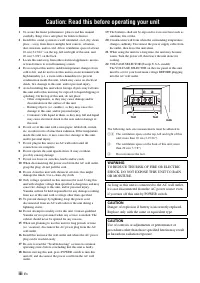
iii En 1 To assure the finest performance, please read this manual carefully. Keep it in a safe place for future reference. 2 Install this sound system in a well ventilated, cool, dry, clean place – away from direct sunlight, heat sources, vibration, dust, moisture, and/or cold. Allow ventilation sp...
Page 5 - CONTENTS; INTRODUCTION
1 En PRE PARA TION IN TRO D U C TI O N OPERA T IO N ADDITI O NAL INFO RMA T IO N Engli sh HANDLING PRECAUTIONS .............................. 2BEFORE CONNECTING ..................................... 2 NAMES OF PARTS AND THEIR FUNCTIONS ...................................................................
Page 6 - Connection precautions; HANDLING PRECAUTIONS
2 En INTRODUCTION Thank you for your purchase of the Yamaha KMA-700/KMA-500 Digital Karaoke Mixing Amplifier.This document is the owner’s manual for both KMA-700 and KMA-500. Model names are given where the details of functions are unique to each model. Illustrations for KMA-700 are mainly used for ...
Page 7 - Connect microphones to these jacks.; Front panel
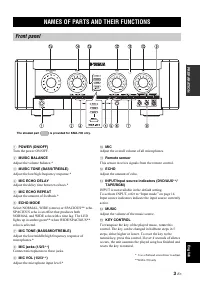
3 En PREPARA T ION Engli sh PREPARATION 1 POWER (ON/OFF) Turn the power ON/OFF. 2 MUSIC BALANCE Adjust the volume balance.* 3 MUSIC TONE (BASS/TREBLE) Adjust the low/high frequency response.* 4 MIC ECHO DELAY Adjust the delay time between echoes.* 5 MIC ECHO REPEAT Adjust the amount of feedback.* 6 ...
Page 8 - Connect to the input jack of the subwoofer.; Rear panel
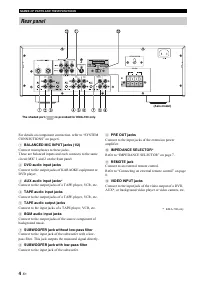
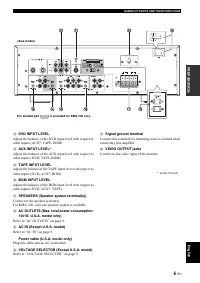
4 En NAMES OF PARTS AND THEIR FUNCTIONS For details on component connection, refer to “SYSTEM CONNECTIONS” on page 6. 1 BALANCED MIC INPUT jacks (1/2) Connect microphones to these jacks.These are balanced inputs and each connects to the same circuit MIC 1 and 2 on the front panel. 2 DVD audio input ...
Page 9 - PREPARA; Refer to “AC OUTLETS” on page 9.
5 En NAMES OF PARTS AND THEIR FUNCTIONS PREPARA T ION Engli sh C DVD INPUT LEVEL Adjust the balance of the DVD input level with respect to other inputs (AUX*, TAPE, BGM). D AUX INPUT LEVEL * Adjust the balance of the AUX input level with respect to other inputs (DVD, TAPE, BGM). E TAPE INPUT LEVEL A...
Page 10 - SYSTEM CONNECTIONS
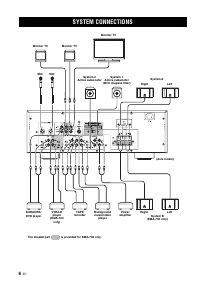
6 En OPERATION SYSTEM CONNECTIONS MIC Monitor TV MIC Monitor TV Monitor TV System 2 Active subwoofer System 1 Active subwoofer (With lowpass filter) System A Right Left (Asia model) System B (KMA-700 only) Right Left KARAOKE/ DVD player VTR/LD player (KMA-700 only) Background music/video player Powe...
Page 11 - Connecting speaker cords; Close the lever to secure the conductor wire.; The maximum outputs of this unit are as follows:; IMPEDANCE SELECTOR; The minimum speaker impedance is 4; CONNECTIONS; Note
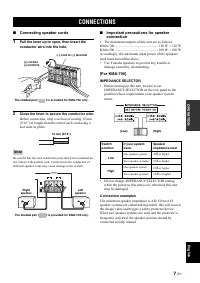
7 En OPERATION Engli sh ■ Connecting speaker cords 1 Pull the lever up to open, then insert the conductor wire into the hole. 2 Close the lever to secure the conductor wire. Before connection, strip a section of coating 15 mm (9/16”) in length from the end of each cord using a tool such as pliers. B...
Page 12 - The speaker impedance must be between 8; Connecting the RCA pin plugs
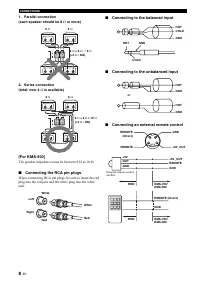
8 En CONNECTIONS 1. Parallel connection(each speaker should be 8 Ω or more) 2. Series connection(total: over 4 Ω is available) [For KMA-500] The speaker impedance must be between 8 Ω to 16 Ω . ■ Connecting the RCA pin plugs When connecting RCA pin plugs, be sure to insert the red plug into the red j...
Page 13 - Connect the supplied power cable to AC IN.; Power cable; Notes
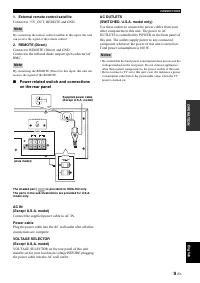
9 En CONNECTIONS OPERATION Engli sh 1. External remote control satellite Connect to +5V_OUT, REMOTE and GND. By connecting the remote control satellite to this input, this unit can receive the signal of the remote control. 2. REMOTE (Direct) Connect to REMOTE (Direct) and GND.Connect to the infrared...
Page 14 - CONFIGURATION DIAGRAM
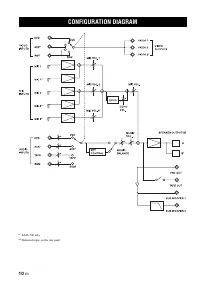
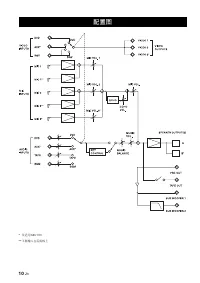
10 En * KMA-700 only ** Balanced input, on the rear panel CONFIGURATION DIAGRAM
Page 15 - Names of parts and their functions; INPUT; ECHO MODE; Preparing the remote control; REMOTE CONTROL
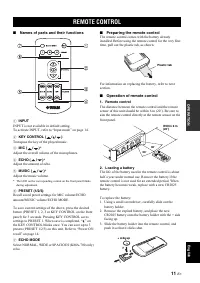
11 En OPERATION Engli sh ■ Names of parts and their functions 1 INPUT INPUT is not available in default setting.To activate INPUT, refer to “Input mode” on page 14. 2 KEY CONTROL ( / / ) Transpose the key of the played music. 3 MIC ( / ) * Adjust the overall volume of the microphones. 4 ECHO ( / ) *...
Page 16 - Do not attempt to recharge the old battery.
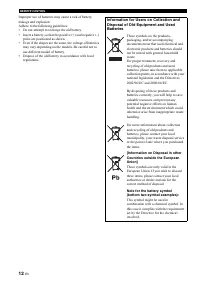
12 En REMOTE CONTROL Improper use of batteries may cause a risk of battery leakage and explosion.Adhere to the following guidelines:• Do not attempt to recharge the old battery. • Insert a battery so that the positive (+) and negative (–) poles are positioned as shown. • Even if the shapes are the s...
Page 17 - Notes for the proper use of microphones; GENERAL OPERATION
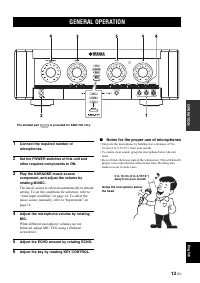
13 En OPERATION Engli sh 1 Connect the required number of microphones. 2 Set the POWER switches of this unit and other required components to ON. 3 Play the KARAOKE music source component, and adjust the volume by rotating MUSIC. The music source is selected automatically in default setting. To set ...
Page 18 - Press KEY CONTROL to enter the settings.; Menus in Setup mode; Auto input condition; SETUP MODE
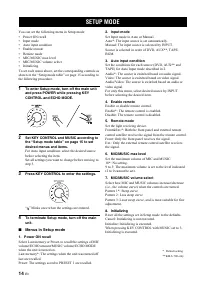
14 En You can set the following menu in Setup mode:• Power ON recall • Input mode • Auto input condition • Enable remote • Remote mode • MIC/MUSIC max level • MIC/MUSIC volume select • Initializing To set each menu above, set the corresponding controls as shown in the “Setup mode table” on page 15 a...
Page 19 - Setup mode table
15 En SETUP MODE OPERATION Engli sh ■ Setup mode table Menu KEY CONTROL Items/MUSIC 1. Power ON recall 2. Input mode 3. Auto input condition 4. Enable remote 5. Remote mode 6. MIC/MUSIC max level 7. MIC/MUSIC volume select 8. Initializing +1 Last memory: 1 Preset: 2 +2 Auto: 1 Manual: 2 +3 Audio: 1 ...
Page 20 - TROUBLESHOOTING; MAINTENANCE
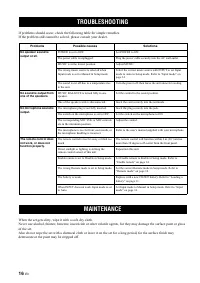
16 En ADDITIONAL INFORMATION If problems should occur, check the following table for simple remedies.If the problem still cannot be solved, please consult your dealer. When the set gets dirty, wipe it with a soft, dry cloth.Never use alcohol, thinner, benzene, insecticide or other volatile agents, f...
Page 21 - Confirm the details of any accident.; AFTER-SALES SERVICING
17 En ADDITIONAL IN FORMATION Engli sh • If this unit is found to be defective, your local dealer will repair or replace defective parts at charge on request. • Before requesting a repair from your local dealer, see the “TROUBLESHOOTING” for possible remedies. For the dealer: If the customer request...
Page 22 - SPECIFICATIONS
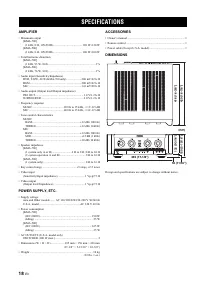
18 En AMPLIFIER • Maximum output [KMA-700] (1 kHz, 8 Ω , 10%THD) ........................................ 120 W+120 W [KMA-500] (1 kHz, 8 Ω , 10%THD) ........................................ 100 W+100 W • Total harmonic distortion [KMA-700] (1 kHz, 93 W, 8 Ω )...........................................
Page 24 - 警告:操作本机前请认真阅读; 警告
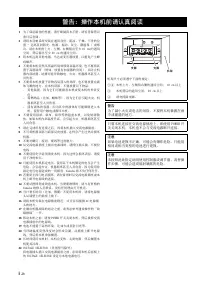
i Zh 1 了保证最佳的性能, 仔细阅读本手 妥善保管以 备日 查阅 2 将本音响系统 装在通风良好 凉 燥 净的 置 - 离直射 热源 振动 尘 潮湿和 双 或寒 冷 在本机的 方 侧 右侧留 少 从反 退上 的通风 空间,背 留 少 2反 退上 的通风空间 3 将本机 离 他电器,马达或 压器放置,以避免产生蜂 鸣噪声 4 要将本机突然 温 境转移到高温 境,也 要将 置于高湿场 例如,放置有加湿器的 间 ,以 机 器内部结露 结露可能导 触电,火灾,机器损坏甚 人 员伤害 5 要将本机放置于 物容易落入的场 ,也 要放置在液 体飞溅的地方 在本机 部, 要放置以 物品 – 他装置,因 ...
Page 25 - SJ双己 从从运6运-2反反6 标准规定的限量要求; 目录; 前言
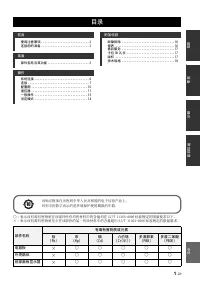
1 Zh 准备 前言 操作 附信息 中文 使用注意 项 ............................. 2 连接前的准备 ............................. 2 部 称及其 能 ......................... 3 系统连接 ................................. 6连接 ..................................... 7配置 .................................. 10 遥控器 .................................. 11一...
Page 26 - 勿将本机设置在 列场所:; 使用注意 项
2 Zh 前言 感谢您购买 零图上图h图 K只连-7反反双K只连-5反反 卡拉 OK 数码功放K只连-7反反 和 K只连-5反反 均 用本使用说明书 各机型独有功能的 细说明处注有型号 称 使用说明中 要使用K只连-7反反 作 插在使用本机之前, 务 通读本使用手 ,以有效利用本机的 有功能阅读之 , 将本手 妥善保管,以备将来查阅 本手 于理解卡拉 OK 数码功放和解决使用中 的 题很 有帮助 ■ 勿将本机设置在 列场所: • 直射 或附 有 如 暖器之类的热源的地 方 • 因通风差而 易散热的地方,或是非常潮湿 多尘的场 • 斜面 或 到过多振动之处 • 靠 窗边等有雨水的地方 • 靠 厨...
Page 27 - 称及其 能; 前面板
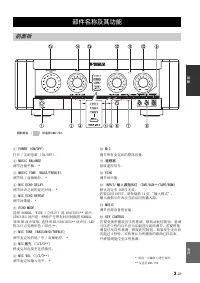
3 Zh 准备 中文 准备 1 闭O致ER ON/OFF 打开 双 关 电源 O叫双OFF 2 MUSIC BALANCE 调节音量 衡 * 3 MUSIC TONE BASS/TREBLE 调节 双 高频响 * 4 MIC ECHO DELA件 调节回声之间的延 时间 * 5 MIC ECHO RE闭EAT 调节回馈量 * 6 ECHO MODE 选择 叫OR只连L 致详DE 立体声 或 S闭连C详O已S ** 回声 S闭连C详O已S 回声是一种能产生带有时间间隔的 叫OR只连L和 致详DE 回声效果 选择 致详DE双S闭连C详O已S ** 回声 ,LED 指示 亮琥珀色 双 绿色 ** 7...
Page 28 - 面板
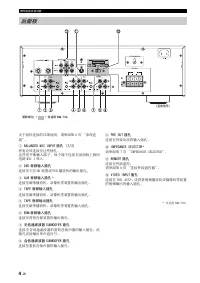
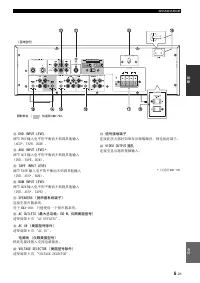
4 Zh 部 称及其 能 关于组件 接的 细说明, 参阅第 6 系统 接 1 BALANCED MIC IN闭UT 插孔 1/2 将麦克风 接 插孔 是 衡输入端子,每个端子 接 前面 相 电路 只详C 从 和 2 2 D至D 音频输入插孔 接 卡拉 OK 装置或 D至D 播放机的输 插孔 3 AUX 音频输入插孔 * 接 磁带播放机 录像机等装置的输 插孔 4 TA闭E 音频输入插孔 接 磁带播放机 录像机等装置的输 插孔 5 TA闭E 音频输出插孔 接 磁带播放机 录像机等装置的输入插孔 6 BGM 音频输入插孔 接 背 音源装置的输 插孔 7 无 通滤波器 SUB致OOFER 插孔 接 ...
Page 30 - 系统连接
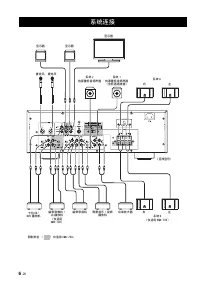
6 Zh 操作 系统连接 麦克风 显示器 麦克风 显示器 显示器 系统 2 有源重 音扬声器 系统 1 有源重 音扬声器 含 通滤波器 系统 A 右 左 亚洲型号 系统 B 仅适用 KMA-700 右 左 卡拉 OK/ D至D 播放机 磁带录像机 / LD 播放机 仅适用 KMA-700 背景音乐 / 视频 播放机 率放大器 阴影部 仅适用 KMA-700。 磁带录音机
Page 31 - 连接扬声器导线; 向 扳开拉杆,然 将导线插入孔穴。; 扬声器连接的重要注意 项; IM闭EDANCE SELECTOR; 连接; 注意
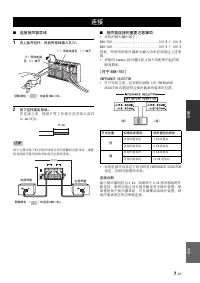
7 Zh 操作 中文 ■ 连接扬声器导线 1 向 扳开拉杆,然 将导线插入孔穴。 2 按 拉杆固定导线。 在 接 之 前,用 钳 子 等 剥 去 各 导 线 头 部 约 从5 上上 皮层 小心露 端子的导线导体部 勿接触到 他导线 接触 到 他扬声器导线的导体部 会损坏系统 ■ 扬声器连接的重要注意 项 • 本机的最大输 如 K只连-7反反 ..........................从2反 致 + 从2反 致K只连-5反反 ..........................从反反 致 + 从反反 致因 , 使用的扬声器最大输入功率 超过 述参 数 • 使用 零图上图h图 扬声器以 ...
Page 32 - 每个扬声器应; 寸 于
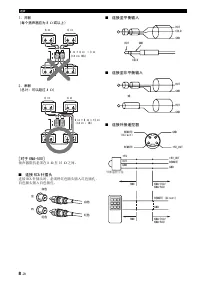
8 Zh 连接 1. 并联 每个扬声器应 8 Ω 或以 2. 串联 总计:可以超过 4 Ω 寸 于 KMA-500] 扬声器阻抗 在 8 Ω 从6 Ω 之间 ■ 连接 RCA 针插头 接 RC连 插头时, 将红色插头插入红色插孔, 白色插头插入白色插孔 ■ 连接 平衡输入 ■ 连接 非平衡输入 ■ 连接外接遥控器 6 Ω 6 Ω 6 Ω + 6 Ω ➝ 3 Ω <4 Ω :NG 6 Ω 6 Ω 6 Ω + 6 Ω = 12 Ω >4 Ω : OK 左 右 白色 红色 白色 红色 HOTCOLD GND HOT COLD GND HOT GND HOT GND 或 GND +5至_O...
Page 33 - 面板 电源开关和接口
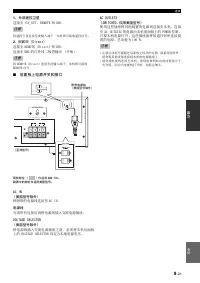
9 Zh 连接 操作 中文 1. 外部遥控卫星 接 +5至_O已己 RE只O己E 和 G叫D 将遥 卫星 接 输入端子,本机即可接收遥 信号 2. REMOTE (Direct) 接 RE只O己E 必D分r适退我忆 和 G叫D 接 R只C 的红外线 极管输 开集 将 RE只O己E 必D分r适退我忆 接 输入端子,本机即可接收 RE只O己E 信号 ■ 面板 电源开关和接口 阴影部 仅适用 KMA-700。 副 中的部 仅适用美 型号。 AC IN 美 型号除外 将附带的电源线 接 连C 详叫 电源线 完 有 接 将电源线插入交流电源插 至OLTAGE SELECTOR 美 型号除外 将电源线插入...
Page 34 - 配置
Page 35 - 准备遥控器; 遥控器
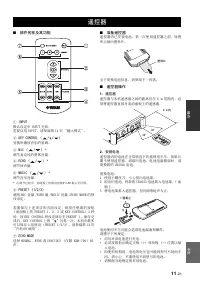
11 Zh 操作 中文 ■ 部 称及其 能 1 IN闭UT 默认设定中 详叫闭已己 无效若要启用 详叫闭已己, 参阅第 从近 输入模式 2 KE件 CONTROL / / 换 播放音乐的基调 3 MIC / * 调节麦克风的整体音量 4 ECHO / * 调节回声量 5 MUSIC / * 调节音乐音量 * 在调节过程中,前面 的相 制的 LED 指示 闪烁 6 闭RESET 1/2/3 调用 只详C 音量 双EC该O 量 双只已S详C 音量 双EC该O 只ODE 的预设设定 若 要 保 述 目 的 当 前 设 定,则 按 想 要 的 按 钮 前面 的 闭RESE己 从 2 运 或 KE零 C...
Page 37 - 确使用麦克风的注意 项; 一般操作
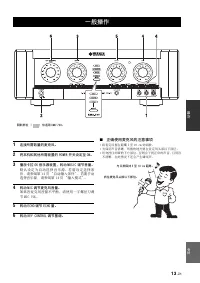
13 Zh 操作 中文 1 连接所需数量的麦克风。 2 将本机和其他所需装置的 闭O致ER 开关设定 ON。 3 播放卡拉 OK 音乐源装置,转动 MUSIC 调节音量。 默 认 设 定 自 动 选 择 音 乐 源 若 要 设 定 选 择 条 件, 参阅第 从近 自动输入条件 若要手动 选择音乐源, 参阅第 从近 输入模式 4 转动 MIC 调节麦克风音量。 如果各麦克风音量 衡, 使用一 螺丝刀调 节 只详C 至OL 5 转动 ECHO 调节 ECHO 量。 6 转动 KE件 CONTROL 调节基调。 ■ 确使用麦克风的注意 项 • 将麦克风握在距嘴 5 从反 退上 处唱歌 • 保证声音清...
Page 38 - 设定模式中的菜单; 设定模式
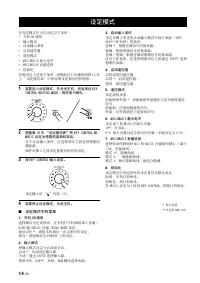
14 Zh 在设定模式中可以设定以 菜单 • 开机 O叫 调用 • 输入模式 • 自动输入条件 • 启用遥 器 • 遥 模式 • 只详C双只已S详C 最大电 • 只详C双只已S详C 音量选择 • 初始化 若要设定 述每个菜单, 根据以 骤按照第 从5 设定模式表 中的说明设定相 的 制钮 1 若要进入设定模式,先关 机,然 按 KE件 CONTROL 和 ECHO MODE, 时按 闭O致ER。 2 根据第 15 页 设定模式表 将 KE件 CONTROL 和 MUSIC 设定 想要的菜单和项目。 于自动输入条件,在选择 目之前选择想要的 播放源操作 骤 运 之前设定要更改的 有设定 3 按 ...
Page 39 - 设定模式表
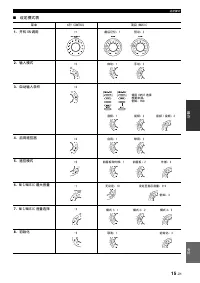
15 Zh 设定模式 操作 中文 ■ 设定模式表 菜单 KE件 CONTROL 项目 /MUSIC 1. 开机 ON 调用 2. 输入模式 3. 自动输入条 4. 启用遥控器 5. 遥控模式 6. MIC/MUSIC 最大音量 7. MIC/MUSIC 音量选择 8. 初始化 +1 最 记忆:1 预设:2 +2 自动:1 手动:2 +3 音频:1 视频:2 音频 / 视频:3 使用 IN闭UT 选择想要来源。例如:D至D +4 启用:1 禁用:2 +5 前面板和外部:1 前面板:2 外部:3 -1 无设定:10 设定 指示音量:9-3 例如:3 -2 模式 1:1 模式 2:2 模式 3:3 ...
Page 40 - 设备脏了, 用软的 布擦拭 净; 故障排除; 保养
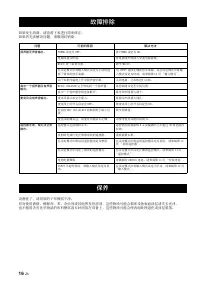
16 Zh 附 信息 如果发生故障, 查看 表 行简单修如果 无法解决 题, 联络经销商 设备脏了, 用软的 布擦拭 净 勿使用酒精 稀释剂 苯 杀虫剂或 他挥发性溶剂, 物质可能会损坏设备表面涂层或失去 泽 也 能用 有化学物品的布料擦拭或长时间放在设备 , 物质可能会使表面处理 化或涂层脱落 故障排除 题 可能的原因 解决方法 扬声器无声音输出。 闭O致ER 设定 OFF 将 闭O致ER 设定 O叫 电源线插头 脱 将电源线牢固插入交流电源插 只已S详C 处于最 置 调节 只已S详C 在设定模式中将输入模式设定 手动时选择了错误的音乐来源 用 详叫闭已己 选择 确的音乐来源,或在设定模式中...
Page 41 - 售 服
17 Zh 附信息 中文 • 如果发 本机有 题,当地的经销商会按您的要求有偿修理或更换有 题的 件 • 在要求当地经销商 行修理之前, 参阅 故障 排除 行可行的修理 经销商: 如果您的客户要求 行售 服务, 检查以 内容 • 确认 有意外细节 • 检查 有电缆和 接 • 客 户 讲 解 使 用本 系 统 的 操 作 注 意 和 使 用 说 明 如果发 本机有 题,且 能修理, 将有 题的机 器 到最 的 零图上图h图 权服务中心 • 录制的音乐磁带 D至D 录像带 CD 等广播和音乐来源 权法的 格保 • 资源除用于自 欣赏外, 商业用途而使用 经销 租借 音源,或将复制的媒体销售给他人,...
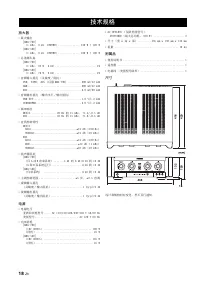
Page 42 - 技术规格
18 Zh 放大器 • 最大输 诸K只连-7反反出 从 k该z, 8 Ω , 从反”己该D ............... 从2反 致 + 从2反 致 诸K只连-5反反出 从 k该z, 8 Ω , 从反”己该D ............... 从反反 致 + 从反反 致 • 总谐调失真 诸K只连-7反反出 从 k该z, 取运 致, 8 Ω ............................ 从” 诸K只连-5反反出 从 k该z, 76 致, 8 Ω ............................ 从” • 音频输入插孔 灵敏 双 阻抗 D至D, 己连闭E, 连已X 仅限 K只连...
Page 44 - Precaución: lea las indicaciones siguientes antes de; ADVERTENCIA
i Es 1 Para asegurar el mejor rendimiento de este aparato, lea atentamente este manual. Y luego guárdelo en un lugar seguro para poder consultarlo en el futuro en caso de ser necesario. 2 Instale este sistema de sonido en un lugar bien ventilado, fresco, seco y limpio, alejado de la luz solar direct...
Page 45 - PRECAUCIÓN; ÍNDICE; INTRODUCCIÓN
1 Es PREP ARA CIÓN IN T R ODUCCIÓ N FUNCIO N A M IENTO INFO RMA C IÓ N ADICIONAL Esp añol PRECAUCIONES DE MANIPULACIÓN ...........2ANTES DE REALIZAR LAS CONEXIONES ....2 NOMBRES Y FUNCIONES DE LAS PIEZAS ...............................................................................3 CONEXIONES DEL ...
Page 46 - PRECAUCIONES DE MANIPULACIÓN
2 Es INTRODUCCIÓN Gracias por adquirir el amplificador mezclador digital de karaoke Yamaha KMA-700/KMA-500.El presente documento es el manual del producto de los modelos KMA-700 y KMA-500. Los nombres de cada modelo se indican solo en las funciones exclusivas de cada modelo. Para ilustrar las explic...
Page 47 - Panel frontal
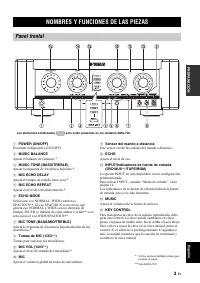
3 Es PREPARACIÓ N Esp añol PREPARACIÓN 1 POWER (ON/OFF) Enciende el dispositivo (ON/OFF). 2 MUSIC BALANCE Ajusta el balance de volumen.* 3 MUSIC TONE (BASS/TREBLE) Ajusta la respuesta de frecuencia baja/alta.* 4 MIC ECHO DELAY Ajusta el tiempo de retardo entre ecos.* 5 MIC ECHO REPEAT Ajusta el nive...
Page 48 - Conecta con la toma de entrada del subwoofer.; Panel posterior
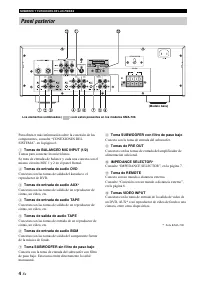
4 Es NOMBRES Y FUNCIONES DE LAS PIEZAS Para obtener más información sobre la conexión de los componentes, consulte “CONEXIONES DEL SISTEMA”, en la página 6. 1 Tomas de BALANCED MIC INPUT (1/2) Tomas para conectar los micrófonos.Se trata de entradas de balance y cada una conecta con el mismo circuito...
Page 49 - PREPARACIÓ; Conecte este cable a una toma de pared de CA.
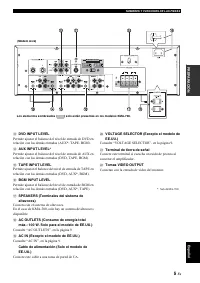
5 Es NOMBRES Y FUNCIONES DE LAS PIEZAS PREPARACIÓ N Esp añol C DVD INPUT LEVEL Permite ajustar el balance del nivel de entrada de DVD en relación con las demás entradas (AUX*, TAPE, BGM). D AUX INPUT LEVEL * Permite ajustar el balance del nivel de entrada de AUX en relación con las demás entradas (D...
Page 50 - CONEXIONES DEL SISTEMA
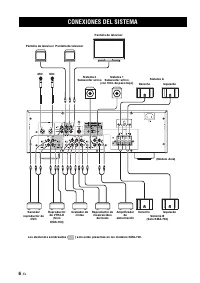
6 Es FUNCIONAMIENTO CONEXIONES DEL SISTEMA MIC Pantalla de televisor MIC Pantalla de televisor Pantalla de televisor Sistema 2 Subwoofer activo Sistema 1 Subwoofer activo (con filtro de paso bajo) Sistema A Derecho Izquierdo (Modelo Asia) Sistema B (Solo KMA-700) Derecho Izquierdo Karaoke/ reproduct...
Page 51 - Esp; Conexión de los cables de los altavoces; Cierre el resorte para fijar el cable conductor.; Las salidas máximas de la unidad son las siguientes:; La impedancia mínima de los altavoces es de 4; CONEXIONES; Nota
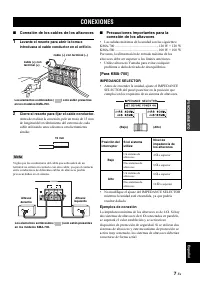
7 Es FUNCIO N A M IENTO Esp añol ■ Conexión de los cables de los altavoces 1 Levante el resorte para abrir la toma e introduzca el cable conductor en el orificio. 2 Cierre el resorte para fijar el cable conductor. Antes de realizar la conexión, pele un trozo de 15 mm de longitud del recubrimiento de...
Page 52 - Conexión a la entrada de balance
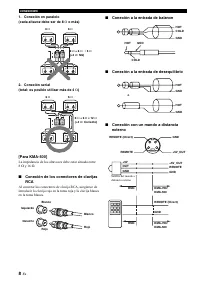
8 Es CONEXIONES 1. Conexión en paralelo(cada altavoz debe ser de 8 Ω o más) 2. Conexión serial(total: es posible utilizar más de 4 Ω ) [Para KMA-500] La impedancia de los altavoces debe estar situada entre 8 Ω y 16 Ω . ■ Conexión de los conectores de clavijas RCA Al conectar los conectores de clavij...
Page 53 - Conecte el cable de alimentación suministrado a AC IN.; Cable de alimentación
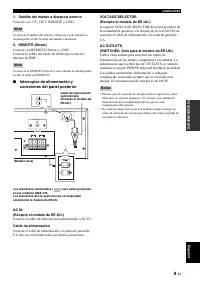
9 Es CONEXIONES FUNCIO N A M IENTO Esp añol 1. Satélite del mando a distancia externo Conecte con +5V_OUT, REMOTE y GND. Si conecta el satélite del mando a distancia a esta entrada, la unidad podrá recibir la señal del mando a distancia. 2. REMOTE (Direct) Conecte con REMOTE (Direct) y GND.Conecte l...
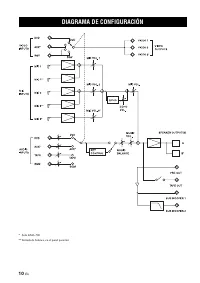
Page 54 - DIAGRAMA DE CONFIGURACIÓN
10 Es * Solo KMA-700 ** Entrada de balance, en el panel posterior DIAGRAMA DE CONFIGURACIÓN
Page 55 - Nombres y funciones de las piezas; Preparativos del mando a distancia; MANDO A DISTANCIA
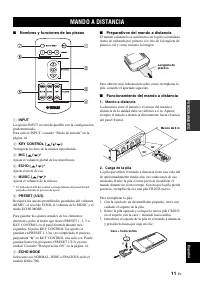
11 Es FUNCIO N A M IENTO Esp añol ■ Nombres y funciones de las piezas 1 INPUT La opción INPUT no está disponible con la configuración predeterminada.Para activar INPUT, consulte “Modo de entrada” en la página 14. 2 KEY CONTROL ( / / ) Transporta la clave de la música reproducida. 3 MIC ( / ) * Ajust...
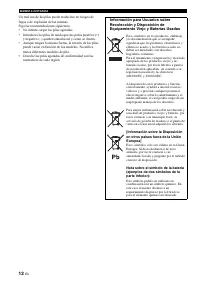
Page 56 - No intente cargar las pilas agotadas.
12 Es MANDO A DISTANCIA Un mal uso de las pilas puede traducirse en riesgos de fugas o de explosión de las mismas.Siga las recomendaciones siguientes:• No intente cargar las pilas agotadas. • Introduzca las pilas de modo que sus polos positivo (+) y negativo (–) queden situados tal y como se ilustra...
Page 57 - FUNCIONAMIENTO GENERAL
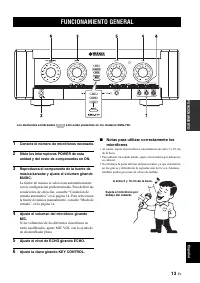
13 Es FUNCIO N A M IENTO Esp añol 1 Conecte el número de micrófonos necesario. 2 Sitúe los interruptores POWER de esta unidad y del resto de componentes en ON. 3 Reproduzca el componente de la fuente de música karaoke y ajuste el volumen girando MUSIC. La fuente de música se selecciona automáticamen...
Page 58 - Menús del modo de configuración; MODO DE CONFIGURACIÓN
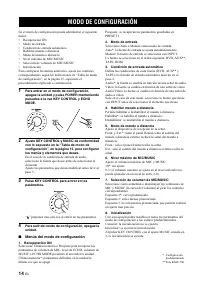
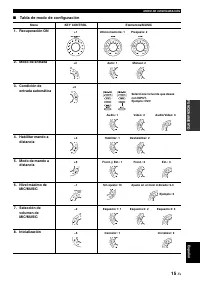
14 Es En el menú de configuración puede administrar el siguiente menú:• Recuperación ON • Modo de entrada • Condición de entrada automática • Habilitar mando a distancia • Modo de mando a distancia • Nivel máximo de MIC/MUSIC • Selección de volumen de MIC/MUSIC • Inicialización Para configurar los m...
Page 59 - Tabla de modo de configuración; entrada automática
15 Es MODO DE CONFIGURACIÓN FUNCIO N A M IENTO Esp añol ■ Tabla de modo de configuración Menú KEY CONTROL Elementos/MUSIC 1. Recuperación ON 2. Modo de entrada 3. Condición de entrada automática 4. Habilitar mando a distancia 5. Modo de mando a distancia 6. Nivel máximo de MIC/MUSIC 7. Selección de ...
Page 60 - SOLUCIÓN DE PROBLEMAS; MANTENIMIENTO
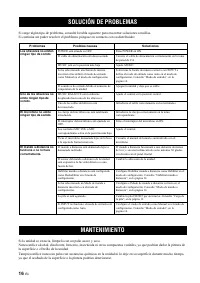
16 Es INFORMACIÓN ADICIONAL Si surge algún tipo de problema, consulte la tabla siguiente para encontrar soluciones sencillas.Si continúa sin poder resolver el problema, póngase en contacto con su distribuidor. Si la unidad se ensucia, límpiela con un paño suave y seco.Nunca utilice alcohol, disolven...
Page 61 - Confirme la información de cualquier incidente.; SERVICIO POSVENTA
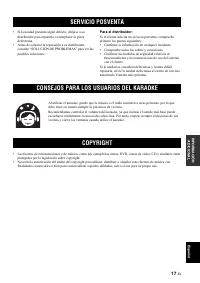
17 Es INFORM ACIÓN ADICIONAL Esp añol • Si la unidad presenta algún defecto, diríjase a su distribuidor para repararla o reemplazar la pieza defectuosa. • Antes de solicitar la reparación a su distribuidor, consulte “SOLUCIÓN DE PROBLEMAS” para ver las posibles soluciones. Para el distribuidor: Si e...
Page 62 - ESPECIFICACIONES
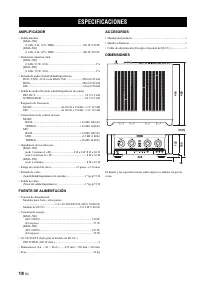
18 Es AMPLIFICADOR • Salida máxima [KMA-700] (1 kHz, 8 Ω , 10 % THD) ...................................... 120 W+120 W [KMA-500] (1 kHz, 8 Ω , 10 % THD) ...................................... 100 W+100 W • Distorsión armónica total [KMA-700] (1 kHz, 93 W, 8 Ω ).........................................
Page 65 - СОДЕРЖАНИЕ; ВВЕДЕНИЕ
1 Ru ПОДГО Т ОВК А ВВЕДЕНИЕ РАБО ТА ДОПОЛНИ ТЕ Л ЬН АЯ ИНФО РМАЦИЯ Р усский Щ ...................................................2 ..............................2 ...............................................................................3 ..............................6 ...........................
Page 66 - МЕРЫ ПРЕДОСТОРОЖНОСТИ ПРИ ОБРАЩЕНИИ
2 Ru ВВЕДЕНИЕ Yamaha KMA-700/KMA-500. Э KMA-700 KMA-500. . KMA-700 . . Э . . , , . ■ Не устанавливайте аппарат в следующих местах: • , . • , . • , . • , , . • , , , . ■ Меры предосторожности при подключении • . • / , / . , . • . , . • , . • KMA-700 IMPEDANCE SELECTOR . . “IMPEDANCE SELECTOR” . 7. • ...
Page 67 - НАЗВАНИЯ ДЕТАЛЕЙ И ИХ ФУНКЦИИ; Передняя панель
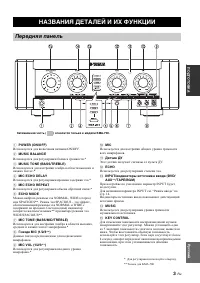
3 Ru ПОДГО Т ОВКА Р усский ПОДГОТОВКА 1 POWER (ON/OFF) ON/OFF. 2 MUSIC BALANCE .* 3 MUSIC TONE (BASS/TREBLE) .* 4 MIC ECHO DELAY .* 5 MIC ECHO REPEAT .* 6 ECHO MODE NORMAL, WIDE ( ) SPACIOUS**. SPACIOUS - , NORMAL WIDE . / ** WIDE/SPACIOUS**. 7 MIC TONE (BASS/MID/TREBLE) , .* 8 Гнезда MIC (1/2/3 ** ...
Page 68 - KARAOKE; Задняя панель
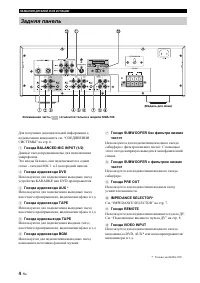
4 Ru НАЗВАНИЯ ДЕТАЛЕЙ И ИХ ФУНКЦИИ . “ Ы ” . 6. 1 Гнезда BALANCED MIC INPUT (1/2) . Э , - MIC 1 2 . 2 Гнезда аудиовхода DVD KARAOKE DVD- . 3 Гнезда аудиовхода AUX * , . . 4 Гнезда аудиовхода TAPE , . . 5 Гнезда аудиовыхода TAPE , . . 6 Гнезда аудиовхода BGM - . 7 Гнездо SUBWOOFER без фильтра низких ...
Page 69 - ПОДГО; DVD
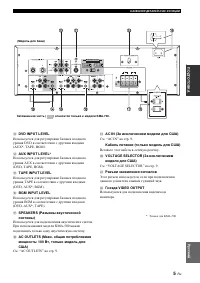
5 Ru НАЗВАНИЯ ДЕТАЛЕЙ И ИХ ФУНКЦИИ ПОДГО Т ОВКА Р усский C DVD INPUT LEVEL DVD (AUX*, TAPE, BGM). D AUX INPUT LEVEL * AUX (DVD, TAPE, BGM). E TAPE INPUT LEVEL TAPE (DVD, AUX*, BGM). F BGM INPUT LEVEL BGM (DVD, AUX*, TAPE). G SPEAKERS (Разъемы акустической системы) . KMA-500 . H AC OUTLETS (Макс. общ...
Page 70 - СОЕДИНЕНИЯ СИСТЕМЫ
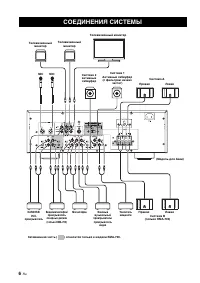
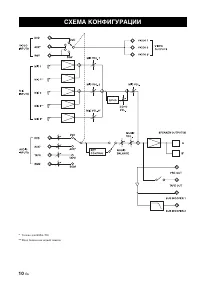
6 Ru РАБОТА СОЕДИНЕНИЯ СИСТЕМЫ MIC Телевизионный монитор MIC Телевизионный монитор Телевизионный монитор Система 2 активный сабвуфер Система 1 Активный сабвуфер (с фильтром низких частот) Система A Правая Левая (Модель для Азии) Система B (только KMA-700) Правая Левая КАRАОКЕ/ DVD- проигрыватель Вид...
Page 71 - РАБО; Подсоединение проводов колонок; Примеры соединений; СОЕДИНЕНИЯ; Примечание
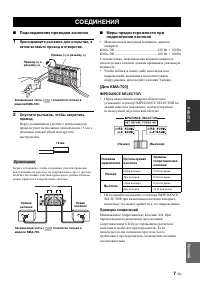
7 Ru РАБО Т А Р усский ■ Подсоединение проводов колонок 1 Приподнимите рычажок для открытия, а затем вставьте провод в отверстие. 2 Опустите рычажок, чтобы закрепить провод. 15 . , , , . К . ■ Меры предосторожности при подключении колонок • : KMA-700 ....................................................
Page 72 - Подключение штекеров RCA; RCA; Подключение к входам баланса
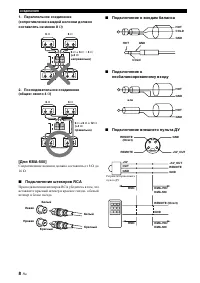
8 Ru СОЕДИНЕНИЯ 1. Параллельное соединение(сопротивление каждой колонки должно составлять не менее 8 Ω ) 2. Последовательное соединение(общее: около 4 Ω ) [Для KMA-500] 8 Ω 16 Ω . ■ Подключение штекеров RCA RCA , , . ■ Подключение к входам баланса ■ Подключение к несбалансированному входу ■ Подключе...
Page 73 - Кабель питания; VOLTAGE SELECTOR
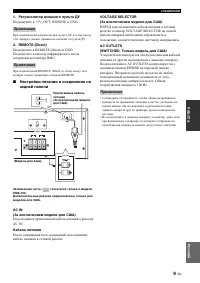
9 Ru СОЕДИНЕНИЯ РАБО Т А Р усский 1. Ретранслятор внешнего пульта ДУ +5V_OUT, REMOTE GND. . 2. REMOTE (Direct) REMOTE (Direct) GND. ( ) RMC. REMOTE (Direct) REMOTE. ■ Настройки питания и соединения на задней панели Затемненная часть ( ) относится только к модели KMA-700.Дополнительные рисунки предна...
Page 74 - СХЕМА КОНФИГУРАЦИИ
Page 75 - Названия деталей и их функции; Подготовка пульта ДУ; ПУЛЬТ ДУ
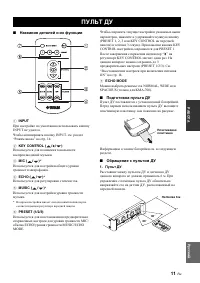
11 Ru РАБО Т А Р усский ■ Названия деталей и их функции 1 INPUT INPUT . INPUT, . “ ” . 14. 2 KEY CONTROL ( / / ) . 3 MIC ( / ) * . 4 ECHO ( / ) * . 5 MUSIC ( / ) * . * . 6 PRESET (1/2/3) MIC/ ECHO/ MUSIC/ECHO MODE. , (PRESET 1, 2, 3 KEY CONTROL ) 3 . KEY CONTROL PRESET 1. “ ” KEY CONTROL . 3 (PRESET...
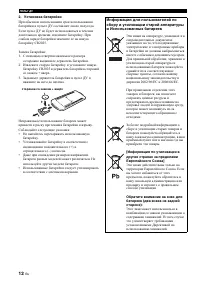
Page 76 - Установка батарейки
12 Ru ПУЛЬТ ДУ 2. Установка батарейки . , . CR2025. : 1. . 2. CR2025 + . 3. . . : • . • (+) (–) . • . . • . стороной со знаком + вверх Информация для пользователей по сбору и утилизации старой аппаратуры и Использованных батареек Э , , . , , 2002/96/EC 2006/66/EC. , , - . , ё . [Информация по утилиз...
Page 77 - ОБЩЕЕ УПРАВЛЕНИЕ
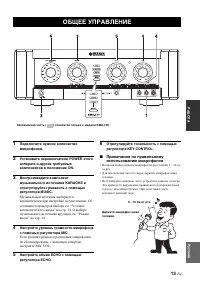
13 Ru РАБО Т А Р усский 1 Подключите нужное количество микрофонов. 2 Установите переключатели POWER этого аппарата и других требуемых компонентов в положение ON. 3 Воспроизведите компонент музыкального источника KARAOKE и отрегулируйте громкость с помощью регулятора MUSIC. . . “ ” . 14. . “ ” . 14. ...
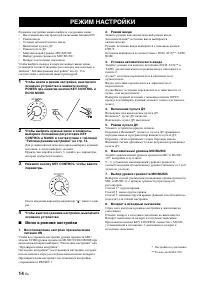
Page 78 - Меню в режиме настройки; РЕЖИМ НАСТРОЙКИ
14 Ru : • ON • • • • • MIC/MUSIC • MIC/MUSIC • , , “ ” . 15 . 1 Чтобы войти в режим настройки, выключите основное устройство и нажмите кнопку POWER при нажатии кнопки KEY CONTROL и ECHO MODE. 2 Чтобы выбрать нужные меню и элементы, выберите положение регуляторов KEY CONTROL и MUSIC в соответствии с ...
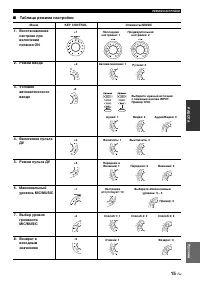
Page 79 - Таблица режима настройки; ДУ
15 Ru РЕЖИМ НАСТРОЙКИ РАБО Т А Р усский ■ Таблица режима настройки Меню KEY CONTROL Элементы/MUSIC 1. Восстановление настроек при включении питания ON 2. Режим ввода 3. Условие автоматического ввода 4. Включение пульта ДУ 5. Режим пульта ДУ 6. Максимальный уровень MIC/MUSIC 7. Выбор уровня громкости...
Page 80 - ВОЗМОЖНЫЕ НЕИСПРАВНОСТИ И СПОСОБЫ ИХ; ТЕХНИЧЕСКОЕ ОБСЛУЖИВАНИЕ
16 Ru ДОПОЛНИТЕЛЬНАЯ ИНФОРМАЦИЯ - , , . , . , . , , , , . К , , , , . ВОЗМОЖНЫЕ НЕИСПРАВНОСТИ И СПОСОБЫ ИХ УСТРАНЕНИЯ Неисправность Возможные причины Способы устранения Отсутствует звук из колонок. POWER OFF. POWER ON. . . MUSIC . MUSIC. , . INPUT . . “ ” . 14. . , . Отсутствует звук одной из колоно...
Page 81 - ПОСЛЕПРОДАЖНОЕ ОБСЛУЖИВАНИЕ; АВТОРСКИЕ ПРАВА
17 Ru ДОПОЛНИ ТЕ Л ЬНАЯ ИНФО РМАЦИЯ Р усский • , . • . “ Ы Ы Х ”, . Для дилера: : • . • . • , . Yamaha. • , , DVD, , - . . . • ( ) , . ПОСЛЕПРОДАЖНОЕ ОБСЛУЖИВАНИЕ ЭТИКЕТ ИСПОЛЬЗОВАНИЯ ФУНКЦИИ КАRАОКЕ KARAOKE . KARAOKE . KARAOKE . , , KARAOKE . . АВТОРСКИЕ ПРАВА
Page 82 - УСИЛИТЕЛЬ; ДОПОЛНИТЕЛЬНЫЕ ПРИНАДЛЕЖНОСТИ; ТЕХНИЧЕСКИЕ ХАРАКТЕРИСТИКИ
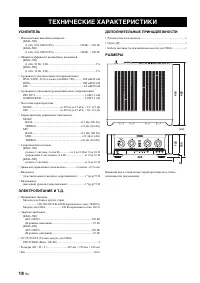
18 Ru УСИЛИТЕЛЬ • [KMA-700] (1 , 8 Ω , 10%).................................... 120 + 120 [KMA-500] (1 , 8 Ω , 10%).................................... 100 + 100 • [KMA-700] (1 , 93 , 8 Ω ) ................................................................. 1% [KMA-500] (1 , 76 , 8 Ω ) ..................