Page 3 - List; English
List English 3 Español 9 Deutsche 15 Français 21 Pусский 27 Українська 33 Italiano 39 Português brasileiro Türkçe 45 51 1
Page 5 - Step 1: Connect the cables
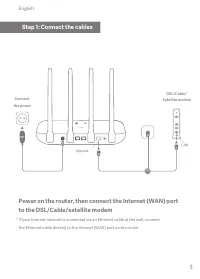
Power on the router, then connect the Internet (WAN) port to the DSL/Cable/satellite modem * If your Internet network is connected via an Ethernet cable at the wall, connect the Ethernet cable directly to the Internet (WAN) port on the router Step 1: Connect the cables 3 Connect the power DSL/Cable/...
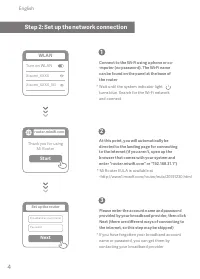
Page 6 - Step 2: Set up the network connection; WLAN; Start; Next
Connect to the Wi-Fi using a phone or co--mputer (no password). The Wi-Fi namecan be found on the panel at the base of the router 1 At this point, you will automatically be directed to the landing page for connecting to the Internet (if you aren’t, open up the browser that comes with your system and...
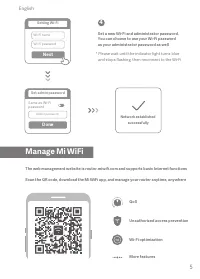
Page 7 - Done; Manage Mi WiFi
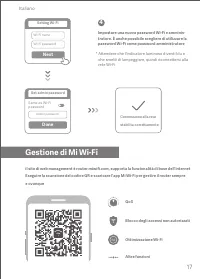
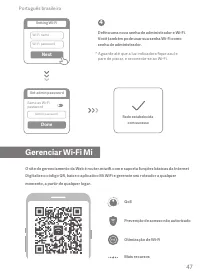
Set a new Wi-Fi and administrator password. You can choose to use your Wi-Fi password as your administrator password as well 4 Network established successfully Same as Wi-Fi password Admin password Done Set admin password Wi-Fi name Wi-Fi password Next Setting Wi-Fi * Please wait until the indicator...
Page 8 - FAQ
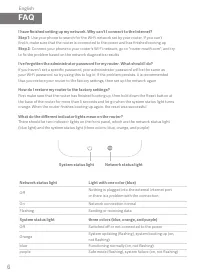
I have finished setting up my network. Why can't I connect to the Internet?Step 1: Use your phone to search for the Wi-Fi network set by your router. If you can’t find it, make sure that the router is connected to the power and has finished booting up Step 2: Connect your phone to your router's Wi-F...
Page 11 - Deutsche
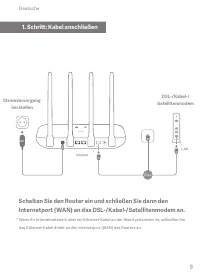
Schalten Sie den Router ein und schließen Sie dann den Internetport (WAN) an das DSL-/Kabel-/Satellitenmodem an. Stromversorgung herstellen * Wenn Ihr Internetnetzwerk über ein Ethernet-Kabel an der Wand verbunden ist, schließen Sie das Ethernet-Kabel direkt an den Internetport (WAN) des Routers an....
Page 12 - Schritt: Netzwerkverbindung einrichten
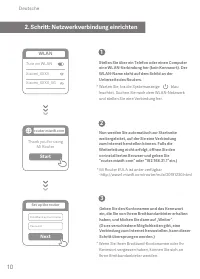
Stellen Sie über ein Telefon oder einen Computer eine WLAN-Verbindung her (kein Kennwort). Der WLAN-Name steht auf dem Schild an der Unterseite des Routers. 1 Nun werden Sie automatisch zur Startseite weitergeleitet, auf der Sie eine Verbindung zum Internet herstellen können. Falls die Weiterleitung...
Page 13 - Mi WiFi verwalten
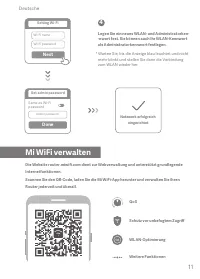
Legen Sie ein neues WLAN- und Administratorken--nwort fest. Sie können auch Ihr WLAN-Kennwort als Administratorkennwort festlegen. 4 Netzwerk erfolgreich eingerichtet * Warten Sie, bis die Anzeige blau leuchtet und nicht mehr blinkt und stellen Sie dann die Verbindung zum WLAN wieder her. Die Websit...
Page 14 - Häufig gestellte Fragen
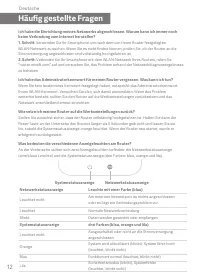
Ich habe die Einrichtung meines Netzwerks abgeschlossen. Warum kann ich immer noch keine Verbindung zum Internet herstellen? 1. Schritt: Verwenden Sie Ihr Smartphone, um nach dem von Ihrem Router festgelegten WLAN-Netzwerk zu suchen. Wenn Sie es nicht finden können, prüfen Sie, ob der Router an die ...
Page 17 - Collegarsi a una; Step 1: Collegare i cavi; Italiano
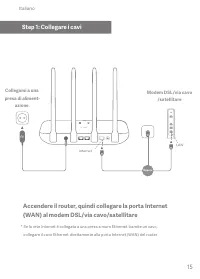
Accendere il router, quindi collegare la porta Internet (WAN) al modem DSL/via cavo/satellitare Collegarsi a una presa di aliment- azione. * Se la rete Internet è collegata a una presa a muro Ethernet tramite un cavo, collegare il cavo Ethernet direttamente alla porta Internet (WAN) del router Modem...
Page 18 - Step 2: Configurare la connessione di rete
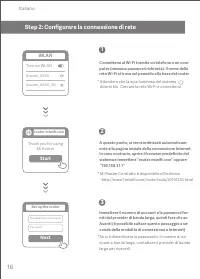
1 A questo punto, si verrà indirizzati automaticam-ente alla pagina iniziale della connessione Internet. In caso contrario, aprire il browser predefinito del sistema e immettere “router.miwifi.com” oppure “192.168.31.1” Connettersi al Wi-Fi tramite un telefono o un com-puter (nessuna password richie...
Page 20 - Domande frequenti
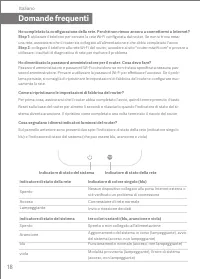
Ho completato la configurazione della rete. Perché non riesco ancora a connettermi a Internet? Step 1: utilizzare il telefono per cercare la rete Wi-Fi configurata dal router. Se non si trova ness- una rete, assicurarsi che il router sia collegato all'alimentazione e che abbia completato l'avvio Ste...
Page 23 - Paso 1: conexión de los cables; por satélite; Español
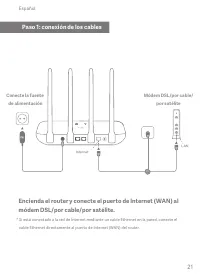
Encienda el router y conecte el puerto de Internet (WAN) al módem DSL/por cable/por satélite. * Si está conectado a la red de Internet mediante un cable Ethernet en la pared, conecte el cable Ethernet directamente al puerto de Internet (WAN) del router. Paso 1: conexión de los cables 21 Módem DSL/po...
Page 24 - Paso 2: configuración de la conexión de red
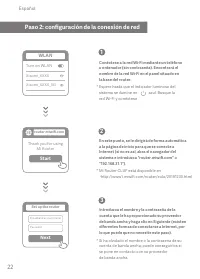
Conéctese a la red Wi-Fi mediante un teléfono u ordenador (sin contraseña). Encontrará el nombre de la red Wi-Fi en el panel situado en la base del router. 1 En este punto, se le dirigirá de forma automática a la página de inicio para que se conecte a Internet (si no es así, abra el navegador del si...
Page 25 - Gestionar Mi WiFi
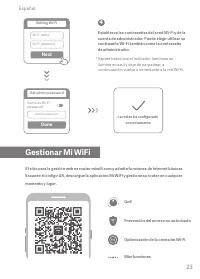
Establezca las contraseñas de la red Wi-Fi y de la cuenta de administrador. Puede elegir utilizar su contraseña Wi-Fi también como la contraseña de administrador. 4 * Espere hasta que el indicador luminoso se ilumine en azul y deje de parpadear; a continuación, vuelva a conectarse a la red Wi-Fi. Ge...
Page 26 - Preguntas Frecuentes
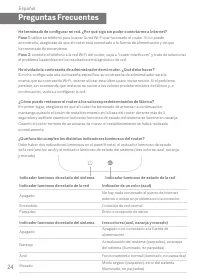
He terminado de configurar mi red. ¿Por qué sigo sin poder conectarme a Internet? Paso 1: utilice su teléfono para buscar la red Wi-Fi que ha creado el router. Si no puede encontrarla, asegúrese de que el router está conectado a la fuente de alimentación y de que ha terminado de encenderse. Paso 2: ...
Page 29 - Branchez; Étape 1 : Connectez les câbles; Français
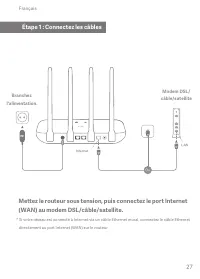
Mettez le routeur sous tension, puis connectez le port Internet (WAN) au modem DSL/câble/satellite. Branchez l'alimentation. * Si votre réseau est connecté à Internet via un câble Ethernet mural, connectez le câble Ethernet directement au port Internet (WAN) sur le routeur. Modem DSL/ câble/satellit...
Page 30 - Étape 2 : Configurez la connexion réseau
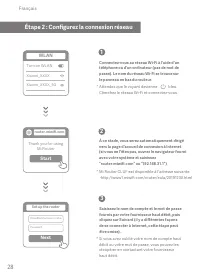
Connectez-vous au réseau Wi-Fi à l'aide d'un téléphone ou d'un ordinateur (pas de mot de passe). Le nom du réseau Wi-Fi se trouve sur le panneau en bas du routeur. 1 À ce stade, vous serez automatiquement dirigé vers la page d'accueil de connexion à Internet (si vous ne l'êtes pas, ouvrez le navigat...
Page 31 - Gérer Mi WiFi
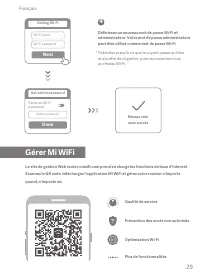
Définissez un nouveau mot de passe Wi-Fi et administrateur. Votre mot de passe administrateur peut être utilisé comme mot de passe Wi-Fi. 4 Réseau créé avec succès * Patientez jusqu'à ce que le voyant passe au bleu et s'arrête de clignoter, puis reconnectez-vous au réseau Wi-Fi. Le site de gestion W...
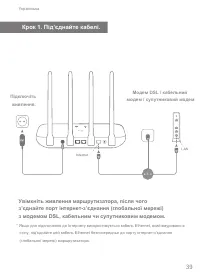
Page 35 - Шаг 1. Подключение кабелей
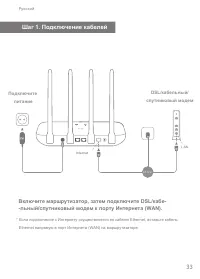
Включите маршрутизатор, затем подключите DSL/кабе--льный/спутниковый модем к порту Интернета (WAN). Подключите питание * Если подключение к Интернету осуществляется по кабелю Ethernet, вставьте кабель Ethernet напрямую в порт Интернета (WAN) на маршрутизаторе DSL/кабельный/ спутниковый модем Шаг 1. ...
Page 36 - Шаг 2. Настройка сетевого подключения
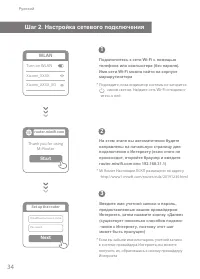
Русский Подключитесь к сети Wi-Fi с помощью телефона или компьютера (без пароля). Имя сети Wi-Fi можно найти на корпусе маршрутизатора 1 На этом этапе вы автоматически будете направлены на начальную страницу для подключения к Интернету (если этого не происходит, откройте браузер и введите router.miw...
Page 37 - Управление Mi WiFi
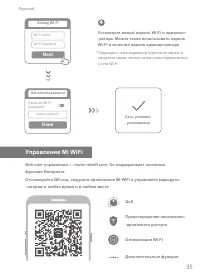
Установите новый пароль Wi-Fi и админист--ратора. Можно также использовать пароль Wi-Fi в качестве пароля администратора 4 Сеть успешно установлена * Подождите, пока индикатор перестанет мигать и загорится синим светом, затем снова подключитесь к сети Wi-Fi Веб-сайт управления — router.miwifi.com. О...
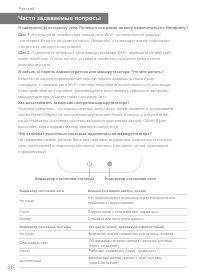
Page 38 - Часто задаваемые вопросы
Я завершил(-а) настройку сети. Почему я все равно не могу подключиться к Интернету? Шаг 1. Используйте телефон для поиска сети Wi-Fi, установленной маршру- -тизатором. Если ее не удается найти, убедитесь, что маршрутизатор подключен к источнику питания и запустился Шаг 2. Подключите телефон к сети м...
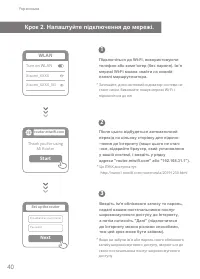
Page 42 - Крок 2. Налаштуйте підключення до мережі.
Підключіться до Wi-Fi, використовуючи телефон або комп’ютер (без пароля). Ім’я мережі Wi-Fi можна знайти на нижній панелі маршрутизатора. 1 Після цього відбудеться автоматичний перехід на цільову сторінку для підклю--чення до Інтернету (якщо цього не стал--ося, відкрийте браузер, який установлено у ...
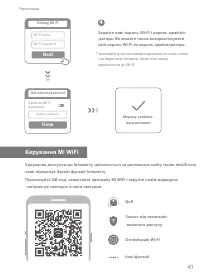
Page 43 - Керування Mi WiFi
Задайте нові пароль Wi-Fi і пароль адмініст--ратора. Ви можете також використовувати свій пароль Wi-Fi як пароль адміністратора. 4 Мережу успішно налаштовано * Зачекайте, доки світловий індикатор не стане синім і не перестане блимати, після чого знову підключіться до Wi-Fi. Керування доступом до Інт...
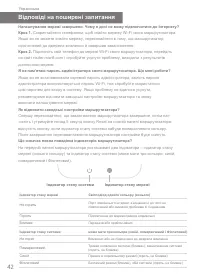
Page 44 - Відповіді на поширені запитання
Налаштування мережі завершено. Чому я досі не можу підключитися до Інтернету? Крок 1. Скористайтеся телефоном, щоб знайти мережу Wi-Fi свого маршрутизатора. Якщо ви не можете знайти мережу, переконайтеся в тому, що маршрутизатор підключений до джерела живлення й завершив завантаження. Крок 2. Підклю...
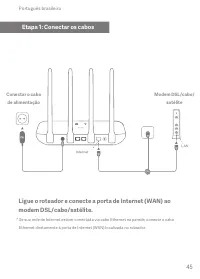
Page 47 - Etapa 1: Conectar os cabos; satélite; Português brasileiro
Ligue o roteador e conecte a porta de Internet (WAN) ao modem DSL/cabo/satélite. * Se sua rede de Internet estiver conectada via cabo Ethernet na parede, conecte o cabo Ethernet diretamente à porta de Internet (WAN) localizada no roteador. Etapa 1: Conectar os cabos 45 Modem DSL/cabo/ satélite Conec...
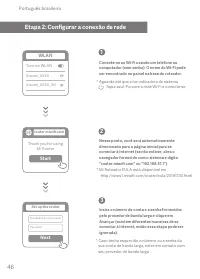
Page 48 - Etapa 2: Configurar a conexão de rede
Conecte-se ao Wi-Fi usando um telefone ou computador (sem senha). O nome do Wi-Fi pode ser encontrado no painel na base do roteador. 1 Nesse ponto, você será automaticamente direcionado para a página inicial para se conectar à Internet (se não estiver, abra o navegador fornecido com o sistema e digi...
Page 50 - Perguntas frequentes
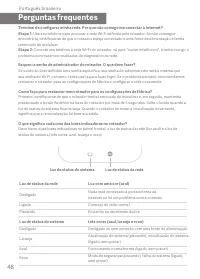
Terminei de configurar minha rede. Por que não consigo me conectar à Internet? Etapa 1: Use seu telefone para procurar a rede Wi-Fi definida pelo roteador. Se não conseguir encontrá-la, certifique-se de que o roteador esteja conectado à uma fonte de alimentação e tenha terminado de inicializar. Etap...
Page 53 - Adım 1: Kabloları bağlayın; Uydu modem; Türkçe
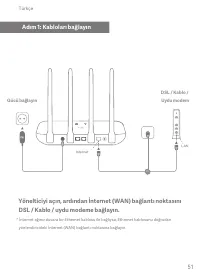
Yönelticiyi açın, ardından İnternet (WAN) bağlantı noktasını DSL / Kablo / uydu modeme bağlayın. * İnternet ağınız duvara bir Ethernet kablosu ile bağlıysa, Ethernet kablosunu doğrudan yönlendiricideki İnternet (WAN) bağlantı noktasına bağlayın. Adım 1: Kabloları bağlayın 51 DSL / Kablo / Uydu modem...
Page 54 - Adım 2: Ağ bağlantısını ayarlayın
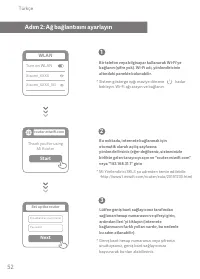
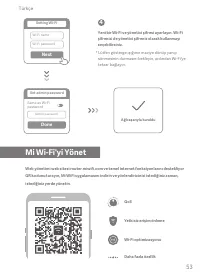
Bir telefon veya bilgisayar kullanarak Wi-Fi'ye bağlanın (şifre yok). Wi-Fi adı, yönlendiricinin altındaki panelde bulunabilir. 1 Bu noktada, internete bağlanmak için otomatik olarak açılış sayfasına yönlendirilirsiniz (eğer değilseniz, sisteminizle birlikte gelen tarayıcıyı açın ve "router.miwi...
Page 56 - SSS
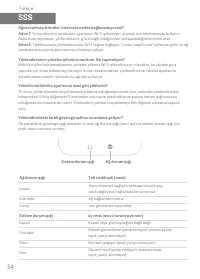
Ağımı kurmayı bitirdim. İnternete neden bağlanamıyorum?Adım 1: Yönlendiriciniz tarafından ayarlanan Wi-Fi şebekesini aramak için telefonunuzu kullanın. Bunu bulamıyorsanız, yönlendiricinin güce bağlı olduğundan ve başlatıldığından emin olun. Adım 2: Telefonunuzu yönlendiricinizin Wi-Fi ağına bağlayı...
Page 61 - R4AC 海外版; 样品
Русский List English 3 R4AC 海外版 暂无 106.5 X 148.5 mm Black 骑马钉 36P 80g 双胶纸 成品尺寸 物料名称 特种工艺 设计于 物料号 印刷颜色 项目名称 物料材质 样品数量 样品 通知人员 采购经理 FCPMR FCPMP FCPRD 产品经理 质量工程 设计主管 审核人员 认证工程 软件测试 硬件测试 售后服务 法务主管 安全测试 助厂工程 V1.0 首次创建 20191218 Power on the router, then connect the Internet (WAN) port to the DSL/Cable/sat...