Wexstar EWT-009US - User Manual
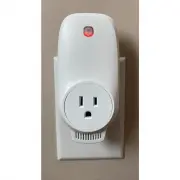
Wexstar EWT-009US Thermostat – User Manual, read for free online in PDF format. We hope this helps you resolve any issues you may have. If you have further questions, please contact us through the contact form.


Programmable Thermostat Wi-Fi
User Manual
Ⅰ. Technical Data
1.
Power Supply: AC100~120V 50/60Hz
2.
Maximum load: USA 1440W/12A
3. Wireless standard: IEEE802.11b/g/n
4. Frequency range: 2.412~2.484GHz
5.Security mechanism: WEP/ WPA-PSK/ WPA2-PSK
6. Encryption type: WEP/TKIP/AES
7. Standby power consumption: <0.8W
8. Working environment: temperature -5~50° C;
humidity 10% -95%
9. Size: L110mm*W56mm*H78mm
10. Unit net weight: 130g
Ⅱ. Product Description
This Programmable Thermostat Wi-Fi can be used with
Wexstar heaters, to be controlled by mobile phone,
function includes:
● WIFI remote control
● Adjust temperature
● Weekly programmable
● Count down
● Group control
● Share to other users
Ⅲ.
WIFI Pair Instructions
1.
Connect your phone to WIFI
(
2.4GHz network ).
2.
Scan and install below Smart Life APP, and Register
an account.
Smart Life App Icon
3.
Plug the Programmable Thermostat Wi-Fi into a
socket and hold the button 5-10 seconds UNTIL the
indicator is blinking.
NOTE: same operation needed when WiFi hotspot changed,
WiFi password changed, or cell phone changed.
4.
Click Smart Life App to enter main interface, select
room name and click “Add Device” or the upper
right corner “
○
+
” icon. A pop-up window
appears as below picture.
5.
Click “Go to add”. In next page click
“
○
+
”
to add a
Bluetooth device, and a Enter Wi-Fi Password
dialog will pop-up as following.
6.
Enter Wi-Fi password, click
“
Confirm
”,
It will
automatically enter the next step for Wi-Fi
connection. The device will be added successfully
after waiting for 20-30 seconds. And meantime the
red indicator on the thermostat lights up. You can
name this device, e.g. “Infrared panel heater”.
Note: If the connection is timed out in Step 6, please
unplug the Thermostat Wi-Fi from power socket for
10 seconds, and then Repeat Step 3-6.
Edit device
Back to main
interface
Device Name
Device Status
Power On/Off
Temperature
Setting
Weekly programming
Countdown
°C/°F Converter
"Loading the manual" means you need to wait until the file loads and becomes available for online reading. Some manuals are very large, and the time they take to appear depends on your internet speed.