Page 2 - Let’s talk safety; Basic
Let’s talk safety Basic safety precautions Don’ts Do’s This vacuum cleaner is intended for household use only and NOT for commercial or industrial use.READ ALL THE INSTRUCTIONS BEFORE USING THIS APPLIANCE • It is a battery-operated appliance, the battery being charged whilst inside the appliance.• O...
Page 4 - Thank you for buying this Cordless SlimVac.; Taking care of your carpets and hard fl oors; Taking care of your Cordless SlimVac; We’re here if you need us
Thank you for buying this Cordless SlimVac. Taking care of your carpets and hard fl oors The Cordless SlimVac series is designed to make vacuuming carpets and hard fl oors regularly, as eff ective and effi cient as possible and this user guide will help you get the most out of your machine. Maintaining...
Page 5 - Contents; Cordless SlimVac; Included with
Contents Cordless SlimVac Let’s talk safety Getting to know your machine Getting started Using your machine Taking care of your machine Let’s talk technical Accessories Notes What to do if it goes wrong Getting in touch Included with your machine 3-in-1 Tool Model comes with a charger, battery, wall...
Page 6 - Getting to know your machine; Technical Specifi cation; Charger Specifi cation
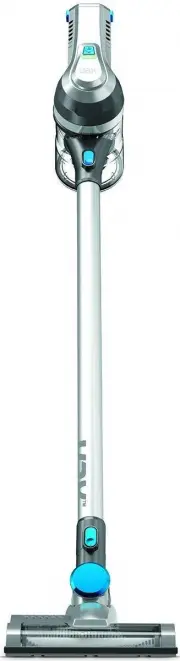
Getting to know your machine Brushbar On/Off button On/Off and charging light Handheld release button Reach wand Power head/accessory release clip Powered Head Brushbar Battery charger inlet Filter cover release buttons Dirt container release button (hidden) Battery release button Handle Dirt releas...
Page 7 - Getting started; Assembling your Cordless SlimVac; Before you begin
Getting started Assembling your Cordless SlimVac Line up the connector on the reach wand with the Powered Head. Push the reach wand down onto the Powered Head until it clicks into place. Push the handheld down onto the reach wand until it clicks into place. The upright slim vacuum cleaner is not fre...
Page 8 - Fixing the wall bracket
Getting started Fixing the wall bracket Fully assemble the vacuum but do not attach the battery. Use both screws and wall plugs to secure the wall bracket to the wall. Place covers over the screws. Attach the wall bracket to the handle. Firmly press the vacuum handle into the wall bracket to secure....
Page 10 - Charging the battery
Charging the battery CAUTION: Do not use the vacuum cleaner when the machine is plugged in and charging. CAUTION: For best performance the terminals on the battery and vacuum cleaner must be clean and free from dust and dirt. The life expectancy of the battery will vary depending on the usage of the...
Page 11 - Using your machine; Using as a slim vacuum cleaner
Using your machine Using as a slim vacuum cleaner Squeeze the trigger located underneath the handle, the machine will switch ‘On’. The On/Off and charging light will illuminate green indicating the power is on and the machine is charged. Release the trigger to switch the machine ‘Off ’. Squeeze the ...
Page 12 - Using as a handheld vacuum cleaner
Using as a handheld vacuum cleaner Using your machine Always take extra care when using the vacuum cleaner on the stairs. Press the handheld release clip. Pull to separate the handheld from the reach wand. The reach wand when attached to the Powered Head/accessory is not free standing, place safely ...
Page 13 - Using as a reach slim vacuum cleaner
Using your machine Using as a reach slim vacuum cleaner Press the Power Head/ accessory release clip and pull to remove the Powered Head from the reach wand. Choose an accessory (pictures illustrated dependent upon model). Push the chosen accessory into the reach wand until it clicks into place. Squ...
Page 14 - Taking care of your machine; Removing the battery
Taking care of your machine Removing the battery Emptying the dirt container Lie the handheld on its side on a fl at stable surface. Press the battery release button. Press the handheld release clip. Pull to separate the handheld from the reach wand. Slide the battery out from the back of the handhe...
Page 15 - Cleaning the post-motor fi lter
Taking care of your machine Cleaning the post-motor fi lter Cleaning the fi lter and separator Press the fi lter cover release buttons located on both sides of the fi lter cover and pull to remove the fi lter from the machine. Turn the handheld over and press the dirt container release button. Pull th...
Page 16 - Cleaning the fi lter and separator
Taking care of your machine Cleaning the fi lter and separator Refi tting the separator, fi lter and dirt container Tap the mesh fi lter and separator over a bin to remove any dirt/ debris. Using a dry cloth wipe away any remaining dirt/debris. Line up the arrows around the side of the separator with t...
Page 17 - Let’s talk technical; Removing blockages from the Powered Head
Let’s talk technical Removing blockages from the Powered Head The brushbar should be removed from the Powered Head before attempting to remove any blockages. Using scissors remove any threads or hair from around the brushbar and clear any dirt or debris from Powered Head. IMPORTANT: If the brushbar ...
Page 18 - Accessories; Reach mode tools; Also available SlimVac Tools; Visit
Accessories Reach mode tools Pet Tool/Stair Tool An ideal tool to help tackle those pet hairs! Simply clip this tool onto the handheld and begin cleaning. The rubber teeth are designed to agitate fi ne hair on both carpets and hardfl oor. This tool is also great for stair cleaning! 3-in-1 Tool The m...
Page 19 - Notes
Page 22 - What to do if it goes wrong
• Check the contents panel on the box to make sure the part is included with your vacuum cleaner. • Check the battery is inserted correctly into the vacuum cleaner. • The battery may not be charged. Go to ‘Getting Started’. • The terminals on the battery and vacuum cleaner may be dirty. Go to ‘Lets ...
Page 23 - Getting in touch
* Calls are charged at the standard local rate. Please make a note of the serial number and model number of the vacuum cleaner before calling. Getting in touch