Tritton ARK 100 7.1 (PC) - User Manual

Tritton ARK 100 7.1 (PC) Headphones – User Manual, read for free online in PDF format. We hope this helps you resolve any issues you may have. If you have further questions, please contact us through the contact form.
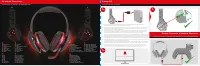
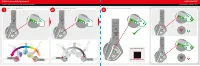
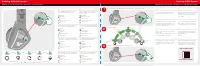

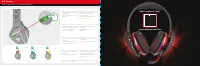

Table of Contents:
- Page 2 – RGB Color & Brightness
- Page 3 – Setting RGB Speed; Setting RGB Behaviour
- Page 4 – Mic Mute; SVM
- Page 5 – EQ Modes
- Page 6 – ARK; ULTIMATE GAMING AUDIO
L
e
f
g
Setup PC
Configuration PC / PC-Setup
Product Overview
Présentation du produit / Produktübersicht
Setup Console & Mobile Devices
Console d'installation et périphériques mobiles / Konsole- & Mobilgeräte-Setup
EN
FR
DE
IT
ES
SV
PT
RU
Go to Control Panel > Sound > Playback Tab. Right-click and set Tritton ARK 100 Audio Device to Default
Device and Default Communication Device. Repeat for Recording tab.
Allez dans le Panneau de configuration> Son> Onglet Lecture. Cliquez avec le bouton droit de la souris et définissez le
périphérique audio Tritton ARK 100 sur le périphérique par défaut et le périphérique de communication par défaut.
Répétez l'opération pour l'onglet Enregistrement.
Rufen Sie das Control Panel auf, klicken Sie auf Sound und dann den Reiter Playback. Jetzt ein rechter Mausklick,
wählen Sie Tritton ARK 100 Audio Device als Default Device (Standardgerät) und Default Communication Device
(Standard-Kommunikationsgerät). Wiederholen Sie diese Schritte für den Reiter Recording (Aufnahme).
Aprire la scheda Gestione risorse > Audio > Riproduzione. Fare clic su Tritton ARK 100 Audio Device e impostare la cuffia
come Dispositivo predefinito e Dispositivo di comunicazione predefinito. Ripetere la procedura per la scheda Registrazione.
Vaya a Panel de control > Sonido > pestaña Reproducción. Haga clic con el botón derecho y establezca Dispositivo de Audio
Tritton ARK 100 a Dispositivo predeterminado y Dispositivo de comunicación predeterminado. Repetir para la pestaña Grabar.
Gå till fliken Kontrollpanelen > Ljud > Uppspelning. Högerklicka och ställ in Tritton ARK 100-ljudenhet till standardenhet
och standardkommunikationsenhet. Upprepa för fliken Inspelning.
Vá a Painel de Controlo > Som > Reprodução. Clique com o lado direito do rato e selecione o Dispositivo de Áudio Tritton
ARK 100 como Dispositivo Predefinido e Dispositivo de Comunicação Predefinido. Repita a operação para a Gravação
Перейдите
в
меню
«
Панель
управления
» > «
Звук
» > «
Устройства
воспроизведения
».
Нажмите
правой
кнопкой
мыши
на
опции
«Tritton ARK 100»
и
и
выберите
«
Использовать
по
умолчанию
»
и
«
Использовать
устройство
связи
по
умолчанию
».
Повторите
то
же
самое
в
меню
«
Записывающие
устройства
»
R
a
c
d
b
EN
DE
FR
IT
ES
SV
PT
RU
RGB Behaviour
RGB Farbverhalten
Comportement RVB
Comportamento RGB
Comportamiento RVA
RGB-beteende
Comportamento RGB
Выбор мерцания подсветки
EN
DE
FR
IT
ES
SV
PT
RU
Mic Mute
Mikrofon stumm
Micro mute
Silenziamento microfono
Silenciar micrófono
Mic Mute
Cortar som do microfone
Отключить звук микрофона
e
EN
DE
FR
IT
ES
SV
PT
RU
RGB Color & Brightness
RGB Farbe & Helligkeit
Couleur et luminosité RVB
Colore e luminosità RGB
Color RVA y Brillo
RGB-färg och ljusstyrka
Cor & Brilho RGB
Цвет и яркость подсветки
f
g
EN
DE
FR
IT
ES
SV
PT
RU
Volume Down
Leiser
Baisser le volume
Volume -
Bajar volumen
Volym ned
Baixar o Volume
Тише
a
EN
DE
FR
IT
ES
SV
PT
RU
EQ
EQ
EQ
EQ
EQ
EQ
Equalizador
Эквалайзер
c
EN
DE
FR
IT
ES
SV
PT
RU
Volume Up
Lauter
Augmentation du volume
Volume +
Subir volumen
Volym upp
Subir o Volume
Громче
b
EN
DE
FR
IT
ES
SV
PT
RU
Surround Sound
Surround Sound
Son surround
Surround Sound
Sonido envolvente
Surround Sound
Som Surround
Объемный звук
d
1
a
1
b
1
c
www.trittonaudio.com/downloads
"Loading the manual" means you need to wait until the file loads and becomes available for online reading. Some manuals are very large, and the time they take to appear depends on your internet speed.
Summary
LED ON/OFF LED ON/ OFF / LED Ein / Aus RGB Color & Brightness Couleur RVB et brillance / RGB Farbe & Helligkeit Help? / Assistance? / Hilfe? www.trittonaudio.com/video 2 3 RGB Color / Couleur RVB / RGB Farbe RGB Brightness / RGB brillance / RGB Helligkeit Finish and Set / Terminer et régler ...
Setting RGB Speed Réglage de la vitesse RVB / Einstellen von RGB Geschwindigkeit Setting RGB Behaviour Réglage du comportement RVB / Einstellen von RGB Verhalten Help? / Assistance? / Hilfe? www.trittonaudio.com/video 1 2 3 BreathingHeartbeatColour CycleRandom Colour CycleSingle Colour Press the RGB...
Mic Mute Fonction mute du microphone / Mikrofon stumm SVM SVM / SVM SVM enables you to hear yourself through the headsetLe SVM vous permet d’entendre votre voix dans le casqueSVM ermöglicht es Ihnen, sich selbst durch das Headset zu hörenLa funzione SVM permette di ascoltare la propria voce nelle cu...