Triplett CM1070 - User Manual
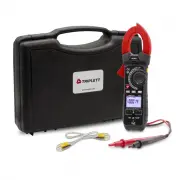
Triplett CM1070 Multimeter – User Manual, read for free online in PDF format. We hope this helps you resolve any issues you may have. If you have further questions, please contact us through the contact form.


Table of Contents:
- Page 2 – International Safety Symbols; OVERVOLTAGE CATEGORY I; WARNING
- Page 3 – Do not directly view or direct the laser pointer at an eye.
- Page 4 – Description; Meter Description
- Page 5 – Operation; NOTES; Input Shutter; NOTE
- Page 7 – Resistance Measurements; COM; Continuity Test; Diode Test; MODE
- Page 8 – Capacitance Measurements; Frequency and Duty Ratio Measurements
- Page 9 – A DC/AC Current Measurements; Type K Temperature Measurements; TYPE K
- Page 11 – Peak Hold
- Page 12 – returned to the OFF position.; Low battery indication; When the
- Page 13 – Maintenance; Cleaning and Storage; Battery ordinance; Disposal
- Page 14 – Specifications; Function
- Page 15 – Warranty; Copyright
User Manual
CM1070
TRMS AC/DC Clamp with Dual Type K and
A
"Loading the manual" means you need to wait until the file loads and becomes available for online reading. Some manuals are very large, and the time they take to appear depends on your internet speed.
Was this manual helpful?
About this manual
- Brand
- Triplett
- Model
- CM1070
- Document type
- User Manual
- Category
- Multimeter
- Language(s)
- English
- Pages
- 16
- File size
- 613 KB
- Format
Summary
2 Introduction Congratulations on your purchase of the CM1070 True RMS Clamp Meter. This meter measures AC Current, DC Current, AC/DC Voltage, Resistance, Capacitance, Frequency, Diode Test, Duty Cycle and Continuity. Special features include Dual Input Thermocouple Temperature and Non-Contact Volta...
3 SAFETY NOTES • Do not exceed the maximum allowable input range of any function. • Do not apply voltage to meter when resistance function is selected. • Set the function switch OFF when the meter is not in use. • Remove the battery if meter is to be stored for longer than 60 days. WARNINGS • Set fu...
4 Description Meter Description 1. Current clamp 2. Clamp opening trigger 3. HOLD/BACKLIGHT button 4. MODE / o C/ o F 5. Backlit LCD Display 6. Type K input jacks 7. Multimeter input jacks 8. Non-Contact Voltage Detector 9. LAMP 10. NCV LED indicator 11. LAMP/ZERO button 12. Function switch 13. MAX/...


