Page 2 - IMPORTANT SAFETY; READ ALL INSTRUCTIONS BEFORE INSTALLING AND USING
2 • Know the symptoms of carbon monoxide poisoning: headache, dizziness, weakness, nausea, vomiting, sleepiness, and confusion. Carbon monoxide reduces the blood’s ability to carry oxygen. Low blood oxygen levels can result in loss of consciousness and death. • See a doctor if you or others develop ...
Page 3 - SAVE THESE INSTRUCTIONS
traegergrills.com | 3 WARNING!Many parts of the grill will become very hot during operation. Care must be taken to avoid burns, both during operation and afterwards, while the grill is still hot. • Never leave the grill unattended when young children are present. • Never move the grill when it is op...
Page 4 - WE’VE GOT YOU; COVERED; PELLETS
4 WE’VE GOT YOU COVERED PELLETS RUBS SAUCES TraegerGrills.com/Shop TraegerGrills.com/Dealers
Page 5 - TABLE OF CONTENTS
traegergrills.com | 5 Register your grill online for a FREE Traeger ebook Go online at traegergrills.com/register TABLE OF CONTENTS 2 2 Important Safety 6 Adding Flavor to Your Fire 8 Getting to Know Your Grill 11 Priming the Grease Trap 12 Seasoning Your Grill 14 Using Your Grill 15 Choosing a Cook...
Page 6 - PELLET GUIDE; BIG GAME BLEND; ADDING FLAVOR TO YOUR FIRE; HICKORY
6 PELLETS SPECIALTY SIZES PELLET GUIDE H A R D W O O D ALDER APPLE CHERRY HICKORY MAPLE MESQUITE OAK PECAN GOOD FOR ANYTHING. GREAT FOR: BIG GAME BLEND 33-lb. (15-kg) bag PEL320 Traeger and Realtree have teamed up to bring you an exclusive blend of hickory and red and white oak, with woodsy rosemary...
Page 8 - GETTING TO KNOW YOUR GRILL; GRILL PARTS AND FEATURES*
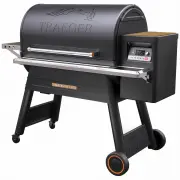
8 Part Description Part Description 1 Grill Door 13 Grease Pan 2 Door Handle 14 Locking-Caster Legs 3 Top Grill Grate 15 Leg Braces 4 Middle Grill Grate 16 All-Terrain Wheel Legs 5 Bottom Grill Grate 17 Front Shelf 6 Grease Drip Tray 18 WiFIRE ® Controller 7 Upper Heat Shield 19 Pellet Hopper 8 Lowe...
Page 10 - YOUR WiFIRE® ELECTRONIC CONTROLLER
10 Your Traeger Timberline Grill is equipped with a state-of-the-art electronic controller that is Wi-Fi ® -capable. Before you begin using the grill, it will be helpful to familiarize yourself with the different settings and button controls. TIMER MENU IGNITE KEEP WARM SUPER SMOKE 1 STANDBY BUTTON ...
Page 11 - PRIMING THE GREASE TRAP
traegergrills.com | 11 Before you can get started smoking up some amazingly tasty food, you will need to prime the grease trap. The grease trap on your Traeger Timberline Grill acts as a barrier to redirect the cold smoke up towards the heat shield/chimney. In order for it to work correctly, follow ...
Page 12 - SEASONING YOUR GRILL
12 SUPER SMOKE NOTE: The seasoning reminder will display the first few times you power up the grill. However, you only have to season your grill once. ALL NA TURAL HARDWOOD SEASONING YOUR GRILL To be used on initial firing only. Your Timberline Grill has a Prime Auger function to prepare your grill ...
Page 14 - USING YOUR GRILL
14 3 Once your grill is on and the home screen is displayed, choose one of these four options to cook your food: Cooking at a Single Temperature, Using a Preset Custom Cook Program, Creating a Custom Cook Program, or Cooking With the Probe. Each method is fully explained in the next section, "Ch...
Page 15 - CHOOSING A COOK METHOD; COOKING AT A SINGLE TEMPERATURE
traegergrills.com | 15 MENU IGNITE KEEP WARM Use this method for simple recipes requiring a single cook cycle at a set temperature. CHOOSING A COOK METHOD NOTES: • It is recommended, but not necessary, to wait until preheat cycle is complete before loading food into the grill. • It is not necessary ...
Page 16 - USING A PRESET CUSTOM COOK PROGRAM
16 TRAEGER WiFIRE >Cook Cycle >Probe >Wi-Fi Information >Settings >Back TIMER MENU IGNITE KEEP WARM SUPER SMOKE 165 °F Turn Dial To Select Temp Your Timberline Grill comes with two of our favorite Custom Cook Programs already loaded: Beginner’s Brisket and Chicken Challenge. Use your ...
Page 18 - CREATING A CUSTOM COOK PROGRAM
18 Use this method to create your own cook program, or to edit an existing program. CREATING A CUSTOM COOK PROGRAM REMINDER: When using the Selection dial to choose options, remember to press in the center of the dial to lock in your choice and move to the next menu item. TIMER MENU IGNITE KEEP WARM...
Page 20 - COOKING WITH A PROBE
20 COOKING WITH A PROBE Use this method when your recipe specifies an internal goal temperature for your food. TIMER MENU IGNITE KEEP WARM SUPER SMOKE 275 °F Push Ignite To Start TIMER MENU IGNITE KEEP WARM SUPER SMOKE PROBE Set Probe Alarm: 145 TIMER MENU IGNITE KEEP WARM SUPER SMOKE TRAEGER WiFIRE...
Page 22 - TIMBERLINE FEATURES; TRAEGER APP
22 TIMBERLINE FEATURES TRAEGER APP TIMER SUPER SMOKE OPTION KEEP WARM FUNCTION Your Timberline Grill can be controlled remotely using the Traeger App. To use the Traeger App and connect your grill to your home’s Wi-Fi, refer to the Traeger App Quick Start Guide found in your Manuals packet.You will ...
Page 24 - OPERATING TIPS
24 OPERATING TIPS 1. You can change the temperature at any time during grilling to increase or decrease cooking temperature. To change between Fahrenheit and Celsius: a. Press MENU.b. Select SETTINGS.c. Select TEMPERATURE UNITS.d. Choose either FAHRENHEIT (°F) or CELSIUS (°C). e. Select BACK. You wi...
Page 25 - MAINTAINING YOUR GRILL
traegergrills.com | 25 MAINTAINING YOUR GRILL 1. CREOSOTE AND GREASE FORMATION AND REMOVAL: When wood pellets are burned slowly, they produce tar and other organic vapors that combine with expelled moisture to form creosote. The creosote vapors condense in the relatively cool flue exhaust of a slow-...
Page 27 - SERVICE AND WARRANTY
traegergrills.com | 27 TRAEGER’S LEGENDARY CUSTOMER SERVICE is the best out there. If you have any questions about your Traeger grill or need tips on cooking your first Thanksgiving turkey, our seasoned experts have your back. We’re here for you 365 days a year including holidays, because we’re cook...