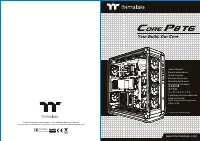
Thermaltake P3 - User Manual
A user manual for the Thermaltake Core P3 computer case outlines essential setup procedures, emphasizing compatibility with liquid cooling systems. Key topics include installation instructions for components like motherboards, power supply units (PSUs), hard drives, and PCI cards, along with specifications such as height/length limits for CPU coolers and VGA cards. The guide also covers mounting configurations–horizontal, vertical, or wall-mounted–and cable connections for LEDs, USB ports, and audio interfaces, ensuring proper compatibility across ATX and ITX form factors.
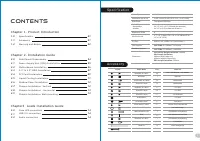
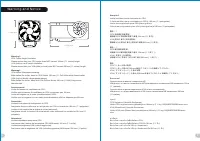
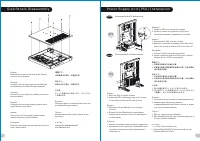
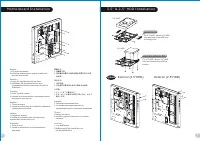
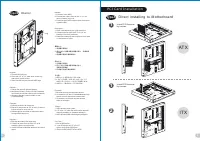
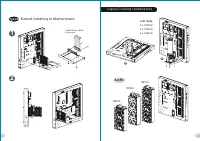
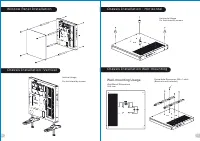
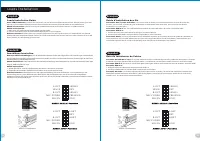
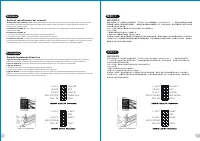
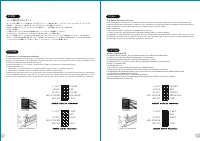
Table of Contents:
- Page 1 – Product Identification and Support Information
- Page 2 – Community Support and Certification
- Page 3 – Installation Specifications and Accessories
- Page 4 – Component Height and Length Limitations
- Page 5 – Case Disassembly and PSU Installation
- Page 6 – Motherboard and Drive Installation
- Page 7 – Drive and PCI Card Installation Methods
- Page 8 – Riser Cable and Liquid Cooling System Setup
- Page 9 – Chassis Mounting Configurations
- Page 10 – External Cable and Audio Connection Setup
- Page 11 – Multi-language Motherboard Component Connections
- Page 12 – Audio and USB Port Functionality Details
©
2016 Thermaltake Technology Co., Ltd. All Rights Reserved. 2016.10
All other registered trademarks belong to their respective companies.
w w w. t h e r m a l t a k e . c o m
w w w. t h e r m a l t a k e . c o m
U s e r ' s M a n u a l
B e n u t z e r h a n d b u c h
M o d e d ’ e m p l o i
M a n u a l d e l u s u a r i o
M a n u a l e d e l l ’ u t e n t e
M a n u a l d o U t i l i z a d o r
安 裝 說 明 書
用 戶 手 冊
ユ ー ザ ー ズ マ ニ ュ ア ル
Р у к о в о д с т в о п о л ь з о в а т е л я
k u l l a n
ı
c
ı
e l k i t a b
ı
(
E E E Y ö n e t m e l i
ğ
i n e U y g u n d u r )
ค ู ่ ม ื อ ก า ร ใ ช ้
Tested To Comply
With FCC Standards
FOR HOME OR OFFICE USE
Yo u r B u i l d . O u r C o r e
C
ore
P
3
藍 色 線 條 為 尺 寸 標 示 , 請 勿 印 刷 上 去 !
產 品 料 號
C A - 1 G 4 - 0 0 M 1 W N - 0 0
C o r e P 3
說 明 書
1 6
/
0 9
/
1 9
A
產 品 名 稱
印 刷 項 目
發 稿 日 期
版 本
騎 馬 釘
2 4
1 0 5
G
雙 銅
單 色
無
無
其 他 特 殊 處 理 效 果
表 面 處 理
2
厚 度
( g / m )
裝 訂 方 式
材 質
頁 數
印 刷 色 彩
規 格 樣 式
整 本
CHECK
DESIGN
Poki
(16/0
9
/
19
)
Mike
.
Lin
(16/0
9
/
19
)
刀 模 線
1 2 5
m m
1 7 6
m m
"Loading the manual" means you need to wait until the file loads and becomes available for online reading. Some manuals are very large, and the time they take to appear depends on your internet speed.
Was this manual helpful?
About this manual
- Brand
- Thermaltake
- Model
- P3
- Document type
- User Manual
- Category
- PC Case
- Language(s)
- German, English, Spanish, French, Italian, Dutch, Polish, Russian, Swedish
- Pages
- 12
- File size
- 7.9 MB
- Format
Summary
Identification details, model reference, support website, and product registration information.
Information on joining the community forum, accessing support, and details regarding the Tt LCS-Liquid Cooling Support Certification.
Table of contents, product introduction, installation steps, cable connections, case dimensions, drive bay options, motherboard support, and accessory list.