Sony NW-WS413 - User Manual
A user manual for the Sony Walkman covers essential operational and safety aspects across multiple languages, including battery care, water resistance guidelines, wireless connectivity, troubleshooting common issues, and environmental compliance. The document highlights key topics such as device usage, safety precautions (including water exposure risks), technical specifications (like electrical ratings), recycling procedures, and compatibility with various systems. It also addresses specialized features like ambient sound mode and wireless earphone setups while emphasizing durability and proper maintenance for long-term reliability.
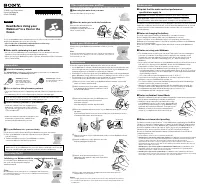
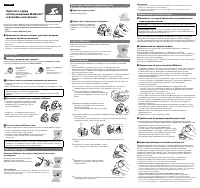
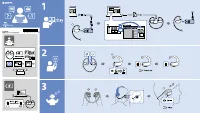
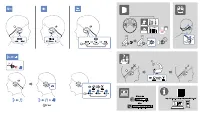
Table of Contents:
- Page 1 – Compliance, Battery Care, and Troubleshooting
- Page 2 – General Usage, Specifications, and Recycling
- Page 3 – Safe Water Usage and Fitting Instructions
- Page 4 – Waterproof Earphone Use and Durability Ratings
- Page 5 – Wireless Earphone Setup and Power-On Process
- Page 6 – Wireless Earphone Operation and Connectivity
NW-WS413/WS414
©2016 Sony Corporation Printed in Malaysia
English
About the manuals
1. Instruction Manual (this manual)
2.
(Startup Guide)
The Startup Guide describes the following:
•
Basic operating instructions of your WALKMAN®
•
How to access the “Help Guide”, which contains all of the operating
instructions and explanations of customer support websites, etc.
•
How to access useful PC applications websites on the internet
While browsing is free, you may be charged a communication fee
according to your carrier contract.
Depending on the country/region in which you have purchased your
Walkman, some models may not be available.
Notes for using Walkman
Note for battery
•
To prevent battery deterioration, charge the battery at least once every six
months or every year.
About Ambient Sound Mode
Ambient Sound Mode allows you to hear ambient sound even while
wearing headphones. However, note that this mode does not enable
you to hear all sounds around you. Ambient sound may not be heard
well depending on the surrounding environment, type of the music
being played on your Walkman, or the volume level. Be very careful
when using the Walkman in places where an inability to hear ambient
sound would be dangerous (such as on roads where there is car or
bicycle traffic).
Note regarding use in a pool or the ocean
Refer to “Read Before Using your Walkman® in a Pool or the Ocean”.
About the operating temperature of the Walkman
The operating temperature of the Walkman is between –5 °C (23 °F) and
45 °C (113 °F).
Symptom & Remedy
Your Walkman cannot charge the battery or is not recognized on
your computer.
•
Attach your Walkman to the USB cradle (supplied) properly and
firmly. Charging will start (the OPR lamp lights up in orange) even
if the connection was not made properly, but there is a possibility
that the computer has not recognized the Walkman. In such a case,
remove the Walkman from the USB cradle and then attach to the USB
cradle again.
•
When you use your Walkman for the first time, or if you have not
used the Walkman for a long time, it may take a few minutes to be
recognized by the computer. Check that the computer recognizes the
Walkman after you have connected it to the computer for about 10
minutes.
•
If the approaches listed above fail to resolve the issue, turn off
your computer completely and disconnect your Walkman. Then
disconnect the power cable, battery, and anything else connected
to the computer and discharge it for five minutes. After discharging,
turn on the computer again and reconnect the Walkman.
Compliance & Information
Information on laws and trademarks
For information on laws, regulations and trademark rights, refer to
“Important Information” contained in the supplied software. To read it,
install the supplied software on your computer.
To install it, open [WALKMAN] in your Walkman’s system storage after
connecting to your computer.
Windows user: [FOR_WINDOWS] - [Help_Guide_Installer(.exe)]
Mac user: [FOR_MAC] - [Help_Guide_Installer_for_mac]
After installing the software, double-click the shortcut or the alias icon
generated on your desktop.
About the in-ear headphones
The earbuds seal your ears. Therefore, be aware that there is a risk of
damage to your ears or eardrums if strong pressure is applied to the
earbuds or the earbuds are suddenly removed from your ears. After
use, be sure to take the earbuds off your ears gently.
About the headphones
•
Avoid playing the unit at so loud a volume that extended play might
affect your hearing.
•
At a high volume outside sounds may become inaudible. Avoid
listening to the unit in situations where hearing must not be
impaired, for example, while driving or cycling.
•
As the headphones are of open-air design, sounds go out through
the headphones. Remember not to disturb those close to you.
Design and specifications are subject to change without notice.
Русский
Сведения о руководствах
1. Инструкция по эксплуатации (данное руководство)
2.
(Руководство по началу роботы)
В Руководстве по началу работы приведена следующая
информация:
•
Основные инструкции по эксплуатации Вашего WALKMAN®
•
Как получить доступ к “Справочному руководству”, в котором
содержаться все инструкции по эксплуатации, а также
приводится информация относительно веб-сайтов технической
поддержки клиентов и т. д.
•
Как в сети Интернет получить доступ к веб-сайтам с полезными
прикладными программами для ПК
Просмотр веб-сайта бесплатен, однако ваш интернет-провайдер
может взимать плату за доступ к сети.
В зависимости от страны/региона, в которой приобретен Walkman,
некоторые модели могут быть недоступны.
Примечания по использованию Walkman
Примечания относительно батареи
•
Чтобы предотвратить повреждение аккумуляторной батареи, заряжайте ее
не реже одного раза в шесть месяцев или одного раза в год.
О режиме окружающего звука
Режим окружающего звука позволяет слышать окружающий звук
даже в надетых наушниках. Однако имейте в виду, что данный
режим не позволяет слышать все звуки вокруг вас. Окружающий
звук может быть недостаточно слышен в зависимости от
окружающей среды, типа музыки, воспроизводимой на
Walkman, или уровня громкости. Будьте очень осторожны при
использовании Walkman в местах, где невозможность слышать
окружающий звук может представлять опасность (например, на
дорогах с автомобильным или велосипедным движением).
Примечание относительно использования в
плавательном бассейне или океане
См. “Прочтите перед использованием Walkman® в бассейне или
океане”.
О рабочей температуре Walkman
Рабочая температура Walkman составляет от –5 °C до 45 °C.
4-580-537-
33
(1)
Instruction Manual
Инструкция по эксплуатации
RU
說明書手冊
CT
说明书手册
CS
AR
تماﻴﻠﻌﺘﻟا ﻞﻴﻟد
Признаки неисправности и способы
устранения
Аккумуляторная батарея Walkman не заряжается или Walkman
не распознается на компьютере.
•
Прикрепите Walkman к док-станции USB (прилагается)
правильно и надежно. Зарядка начнется (индикатор OPR
загорится оранжевым цветом), даже если подключение не было
выполнено должным образом, однако есть вероятность того,
что компьютер не распознал Walkman. В этом случае извлеките
Walkman из док-станции USB, а затем прикрепите его к док-
станции USB снова.
•
При использовании Walkman в первый раз или же если Walkman
не использовался длительное время, может пройти несколько
минут, прежде чем он будет распознан компьютером. Убедитесь
в том, что компьютер распознал Walkman по прошествии
примерно 10 минут после его подключения.
•
Если действия, перечисленные выше, не принесли результатов,
выключите компьютер полностью и отсоедините Walkman. Затем
отсоедините кабель питания, батарею и все, что подключено
к компьютеру и разряжайте его в течение пяти минут. После
разрядки включите компьютер снова и подключите Walkman
еще раз.
Соответствие и информация
Информация о законах и товарных знаках
Для получения информации о законах, нормативных требованиях
и правах на товарные знаки обратитесь к разделу “Важная
информация”, содержащемуся в прилагаемом программном
обеспечении. Для этого установите на свой компьютер
прилагаемое программное обеспечение.
Для ее установки откройте [WALKMAN] в системном хранилище
Walkman после подключения к компьютеру.
Для пользователей Windows: [FOR_WINDOWS] - [Help_Guide_
Installer(.exe)]
Для пользователей Mac: [FOR_MAC] - [Help_Guide_Installer_for_mac]
После установки программного обеспечения дважды щелкните
ярлык или альтернативный значок, созданный на рабочем столе.
Содержание
•
“WALKMAN” (1)
•
Вкладыши (1 комплект)
•
Вкладыши для плавания (1 комплект)
•
Док-станция USB (1)
•
USB-кабель (1)
•
Лента для регулировки (1)
•
Руководство по началу работы
•
Инструкция по эксплуатации
•
Прочтите перед использованием Walkman в бассейне или океане
О вставных наушниках
Вкладыши герметично закрывают уши. Поэтому следует помнить,
что существует риск повреждения слухового аппарата или
барабанных перепонок в случае воздействия сильного давления
на вкладыши или при их резком извлечении из ушей. После
использования проследите за тем, чтобы осторожно извлечь
вкладыши из ушей.
О наушниках
•
Избегайте пользоваться вашим устройством на большой
громкости, так как длительное воспроизведение с большой
громкостью может повлиять на ваш слух.
•
При большой громкости внешние звуки могут быть не слышны.
Избегайте прослушивания устройства в ситуациях, когда это
может повлиять на слух, например, во время управления
автомобилем или велосипедом.
•
Taк кaк головные тeлeфоны имeют конcтpyкцию откpытого типa,
то звyки бyдyт cлышны чepeз головныe тeлeфоны. Cлeдyeт пpи
зтом помнить, что нeльзя мeшaть звyкaми от aппapaтa дpyгим
людям, нaxодящимcя pядом c Baми.
Для клиентов в России
Цифровой музыкaльный проигрыватель
Изготовитель: Сони Корпорейшн
Адрес: 1-7-1 Конан,
Минато-ку, Токио 108-0075, Япония
Страна-производитель: Малайзия
Импортер на территории стран Таможенного союза
ЗАО «Сони Электроникс», Россия, 123103, Москва, Карамышевский
проезд, 6
Название и адрес организации, раположенной на территории РФ,
уполномоченной принимать претензии от пользователей:
ЗАО “Сони Электроникс”, 123103,Москва,Карамышевский проезд, 6,
Россия
Конструкция и технические характеристики могут быть изменены
без предварительного уведомления.
"Loading the manual" means you need to wait until the file loads and becomes available for online reading. Some manuals are very large, and the time they take to appear depends on your internet speed.
Was this manual helpful?
About this manual
- Brand
- Sony
- Model
- NW-WS413
- Document type
- User Manual
- Category
- MP3 Player
- Language(s)
- German, English, Spanish, French, Italian, Dutch, Polish, Russian, Swedish
- Pages
- 6
- File size
- 967.6 KB
- Format
Summary
Information regarding legal notices, battery maintenance, operating temperature limits, and troubleshooting procedures for device recognition or charging issues.
Multi-language usage instructions, safety guidelines, warranty details, environmental regulations, electrical specifications, and recycling procedures.
Guidance on safely using the device in water, methods for attaching swimming earbuds, proper fitting into ears, maintenance after water exposure, and water resistance specifications.