Siemens QA115AFCP - User Manual
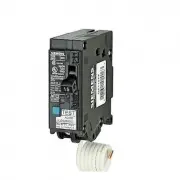
A troubleshooting guide for Siemens AFCI (Arc Fault Circuit Interrupter) and GFCI (Ground Fault Circuit Interrupter) circuit breakers helps electrical professionals diagnose common issues like nuisance tripping, overcurrent faults, or ground failures. The manual covers key topics such as identifying breaker types, interpreting LED indicators, troubleshooting reset procedures, and investigating wiring defects–including damaged cords, loose connections, and improper loads. It emphasizes safety warnings and directs users to qualified personnel for maintenance when needed.


Table of Contents:
- Page 1 – Product Identification and Support Information
- Page 2 – Diagnostic Guide Index
- Page 3 – AFCI/GFCI Circuit Breaker Troubleshooting Basics
- Page 4 – Circuit Breaker Fault Reset and Testing
- Page 5 – Circuit Breaker Type Identification
- Page 6 – Interpreting LED Indicator Lights
- Page 7 – Trip Indicator Status and Test Locations
- Page 8 – Troubleshooting Tripped Circuit Breakers
- Page 9 – Arc Fault Troubleshooting Procedures
- Page 10 – Arc-Fault Trip Diagnostic Questions
- Page 11 – Ground Fault Troubleshooting Procedures
- Page 12 – Legal Disclaimers and Contact Information
usa.siemens.com
AFCI-GFCI Circuit Breaker
Diagnostic Guide
"Loading the manual" means you need to wait until the file loads and becomes available for online reading. Some manuals are very large, and the time they take to appear depends on your internet speed.
Was this manual helpful?
About this manual
- Brand
- Siemens
- Model
- QA115AFCP
- Document type
- User Manual
- Category
- Circuit Breaker
- Language(s)
- English
- Pages
- 12
- File size
- 7.3 MB
- Format
Summary
Cover page featuring branding, model identification, and support resources.
Index outlining sections for arc fault and ground fault facts, general diagnostic procedures, and investigative guides for electrical professionals.
Explanation of AFCI and GFCI devices, definition of nuisance tripping, general troubleshooting steps, safety warnings, and causes like damaged cords or loose connections.
Ask a question
Related manuals
Popular Siemens Circuit Breakers


More Siemens Circuit Breakers models
 Siemens Q2100 User Manual
 Siemens Q2100P User Manual
 Siemens Q2125 User Manual
 Siemens Q21530CT User Manual
 Siemens Q22050CT User Manual
 Siemens QN2200 User Manual
 Siemens MP270 User Manual
 Siemens Q220 User Manual
 Siemens Q270 User Manual
 Siemens Q280 User Manual
 Siemens Q290 User Manual
 Siemens Q320 User Manual
 Siemens Q330 User Manual