Sharp SJFP676VSL - User Manual
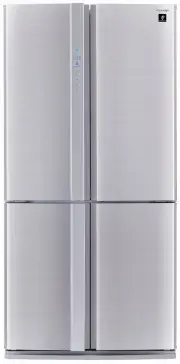
Sharp SJFP676VSL Refrigerator – User Manual, read for free online in PDF format. We hope this helps you resolve any issues you may have. If you have further questions, please contact us through the contact form.


Table of Contents:
- Page 4 – WARNING; Before using your refrigerator; INSTALLATION; NOTE
- Page 5 – Deodorising unit; If you wish to store large items within; DESCRIPTION
- Page 6 – To set sound “ON”; Control panel; Feature icons; To set sound “OFF”
- Page 7 – OPERATION; Plasmacluster; Energy Saving; To start operation
- Page 8 – Vacation mode; Express Freezing
- Page 9 – Door Alarm; To cancel operation; Child Lock
- Page 10 – Advanced Setting of Freezer / Refrigerator compartment; Freezer compartment; Controlling Temperature; Freezer compartment
- Page 11 – STORING FOOD; Dairy Products & Eggs; For best freezing
- Page 12 – CARE AND CLEANING; Tips for saving energy
- Page 13 – If you still require service; BEFORE YOU CALL FOR SERVICE
- Page 14 – SPECIFICATION
- Page 16 – SHARP CORPORATION OF AUSTRALIA PTY .LTD .
Device of this mark is a trademark of
Sharp Corporation.
Plasmacluster is a registered trademark
or a trademark of Sharp Corporation.
(Only for SJ-FP624V, SJ-FP676V)
REFRIGERATOR - FREEZER
OPERATION MANUAL
CONTENTS
WARNING
•
. . . . . . . . . . . . . . . . . . . . . . . . . . . . . . . . . 3
CAUTION
•
. . . . . . . . . . . . . . . . . . . . . . . . . . . . . . . . . . 3
INSTALLATION
•
. . . . . . . . . . . . . . . . . . . . . . . . . . . . . 4
DESCRIPTION
•
. . . . . . . . . . . . . . . . . . . . . . . . . . . . . . 5
OPERATION
•
. . . . . . . . . . . . . . . . . . . . . . . . . . . . . . . 7
STORING FOOD
•
. . . . . . . . . . . . . . . . . . . . . . . . . . . .11
CARE AND CLEANING
•
. . . . . . . . . . . . . . . . . . . . . . 12
BEFORE YOU CALL FOR SERVICE
•
. . . . . . . . . . . 13
SPECIFICATION
•
. . . . . . . . . . . . . . . . . . . . . . . . . . . 14
WARRANTY
•
. . . . . . . . . . . . . . . . . . . . . . . . . . . . . . . 15
MODEL
SJ-FP624V
SJ-FP676V
MODEL
SJ-FB624V
(B352).indb 1
2012/08/10 10:11:56
"Loading the manual" means you need to wait until the file loads and becomes available for online reading. Some manuals are very large, and the time they take to appear depends on your internet speed.
Summary
4 WARNING Do not install the refrigerator in a damp or wet ■ location as this may cause damage to the insulation and a leakage. Condensation may also build on the outer cabinet and cause rust. 1 Keep adequate ventilation space around the refrigerator. The figure shows the minimum required space for ...
5 Door pockets 1. (3 pcs.) Refrigerator shelves 2. (2 pcs.) Shelf 3. Bottle pocket (left) 4. Highly sealed vegetable crisper 5. The cover of the Vegetable crisper opens as the case is pulled. Freezer cases (small) 6. (3 pcs.) Freezer cases (large) 7. (2 pcs.) Casters 8. (4 pcs.) Adjustable feet 9. (...
6 To set sound “ON” Press the button and button simultaneously and continuously for 3 seconds or more again. Control panel Sound OFF indication This indication shows sound “OFF”. Door alarm indication This indication shows door alarm “ON”. Feature icons Icons of features in operation are displayed. ...