Sennheiser SB02M - User Manual
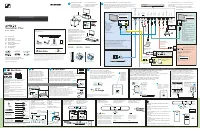
This Quick Guide covers the Sennheiser AMBEO Soundbar Plus (Model SB820M), focusing on its setup, connectivity, and wireless features. The document highlights how to pair it with TVs or audio sources via HDMI, optical, or RCA cables, while also detailing Bluetooth pairing for mobile devices and Smart Control integration through a smartphone app. Key topics include input source management, volume adjustments, and LED indicator interpretations for troubleshooting.


Table of Contents:
- Page 1 – Installation and Basic Operation Guide for Soundbar
- Page 2 – Setup Controls and Indicator Meanings
- Page 3 – Detailed Setup and Connection Options
TV with HDMI eARC/ARC
TV: no HDMI eARC/ARC
eARC
HDMI IN
PRE OUT SUB
IN OPTIC
AL
IN HDMI 2
IN HDMI 1
HDMI T
V
(e)AR
C
ETHERNET
Setup
R
eset
USB 5V
⎓
1A
e.g. CD player
L
AUDIO
OUT
R
RCA stereo cable
not included
USB
-A cable
not included
HDMI 4K
HDMI 8K or higher
Auto Power
ON
/
ECO
Mode
Streaming device e.g.
Apple TV, Netflix, ...
Gaming console e.g.
PS5, Xbox, ...
Blu-ray player, DVD player,
cable or satellite receiver
Optical Cable
not included
Recommended
Ultra High Speed
HDMI cable
not included
Recommended
Premium High Speed
HDMI cable
not included
*
Premium High Speed
HDMI Cable
included
Po
w
er cable
included
RJ-45 cable
not included
Router
HDMI
OUT
HDMI
OUT
Auto/Bypass/Pass-Through
Downmix/Stereo/PCM
TV/Player sound menu
*
:
HDMI Audio OUT/Optical OUT
Auto/Bypass/Pass-Through
Downmix/Stereo/PCM
Player sound menu
*
:
HDMI Audio OUT/Optical OUT
Auto/Bypass/Pass-Through
Downmix/Stereo/PCM
TV/Player sound menu
*
:
HDMI Audio OUT/Optical OUT
IN
AUX
L
R
max. 4K 60Hz
more than 4K 60Hz
(e.g. 8k, 120Hz)
OPTICAL
OUT
100
-2
40
V∿
50
/60Hz max
. 2A
PO
WER IN
/
电源输入
WiFi off when Ethernet
cable is connected
EN Quick Guide
DE Kurzanleitung
FR Guide rapide
ES Instrucciones resumidas
PT Guida rápidos
NL Beknopte handleiding
IT
Guida rapida
DA Kort vejledning
SV Snabbguide
2
Sonova Consumer Hearing GmbH
Am Labor 1, 30900 Wedemark, Germany
www.sennheiser-hearing.com
Publ. 05/22, 591152/A02
Package contents
| Lieferumfang | Contenu | Volumen de suministro |
Material fornecido | Omvang levering | Dotazione | Leveringsomfang |
Medföljande delar
* sound menu can vary
* sound menu can vary
* sound menu can vary
Bluetooth
3s
Hold
2
LED
Connected
1
3
AMBEO
Soundbar | Plus
Add device
Bluetooth menu
ON
3s
Hold
Adjusting the volume
Lautstärke einstellen
Régler le volume
Ajustar el volumen
Ajustar o volume
Het volume instellen
Impostazione del volume
Indstilling af lydstyrke
Ställa in volymen
3
4
3.1
3.2
www.sennheiser-hearing.com/smartcontrol
Smart Control
Auto connect
AMBEO
Sub SW02
Playback control
²
Wiedergabesteuerung
Contrôle de la lecture
Control de reproducción
Controlo da reprodução
Weergaveregeling
Pairing the Soundbar to a mobile device using
Bluetooth
Soundbar über Bluetooth mit einem Mobilgerät
koppeln
Connecter la Soundbar à un appareil mobile via
Bluetooth
Conectar la barra de sonido con un dispositivo móvil
vía Bluetooth
Ligar a barra de som a um dispositivo móvel por
Bluetooth
De soundbar via Bluetooth met een mobiel toestel
verbinden
Collegamento della Soundbar via Bluetooth con un
dispositivo mobile
Forbindelse af soundbar med et mobilt apparat via
Bluetooth
Ansluta Soundbar till en mobil enhet via Bluetooth
Manual
LOW LEVEL
IN/MONO
Recommended settings:
Volume: 50 %
Crossover: Max
PRE OUT SUB
SER
VICE
USB 5
V
⎓
1A
IN
AUX
L
R
100
-2
40
V∿
50
/60Hz max
. 2A
PO
WER IN
/
电源输入
Multi-purpose
LED
LED Active
Codec
(depends on
played content)
(Standby, minimum
power consumption
when no audio playback)
Auto Power
ON
/
ECO
Mode
Source selection
AUX
L
R
OPTICAL
HDMI TV
or
HDMI 1
HDMI 2
LED
Bluetooth
Network
streaming
Use
streaming app
to select "AMBEO
Soundbar Plus
¹
"
USB
ON
OFF
Spotify
Network
streaming
Auto Input Selection for HDMI, OPTICAL, Bluetooth, AUX and
network streaming. Only connected inputs are selectable.
NEWS
SPORTS
NEUTRA
L
ADAPTIVE
MUSI
C
MOVI
E
VO
L
SOURC
E
VOIC
E
NIGHT
Mic Mute
(turn off microphones
for voice assistant Alexa)
The LED color of
the inputs can be
defined within the
Smart Control app.
WiFi setup using WPS
Router
ETHERNET
Setup
R
eset
WPS
5s
Hold
1
2
RCA/Cinch
mono cable
not included
Multi-purpose
3 x
1 x
2 x
NEWS
SPORTS
NEUTRA
LA
DAPT
IV
E
M
US
IC
M
O
VI
E
VO
L
SOUR
C
E
VOIC
E
NI
G
H
T
Recommended
Empfohlen
Recommandé
Recomendado
Recomendado
Aanbevolen
Consigliato
Anbefales
Rekommenderas
Optionally, use HDMI eArc if
possible.
Optional, verwenden Sie HDMI
eARC wenn möglich.
En option, utilisez HDMI eArc si
possible.
Opcionalmente, utilice HDMI eArc
si es posible
Opcional, utilize o HDMI eArc se
possível.
Gebruik optioneel de HDMI eArc
waar mogelijk.h
Opzionale, utilizzare HDMI eArc,
se possibile.
Anvend som option HDMI eArc,
hvis det er muligt.
Använd HDMI eArc som alternativ
om detta skulle vara möjligt.
Wirelessly connecting the AMBEO Sub Model SW02 to the soundbar
AMBEO Sub Model SW02 drahtlos mit Soundbar verbinden
Connecter sans fil l‘AMBEO Sub Model SW02 avec la Soundbar
Conectar el AMBEO Sub Model SW02 con la barra de sonido de forma inalámbrica
Ligar o AMBEO Sub Model SW02 à barra de som sem fios
AMBEO Sub Model SW02 draadloos met de soundbar verbinden
Collegare AMBEO Sub Model SW02 senza fili con la Soundbar
Trådløs forbindelse af AMBEO Sub Model SW02 med soundbar
Anslut AMBEO Sub Model SW02 trådlöst till Soundbar
Configuration
Konfiguration
Configuration
Configuración
Configuração
Configuratie
Configurazione
Konfiguration
Konfiguration
Optional
| Optional | En option | Opcional | Opcional | Optie | Opzionale | Option | Valfritt
Connecting the soundbar to a subwoofer via cable
Soundbar mit einem Subwoofer über Kabel verbinden
Raccorder la Soundbar à un subwoofer par câble
Conectar la barra de sonido con un subwoofer mediante
cable
Ligar a barra de som a um subwoofer por cabo
De soundbar met een kabel verbinden met een subwoofer
Collegare la Soundbar con un subwoofer tramite il cavo
Forbindelse af soundbar med en subwoofer via kabel
Anslut Soundbar med en subwoofer via kabel
up to 4 possible
bis zu 4 möglich
jusqu‘à 4 possibles
hasta 4 posibles
possível até 4
tot 4 mogelijk
fino a 4
Op til 4 mulig
möjligt upp till 4
Play and Pause/ECO Mode | Wieder-
gabe und Pause/ECO-Mode | Lecture
et pause/mode ECO | Reproducir y
Pausa/Modo de ECO | Reproduzir e/
Pausar/Modo de ECO | Afspeleen
Pauze/ECO modus | Play e Pausa/
modalità ECO | Afspil og Pause/ECO-
tilstand | Spela och Pausa/ECO-läge
Previous | Vorheriger Titel |
Précédent | Anterior |
Anterior | Vorige |
Precedente | Forrige |
Tillbaka
Next | Nächster Titel |
Suivant | Siguiente |
Seguinte | Volgende |
Successivo | Næste |
Nästa
Operating elements of the
soundbar
Bedienelemente der Soundbar
Commandes de la Soundbar
Elementos de control de la barra
de sonido
Elementos de operação da barra
de som
Bedieningselementen van de
soundbar
Elementi di comando della
Soundbar
Soundbarens
betjeningselementer
Soundbars manöverenheter
Installing the Smart Control app for your
smartphone
Smart Control App für Ihr Smartphone
installieren
Installer l‘appli Smart Control pour votre
smartphone
Instalar la app Smart Control para su
smartphone
Instalar a/o aplicação (aplicativo) Smart Control
para o seu smartphone
Smart Control-app voor uw smartphone
installeren
Installazione dell‘app Smart Control per lo
smartphone
Installér Smart Control-appen til din smartphone
Starting room calibration in the Smart Control app
Raumkalibrierung in der Smart Control App starten
Démarrer le calibrage de la pièce dans l‘appli Smart Control
Iniciar la calibración de sala en la app Smart Control
Iniciar a calibração espacial na/no aplicação/ aplicativo Smart Control
Kalibratie van de ruimte in de Smart Control-app starten
Avvio della calibrazione ambientale nell‘app Smart Control
Start af rumkalibrering i Smart Control-appen
Starta rumskalibrering i appen Smart Control
Setting up the WiFi settings
WLAN-Einstellungen einrichten.
Configurer les réglages Wi-Fi.
Configurar los ajustes de WLAN
Configurar as definições WLAN
WLAN-instellingen instellen
Configurazione delle impostazioni WLAN
Indstil WLAN-indstillingerne
Upprätta Wi-Fi-inställningarna
Optional
| Optional | En option | Opcional | Opcional | Optie | Opzionale | Option | Valfritt
Starting room calibration without the
Smart Control app
Raumkalibrierung ohne Smart Control App starten
Démarrer le calibrage de la pièce sans l‘appli Smart Control
Iniciar la calibración de sala sin la app Smart Control
Iniciar a calibração espacial sem aplicação/aplicativo Smart Control
Kalibratie van de ruimte zonder de Smart Control-app starten
Avvio della calibrazione ambientale senza app Smart Control
Start af rumkalibrering uden Smart Control-appen
Starta rumskalibrering utan appen Smart Control
3s
Hold
Cancel
calibration
Multi-purpose
button
¹
the Bluetooth/network name can be defined within the Smart Control app
²
if Alexa is activated the Multi-purpose button will turn to Alexa action button to trigger Alexa.
See instruction manual or Smart Control app for details.
1
>10 cm
Remote control SB02-RC
Remote control
Fernbedienung
Télécommande
Control remoto
Controlo remoto
Afstandsbediening
Telecomando
Fjernbetjening
Fjärrkontroll
1
2
Installing the Soundbar
Soundbar aufstellen
Installer la Soundbar
Colocar la barra de sonido
Instalar a barra de som
Wall mount SB02-WM
Wall mount (optional accessory)
Wandhalterung (optionales Zubehör)
Support mural (accessoire optionnel)
Soporte mural (accesorio opcional)
Suporte de parede (acessório
opcional)
Wandhouder (optioneel accessoire)
Supporto a parete (accessorio
opzionale)
Vægholder (ekstra tilbehør)
Väggfäste (separat tillbehör)
De soundbar installeren
Installazione della Soundbar
Installation af soundbar
Installera Soundbar
*
Only use a Premium High Speed HDMI cable to connect the soundbar to your TV.
Verwenden Sie ausschließlich ein Premium High Speed HDMI Kabel.
Utilisez uniquement un câble Premium HDMI haute vitesse.
Opcionalmente, utilice Premium HDMI eArc si es posible.
Opcional, utilize o Premium HDMI eArc se possível.
Gebruik optioneel de Premium HDMI eArc waar mogelijk.
Opzionale, utilizzare Premium HDMI eArc, se possibile.
Anvend som option Premium HDMI eArc, hvis det er muligt.
Använd Premium HDMI eArc som alternativ om detta skulle vara möjligt.
*
For Bluetooth or network streaming content
(e.g. Apple AirPlay 2, Spotify Connect, TIDAL Connect, UPnP)
Smart Control
NEW
S
SPORT
S
NEUTRA
L
A
DA
PT
IV
E
MUS
IC
MOVI
E
VO
L
SOURCE
V
O
ICE
N
IG
HT
To voice control the soundbar, use:
Nutzen Sie zur Steuerung der Soundbar:
Pour le contrôle vocal de la Soundbar, utilisez :
Utilice para el control por voz de la barra de sonido:
Para o comando por voz da barra de som, use:
Gebruikt u voor de spraakbesturing van de soundbar:
Per il comando vocale della Soundbar utilizzare:
Anvend følgende til sprogstyring af soundbaren:
Använd Soundbar för röststyrning:
¹
3-5 min
Ok Google
works with
Smart Control
Configuration
Konfiguration
Configuration
Configuración
Configuração
Configuratie
Configurazione
Konfiguration
Konfiguration
²
SB02-WM
Manual
www.sennheiser-hearing.com
Sennheiser Smart Control app
Manual and support
NEWS
SPORTS
NEUTRAL
ADAPTIVE
MUSIC
MOVIE
VOL
SOURCE
VOICE
NIGHT
Quick guide
Safety guide
Premium High Speed
HDMI cable
Power cable,
country-specific
AMBEO Soundbar Plus
Model: SB02M
Remote control
Model: SB02-RC
incl. battery CR 2032
Ok Google
works with
Battery: 1 x CR 2032
Internet connection and user account required. The availability
of Amazon Alexa and Alexa Cast and Ok Google and Chromecast
depends on region.
Controllo della riproduzione
Afspilningsstyring
Styrning av uppspelning
Soundbar Plus
Model: SB02M
Amazon, Alexa and all related marks are trademarks of Amazon.com, Inc. or its affiliates. Alexa is not available in all
languages and countries. Alexa features and functionality may vary by location.
Android, Google play, Google play logo, Google Chromecast built-in and OK Google are trademarks of Google LLC.
App Store is a service mark of Apple Inc. Use of the Works with Apple badge means that an accessory has been
designed to work specifically with the technology identified in the badge and has been certified by the developer to
meet Apple performance standards. To control this AirPlay 2–enabled speaker, iOS 11.4 or later is required.
The Spotify Software is subject to third party licenses found here:
https://www.spotify.com/connect/third-party-licenses. Use your phone, tablet or computer as a remote control
for Spotify. Go to spotify.com/connect to learn how.
Connecting the Soundbar to a TV and other audio sources
Soundbar an ein Fernsehgerät und andere Audioquellen anschließen
Raccorder la Soundbar à une télé et à d‘autres sources audio
Conectar la barra de sonido a un televisor y a otras fuentes de audio
Ligar a barra de som a um televisor ou a outras
fontes áudio
De soundbar aansluiten op een tv en andere bronnen
Collegamento della Soundbar a un televisore e ad altre
sorgenti audio
Tilslut soundbaren til et fjernsyn og andre lydkilder
Anslut Soundbar till en tv-apparat och
andra ljudkällor
"Loading the manual" means you need to wait until the file loads and becomes available for online reading. Some manuals are very large, and the time they take to appear depends on your internet speed.
Was this manual helpful?
Helpful for 4 of 4 readers
About this manual
- Brand
- Sennheiser
- Model
- SB02M
- Document type
- User Manual
- Category
- Sound Bar
- Language(s)
- German, English, Spanish, French, Italian, Dutch, Polish, Russian, Swedish
- Pages
- 3
- File size
- 3.7 MB
- Format
Summary
Quick guide for installing and using the soundbar, covering connections to audio sources, WiFi setup, Smart Control via an application, volume adjustment, playback controls, and Bluetooth pairing with mobile devices.
Details regarding setup options, connection diagrams for various devices, Smart Control application configuration, and meanings of LED indicators for input sources and operational modes.
Multi-language instructions detailing setup procedures, connection methods using HDMI, optical, and RCA cables to TVs and other devices, usage of the Smart Control application, and Bluetooth functionality.
Ask a question
Related manuals
More Sennheiser Sound Bars models
Other Sennheiser appliances
 Sennheiser 50 Manual
 Sennheiser 100 Manual
 Sennheiser 100 G3 Manual
 Sennheiser 100 Series Manual
 Sennheiser 200 Manual
 Sennheiser 250 Manual
 Sennheiser 300 Manual
 Sennheiser 400 Manual
 Sennheiser 418S Manual
 Sennheiser 500 Manual
 Sennheiser 500 Series Manual
 Sennheiser 518 Manual
 Sennheiser 602 Manual
 Sennheiser 604 Manual
 Sennheiser 810 Manual
 Sennheiser 835 Manual
 Sennheiser 835 FX Manual
 Sennheiser 840 S Manual