Page 2 - Warning! Important Safety Instructions
English - 2 Warning! Important Safety Instructions (Please read the appropriate section that corresponds to the marking on your Samsung product before attempting to install the product.) CAUTION RISK OF ELECTRIC SHOCK DO NOT OPEN CAUTION: TO REDUCE THE RISK OF ELECTRIC SHOCK, DO NOT REMOVE COVER (OR...
Page 3 - Features of your new TV
English - 3 Features of your new TV 3D This new feature enables you to view 3D content. SMART HUB This TV features Smart Hub, a multi-purpose entertainment and family centre. With Smart Hub, users can surf the web, download applications, and stay in touch with family and friends through social netwo...
Page 4 - Contents; 2 Assembling the TV
English - 4 Contents 01 What's in the Box? 02 Assembling the TV 7 Attaching the TV to the Stand7 Mounting the TV on the Wall Using the Wall Mount Kit (Optional)9 Providing Proper Ventilation for Your TV10 Securing the TV to the Wall10 Arrange the cables using the Cable Holder 03 Connections and Remo...
Page 5 - 6 Using the Samsung Smart Control; 7 Getting more details.; 8 Troubleshooting and Maintenance
English - 5 06 Using the Samsung Smart Control 22 Using the Samsung Smart Control26 Controlling External Devices with the TV Remote ( Universal Remote Setup ) 07 Getting more details. 27 Viewing more TV features 08 Troubleshooting and Maintenance 29 Troubleshooting30 Cautions about the Eco Sensor an...
Page 7 - 2 Assembling the TV; Attaching the TV to the Stand; Installing the Wall Mount Kit
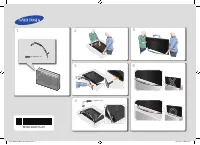
English - 7 02 Assembling the TV Attaching the TV to the Stand X 12 (M4 X L14) X 2 X 2 Make sure you have all the accessories shown, and that you assemble the stand following the provided assembly instructions. Mounting the TV on the Wall Using the Wall Mount Kit (Optional) If you mount this product...
Page 9 - Providing Proper Ventilation for Your TV; Other Cautions
English - 9 Providing Proper Ventilation for Your TV When you install your TV, maintain a distance of at least 10 cm between the TV and other objects (walls, cabinet sides, etc.) to ensure proper ventilation. Failing to maintain proper ventilation may result in a fire or a problem with the product c...
Page 10 - Securing the TV to the Wall; To Avoid the TV from Falling; Arrange the cables using the Cable Holder
English - 10 Securing the TV to the Wall Caution: Pulling, pushing, or climbing on the TV may cause the TV to fall. In particular, ensure that your children do not hang on to or destabilize the TV. Doing so may cause the TV to tip over, resulting in serious injuries or death. Follow all safety preca...
Page 11 - Connecting devices to your TV
English - 11 03 Connections and Remote Control Connecting devices to your TV You can connect various external devices using the connectors located at the back of the product. Check the connectors and then refer to the Quick Guide for more instructions on supported external devices. [UH7000-XU]BN68-0...
Page 12 - Connecting to a Network; Network Connection - Wireless
English - 12 Connecting to a Network Connecting the TV to a network gives you access to online services such as the Smart Hub, as well as software updates. - The shape of the rear panel differs among the models. Network Connection - Wireless Connect the TV to the Internet using a standard router or ...
Page 14 - Connecting to a COMMON INTERFACE slot; Attaching the CI Card Adapter
English - 14 Connecting to a COMMON INTERFACE slot (Your TV viewing Card Slot) - Turn the TV off to connect or disconnect a CI card or CI card adapter. Attaching the CI Card Adapter Attach the adapter as shown. - To install the CI CARD Adapter, please remove the sticker attached to the TV. To connec...
Page 15 - Using the “CI or CI+ CARD”; NOTE
English - 15 Using the “CI or CI+ CARD” To watch paid channels, the “CI or CI+ CARD” must be inserted. - If you don’t insert the “CI or CI+ CARD”, some channels will display the “Scrambled Signal” message. - The pairing information containing a telephone number, the “CI or CI+ CARD” ID, the Host ID,...
Page 16 - Inserting Batteries into Samsung Smart Control
English - 16 Inserting Batteries into Remote Control (Battery size: AAA) Match the polarities of the batteries to the symbols in the battery compartment. 1 3 2 - The colour and shape may vary depending on the model. - Use the remote control within 7 m of the TV. - Bright lights may affect the perfor...
Page 17 - Remote Control
English - 17 Remote Control Learn where the function buttons are on your remote, such as: SOURCE , MUTE , Y , < P > , MENU , TOOLS , E , INFO , CH LIST , RETURN , GUIDE and EXIT . - This remote control has Braille points on the Power , Channel , and Volume buttons and can be used by visually i...
Page 18 - Samsung Smart Control
English - 18 Samsung Smart Control - Colours and shape may vary depending on the model. - For more information about "Using the Samsung Smart Control", refer to page 22. Turns the TV on/off. (page 19) Changes the source. (page 21) Changes the channel. Press this button to use the search wind...
Page 19 - 4 Performing the initial setup; Turning on the TV
English - 19 04 Performing the initial setup - The initial setup differs from model to model. Turning on the TV Turn on the TV using the P button on the remote control or TV panel. - The product colour and shape may vary depending on the model. - The TV ’s Controller, a small joystick-like button at...
Page 20 - Initial setup; Samsung's ‘On TV’ Recommendations Service; Password Change; Changing the TV’s password.
English - 20 Initial setup The initial setup dialogue box appears when the TV is first activated. Follow the on-screen instructions to finish the initial setup process such as selecting the menu language, scanning channels, connecting to the network, and more. During each step, either make a choice ...
Page 21 - Additional functions
English - 21 05 Selecting Connected Devices You can select a connected external device using the SOURCE button. For example, to switch to a gaming console connected to the second HDMI connector, press SOURCE . From the Source list, select HDMI2 to change the input signal to HDMI mode. Connector name...
Page 22 - Using the Samsung Smart Control; Pairing the Samsung Smart Control
English - 22 06 Using the Samsung Smart Control Using the Samsung Smart Control Samsung Smart Control makes it even easier and more convenient to use the TV. Pressing the KEYPAD button displays a virtual remote control that allows you to easily enter digits, control content, and activate functions o...
Page 23 - Reconnecting the Samsung Smart Control
English - 23 Reconnecting the Samsung Smart Control If the Samsung Smart Control stops operating or works abnormally, replace the batteries as this may be due to insufficient battery power.If the problem persists, follow the directions below: 1. Press both the RETURN button and the GUIDE button simu...
Page 24 - Moving the Focus/Pointer
English - 24 Using the TV by Moving the Samsung Smart Control The Samsung Smart Control has a motion sensor (gyro sensor) that allows you to easily control the TV by holding and moving the Samsung Smart Control. After placing the thumb on the touchpad, a pointer appears on the screen. Hold and move ...
Page 25 - Moving to the Smart Hub panel
English - 25 Menu Access & Item Selection Press the touchpad. This lets you access the TV menu and its programme information or select an item. Displaying the Context-sensitive Menu on Smart Hub Press and hold on the touch pad from the Smart Hub screen. The Options menu available to the selected...
Page 26 - Controlling External Devices with the TV; Setting Up the Universal Remote Control; Controlling External Devices with the TV Remote
English - 26 Controlling External Devices with the TV Remote ( Universal Remote Setup ) System > Universal Remote Setup - Availability depends on the specific model and area. The universal remote control feature lets you control cable boxes, Blu-ray players, home theatres, and other external devi...
Page 27 - 7 Getting more details.; Viewing more TV features; Launching the e-Manual
English - 27 07 Getting more details. - For more information about the Samsung TV, refer to the e-Manual . Viewing more TV features The e-Manual contains more detailed information on the TV features. How to access e-Manual : Using the Remote Control: Press the E-MANUAL button on the Remote Control. ...
Page 28 - Additional e-Manual Features; Loading Pages using Keywords; Loading Reference Pages; Updating the e-Manual to the Latest Version
English - 28 Additional e-Manual Features Loading Pages using Keywords Select Search from the side of the screen to bring up the search screen. Enter a search term and then select Done . Select an item from the search results to load the corresponding page. Loading Pages from the Index Page Select I...
Page 29 - Troubleshooting
English - 29 08 Troubleshooting and Maintenance Troubleshooting If you have any questions about the TV, first refer to the Troubleshooting list below. If none of these troubleshooting tips apply, please visit “www.samsung.com” and click on Support, or contact the call centre listed on the back cover...
Page 32 - TV Specifications; Standby mode
English - 32 09 Specifications and other information TV Specifications Display Resolution (pixel) 1920 x 1080 Environmental ConsiderationsOperating TemperatureOperating HumidityStorage TemperatureStorage Humidity 50°F to 104°F (10°C to 40°C) 10% to 80%, non-condensing -4°F to 113°F (-20°C to 45°C) 5...
Page 33 - Licences; Still image warning; Recommendation - EU Only
English - 33 Licences The terms HDMI and HDMI High-Definition Multimedia Interface, and the HDMI Logo are trademarks or registered trademarks of HDMI Licensing LLC in the United States and other countries. Still image warning Avoid displaying still images (such as jpeg picture files), still image el...
Page 35 - Warranty Card; WARRANTY CONDITIONS
Warranty Card United Kingdom Republic of Ireland (EIRE) This Samsung product is warranted for a period of twelve (12) months from the original date of purchase, against defective materials and workmanship. In the event that warranty service is required, you should return the product to the retailer ...
Page 36 - Wiring the Mains Power Supply Plug (UK Only)
Wiring the Mains Power Supply Plug (UK Only) IMPORTANT NOTICEThe mains lead on this equipment is supplied with a molded plug incorporating a fuse. The value of the fuse is indicated on the pin face of the plug, and if it requires replacing, a fuse approved to BSI1362 of the same rating must be used....
Page 37 - This page is intentionally
This page is intentionally left blank. [UH7000-XU]BN68-05978F-02ENG.indb 37 2014-05-20 11:47:45