Page 2 - Before Reading This User Manual; Warning! Important Safety; Power
Before Reading This User Manual This TV comes with this User Manual and an embedded e-Manual ( > Settings > e-Manual ). Warning! Important Safety Instructions Please read the Safety Instructions before using your TV. Refer to the table below for an explanation of symbols which may be on your S...
Page 3 - Installation; Mounting the TV on a wall; Providing proper ventilation for your TV
Installation • Do not place this apparatus near or over a radiator or heat register, or where it is exposed to direct sunlight. • Do not place vessels (vases etc.) containing water on this apparatus, as this can result in a fire or electric shock. • Do not expose this apparatus to rain or moisture. ...
Page 4 - Preventing the TV from falling; Operation; Caring for the TV
• Always use cabinets or stands or mounting methods recommended by Samsung. • Always use furniture that can safely support the television set. • Always ensure the television set is not overhanging the edge of the supporting furniture. • Always educate children about the dangers of climbing on furnit...
Page 5 - 2 Initial Setup; Using the TV Controller; 3 Troubleshooting and; Troubleshooting; The TV won’t turn on.
01 What's in the Box? Make sure the following items are included with your TV. If any items are missing, contact your dealer. • Remote Control & Batteries (AAA x 2) • User Manual • Warranty Card / Regulatory Guide (Not available in some locations) • TV Power Cable • The items’ colours and shapes...
Page 6 - 4 Specifications and Other; Specifications; Display Resolution
Eco Sensor and screen brightness Eco Sensor adjusts the brightness of the TV automatically. This feature measures the light in your room and optimises the brightness of the TV automatically to reduce power consumption. If you want to turn this off, go to > Settings > General > Eco Solution ...
Page 8 - Avant de lire le présent manuel de; Avertissement ! Consignes de; Alimentation
Avant de lire le présent manuel de l'utilisateur Ce téléviseur est fourni avec le présent manuel de l'utilisateur ainsi qu'un manuel électronique intégré ( > Paramètres > e-Manual ). Avertissement ! Consignes de sécurité importantes Veuillez lire les consignes de sécurité avant d'utiliser le t...
Page 9 - Fixation du téléviseur à un mur; Précautions de sécurité
Installation • Ne placez pas l'appareil à proximité ou au-dessus d'un radiateur ou d'une bouche de chauffage, ni dans un endroit exposé à la lumière directe du soleil. • Ne placez pas de récipients contenant de l'eau (vases, etc.) sur l'appareil afin d'éviter tout risque d'incendie ou de choc électr...
Page 10 - Conseils pour éviter toute chute du téléviseur; Opération; Entretien du téléviseur
• Utilisez des armoires, des supports et des méthodes recommandés par Samsung. • Utilisez du mobilier pouvant supporter le téléviseur en toute sécurité. • Assurez-vous que le téléviseur ne surplombe pas le bord du meuble sur lequel il se trouve. • Informez les enfants des dangers auxquels ils s'expo...
Page 11 - 1 Contenu de la boîte; 2 Configuration initiale; Utilisation de contrôleur TV; 3 Résolution des problèmes et; Résolution des problèmes; La télécommande ne fonctionne pas.
01 Contenu de la boîte Vérifiez que vous avez bien reçu les éléments suivants avec votre téléviseur. S'il manque des éléments, contactez votre revendeur. • Télécommande et piles (AAA x 2) • Guide d'utilisation • Carte de garantie / Guide réglementaire (non disponible dans tous les pays) • Câble d'al...
Page 12 - 4 Spécifications et informations; Caractéristiques techniques; Résolution de l'affichage
Capteur Eco et luminosité de l'écran La fonction Capteur Eco règle automatiquement la luminosité de l'écran du téléviseur. Cette fonction mesure la luminosité de votre pièce et optimise automatiquement celle de votre téléviseur afin de réduire la consommation d'énergie. Si vous souhaitez la désactiv...
Page 14 - ¡Advertencia! Instrucciones; Alimentación
Antes de leer este manual del usuario El televisor se suministra con este Manual del usuario y un e-Manual integrado ( > Configuración > e-Manual ). ¡Advertencia! Instrucciones importantes de seguridad Lea las instrucciones de seguridad antes de utilizar el televisor. Consulte la tabla a conti...
Page 15 - Instalación; Instalación del televisor en una pared
Instalación • No instale este aparato cerca o sobre un radiador o una rejilla de aire caliente, ni en lugares expuestos a la luz solar directa. • No coloque recipientes con agua sobre este aparato (jarrones, etc.), ya que podría originar un incendio o una descarga eléctrica. • No exponga el aparato ...
Page 16 - Precauciones para evitar la caída del televisor; Funcionamiento; Cuidado del televisor
• Utilice siempre armarios,estantes o métodos de montaje recomendados por Samsung. • Utilice siempre muebles capaces de soportar el televisor con seguridad. • Asegúrese siempre de que el televisor no sobresale del borde del mueble que lo sostiene. • Informe siempre a los niños de los peligros de sub...
Page 17 - Uso del Controlador TV; 3 Solución de problemas y; Solución de problemas; El televisor no se enciende.
01 ¿Qué hay en la caja? Compruebe que los artículos siguientes vengan incluidos con su televisor. Si falta alguno, póngase en contacto con su distribuidor. • Mando a distancia y pilas (AAA x 2) • Manual del usuario • Tarjeta de garantía / Guía de información legal (no disponible en algunos lugares) ...
Page 18 - 4 Especificaciones e; Especificaciones; Resolución de pantalla
Sensor económico y brillo de la pantalla El sensor económico ajusta automáticamente el brillo del televisor. Esta función mide la iluminación de la sala y optimiza el brillo del televisor automáticamente para reducir el consumo de energía. Si desea desactivarlo, vaya a > Configuración > Genera...
Page 20 - Antes de ler o manual do utilizador; Aviso! Instruções de segurança; Potência
Antes de ler o manual do utilizador Este televisor vem acompanhado deste manual do utilizador e de e-Manual incluído ( > Definições > e-Manual ). Aviso! Instruções de segurança importantes Leia as instruções de segurança antes de usar o televisor. Consulte a tabela abaixo para uma explicação s...
Page 21 - Instalação; Montagem do televisor numa parede
Instalação • Não coloque este aparelho perto ou sobre um aquecedor ou uma saída de calor, nem num local onde este esteja exposto à luz solar directa. • Não coloque recipientes com água (jarras, etc.) sobre este aparelho, pois podem provocar um incêndio ou um choque eléctrico. • Não exponha este apar...
Page 22 - Como evitar que o televisor caia; Operação; Cuidados a ter com o televisor
• Utilizar sempre bases, armários ou métodos de montagem recomendados pela Samsung. • Utilizar sempre mobília que possa suportar o televisor em segurança. • Certificar-se sempre de que o televisor não está suspenso na extremidade da mobília que o suporta. • Informar sempre as crianças sobre os perig...
Page 23 - Utilização do Controlador da TV; 3 Resolução de problemas e; Resolução de problemas; O televisor não liga.
01 O que está incluído na caixa? Verifique se os acessórios abaixo indicados foram enviados com o televisor. Se faltar algum acessório, contacte o seu revendedor. • Telecomando & pilhas (2 pilhas AAA) • Manual do utilizador • Certificado de garantia/Guia de regulamentação (não estão disponíveis ...
Page 24 - 4 Características técnicas e; Características técnicas; Resolução do ecrã
Sensor Eco e brilho do ecrã O sensor Eco Sensor ajusta o brilho do ecrã do televisor automaticamente. Esta funcionalidade mede a luz da sua divisão e optimiza automaticamente o brilho do ecrã do televisor para reduzir o consumo de energia. Se pretender desactivar esta funcionalidade, aceda a > De...
Page 26 - Sicherheitshinweise; Stromversorgung
Vor dem Lesen der Bedienungsanleitung Dieser Fernseher wird mit dieser Bedienungsanleitung und einem eingebetteten e-Manual ( > Einstellungen > e-Manual ) geliefert. Achtung! Wichtige Sicherheitshinweise Lesen Sie die Sicherheitshinweise sorgfältig, bevor Sie das Fernsehgerät verwenden. In der...
Page 27 - Montieren des Geräts an der Wand
Installation • Außerdem darf das Gerät keinesfalls in der Nähe oder oberhalb eines Heizstrahlers oder -körpers aufgestellt werden oder an Orten, an denen es direkter Sonneneinstrahlung ausgesetzt ist. • Stellen Sie keine mit Flüssigkeit gefüllten Behälter (Vasen usw.) auf das Gerät, da dies zu einem...
Page 28 - Verwenden des Kippschutzes; Funktion; Pflegen des Fernsehgeräts
• Verwenden Sie stets die von Samsung empfohlenenn Schränke, Standfüße und Installationsverfahren. • Verwenden Sie ausschließlich Möbel, die das Gewicht des Fernsehgeräts sicher tragen können. • Stellen Sie jederzeit sicher, dass das Fernsehgerät nicht über den Rand der tragenden Möbel hinausragt. •...
Page 29 - Verwenden des TV-Steuerung; 3 Fehlerbehebung und Wartung; Fehlerbehebung; Der Fernseher kann nicht eingeschaltet werden.
01 Lieferumfang Vergewissern Sie sich, dass die folgenden Teile im Lieferumfang des Geräts enthalten sind. Falls Komponenten fehlen sollten, setzen Sie sich bitte mit Ihrem Händler in Verbindung. • Fernbedienung & 2 Batterien (Typ AAA) • Benutzerhandbuch • Garantiekarte/Rechtshinweise (nicht übe...
Page 30 - 4 Technische Daten und weitere; Technische Daten; Anzeigeauflösung
Öko-Sensor und Bildschirmhelligkeit Mit Hilfe des Öko-Sensors kann die Helligkeit des Fernsehgeräts automatisch eingestellt werden. Mit dieser Funktion werden die Lichtverhältnisse im Zimmer automatisch gemessen, und die Helligkeit des Bildschirms wird optimiert, um den Energieverbrauch zu senken. S...
Page 32 - säkerhetsanvisningar; Effekt
Innan du läser den här bruksanvisningen Tv:n levereras med den här bruksanvisningen och en inbäddad e-handbok ( > Inställningar > e-Manual ). Varning! Viktiga säkerhetsanvisningar Läs igenom säkerhetsanvisningarna innan du använder tv:n. Se tabellen nedan för en förklaring av symboler som kan ...
Page 33 - Montera TV:n på en vägg
Installation • Placera inte den här apparaten nära eller ovanför ett element eller värmeaggregat, eller där den utsätts för direkt solljus. • Placera inte behållare med vatten (vaser etc.) på den här apparaten, eftersom det kan orsaka brand eller elektrisk kortslutning. • Utsätt inte den här apparat...
Page 34 - Hindra TV:n från att falla; Användning
• Använd alltid skåp, stativ eller monteringsmetoder som rekommenderas av Samsung. • Använd alltid möbler som ger ett säkert stöd för tv:n. • Kontrollera alltid att tv:n inte hänger över kanten på den bärande möbeln. • Utbilda alltid barn i de faror som finns när det gäller att klättra på möbler för...
Page 35 - Felsökning; Fjärrkontrollen fungerar inte.
01 Vad finns i förpackningen? Försäkra dig om att följande delar följer med tv:n. Kontakta din återförsäljare om det saknas något. • Fjärrkontroll & batterier (AAA x 2) • Bruksanvisning • Garantibevis/Säkerhetsmanual (inte tillgänglig på alla platser) • TV-strömkabel • Delarnas färg och form kan...
Page 36 - Ekosensor och skärmljusstyrka; 4 Specifikationer och annan; Specifikationer; Skärmupplösning
Ekosensor och skärmljusstyrka Ekosensorn justerar ljusstyrkan på tv:n automatiskt. Den här funktionen mäter ljuset i rummet och optimerar ljusstyrkan för tv:n automatiskt för att minska strömförbrukningen. Om du vill inaktivera den går du till > Inställningar > Allmänna > Ekolösning > Id...
Page 38 - sikkerhedsinstruktioner
Før du læser denne brugervejledning Denne brugervejledning og en integreret e-Manual følger med tv’et ( > Indstillinger > e-Manual ). Advarsel! Vigtige sikkerhedsinstruktioner Læs sikkerhedsinstruktionerne, inden du anvender dit tv. Se tabellen herunder for en forklaring på symboler, der kan f...
Page 39 - Montering af tv'et på en væg; Sørg for korrekt ventilation til dit tv
Installation • Placer ikke apparatet i nærheden af eller over en radiator eller varmeovn, eller hvor det er udsat for direkte sollys. • Anbring ikke en beholder (vaser mv.) med vand på dette apparat, da dette kan medføre risiko for brand eller elektrisk stød. • Udsæt ikke dette apparat for regn elle...
Page 40 - Undgå at tv'et vælter; Handling
• Brug altid skabe eller sokler eller monteringsmetoder, der er anbefalet af Samsung. • Brug altid kun møbler, der kan understøtte tv'et sikkert. • Sørg altid for, at tv'et ikke hænger ud over kanten på det understøttende møbel. • Fortæl altid børn om farerne ved at klatre på møbler for at nå tv'et ...
Page 41 - Sådan bruger du Tv-fjernbetjening; 3 Problemløsning og; Problemløsning; Fjernbetjeningen fungerer ikke.
01 Hvad er der i kassen? Kontrollér, at følgende dele leveres sammen med dit tv. Kontakt forhandleren, hvis der mangler nogle dele. • Fjernbetjening og batterier (2 x AAA) • Brugervejledning • Garantibevis/lovgivningsmæssig vejledning (ikke tilgængelig i visse områder) • TV-strømkabel • Farve og for...
Page 42 - Økosensor og skærmens lysstyrke; 4 Specifikationer og andre
Økosensor og skærmens lysstyrke Eco Sensor regulerer automatisk tv'ets lysstyrke. Denne funktion måler lyset i dit rum og optimerer automatisk tv'ets lysstyrke for at reducere strømforbruget. Hvis du ønsker at slukke for denne funktion, skal du gå til > Indstillinger > Generelt > Økoløsning...
Page 44 - sikkerhetsinstruksjoner
Før du leser denne brukerhåndboken Denne TV-en kommer med denne brukerhåndboken og en innebygd e-håndbok ( > Innstillinger > e-Manual ). Advarsel! Viktige sikkerhetsinstruksjoner Les sikkerhetsinstruksjonene før du bruker TV-en. Se tabellen nedenfor for en forklaring på symboler som kan finnes...
Page 45 - Installasjon; Feste TV-en på en vegg; Sikre egnet ventilasjon rundt TV-en
Installasjon • Ikke plasser dette apparatet i nærheten av eller over en radiator eller varmeovn. Det må heller ikke eksponeres for direkte sollys. • Ikke plasser beholdere (vaser e.l.) med vann på dette apparatet, da det vil kunne føre til brann eller elektrisk støt. • Apparatet skal ikke utsettes f...
Page 46 - Forhindre at TV-en faller; Operasjon
• Bruk alltid kabinetter, stativer eller monteringsmetoder anbefalt av Samsung. • Bruk alltid møbler som trygt kan støtte vekten av TV-en. • Påse alltid at TV-en ikke går utover kanten til møbelet den står på. • Instruer alltid barn om farene som kan oppstå ved å klatre på møbler for å nå TV-en elle...
Page 47 - Feilsøking; Fjernkontrollen fungerer ikke.
01 Hva er i esken? Kontroller at følgende deler følger med TV-en. Kontakt forhandleren hvis det mangler noen deler. • Fjernkontroll & batterier (AAA x 2) • Brukerhåndbok • Garantikort/Sikkerhetsveiledning (ikke tilgjengelig alle steder) • TV-strømkabel • Delenes farge og utforming kan variere, a...
Page 48 - Økosensoren og lysstyrken til skjermen; 4 Spesifikasjoner og annen; Spesifikasjoner; Skjermoppløsning
Økosensoren og lysstyrken til skjermen Økosensoren justerer automatisk lysstyrken til TV-en. Denne funksjonen måler lyset i rommet og optimerer lysstyrken til TV-en automatisk for å redusere strømforbruket. Hvis du vil slå av dette, kan du gå til > Innstillinger > Generelt > Økoløsning >...
Page 50 - turvallisuusohjeita; Virta
Ennen tämän käyttöoppaan lukemista Tämän television mukana toimitetaan tämä käyttöopas sekä televisioon sisäänrakennettu e-Manual-opas ( > Asetukset > e-Manual ). Varoitus! Tärkeitä turvallisuusohjeita Lue turvallisuusohjeet ennen television käyttöä. Katso seuraavasta taulukosta Samsung tuotte...
Page 51 - Asentaminen; Television asentaminen seinälle; Television ilmankierron takaaminen; Varotoimenpide
Asentaminen • Älä asenna laitetta lämpöpatterin tai -vastuksen lähelle tai päälle tai sellaiseen paikkaan, jossa se altistuu suoralle auringonvalolle. • Älä aseta laitteen päälle mitään vettä sisältäviä astioita (maljakkoja yms.), sillä tämä voi aiheuttaa tulipalon tai sähköiskun. • Älä altista lait...
Page 52 - Television putoamisen estäminen; Toiminto; Television huoltaminen
• Käytä aina Samsungin suosittelemia kaappeja, jalustoja tai kiinnitysmenetelmiä. • Käytä aina sellaisia huonekaluja, jotka varmasti kestävät television painon. • Varmista aina, että televisio on kokonaan huonekalun päällä. • Kerro aina lapsille, kuinka vaarallista niissä huonekaluissa on kiipeillä,...
Page 53 - Television kaukosäädin-oppaan käyttö; 3 Vianmääritys ja huolto; Vianmääritys; Televisio ei käynnisty.
01 Pakkauksen sisältö Varmista, että television mukana toimitetaan alla mainitut osat. Jos osia puuttuu, ota yhteyttä jälleenmyyjään. • Kaukosäädin ja paristot (AAA, 2 kpl) • Käyttöopas • Takuukortti ja määräysopas (ei saatavissa kaikkialla) • Television virtajohto • Osien väri ja muoto voivat vaihd...
Page 54 - 4 Tekniset tiedot ja muita tietoja; Tekniset tiedot; Näytön erottelutarkkuus
Ekotunnistin ja kuvaruudun kirkkaus Ekotunnistin säätää television kuvaruudun kirkkauden automaattisesti. Ekotunnistin mittaa huoneen valaistuksen ja optimoi television kirkkauden automaattisesti virran säästämiseksi. Jos haluat ottaa tämän toiminnon pois käytöstä, siirry kohtaan > Asetukset >...
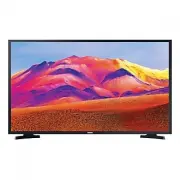


 Samsung UE32K5672SU User Manual
 Samsung UE32N4005AW User Manual
 Samsung UE32N5370AU User Manual
 Samsung UE32T4000AK User Manual
 Samsung UE32T4302AE User Manual
 Samsung UE32T5370AU User Manual
 Samsung UE40ES6530S Quick Guide