Page 2 - Contents; Safety information
English 2 C ontents Contents Safety information 4 What you need to know about the safety instructions 4 Important safety symbols and precautions: 5 State of California Proposition 65 Warning 5 Important safety precautions 5 Severe warning signs for transportation and site 7 Critical installation war...
Page 4 - What you need to know about the safety instructions
English 4 Safety information Before using your new Samsung Refrigerator, please read this manual thoroughly to ensure that you know how to operate the features and functions that your new appliance offers safely and efficiently. What you need to know about the safety instructions • This appliance is...
Page 5 - Important safety symbols and precautions:; State of California Proposition 65 Warning; WARNING; Important safety precautions; Warning Risk of fire / flammable materials; WARNING
English 5 Safety inf ormation Important safety symbols and precautions: Please follow all safety instructions in this manual. This manual uses the following safety symbols. WARNING Hazards or unsafe practices that may result in severe personal injury, property damage, and/or death . CAUTION Hazards ...
Page 7 - Severe warning signs for transportation and site; Critical installation warnings
English 7 Safety inf ormation Severe warning signs for transportation and site WARNING • When transporting and installing the appliance, care should be taken to ensure that no parts of the refrigerating circuit are damaged.- Refrigerant leaking from the pipe work could ignite or cause an eye injury....
Page 9 - Installation cautions; Critical usage warnings
English 9 Safety inf ormation Installation cautions CAUTION • Allow sufficient space around the refrigerator and install it on a flat surface. - Keep the ventilation space in the appliance enclosure or mounting structure clear of obstructions. • After you have installed the refrigerator and turned i...
Page 12 - Usage cautions
Safety information English 12 Safety inf ormation Usage cautions CAUTION • Do not re-freeze frozen foods that have thawed completely.• Use only the ice maker provided with the refrigerator.• To get the best performance from the product: - Do not place food too close to the vents at the rear of the r...
Page 13 - Cleaning cautions
English 13 Safety inf ormation Cleaning cautions CAUTION • Do not spray water directly on the inside or outside of the refrigerator. - There is a risk of fire or electric shock. • Do not use a hair dryer to dry the inside of the refrigerator.• Do not place a lighted candle in the refrigerator to rem...
Page 14 - Critical disposal warnings
Safety information English 14 Safety inf ormation Critical disposal warnings WARNING • Children trapped inside a refrigerator can hurt themselves or suffocate to death.• Please dispose of the packaging material from this product in an environmentally friendly manner. • Ensure that none of the pipes ...
Page 15 - Installation; Refrigerator at a glance; Type A
English 15 Installation Follow these instructions carefully to ensure a proper installation of this refrigerator and to prevent accidents before using it. WARNING • Use the refrigerator only for its intended purpose as described in this manual.• Any servicing must be performed by a qualified technic...
Page 16 - Type B
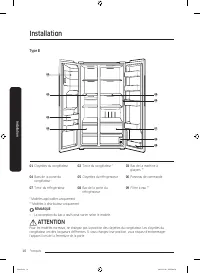
Installation English 16 Installation Type B 01 03 02 04 05 06 08 09 07 01 Freezer shelves 02 Freezer drawer * 03 Ice maker bucket ** 04 Freezer door bins 05 Fridge shelves 06 Feature panel 07 Fridge drawer 08 Fridge door bin 09 Water filter ** * Applicable models only** Dispenser models only NOTE • ...
Page 17 - STEP 1; Select a site
English 17 Installation Step-by-step installation STEP 1 Select a site Site requirements: • Solid, level surface without carpeting or flooring that may obstruct ventilation• Away from direct sunlight• Adequate room for opening and closing the door• Away from a heat source• Room for maintenance and s...
Page 19 - STEP 2; Flooring
English 19 Installation STEP 2 Flooring • The surface to install the refrigerator must support a fully loaded refrigerator. • To protect the floor, put a large piece of cardboard on each leg of the refrigerator when you move it for installation. • Once the refrigerator is in its final position, do n...
Page 20 - STEP 3; Door removal for entrance
Installation English 20 Installation STEP 3 Door removal for entrance If the refrigerator cannot pass through the entrance due to its size, follow these instructions: Tools required (not provided) These tools are used for removing the doors. Phillips screwdriver Flat-head screwdriver Socket spanner ...
Page 25 - STEP 4; Adjust the leveling feet
English 25 Installation STEP 4 Adjust the leveling feet CAUTION • The refrigerator must be leveled on a flat, solid floor. Failing to do so can cause damage to the refrigerator or physical injury. • Leveling must be performed with an empty refrigerator. Make sure no food items remain inside the refr...
Page 26 - STEP 5; Adjust the door height
Installation English 26 Installation STEP 5 Adjust the door height The height of a door can be adjusted using the clamp nut and the height nut on the front bottom of each door. B A 1. Open the door to adjust, and locate the two nuts (A) and (B) on the front bottom of the door. A 2. With a 19 mm span...
Page 27 - STEP 6; Connect the water dispenser line
English 27 Installation STEP 6 Connect the water dispenser line A water dispenser with a filter is one of the helpful features on your new refrigerator. To help promote better health, the water filter removes unwanted particles from your water. However, it does not sterilize or destroy microorganism...
Page 30 - STEP 7; Initial settings; STEP 8; Final check
Installation English 30 Installation STEP 7 Initial settings By completing the following steps, the refrigerator should be fully functioning. 1. Plug the power cord into the wall socket to turn the refrigerator on. 2. Open the door, and check if the interior light lights up. 3. Set the temperature t...
Page 31 - Operations; Feature panel
English 31 Operations Feature panel Type A Type B Type C 01 02 03 08 08 04 05 07 06 01 02 03 08 08 04 05 06 01 02 03 08 08 05 06 01 Fridge / °F °C 02 Power Cool 03 Freezer / Power Freeze 04 Ice Maker / Filter Reset 05 Door Alarm / Peak Demand Off * 06 Lock 07 Network connection * 08 Sabbath Mode *...
Page 36 - Refrigerator app
Operations English 36 Oper ations Samsung account You are required to register your Samsung account to use the app. If you don’t have a Samsung account, follow the app’s onscreen instructions to create a free Samsung account. Getting started Turn on the device you want to connect, open the SmartThin...
Page 38 - Using the SMART GRID (Demand Response) Function
Operations English 38 Oper ations SMART GRID Function (Demand Response) (applicable models only) When the refrigerator operates in SMART GRID (Demand Response) mode, the Energy Management Refrigerator function can control energy usage or delay the operation of some functions to save money when energ...
Page 39 - To check the MAC address; Activating and deactivating Peak Demand Off (Override mode)
English 39 Oper ations To check the MAC address 1. In this mode, the MAC address appears on the temperature panel (on both the freezer and the fridge sections of the panel) sequentially for 1 minute.Press and hold both Freezer and Fridge for 6 seconds. The temperature panel blinks. Then, press Freez...
Page 40 - Using the Energy Management Function; Provision for Open Access to the Connected Product Requirements
Operations English 40 Oper ations Using the Energy Management Function The Energy Management function enables you to control and monitor your Energy Management refrigerator using the SmartThings app for your convenience. NOTE • To use the Energy Management refrigerator functions, you have to install...
Page 42 - Special features
Operations English 42 Oper ations Special features Water/Ice dispenser (applicable models only) Using the dispenser, you can dispense water with or without ice.The water dispenser offers 3 options: chilled water, cubed ice, and crushed ice. To dispense chilled water, press Water on the dispenser pan...
Page 45 - To secure more storage space (applicable models only)
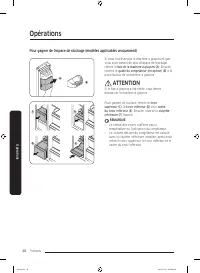
English 45 Oper ations To secure more storage space (applicable models only) A B If you do not use the ice maker and need more storage space, remove the icemaker bucket (A) . Then, insert the Freezer guide (Optional) (B) into the icemaker bucket’s place. CAUTION If the ice bucket has been removed, y...
Page 46 - Maintenance; Handle and care
English 46 Maintenance Handle and care Icemaker bucket (applicable models only) If you do not dispense ice for an extended period, ice may form clumps inside the bucket. If this happens, remove and empty the icemaker bucket. 1. To remove the icemaker bucket, gently lift it up and pull out slowly whi...
Page 47 - Door bins
English 47 Maint enanc e Shelves (fridge/freezer) Pull the shelf out as far as it goes. Then lift it up and remove it. Door bins To remove a door bins, hold the front sides of the bin and gently lift up to remove. Untitled-9 47 2019-11-11 PM 6:35:20
Page 48 - Drawers
Maintenance English 48 Maint enanc e Drawers To remove, pull the drawers out as far as they go, and then lift up slightly and pull. Drawer cover While pushing the left and right hooks underneath the drawer cover, pull the drawer cover to remove. Untitled-9 48 2019-11-11 PM 6:35:20
Page 49 - Cleaning; Interior and exterior; Rubber seals
English 49 Maint enanc e Cleaning Interior and exterior WARNING • Do not use benzene, thinner, or home/car detergent such as Clorox™ for cleaning purposes. They may damage the surface of the refrigerator and cause a fire. • Do not spray water onto the refrigerator. This may cause electric shock.Regu...
Page 50 - Replacement
Maintenance English 50 Maint enanc e Replacement Water filter (applicable models only) WARNING • Do not use third-party water filters. Use only Samsung-provided or -approved filters.• Unapproved filters may leak and damage the refrigerator, causing electric shock. Samsung is not responsible for any ...
Page 51 - LED Lamps
English 51 Maint enanc e Reverse osmosis water filtration system The water pressure of the water supply system to a reverse osmosis water filtration system must be between 30 to 120 psi (206 to 827 kPa).The water pressure of the reverse osmosis water filtration system to the refrigerator’s cold wate...
Page 52 - Troubleshooting; General; Temperature
English 52 Troubleshooting Before calling for service, review the checkpoints below. Any service calls regarding normal situations (No Defect Cases) will be charged to users. General Temperature Symptom Possible causes Solution Fridge/freezer does not operate.Fridge/freezer temperature is warm. • Po...
Page 53 - Odour
English 53 Tr ouble shoo ting Odour Symptom Possible causes Solution Refrigerator has odours. • Spoiled food. • Clean the refrigerator and remove any spoiled food. • Food with strong odours. • Make sure strong smelling food is wrapped airtight. Frost Symptom Possible causes Solution Frost around the...
Page 56 - Do you hear abnormal sounds from the refrigerator?; These sounds are normal.
Troubleshooting English 56 Tr ouble shoo ting Do you hear abnormal sounds from the refrigerator? Before calling for service, review the checkpoints below. Any service calls related to normal sounds will be charged to the user. These sounds are normal. • When starting or ending an operation, the refr...
Page 60 - SAMSUNG REFRIGERATOR
English 60 LIMITED WARRANTY (U.S.A.) SAMSUNG REFRIGERATOR LIMITED WARRANTY TO ORIGINAL CONSUMER PURCHASER WITH PROOF OF PURCHASE This SAMSUNG brand product, as supplied and distributed by Samsung Electronics America, Inc. (SAMSUNG) and delivered new, in the original carton to the original consumer p...
Page 61 - EXCLUSION OF IMPLIED WARRANTIES
English 61 This limited warranty covers manufacturing defects in materials or workmanship encountered in normal household, noncommercial use of this product and shall not cover the following: damage that occurs in shipment, delivery, installation, and uses for which this product was not intended; da...
Page 62 - LIMITATION OF REMEDIES
LIMITED WARRANTY (U.S.A.) English 62 LIMITATION OF REMEDIES YOUR SOLE AND EXCLUSIVE REMEDY IS PRODUCT REPAIR, PRODUCT REPLACEMENT, OR REFUND OF THE PURCHASE PRICE AT SAMSUNG’S OPTION, AS PROVIDED IN THIS LIMITED WARRANTY. SAMSUNG SHALL NOT BE LIABLE FOR SPECIAL, INCIDENTAL OR CONSEQUENTIAL DAMAGES, ...
Page 63 - If your refrigerator needs service
English 63 Warranty Information (CANADA) If your refrigerator needs service Do not hesitate to call any Samsung Authorized Service Center nearby giving them your name, address and telephone number if your product is not functioning properly. Limited Warranty for Original Purchaser This Samsung produ...
Page 64 - Obligation to the Original Owner
Warranty Information (CANADA) English 64 Obligation to the Original Owner The original dated sales receipt must be retained by the customer and is the only acceptable proof of purchase. It must be presented to a SECA Authorized Service Center at the time service is requested before warranty services...
Page 65 - Regulatory Notice; FCC Notice; FCC RADIATION EXPOSURE STATEMENT:
English 65 Regulatory Notice FCC Notice FCC CAUTION: Any changes or modifications not expressly approved by the party responsible for compliance could void the user’s authority to operate the equipment.Contains Transmitter Module FCC ID: A3LCWAP210MThis device complies with Part 15 of FCC Rules. Ope...
Page 66 - IC Notice; IC RADIATION EXPOSURE STATEMENT:
Regulatory Notice English 66 IC Notice Contains Transmitter Module IC: 649E-CWAP210MThe term “IC” before the radio certification number only signifies that Industry Canada technical specifications were met. Operation is subject to the following two conditions : (1) this device may not cause interfer...
Page 67 - Open Source Announcement
English 67 Open Source Announcement The software included in this product contains open source software. The following URL http://opensource.samsung.com/opensource/SMART_TP2_0/seq/0 leads to open source license information as related to this product. Untitled-9 67 2019-11-11 PM 6:35:23
Page 69 - Refrigerador; Manual del usuario
Refrigerador Manual del usuario RS22T5201* Electrodoméstico independiente Untitled-11 1 2019-11-08 PM 5:29:03
Page 70 - Contenido
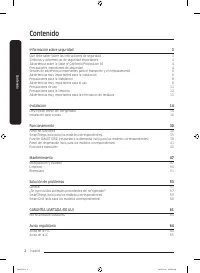
Español 2 Contenido Contenido Información sobre seguridad 3 Qué debe saber sobre las instrucciones de seguridad 3 Símbolos y advertencias de seguridad importantes: 4 Advertencia sobre la State of California Proposition 65 4 Precauciones importantes de seguridad 4 Señales de advertencia importantes p...
Page 71 - Información sobre seguridad; Qué debe saber sobre las instrucciones de seguridad
Español 3 Información sobre seguridad Antes de utilizar su nuevo refrigerador Samsung, lea detenidamente este manual a fin de aprender a usar las funciones que ofrece de manera segura y eficiente. Qué debe saber sobre las instrucciones de seguridad • Este electrodoméstico no debe ser utilizado por p...
Page 72 - Símbolos y advertencias de seguridad importantes:; Advertencia sobre la State of California Proposition 65; ADVERTENCIA; Precauciones importantes de seguridad; ADVERTENCIA
Información sobre seguridad Español 4 Inf ormación sobr e seg uridad Símbolos y advertencias de seguridad importantes: Sírvase seguir todas las instrucciones de seguridad del presente manual. En el presente manual se utilizan los siguientes símbolos de seguridad. ADVERTENCIA Riesgos o prácticas inse...
Page 74 - Advertencias muy importantes para la instalación
Información sobre seguridad Español 6 Inf ormación sobr e seg uridad Señales de advertencia importantes para el transporte y el emplazamiento ADVERTENCIA • Al transportar e instalar el electrodoméstico deberá tener cuidado de no dañar ninguna de las piezas del circuito del refrigerante. - La pérdida...
Page 76 - Precauciones para la instalación; Advertencias muy importantes para el uso
Información sobre seguridad Español 8 Inf ormación sobr e seg uridad Precauciones para la instalación PRECAUCIÓN • Deje espacio suficiente alrededor del refrigerador e instálelo sobre una superficie plana. - Mantenga libre de obstáculos el espacio de ventilación en el gabinete o la estructura de mon...
Page 79 - Precauciones de uso
Español 11 Inf ormación sobr e seg uridad Precauciones de uso PRECAUCIÓN • No vuelva a congelar alimentos que se hayan descongelado completamente.• Utilice solamente la fábrica de hielo del refrigerador.• Para obtener el mejor desempeño del producto: - No coloque alimentos muy cerca de las rejillas ...
Page 80 - Precauciones para la limpieza
Información sobre seguridad Español 12 Inf ormación sobr e seg uridad Precauciones para la limpieza PRECAUCIÓN • No pulverice con agua directamente dentro o fuera del refrigerador. - Existe el riesgo de que se produzca un incendio o una descarga eléctrica. • No utilice un secador de cabello para sec...
Page 81 - Advertencias muy importantes para la eliminación de residuos
Español 13 Inf ormación sobr e seg uridad Advertencias muy importantes para la eliminación de residuos ADVERTENCIA • Si algún niño queda atrapado dentro del refrigerador, puede lastimarse o asfixiarse hasta morir.• Deseche el material de empaque de este producto de forma tal que no resulte nocivo pa...
Page 82 - Instalación; Descripción breve del refrigerador; Tipo A
Español 14 Instalación Siga las instrucciones cuidadosamente a fin de garantizar la instalación adecuada del refrigerador y de evitar accidentes antes de utilizarlo. ADVERTENCIA • Utilice el refrigerador solamente para su uso previsto como se describe en este manual.• Todas las reparaciones deben es...
Page 83 - Tipo B
Español 15 Instalación Tipo B 01 03 02 04 05 06 08 09 07 01 Estantes del congelador 02 Cajón del congelador * 03 Cubeta de la fábrica de hielo ** 04 Compartimientos de la puerta del congelador 05 Estantes del refrigerador 06 Panel de funciones 07 Cajón del refrigerador 08 Compartimiento de la puerta...
Page 84 - Instalación paso a paso; PASO 1; Seleccione un lugar
Instalación Español 16 Instalación Instalación paso a paso PASO 1 Seleccione un lugar Requisitos del lugar: • Una superficie sólida, nivelada sin alfombrado ni pisos que puedan obstruir la ventilación• Alejado de la luz solar directa• Espacio suficiente para abrir y cerrar la puerta• Alejado de las ...
Page 86 - PASO 2; Piso
Instalación Español 18 Instalación PASO 2 Piso • La superficie sobre la que se instalará el refrigerador debe soportar un refrigerador completamente cargado. • A fin de proteger el piso, coloque un trozo de cartón debajo de las patas del refrigerador al moverlo para realizar la instalación. • Una ve...
Page 87 - PASO 3; Extracción de la puerta para la entrada
Español 19 Instalación PASO 3 Extracción de la puerta para la entrada Si el refrigerador no pasa por la puerta por su tamaño, siga estas instrucciones: Herramientas necesarias (no provistas) Para extraer las puertas se utilizan las siguientes herramientas. Destornillador Phillips Destornillador de c...
Page 92 - PASO 4; Ajuste de las patas de nivelación
Instalación Español 24 Instalación PASO 4 Ajuste de las patas de nivelación PRECAUCIÓN • El refrigerador debe estar nivelado sobre un piso plano y sólido. De lo contrario, el refrigerador podría dañarse o causar lesiones. • La nivelación debe realizarse con el refrigerador vacío. Asegúrese de que no...
Page 93 - PASO 5; Ajuste la altura de la puerta
Español 25 Instalación PASO 5 Ajuste la altura de la puerta Es posible ajustar la altura de la puerta con la tuerca de fijación y la tuerca de regulación de altura ubicadas en la parte inferior de las puertas. B A 1. Abra la puerta que desea ajustar y ubique las dos tuercas (A) y (B) en la parte fro...
Page 94 - PASO 6; Conectar la tubería del dispensador de agua
Instalación Español 26 Instalación PASO 6 Conectar la tubería del dispensador de agua El dispensador de agua con filtro es una de las funciones útiles de su nuevo refrigerador. Con el fin de promover la buena salud, el filtro de agua elimina las partículas no deseadas del agua. No obstante, no la es...
Page 97 - PASO 7; Configuración inicial; PASO 8; Verificación final
Español 29 Instalación PASO 7 Configuración inicial Al completar los siguientes pasos, el refrigerador quedará en perfectas condiciones de funcionamiento. 1. Enchufe el cable de alimentación al tomacorriente para encender el refrigerador. 2. Abra la puerta y verifique que la luz interna se encienda....
Page 98 - Funcionamiento; Panel de funciones
Español 30 Funcionamiento Panel de funciones Tipo A Tipo B Tipo C 01 02 03 08 08 04 05 07 06 01 02 03 08 08 04 05 06 01 02 03 08 08 05 06 01 Fridge (Refrigerador) / °F °C 02 Power Cool (Refrigeración rápida) 03 Freezer (Congelador) / Power Freeze (Congelación rápida) 04 Ice Maker (Fabricación de h...
Page 103 - SmartThings (solo para los modelos correspondientes)
Español 35 Funcionamient o SmartThings (solo para los modelos correspondientes) Instalación Visite Google Play Store, Galaxy Apps o Apple App Store y busque “SmartThings”. Descargue e instale la aplicación SmartThings provista por Samsung Electronics en su dispositivo inteligente. NOTA • La aplicaci...
Page 104 - Aplicación del refrigerador
Funcionamiento Español 36 Funcionamient o Cuenta Samsung Debe registrar su cuenta Samsung para utilizar la aplicación. Si no tiene una cuenta Samsung, siga las instrucciones en pantalla de la aplicación para crear una cuenta Samsung gratuita. Cómo comenzar Encienda el dispositivo que desea conectar,...
Page 106 - Uso de la función SMART GRID (respuesta a la demanda)
Funcionamiento Español 38 Funcionamient o Función SMART GRID (respuesta a la demanda) (solo para los modelos correspondientes) Cuando el refrigerador opera en modo SMART GRID (respuesta a la demanda), la función de gestión de energía del refrigerador permite controlar el uso de la energía o demorar ...
Page 107 - Para verificar la dirección MAC; Pico de demanda desactivado (Modo de anulación)
Español 39 Funcionamient o Para verificar la dirección MAC 1. En este modo, la dirección MAC aparece en el panel de temperatura (en las secciones del congelador y del refrigerador del panel) en forma secuencial durante 1 minuto.Mantenga presionados Freezer (Congelador) y Fridge (Refrigerador) durant...
Page 108 - Uso de la función de gestión de energía
Funcionamiento Español 40 Funcionamient o Activación y desactivación de Pico de demanda desactivado (Modo de anulación) 1. Mantenga presionado Alarma de la puerta durante 3 segundos. 2. Se oye un zumbido y se muestra “Or” y “on” en los visores de temperatura del congelador y del refrigerador durante...
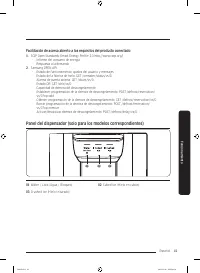
Page 109 - Panel del dispensador (solo para los modelos correspondientes)
Español 41 Funcionamient o Facilitación de acceso abierto a los requisitos del producto conectado 1. SGIP Open Standards (Smart Energy Profile 2.0 http://www.csep.org/) - Informe del consumo de energía- Respuesta a la demanda 2. Samsung OPEN API - Estado de funcionamiento, ajustes del usuario y mens...
Page 111 - Funciones especiales
Español 43 Funcionamient o Funciones especiales Dispensador de agua/hielo (solo para los modelos correspondientes) Usando el dispensador, puede obtener agua con o sin hielo.El dispensador de agua ofrece 3 opciones: agua fría, hielo en cubo y hielo triturado. Para dispensar agua fría, presione Water ...
Page 113 - Fábrica de hielo (solo para los modelos correspondientes)
Español 45 Funcionamient o Fábrica de hielo (solo para los modelos correspondientes) A 1. Abra la puerta del congelador y deslice la charola para el hielo. 2. Llene la charola con agua hasta el nivel máximo (A) marcado en la parte posterior interna de la charola. 3. Coloque nuevamente la charola en ...
Page 115 - Mantenimiento; Manipulación y cuidado
Español 47 Mantenimiento Manipulación y cuidado Cubeta de la fábrica de hielo (solo para los modelos correspondientes) Si no sirve hielo durante un período prolongado, el hielo puede apelmazarse en la cubeta. Si esto ocurriera, retire y vacíe la cubeta de la fábrica de hielo. 1. Para extraer la cube...
Page 116 - Compartimientos de las puertas
Mantenimiento Español 48 Mant enimient o Estantes (refrigerador/congelador) Jale el estante hacia afuera hasta donde llegue. Luego levántelo y retírelo. Compartimientos de las puertas Para retirar un compartimiento de la puerta, sosténgalo por ambos lados y elévelo suavemente para retirarlo. Untitle...
Page 117 - Cajones
Español 49 Mant enimient o Cajones Para retirar, jale lo más posible los cajones hacia fuera y luego levántelos suavemente para quitarlos. Cubierta del cajón Jale de la cubierta del cajón mientras empuja los ganchos de la derecha e izquierda debajo de esta para retirarla. Untitled-11 49 2019-11-08 P...
Page 118 - Limpieza; Interior y exterior; Burletes de goma
Mantenimiento Español 50 Mant enimient o Limpieza Interior y exterior ADVERTENCIA • No utilice benceno, solvente ni detergente para automóvil/hogar como Clorox™ para limpiar. Pueden dañar la superficie del refrigerador y provocar un incendio. • No rocíe agua sobre el refrigerador. Puede provocar una...
Page 119 - Reemplazo; Filtro de agua (solo para los modelos correspondientes)
Español 51 Mant enimient o Reemplazo Filtro de agua (solo para los modelos correspondientes) ADVERTENCIA • No utilice filtros de agua de terceros. Utilice únicamente filtros provistos o aprobados por Samsung.• Los filtros no aprobados pueden provocar pérdidas y daños al refrigerador y descargas eléc...
Page 120 - Lámparas de LED
Mantenimiento Español 52 Mant enimient o • El proceso de reemplazo puede hacer que el dispensador de agua gotee por un período breve. Si gotea, simplemente limpie el agua del piso con una toalla seca. Sistema de filtración por ósmosis inversa La presión de agua del sistema de suministro hacia un sis...
Page 121 - Solución de problemas; Temperatura
Español 53 Solución de problemas Antes de solicitar servicio técnico revise los siguientes puntos de verificación. En el caso de solicitudes de servicio para situaciones normales (cuando no existe ningún defecto), se exigirá un cargo a los usuarios. General Temperatura Síntoma Causas posibles Soluci...
Page 122 - Olores
Solución de problemas Español 54 Solución de pr oblemas Olores Síntoma Causas posibles Solución El refrigerador huele mal. • Alimentos descompuestos. • Limpie el refrigerador y retire los alimentos descompuestos. • Alimentos con olores fuertes. • Asegúrese de que los alimentos con olores fuertes est...
Page 125 - ¿Se oyen ruidos anómalos procedentes del refrigerador?; Dichos ruidos son normales.
Español 57 Solución de pr oblemas ¿Se oyen ruidos anómalos procedentes del refrigerador? Antes de solicitar servicio técnico revise los siguientes puntos de verificación. En el caso de solicitudes de servicio relacionado con ruidos normales se exigirá un cargo al usuario. Dichos ruidos son normales....
Page 128 - Smart Grid (solo para los modelos correspondientes)
Solución de problemas Español 60 Solución de pr oblemas Smart Grid (solo para los modelos correspondientes) Síntoma Acción ¿Qué necesito para utilizar las funciones de gestión de energía y Smart Grid? Para usar las funciones Smart Grid (respuesta a la demanda) y de gestión de energía del refrigerado...
Page 129 - REFRIGERADOR SAMSUNG
Español 61 GARANTÍA LIMITADA (EE.UU.) REFRIGERADOR SAMSUNG GARANTÍA LIMITADA AL COMPRADOR ORIGINAL CON COMPROBANTE DE COMPRA Este producto de marca SAMSUNG, suministrado y distribuido por Samsung Electronics America, Inc. (SAMSUNG) y entregado nuevo en su caja de fábrica al comprador original, está ...
Page 130 - EXCLUSIÓN DE GARANTÍAS IMPLÍCITAS
GARANTÍA LIMITADA (EE.UU.) Español 62 Esta garantía limitada cubre defectos de fabricación en materiales o de mano de obra bajo condiciones de uso doméstico normal, no comercial, del producto y no cubrirá lo siguiente: daños ocasionados durante el transporte, la entrega o la instalación o por uso di...
Page 131 - LIMITACIÓN DE COMPENSACIÓN
Español 63 LIMITACIÓN DE COMPENSACIÓN SU ÚNICA COMPENSACIÓN ES LA REPARACIÓN DEL PRODUCTO, EL REMPLAZO DEL PRODUCTO O LA DEVOLUCIÓN DEL MONTO DE LA COMPRA, SEGÚN DECIDA SAMSUNG, DE ACUERDO A LO ESTIPULADO EN ESTA GARANTÍA LIMITADA. SAMSUNG NO SERÁ RESPONSABLE DE DAÑOS IMPREVISTOS O DERIVADOS, QUE IN...
Page 132 - Aviso regulatorio; Aviso de la FCC; PRECAUCIÓN de la FCC:; DECLARACIÓN DE LA FCC:
Español 64 Aviso regulatorio Aviso de la FCC PRECAUCIÓN de la FCC: Todos los cambios y modificaciones que no cuenten con la aprobación expresa de la parte responsable del cumplimiento pueden invalidar la autoridad del usuario para operar el equipo.Contiene módulo transmisor FCC ID: A3LCWAP210MEste a...
Page 133 - Aviso de la IC; DECLARACIÓN IC SOBRE LA EXPOSICIÓN A LA RADIACIÓN:
Español 65 Aviso de la IC Contiene módulo de transmisor IC: 649E-CWAP210MEl término “IC” antes del número de certificación de radio solo significa que cumple con las especificaciones técnicas de la Industria de Canadá. El funcionamiento se encuentra sujeto a las siguientes dos condiciones: (1) Este ...
Page 134 - Notas
Page 137 - Réfrigérateur
Réfrigérateur Guide d'utilisation RS22T5201* Appareil amovible Untitled-9 1 2019-11-08 PM 5:08:16
Page 138 - Sommaire
Français 2 Sommair e Sommaire Consignes de sécurité 4 Choses à savoir concernant les consignes de sécurité 4 Consignes de sécurité importantes et symboles : 5 Avertissement de la proposition 65 de l'État de Californie 5 Consignes de sécurité importantes 5 Symboles d'avertissement importants concerna...
Page 139 - Avis d'application de la réglementation
Français 3 Sommair e Avis d'application de la réglementation 65 Avis de la FCC 65 Avis d'IC 66 Untitled-9 3 2019-11-08 PM 5:08:16
Page 140 - Consignes de sécurité; Choses à savoir concernant les consignes de sécurité
Français 4 Consignes de sécurité Avant d'utiliser votre nouveau réfrigérateur Samsung, veuillez lire attentivement ce guide afin de vous assurer que vous savez comment utiliser de manière sûre et efficace ses différentes fonctionnalités. Choses à savoir concernant les consignes de sécurité • Cet app...
Page 141 - Consignes de sécurité importantes et symboles :; ATTENTION; Avertissement de la proposition 65 de l'État de Californie; AVERTISSEMENT; Consignes de sécurité importantes; AVERTISSEMENT
Français 5 Consigne s de sécurit é Consignes de sécurité importantes et symboles : Veuillez suivre toutes les instructions relatives à la sécurité fournies dans le présent manuel. Le présent manuel utilise les symboles de sécurité suivants. AVERTISSEMENT Risques ou manipulations dangereuses suscepti...
Page 142 - DANGER
Consignes de sécurité Français 6 Consigne s de sécurit é • L'emplacement choisi pour l'installation ne doit pas être exposé à la lumière directe du soleil et ne doit pas être placé à proximité d'une source de chaleur ou d'un autre appareil électrique, par exemple d'une cuisinière, d'un four, d'une p...
Page 143 - Avertissements importants concernant l'installation
Français 7 Consigne s de sécurit é Symboles d'avertissement importants concernant le transport et le lieu d'installation de l'appareil AVERTISSEMENT • Veillez à ce qu'aucune pièce du circuit frigorifique ne soit endommagée pendant le transport ou l'installation de l'appareil. - Risque d'incendie ou ...
Page 145 - Installation en toute sécurité; Avertissements importants concernant l'utilisation
Français 9 Consigne s de sécurit é Installation en toute sécurité ATTENTION • Laissez un espace suffisant autour du réfrigérateur et installez celui-ci sur une surface plane. - N'obstruez pas l'espace de ventilation à l'intérieur du réfrigérateur ou de son caisson. • Après avoir installé et mis sous...
Page 148 - Utilisation en toute sécurité
Consignes de sécurité Français 12 Consigne s de sécurit é Utilisation en toute sécurité ATTENTION • Ne recongelez pas un aliment qui a complètement décongelé.• Utilisez uniquement la machine à glaçons fournie avec le réfrigérateur.• Pour un fonctionnement optimal de l'appareil : - Ne placez pas d'al...
Page 149 - Nettoyage en toute sécurité
Français 13 Consigne s de sécurit é Nettoyage en toute sécurité ATTENTION • Ne vaporisez pas d'eau directement à l'intérieur ou sur l'extérieur du réfrigérateur. - Risque d'incendie ou de choc électrique. • N'utilisez pas de séchoir à cheveux pour sécher l'intérieur du réfrigérateur.• Ne placez pas ...
Page 150 - Avertissements importants concernant la mise au rebut
Consignes de sécurité Français 14 Consigne s de sécurit é Avertissements importants concernant la mise au rebut AVERTISSEMENT • Les enfants qui se retrouvent coincés à l'intérieur peuvent se blesser ou suffoquer et en mourir.• Jetez le matériel d'emballage de cet appareil dans le respect de l'enviro...
Page 151 - Présentation rapide du réfrigérateur
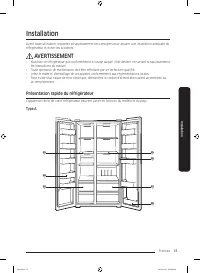
Français 15 Installation Avant toute utilisation, respectez scrupuleusement ces consignes pour assurer une installation adéquate du réfrigérateur et éviter les accidents. AVERTISSEMENT • N'utilisez ce réfrigérateur que conformément à l'usage auquel il est destiné, en suivant scrupuleusement les inst...
Page 153 - Installation étape par étape; ÉTAPE 1; Sélectionner un site
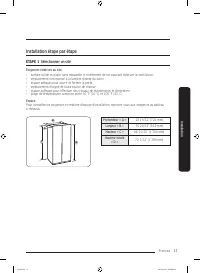
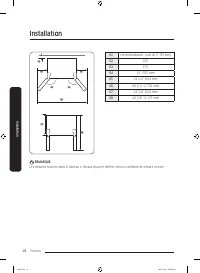
Français 17 Installation Installation étape par étape ÉTAPE 1 Sélectionner un site Exigences relatives au site : • surface solide et plane, sans moquette ni revêtement de sol pouvant obstruer la ventilation ;• emplacement non exposé à la lumière directe du soleil ;• espace adéquat pour ouvrir et fer...
Page 155 - ÉTAPE 2; Sol
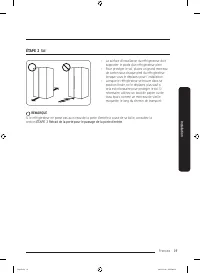
Français 19 Installation ÉTAPE 2 Sol • La surface d'installation du réfrigérateur doit supporter le poids d'un réfrigérateur plein. • Pour protéger le sol, placez un grand morceau de carton sous chaque pied du réfrigérateur lorsque vous le déplacez pour l'installation. • Lorsque le réfrigérateur se ...
Page 156 - ÉTAPE 3; Retrait de la porte pour le passage de la porte d'entrée
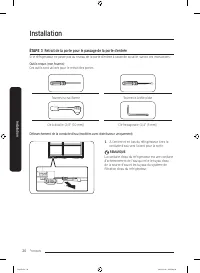
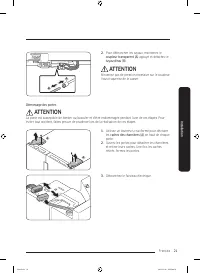
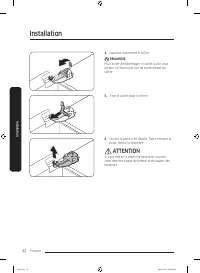
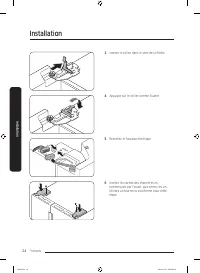
Installation Français 20 Installation ÉTAPE 3 Retrait de la porte pour le passage de la porte d'entrée Si le réfrigérateur ne passe pas au niveau de la porte d'entrée à cause de sa taille, suivez ces instructions : Outils requis (non fournis) Ces outils sont utilisés pour le retrait des portes. Tour...
Page 161 - ÉTAPE 4; Réglage des pieds de mise à niveau
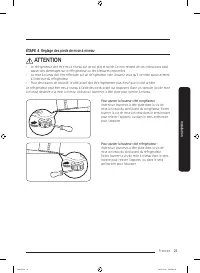
Français 25 Installation ÉTAPE 4 Réglage des pieds de mise à niveau ATTENTION • Le réfrigérateur doit être mis à niveau sur un sol plat et solide. Le non-respect de ces instructions peut causer des dommages sur le réfrigérateur ou des blessures corporelles. • La mise à niveau doit être effectuée sur...
Page 162 - ÉTAPE 5; Ajuster la hauteur de la porte
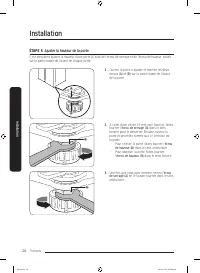
Installation Français 26 Installation ÉTAPE 5 Ajuster la hauteur de la porte Il est possible d'ajuster la hauteur d'une porte à l'aide de l'écrou de serrage et de l'écrou de hauteur, situés sur la partie basse de l'avant de chaque porte. B A 1. Ouvrez la porte à ajuster et repérez les deux écrous (A...
Page 163 - ÉTAPE 6; Raccorder le circuit du distributeur d'eau
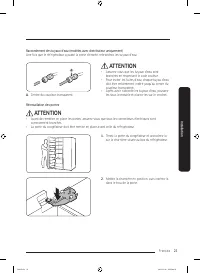
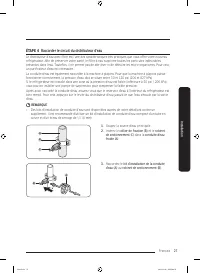
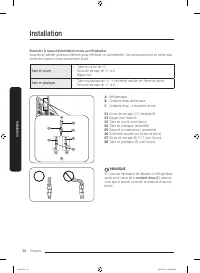
Français 27 Installation ÉTAPE 6 Raccorder le circuit du distributeur d'eau Le distributeur d'eau avec filtre est l'une des caractéristiques très pratiques que vous offre votre nouveau réfrigérateur. Afin de préserver votre santé, le filtre à eau supprime toutes les particules indésirables présentes...
Page 166 - ÉTAPE 7; Réglages initiaux; ÉTAPE 8; Vérification finale
Installation Français 30 Installation ÉTAPE 7 Réglages initiaux En effectuant les étapes suivantes, le réfrigérateur doit fonctionner entièrement. 1. Insérez la fiche d'alimentation dans la prise murale pour allumer le réfrigérateur. 2. Ouvrez la porte et vérifiez si l'éclairage à l'intérieur s'allu...
Page 167 - Opérations; Panneau de commande
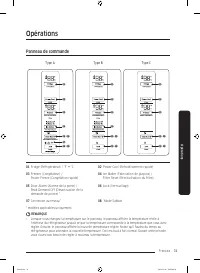
Français 31 Opérations Panneau de commande Type A Type B Type C 01 02 03 08 08 04 05 07 06 01 02 03 08 08 04 05 06 01 02 03 08 08 05 06 01 Fridge (Réfrigérateur) / °F °C 02 Power Cool (Refroidissement rapide) 03 Freezer (Congélateur) / Power Freeze (Congélation rapide) 04 Ice Maker (Fabrication de...
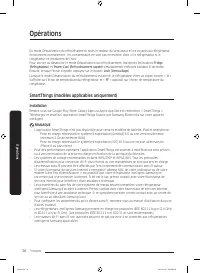
Page 172 - SmartThings (modèles applicables uniquement)
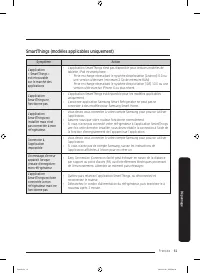
Opérations Français 36 Opér ations En mode Désactivation du refroidissement, seuls le moteur du ventilateur et les voyants du réfrigérateur fonctionnent normalement ; les compresseurs ne sont pas en marche, donc ni le réfrigérateur ni le congélateur ne produisent de froid.Pour activer ou désactiver ...
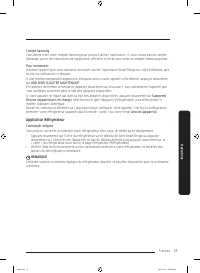
Page 173 - Application Réfrigérateur
Français 37 Opér ations Compte Samsung Vous devez créer votre compte Samsung pour pouvoir utiliser l'application. Si vous n'avez pas de compte Samsung, suivez les instructions de l'application affichées à l'écran pour créer un compte Samsung gratuit. Pour commencer Allumez l'appareil que vous souhai...
Page 175 - Utilisation de la fonction SMART GRID (réponse à la demande)
Français 39 Opér ations Fonction SMART GRID (Réponse à la demande) (modèles applicables uniquement) Lorsque le réfrigérateur fonctionne en mode SMART GRID (Réponse à la demande), la fonction Réfrigérateur Gestion de l'énergie du réfrigérateur permet de contrôler la consommation d'énergie ou de repou...
Page 176 - Vérifier l'adresse MAC; Désactivation de la demande de pointe (mode Override)
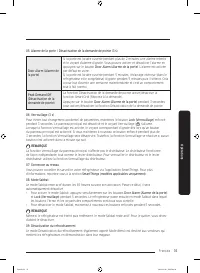
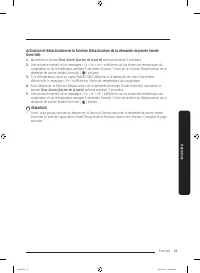
Opérations Français 40 Opér ations Vérifier l'adresse MAC 1. Dans ce mode, l'adresse MAC apparaît sur le panneau de température (sur les sections congélateur et réfrigérateur du panneau) pendant 1 minute, en suivant un certain ordre.Maintenez les boutons Freezer (Congélateur) et Fridge (Réfrigérateu...
Page 178 - Utilisation de la fonction Gestion de l'énergie
Opérations Français 42 Opér ations Utilisation de la fonction Gestion de l'énergie La fonction Gestion de l'énergie vous permet de contrôler et surveiller votre réfrigérateur Gestion de l'énergie à l'aide de l'application SmartThings, à des fins de commodité. REMARQUE • Pour utiliser les fonctions d...
Page 179 - Disposition pour l'accès ouvert aux Demandes du produit connecté; Panneau du distributeur (modèles applicables uniquement)
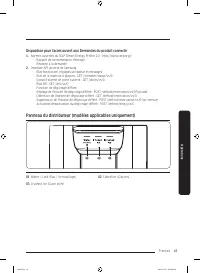
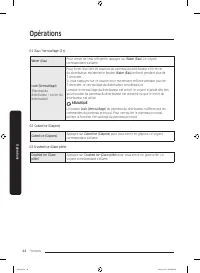
Français 43 Opér ations Disposition pour l'accès ouvert aux Demandes du produit connecté 1. Normes ouvertes du SGIP (Smart Energy Profile 2.0 - http://www.csep.org/) - Rapport de consommation d'énergie- Réponse à la demande 2. Interface API ouverte de Samsung - État fonctionnel, réglages utilisateur...
Page 181 - Fonctions spéciales; Machine à glaçons automatique (modèles applicables uniquement)
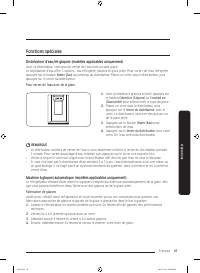
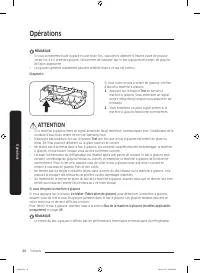
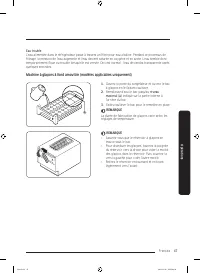
Français 45 Opér ations Fonctions spéciales Distributeur d'eau/de glaçons (modèles applicables uniquement) Avec ce distributeur, vous pouvez verser de l'eau avec ou sans glace.Le distributeur d'eau offre 3 options : eau réfrigérée, glaçons et glace pilée. Pour verser de l'eau réfrigérée, appuyez sur...
Page 185 - Utilisation et entretien; Bac de la machine à glaçons (modèles applicables uniquement)
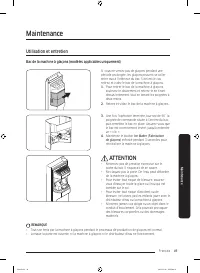
Français 49 Maintenance Utilisation et entretien Bac de la machine à glaçons (modèles applicables uniquement) Si vous ne versez pas de glaçons pendant une période prolongée, les glaçons peuvent se coller entre eux à l'intérieur du bac. Si tel est le cas, retirez et videz le bac de la machine à glaço...
Page 186 - Bacs de la porte
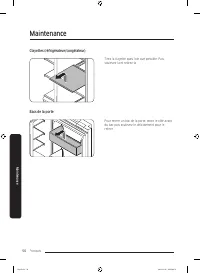
Maintenance Français 50 Maint enanc e Clayettes (réfrigérateur/congélateur) Tirez la clayette aussi loin que possible. Puis, soulevez-la et retirez-la. Bacs de la porte Pour retirer un bac de la porte, tenez le côté avant du bac puis soulevez-le délicatement pour le retirer. Untitled-9 50 2019-11-08...
Page 187 - Tiroirs
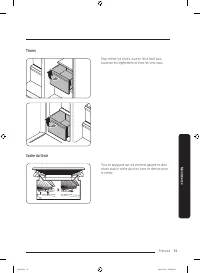
Français 51 Maint enanc e Tiroirs Pour retirer les tiroirs, ouvrez-les à fond puis soulevez-les légèrement et tirez-les vers vous. Cache du tiroir Tout en appuyant sur les crochets gauche et droit situés sous le cache du tiroir, tirez ce dernier pour le retirer. Untitled-9 51 2019-11-08 PM 5:08:31
Page 188 - Nettoyage; Intérieur et extérieur; Joints en caoutchouc
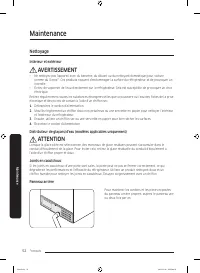
Maintenance Français 52 Maint enanc e Nettoyage Intérieur et extérieur AVERTISSEMENT • Ne nettoyez pas l'appareil avec du benzène, du diluant ou du nettoyant domestique/pour voiture comme du Clorox™. Ces produits risquent d'endommager la surface du réfrigérateur et de provoquer un incendie. • Évitez...
Page 189 - Remplacement; Filtre à eau (modèles applicables uniquement)
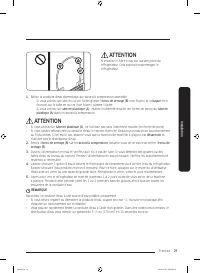
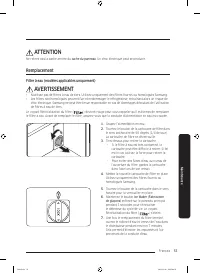
Français 53 Maint enanc e ATTENTION Ne retirez pas la partie arrière du cache du panneau . Un choc électrique peut se produire. Remplacement Filtre à eau (modèles applicables uniquement) AVERTISSEMENT • N'utilisez pas de filtres à eau de tiers. Utilisez uniquement des filtres fournis ou homologués S...
Page 190 - Ampoules à DEL
Maintenance Français 54 Maint enanc e REMARQUE • De l'eau peut brièvement gicler du distributeur d'eau si le filtre a récemment été installé. Cela est dû à l'air pénétrant dans la conduite d'eau. • Après le processus de remplacement, le distributeur d'eau peut goutter pendant une courte durée. S'il ...
Page 191 - Dépannage; Généralités; Température
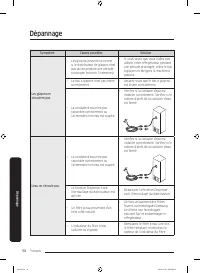
Français 55 Dépannage Avant de communiquer avec le service d'assistance, vérifiez les points ci-dessous. Tout appel d'assistance concernant des situations normales (pas de défaillances) sera facturé aux utilisateurs. Généralités Température Symptôme Causes possibles Solution Le réfrigérateur/congéla...
Page 192 - Odeurs
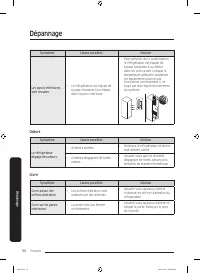
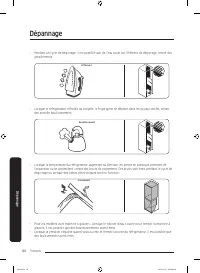
Dépannage Français 56 Dépannag e Symptôme Causes possibles Solution Les parois intérieures sont chaudes. • Le réfrigérateur est équipé de tuyaux résistants à la chaleur dans la paroi intérieure. • Pour prévenir de la condensation, le réfrigérateur est équipé de tuyaux résistants à la chaleur dans le...
Page 193 - Condensation
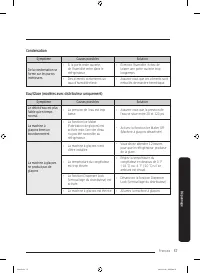
Français 57 Dépannag e Condensation Symptôme Causes possibles Solution De la condensation se forme sur les parois intérieures. • Si la porte reste ouverte, de l'humidité entre dans le réfrigérateur. • Éliminez l'humidité, évitez de laisser une porte ouverte trop longtemps. • Des aliments contiennent...
Page 195 - Entendez-vous des sons anormaux provenant du réfrigérateur?; Ces sons sont normaux.
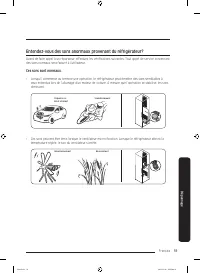
Français 59 Dépannag e Entendez-vous des sons anormaux provenant du réfrigérateur? Avant de faire appel à un réparateur, effectuez les vérifications suivantes. Tout appel de service concernant des sons normaux sera facturé à l’utilisateur. Ces sons sont normaux. • Lorsqu’il commence ou termine une o...
Page 198 - Smart Grid (modèles applicables uniquement)
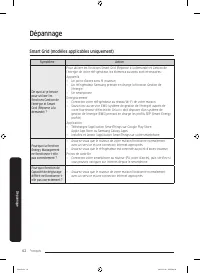
Dépannage Français 62 Dépannag e Smart Grid (modèles applicables uniquement) Symptôme Action De quoi ai-je besoin pour utiliser les fonctions Gestion de l'énergie et Smart Grid (Réponse à la demande) ? Pour utiliser les fonctions Smart Grid (Réponse à la demande) et Gestion de l'énergie de votre réf...
Page 199 - Informations relatives à la garantie (CANADA); Si votre réfrigérateur doit être réparé
Français 63 Informations relatives à la garantie (CANADA) Si votre réfrigérateur doit être réparé N'hésitez pas à appeler un centre de service autorisé Samsung proche en lui communiquant vos nom, adresse et numéro de téléphone lorsque votre appareil ne fonctionne pas correctement. Garantie limitée à...
Page 200 - Exclusions de la garantie
Informations relatives à la garantie (CANADA) Français 64 Exclusions de la garantie Cette garantie ne couvre pas les dommages provoqués par un accident, un incendie, une inondation et/ou toutes autres catastrophes naturelles, une manipulation, une tension d'alimentation ou une installation incorrect...
Page 201 - MISE EN GARDE DE LA FCC :; DÉCLARATION DE LA FCC :
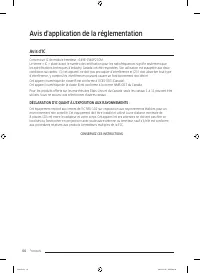
Français 65 Avis d'application de la réglementation Avis de la FCC MISE EN GARDE DE LA FCC : Tout changement ou modification, non expressément approuvé par la partie responsable de la conformité, peut annuler l'autorisation de l'utilisateur à utiliser cet équipement.Contient un Module émetteur FCC I...
Page 203 - Mémo














 Samsung RS6KA8101S9 User Manual
 Samsung RS6KN8101S9 User Manual
 Samsung RS7G78FHCSL User Manual
 Samsung RS21KGRS User Manual
 Samsung RS22T5201SR User Manual
 Samsung RS22T5561SR User Manual
 Samsung RS23A500ASR User Manual
 Samsung RS23A500ASR/AA User Manual
 Samsung RS23CB7600QLAA User Manual
 Samsung RS23CB760012AA User Manual
 Samsung RS27T5200SG User Manual