Samsung RR35H61657F - User Manual
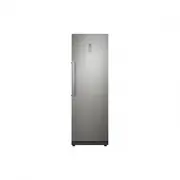
Samsung RR35H61657F Refrigerator – User Manual, read for free online in PDF format. We hope this helps you resolve any issues you may have. If you have further questions, please contact us through the contact form.


Table of Contents:
- Page 2 – Safety information; SAFETY INFORMATION; • Before operating the; Contents
- Page 3 – • Because these following
- Page 8 – • Leave the shelves in place so
- Page 9 – • If the appliance contains iso-
- Page 10 – Saving Energy Tips
- Page 11 – For the most efficient use
- Page 12 – Setting up your refrigerator
- Page 16 – LEVELLING THE REFRIGERATOR
- Page 17 – Operating your refrigerator; USING THE CONTROL PANEL
- Page 20 – USING THE FOLDABLE SHELF; USING THE WATER DISPENSER
- Page 21 – REMOVING THE INTERIOR PARTS
- Page 22 – CLEANING THE REFRIGERATOR
- Page 23 – Troubleshooting
- Page 24 – Installation Part
- Page 25 – Memo
- Page 28 – English
Refrigerator
user manual
imagine
the possibilities
Thank you for purchasing this Samsung product.
Free Standing Appliance
DA68-03008C (EN)-05.indd 1
2016. 3. 24. �� 11:01
"Loading the manual" means you need to wait until the file loads and becomes available for online reading. Some manuals are very large, and the time they take to appear depends on your internet speed.
Was this manual helpful?
About this manual
- Brand
- Samsung
- Model
- RR35H61657F
- Document type
- User Manual
- Category
- Refrigerator
- Language(s)
- English
- Pages
- 28
- File size
- 4.9 MB
- Format
Summary
English - 2 Safety information SAFETY INFORMATION • Before operating the appliance, please read this manual thoroughly and retain it for your reference. • Use this appliance only for its intended purpose as described in this instruction manual. This appliance is not intended for use by persons (incl...
English - 3 SAFETY INFORMA TION • Because these following operating instructions cover various models, the characteristics of your refrigerator may differ slightly from those described in this manual. • It is hazardous for anyone other than an Authorised Service Person to service this appliance. In ...
English - 8 • Remove any foreign matter or dust from the power plug pins. But do not use a wet or damp cloth when cleaning the plug, remove any foreign material or dust from the power plug pins. - Otherwise there is a risk of fire or electric shock. • Unplug the refrigerator before cleaning and maki...
Ask a question
Related manuals
Popular Samsung Refrigerators




More Samsung Refrigerators models
 Samsung RL4363SBAB1 User Manual
 Samsung RL4363SBASL User Manual
 Samsung RQ48T94B277/AA User Manual
 Samsung RR35H6110SA User Manual
 Samsung RR35H6110WW User Manual
 Samsung RR35H6610SS User Manual
 Samsung RR39A74A312 User Manual
 Samsung RR39C7BB7WW User Manual
 Samsung RR39C7BG7S9 User Manual
 Samsung RR39C7DJ5B1 Repair Manual
 Samsung RR39C76C322 User Manual
- Samsung RR39C76K3AP User Manual