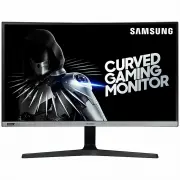
Page 2 - Table of contents
2 Table of contents Before Using the Product Securing the Installation Space 4 Safety Precautions 4 Cleaning 5Electricity and Safety 5 Installation 6Operation 7 Preparations Parts 10 Control Panel 10 Function Key Guide 11 Changing Brightness, Contrast and Sharpness settings 13Changing the Volume set...
Page 4 - Securing the Installation Space; Safety Precautions; Warning; Before Using the Product
4 Securing the Installation Space Make sure to have enough space for ventilation when placing the product. An internal temperature rise may cause fire and damage the product. Maintain enough space around the product as shown in the diagram when installing the product. ― The exterior may differ depen...
Page 5 - Cleaning; Electricity and Safety
5 Cleaning High-glossy models can develop white stains on the surface if an ultrasonic wave humidifier is used nearby. ― Contact your nearest Samsung Customer Service Centre if you want to clean the inside of the product (Service fee will be charged.) ― Exercise care when cleaning as the panel and e...
Page 6 - Installation
6 Warning • DO NOT PLACE CANDLES, INSECT REPELLANTS OR CIGARETTES ON TOP OF THE PRODUCT. DO NOT INSTALL THE PRODUCT NEAR HEAT SOURCES. • Do not install the product in poorly ventilated spaces such as a bookcase or closet. • Install the product at least 10cm away from the wall to allow ventilation. •...
Page 7 - Operation
7 Warning • There is a high voltage inside the product. Never disassemble, repair or modify the product yourself. ‒ Contact Samsung Customer Service Centre for repairs. • To move the product, first disconnect all the cables from it, including the power cable. • If the product generates abnormal soun...
Page 8 - Caution
8 Caution • Leaving the screen fixed on a stationary image for an extended period of time may cause afterimage burn-in or defective pixels. ‒ Set the screen to power-saving mode or moving-picture screen saver when not using the product for an extended period of time. • Disconnect the power cord from...
Page 10 - Preparations; Control Panel
10 Preparations Chapter 02 Parts Control Panel ― The colour and shape of parts may differ from what is shown. Specifications are subject to change without notice to improve quality. Function Key Guide Power LED UP(REAR) PRESS(ENTER) DOWN(FRONT) LEFT RIGHT Return JOG Button Parts Description JOG Butt...
Page 13 - Changing Brightness, Contrast and Sharpness settings; Brightness; Changing the Volume setting; Volume
13 Changing Brightness, Contrast and Sharpness settings You can adjust Brightness , Contrast or Sharpness by moving the JOG button up or down, if no OSD menu is displayed. Brightness Contrast Sharpness 100 ― The displayed image may differ depending on the model. ― The default brightness can vary dep...
Page 14 - Types of Ports; Upgrading the Software via USB; Power Off
14 Types of Ports ― The functions available may vary depending on the product model. The colour and shape of parts may differ from what is shown. Specifications are subject to change without notice to improve quality. Refer to the actual product. HDMI IN 1 HDMI IN 2 DP IN SERVICE DC 19V HDMI IN 1 HD...
Page 15 - Note
15 3 When the screen as shown in the following figure is displayed, select Yes . Update now Yes No Update from version XXXX.X to version XXXX.X? 4 The software upgrading proceeds. Update now 0% Updating product Software…Your product will turn itself off and on again automatically after completing up...
Page 16 - Adjusting the Product Tilt
16 Adjusting the Product Tilt ― The colour and shape of parts may differ from what is shown. Specifications are subject to change without notice to improve quality. -2.0° (±2.0°) ~ 15.0° (±2.0°) • The product tilt can be adjusted. • Hold the lower part of the product and adjust the tilt carefully. A...
Page 17 - Precautions for moving the product
17 Precautions for moving the product • Do not directly apply pressure on the screen. • Do not hold the screen when moving the product. • Do not hold the product upside down only by the stand. • Hold the lower corners or edges of the product when moving it. Wall Mount Kit Specifications (VESA) ― Ins...
Page 18 - Attaching the Stand
18 Installation Attaching the Stand ― Before assembling the product, place the product down on a flat and stable surface so that the screen is facing downwards. : The product is curved. Placing pressure on the product when on a flat surface may damage the product. When the product is on the ground f...
Page 19 - Removing the Stand
19 Removing the Stand ― Before removing the stand from the product, place the product on a flat and stable surface with the screen facing down. : The product is curved. Placing pressure on the product when on a flat surface may damage the product. When the product is on the ground facing up or down,...
Page 20 - Connecting and Using a Source Device; Read below before installing the product.; Connection Using the HDMI Cable
20 Connecting and Using a Source Device Chapter 03 Read below before installing the product. 1 Before installing the product, check the shapes of both ports of the supplied signal cables and the shapes and locations of the ports on the product and external device. 2 Before connecting signal cable, m...
Page 21 - Connection Using an DP Cable; DP IN; Connecting to headphones or earphones
21 Connection Using an DP Cable DP IN ― A DP cable shorter under 1.5 m in length is recommended. Using a cable longer than 1.5 m can affect the picture quality. Connecting to headphones or earphones ― Use headphones or earphones when activating sound with an HDMI-HDMI or DP cable. ― The headphones o...
Page 22 - Tidying Up the Connected Cables
22 Tidying Up the Connected Cables 1 2 3 Connect cables to their port and route them through the ring on the back of the stand. Push the cables further close to the stand. Route the cables through the HOLDER-CABLE. 4 5 Secure the HOLDER-CABLE to the stand. (HOOK type) Cables arrangement is complete....
Page 23 - Correct posture to use the product; Driver Installation
23 Correct posture to use the product Use the product in the correct posture as follows: • Straighten your back. • Allow a distance of 45 to 50cm between your eye and the screen, and look slightly downward at the screen. • Keep your eyes directly in front of the screen. • Adjust the angle so light d...
Page 24 - Game; Picture Mode; In PC mode
24 Game Function Key Guide → → Game A detailed description of each function is provided. Refer to your product for details. Chapter 04 ― The functions available may vary depending on the product model. The colour and shape of parts may differ from what is shown. Specifications are subject to change ...
Page 26 - The models in the Graphics Cards list supports Adaptive-Sync
26 Adaptive-Sync Adaptive-Sync technology is solution that eliminates screen tearing without all the usual lag and latency.This feature will eliminate screen tearing and lag during game play. Improve your gaming experience.The displayed Adaptive-Sync menu items on the product may vary, depending on ...
Page 27 - Low Input Lag; In AV mode
27 Low Input Lag Minimise input lag for fast reactions by reducing the video processing time. ― This menu is not available when Adaptive-Sync is enabled. ― This menu is not available when Refresh Rate is set to 60Hz. ― If the refresh rate of the PC is different from the setting for Refresh Rate on t...
Page 28 - Virtual Aim Point
28 • Off : Virtual Aim Point is not available while Off is selected. • / / / / / : Select the preferred aim point style. • Position Reset : Restore the aim point position to the default. Move the aim point using the jog button and press Enter to confirm the moved position. To restore the default pos...
Page 30 - Picture
30 Picture Function Key Guide → → Picture Configure the screen settings such as brightness. A detailed description of each function is provided. Chapter 05 ― The functions available may vary depending on the product model. The colour and shape of parts may differ from what is shown. Specifications a...
Page 32 - Eye Saver Mode; Screen Adjustment
32 HDMI Black Level If a DVD player or set-top box is connected to the product via HDMI, image quality degradation (contrast/colour degradation, black level, etc.) may occur, depending on the connected source device.In such case, HDMI Black Level can be used to adjust the image quality. ― This funct...
Page 33 - OnScreen Display; Language
33 OnScreen Display Function Key Guide → → OnScreen Display A detailed description of each function is provided. Refer to your product for details. Chapter 06 ― The functions available may vary depending on the product model. The colour and shape of parts may differ from what is shown. Specification...
Page 34 - System; Self Diagnosis
34 System Function Key Guide → → System A detailed description of each function is provided. Refer to your product for details. Chapter 07 ― The functions available may vary depending on the product model. The colour and shape of parts may differ from what is shown. Specifications are subject to cha...
Page 36 - Off Timer Plus; Configuring Off Timer; HDMI Mode
36 Off Timer Plus Configuring Off Timer Off Timer : Turn on Off Timer mode. Turn Off After : The off timer can be set within a range of 1 to 23 hours. The product will automatically power off after the specified number of hours. ― This option is only available when Off Timer is set to On . ― For pro...
Page 37 - Key Repeat Time; Power LED On; Reset All
37 Key Repeat Time Control the response rate of a button when the button is pressed. Acceleration , 1 sec , or 2 sec can be selected. If No Repeat is selected, a command responds only once when a button is pressed. Power LED On Configure the settings to enable or disable the power LED located at the...
Page 38 - Information
38 Information Function Key Guide → → Information A detailed description of each function is provided. Refer to your product for details. Chapter 08 ― The functions available may vary depending on the product model. The colour and shape of parts may differ from what is shown. Specifications are subj...
Page 39 - Installing the Software; Upgrade by downloading the firmware from the website
39 Installing the Software Chapter 09 Easy Setting Box Easy Setting Box enables users to use the product by partitioning multiple sections. To install the latest version of Easy Setting Box , download it from the Samsung Electronics website at http://www.samsung.com. ― The software may not work prop...
Page 40 - Troubleshooting Guide; Requirements Before Contacting Samsung; Screen issue
40 Troubleshooting Guide Chapter 10 Requirements Before Contacting Samsung Customer Service Centre ― Before calling Samsung Customer Service Centre, test your product as follows. If the problem persists, contact Samsung Customer Service Centre. Monitor diagnosis (Screen issue) If a problem occurs wi...
Page 43 - Specifications; General
43 Specifications Chapter 11 General Model Name C27RG5* Size 27 Class (27 Inches / 68.6 cm) Display area 597.888 mm (H) x 336.312 mm (V) Pixel Pitch 0.3114 mm (H) x 0.1038 mm (V) Maximum Pixel Clock 600 MHz Power Supply AC100-240V~ 50/60HzBased on the AC voltage of the adapter. For the DC voltage of...
Page 44 - Standard Signal Mode Table
44 Standard Signal Mode Table Synchronization Horizontal Frequency 30 - 270 kHz Vertical Frequency 48 – 240 Hz Resolution Optimum resolution 1920 x 1080 @ 60 Hz Maximum resolution 1920 x 1080 @ 240 Hz If a signal that belongs to the following standard signal modes is transmitted from your PC, the sc...
Page 46 - Appendix; Responsibility for the Pay Service (Cost to; Not a product defect; Others
46 Appendix Chapter 12 Responsibility for the Pay Service (Cost to Customers) ― When the service is requested, in spite of in warranty, we may charge you for a visit from a service technician in the following cases. Not a product defect Cleaning of the product, Adjustment, Explanation, Re-installati...