Samsung HW-H750 - User Manual
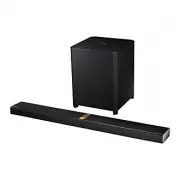
A user manual for the Samsung HW-H750 and HW-H751 wireless soundbars covers essential topics like setup, connectivity, and operation. The guide details features such as TV SoundConnect, HDMI ARC, Bluetooth, NFC, and multiroom audio capabilities, alongside safety warnings for electrical use and proper installation. It also includes troubleshooting for common issues, remote control functions, and detailed instructions for connecting accessories like subwoofers or wall mounts.


Table of Contents:
- Page 1 – Product Identification and Registration
- Page 2 – Soundbar Features and Licensing
- Page 3 – Electrical Safety Instructions
- Page 4 – Operational and Environmental Safety Precautions
- Page 5 – User Manual Structure and Warnings
- Page 6 – Introduction and Accessories
- Page 7 – Soundbar Panel Controls and Components
- Page 8 – Rear Panel Connections
- Page 9 – Remote Control Functions
- Page 10 – Remote Operation and Battery Installation
- Page 11 – Wall Mount Installation Guide
- Page 12 – Wall Mount Detachment and Bracket Installation
- Page 13 – Wireless Subwoofer Linking
- Page 14 – Electromagnetic Noise Reduction Setup
- Page 15 – HDMI and Audio Cable Connections
- Page 16 – External Device Cable Connections
- Page 17 – Input Selection and ARC Setup
- Page 18 – Bluetooth Device Pairing
- Page 19 – Bluetooth Disconnection and Stability
- Page 20 – Smart Device Connectivity and Compatibility
- Page 21 – TV SoundConnect Synchronization
- Page 22 – USB Media Playback Specifications
- Page 23 – Network Power Management Features
- Page 24 – Multiroom System Setup
- Page 25 – Wired Network Connection Setup
- Page 26 – Firmware Update Procedures
- Page 27 – System Troubleshooting Guide
- Page 28 – Technical Specifications and Licensing
- Page 29 – Customer Support and Disposal Information
Wireless Audio - Soundbar
Imagine the possibilities
Thank you for purchasing this Samsung product.
To receive a more complete service, please register your product at
www.samsung.com/register
User manual
HW-H750
HW-H751
'This Nanum Gothic Eco font is provided by NAVER'
HW-H750_H751_XU_ENG_141028.indd 1
HW-H750_H751_XU_ENG_141028.indd 1
2014-10-28 2:31:51
2014-10-28 2:31:51
"Loading the manual" means you need to wait until the file loads and becomes available for online reading. Some manuals are very large, and the time they take to appear depends on your internet speed.
Was this manual helpful?
About this manual
- Brand
- Samsung
- Model
- HW-H750
- Document type
- User Manual
- Category
- Sound Bar
- Language(s)
- English
- Pages
- 29
- File size
- 6.4 MB
- Format
Summary
Identification of the Wireless Audio Soundbar models HW-H750 and HW-H751 and instructions for product registration.
Features including TV SoundConnect, HDMI ARC, Surround Sound Expansion, wireless subwoofer, Bluetooth, NFC, Multiroom Link, and supported audio licenses like Dolby Digital and DTS.
Safety warnings for electrical appliances, guidance on UK mains plug wiring (blue to neutral, brown to live), and precautions against electric shock hazards.
Ask a question
Related manuals
Popular Samsung Sound Bars



More Samsung Sound Bars models
 Samsung HW-H450 User Manual
 Samsung HW-H550 User Manual
 Samsung HW-H600 User Manual
- Samsung HW-H610 User Manual
 Samsung HW-H751 User Manual
 Samsung HW-H7500 User Manual
 Samsung HW-H7501 User Manual
 Samsung HW-J250 User Manual
 Samsung HW-J355 User Manual
 Samsung HW-J365 User Manual
 Samsung HW-J450 User Manual
 Samsung HW-J470 User Manual