Samsung GP-U999SJVLAAA - User Manual
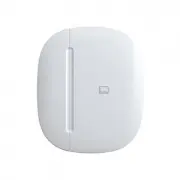
Samsung GP-U999SJVLAAA Sensor – User Manual, read for free online in PDF format. We hope this helps you resolve any issues you may have. If you have further questions, please contact us through the contact form.


Setup
1.
Make sure the Multipurpose Sensor
is within 15 feet (4.5 meters) of your
SmartThings Hub or SmartThings
Wi
fi
(or compatible device with
SmartThings Hub functionality)
during setup.
Multipurpose Sensor
3.
2.
Remove the tab on the Multipurpose
Sensor marked “Remove When
Connecting” and follow the
on-screen instructions in the
SmartThings app to complete setup.
Use the SmartThings mobile app to
select the “Add device” card and
then select the “Multipurpose sensor”
category.
"Loading the manual" means you need to wait until the file loads and becomes available for online reading. Some manuals are very large, and the time they take to appear depends on your internet speed.