Page 2 - Air conditioner; User manual
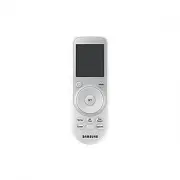
Air conditioner User manual Wireless remote control AR-KH00E / AR-KH00U • Thank you for purchasing this Samsung air conditioner. • Before operating this unit, please read this user manual carefully and retain it for future reference. 360_Remote_ENG.indb 1 2015-12-24 오후 3:33:58
Page 3 - Contents
2 English Contents Safety Information 3 Safety Information 3 At a Glance 6 Preparation 6 Checking the package contents • Inserting batteries • Installing the remote control holder Remote Control Overview 7 Remote Control Operation 8 Controlling temperature • Controlling fan speed • Controlling air f...
Page 4 - Hazards or unsafe practices that may result in severe personal; CAUTION; Hazards or unsafe practices that may result in minor personal; WARNING; • Failing to do so may result in electric shock, fire, product
3 English Safety Inf ormation This content is intended to protect the user’s safety and prevent property damage. Please read it carefully for correct use of the product. Safety Information Safety Information WARNING Hazards or unsafe practices that may result in severe personal injury or death. CAUT...
Page 5 - FOR OPERATION
4 English Safety Inf ormation Safety Information CAUTION Install the product on a hard and level place that can support its weight. • If the place cannot support its weight, the product may fall down and it may cause product damage. FOR OPERATION WARNING If the product generates a strange noise, a b...
Page 6 - Do not give a strong impact to the product and do not
5 English Safety Inf ormation Do not give a strong impact to the product and do not disassemble the product.Do not use this product for other purposes. • This product is designed to be used only for a system air conditioner. Do not press the buttons with any sharp objects. • Failing to do so may res...
Page 7 - Checking the package contents; Installing the remote control holder; Preparation
6 English A t a Glanc e At a Glance Checking the package contents Item Wireless remote control Battery (AAA 1.5V) M4 x L16 screw Remote control holder User manual Quantity 1 2 2 1 1 Shape Inserting batteries • If the (Low battery) indicator appears on the remote control display, replace the batterie...
Page 8 - Remote Control Overview
7 English A t a Glanc e Remote Control Overview 01 02 03 04 10 08 12 13 15 07 09 11 14 16 05 06 01 Set temperature/Timer indicator NOTE • For the AR-KH00U model, the temperature is shown in degrees Fahrenheit (°F) on the display. 02 Operation mode indicator 03 Air flow direction indicator 04 Options...
Page 9 - Remote Control Operation; Controlling temperature; Controlling fan speed; Controlling air flow direction
8 English A t a Glanc e You can use the air conditioner easily by selecting a function and then by controlling the temperature, fan speed, and air flow direction with the Wheel. Remote Control Operation Controlling temperature You can control the temperature in each mode as follows: Mode Temperature...
Page 10 - Cooling Operation
9 English P ow er Smar t F eatur es The smart and powerful cooling functions of the Samsung air conditioner keep an enclosed space cool and comfortable. Cooling Operation Cool mode Use the Cool mode to stay cool in hot weather. ► ► Rotate the Wheel. ► Select Cool. ► NOTE • You can also select the mo...
Page 11 - Dehumidifying Operation; Dry mode
10 English P ow er Smar t F eatur es The dehumidifying function of the Samsung air conditioner keeps an enclosed space fresh and comfortable. Dehumidifying Operation Dry mode Use the Dry mode in rainy or humid weather. ► ► Rotate the Wheel. ► Select Dry. ► NOTE • You can also select the mode that yo...
Page 12 - Air Purifying Operation
11 English P ow er Smar t F eatur es The air purification function of the Samsung air conditioner keeps the air in an enclosed space purified. Air Purifying Operation Purify function (optional) Use the Purify function to purify your room with positive ions produced by the air conditioner. This funct...
Page 13 - Heating Operation; Heat mode
12 English P ow er Smar t F eatur es The heating functions of the Samsung air conditioner keep an enclosed space warm and comfortable. Heating Operation Heat mode Use the Heat mode to stay warm. ► ► Rotate the Wheel. ► Select Heat. ► NOTE • You can also select the mode that you want to use by pressi...
Page 14 - Quick Smart Features; Auto mode
13 English P ow er Smar t F eatur es There is a variety of useful functionality provided by the Samsung air conditioner. Quick Smart Features Auto mode Use the Auto mode when you want the air conditioner to automatically control the mode (Heat or Cool). The air conditioner will provide the most comf...
Page 15 - Controlling the air flow direction individually
14 English P ow er Smar t F eatur es Quick Smart Features Controlling the air flow direction individually Use the individual air-flow-direction control function to individually control the air flow directions of the air outlets. In operation ► ► Rotate the Wheel. ► Select one from Blade 1 to Blade 3...
Page 16 - Display indications; Sleep function
15 English P ow er Smar t F eatur es Display indications Use the Unit LED function to change the indications that appear on the indoor unit display. In operation ► ► Rotate the Wheel. ► Select Unit LED. ► NOTE • You can also select the function that you want to use by pressing the button repeatedly ...
Page 17 - Clearing the filter-cleaning reminder; Beep sound function
16 English P ow er Smar t F eatur es Clearing the filter-cleaning reminder Use the Filter Reset function to reset the filter-cleaning reminder after cleaning or replacing the filter. ► Rotate the Wheel. ► Select Filter Reset. ► NOTE • You can also select the function that you want to use by pressing...
Page 18 - Controlling the indoor units individually
17 English P ow er Smar t F eatur es Controlling the indoor units individually Use the Zone function to choose the indoor unit you want to operate individually. For example, select Zone 1 to control only the indoor unit 1. ► Rotate the Wheel. ► Select one from Zone 1 to Zone 4. ► NOTE • You can also...
Page 19 - Energy-Saving Operation
18 English Energy -Saving F eatur es The Samsung air conditioner provides functions that allow you to reduce electricity consumption. Energy-Saving Operation Timed on/Timed off function Use the Timed on/Timed off to turn on or off the air conditioner after the time that you set. ► Select On or Off. ...
Page 20 - MEMO
19 English Energy -Saving F eatur es MEMO 360_Remote_ENG.indb 19 2015-12-24 오후 3:34:07