Page 2 - USERS PARTS
2 AA Safety precautions ................................................................................................................................................................................................................. 3 Checking before use ...............................................
Page 3 - Safety precautions; Important safety symbols and precautions:; Hazards or unsafe practices that may result in; severe personal; CAUTION; Hazards or unsafe practices that may result; in minor personal; FOR INSTALLATION; WARNING; Extending the power line may result in electric shock or fire.; technician or service company.; Failing to do so may result in electric shock or fire.; appliance in a location where gas may leak.; This may result in electric shock or fire.
ENGLISH 3 Safety precautions Before using your new air conditioner, please read this manual thoroughly to ensure that you know how to safely and efficiently operate the extensive features and functions of your new appliance.Because the following operating instructions cover various models, the chara...
Page 4 - so that draining is performed correctly.; the power line into the space behind the appliance.; FOR POWER SUPPLY; thunder/lightning storm, cut the power at the circuit breaker.; FOR USING; a gas pipe, plastic water pipe, or telephone
4 Safety precautions FOR INSTALLATION CAUTION Install your appliance on a level and hard floor that can support its weight. Failing to do so may result in abnormal vibrations, noise, or problems with the product. Install the draining hose properly so that water is drained correctly. Failing to d...

Page 5 - Do not touch the circuit breaker with wet hands.; immediately without touching the power line.
5 ENGLISH FOR USING WARNING Do not touch the circuit breaker with wet hands. This may result in electric shock. Do not strike or pull the air conditioner with excessive force. This may result in fire, injury, or problems with the product. Do not place an object near the outdoor unit that allows ...
Page 7 - This may result in property damage.; FOR CLEANING; maintaining the air conditioner’ section.
7 ENGLISH FOR USING CAUTION Do not use this air conditioner to preserve precision equipment, food, animals, plants or cosmetics, or for any other unusual purposes. This may result in property damage. Avoid directly exposing humans, animals or plants from the air flow from the air conditioner for l...
Page 8 - Maintaining your air conditioner; Internal protections via the unit control system; Checking before use; Operation ranges
8 Maintaining your air conditioner Internal protections via the unit control system This internal protection operates if an internal fault occurs in the air conditioner. Type Description Against cold air The internal fan will be off to against cold air when the heat pump is heating. De-ice cycle (...
Page 9 - Tips on using air conditioner
9 ENGLISH Tips on using air conditioner Here are some tips that you would follow when using your air conditioner. TOPIC RECOMMENDATION Cooling • If current outside temperatures are much higher than the selected indoor temperature, it may take time to bring the inner temperature to the desired coolne...
Page 10 - Viewing the parts
10 Main parts Display Air flow blade Air filter (under the grille) Air intake Indicator Viewing the parts • Your air conditioner and display may look slightly different from the illustration shown above depending on your model. NOTE Remote control sensor Removing frost indicator On/Off operation ind...
Page 11 - Cleaning the exterior; Cleaning and maintaining the air conditioner; Model specification (Dimension and weight)
ENGLISH 11 Cleaning the exterior Wipe the surface of the unit with a slightly wet or dry cloth when needed. Wipe off dirt of odd-shaped area by using a soft brush. Cleaning and maintaining the air conditioner • Do not use Benzene or Thinner. They may damage the surface of the air conditioner and can...
Page 12 - Cleaning air filter and grille
12 Pull out the Air filter. Detach the front grille. Remove the safety clip from panel front. (There are two safety clips between grille and panel base.) If you want to clean the filter only, you do not have to detach the grille. Follow step 4 and 5 Open the front grille. Pull both hooks and t...
Page 13 - Periodical checks
13 ENGLISH If the air conditioner will not be used for an extended period of time, dry the air conditioner to maintain it in best condition. Dry the air conditioner thoroughly by operating in Fan mode for 3 to 4 hours and disconnect the power plug. There may be internal damage if moisture is left ...
Page 14 - Troubleshooting
14 Refer to the following chart if the air conditioner operates abnormally. This may save time and unnecessary expenses. PROBLEM SOLUTION The air conditioner does not operate immediately after it has been restarted. • Because of the protective mechanism, the appliance does not start operating immedi...
Page 15 - AA; Leak test; INSTALLATION PARTS; Indoor Unit Installation
ENGLISH 15 AA It is recommended to install the Y- joint before installing the indoor unit. 1. Place the pattern sheet on the ceiling at the spot where you want to install the indoor unit. Since the diagram is made of paper, it may shrink or stretch slightly due to temperature or humidity. For this r...
Page 16 - Insulation; Drain pipe and Drain hose installation
AA 16 1. To avoid condensation problems, place T13.0 or thicker Acrylonitrile Butadien Rubber separately around each refrigerant pipe. Always make the seam of pipes face upwards. Note No gap NBR(T13.0 or thicker) 2. Wind insulating tape around the pipes and drain hose avoiding to compress the insula...
Page 17 - Drainpipe Connection; Centralized Drainage; Power and communication cable connection; Selecting compressed ring terminal; Wire work
17 ENGLISH 1. The drain pipe should be installed within 100mm from the flexible hose, lift up from 100mm to 550mm and lift down 20mm or more. 2. Install horizontal drainpipe with a slope of 1/100 or more and fix it by hanger space of 1~1.5m. 3. Install the air vent in the horizontal drainpipe to pre...
Page 18 - The procedure of setting option; Setting an indoor unit address and installation option
AA 18 Step 1. Entering mode to set option 1. Remove batteries from the remote controller. 2. Insert batteries and enter the option setting mode while pressing High Temp button and Low Temp button. 3. Check if you have entered the option setting status. Step 2. The procedure of option setting After e...
Page 22 - 2 series installation option
AA 22 Setting an indoor unit address and installation option 1. Check whether power is supplied or not. - When the indoor unit is not plugged in, there should be additional power supply in the indoor unit. 2. The panel(display ) should be connected to an indoor unit to receive option.3. Set the inst...
Page 25 - 5 series installation option
25 ENGLISH SEG1 SEG2 SEG3 SEG4 SEG5 SEG6 0 5 Use of Auto Change Over for HR only in Auto mode (When setting SEG3) Standard heating temp. Offset (When setting SEG3) Standard cooling temp. Offset (When setting SEG3) Standard for mode change Heating → Cooling SEG7 SEG8 SEG9 SEG10 SEG11 SEG12 1 (When se...
Page 28 - Changing a particular option
28 AA Changing a particular option Option SEG1 SEG2 SEG3 SEG4 SEG5 SEG6 Explanation PAGE MODE The option mode you want to change The tens’ digit of an option SEG you will change The unit digit of an option SEG you will change Changed value Remote Controller Display Indication and Details Indication ...
Page 31 - Air Conditioner; user manual; imagine
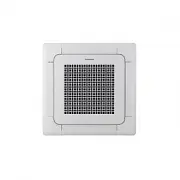
4 Way Cassette TypeMini 4way : AM ✴✴✴ FNND ✴✴✴ Air Conditioner user manual imagine the possibilities Thank you for purchasing this Samsung product.