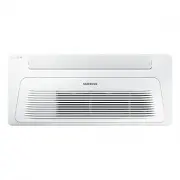
Page 2 - English; Contents; Safety Information; Troubleshooting
2 English Contents Safety Information 3 Installation Procedure 5 Step 1 Checking and preparing accessoriesStep 2 Choosing the installation locationStep 3 Optional: Insulating the body of the indoor unitStep 4 Installing the indoor unitStep 5 Purging inert gas from the indoor unitStep 6 Cutting and f...
Page 3 - General information; WARNING; Installing the unit; WARNING
3 English Sa fe ty In fo rm at io n Safety Information WARNING • Hazards or unsafe practices that may result in severe personal injury or death. CAUTION • Hazards or unsafe practices that may result in minor personal injury or property damage. • Carefully follow the precautions listed below because ...
Page 4 - Power supply line, fuse or circuit; Make sure that you earth the cables.
4 Safety Information English Sa fe ty In fo rm at io n • After completing the installation, always carry out a functional test and provide the instructions on how to operate the air conditioner to the user. • Do not use the air conditioner in environments with hazardous substances or close to equipm...
Page 5 - Installation Pr; Installation Procedure; Step 1 Checking and preparing; Installation location requirements; CAUTION
5 English Installation Pr oc edur e Installation Procedure Step 1 Checking and preparing accessories The following accessories are supplied with the indoor unit. The type and quantity may differ, depending on the specifications. Installation template Dimension gauge Insulation drain Flexible hose Ru...
Page 6 - Indoor unit dimensions
6 Installation Procedure English Installation Pr oc edur e Indoor unit dimensions (Unit: mm) 410 14 5 34 22 46 50 77 970 80 130 17 9 500 1198 Ceiling 1150 (Ceiling opening dimension) 249 (S pac e of suspension bolts) 440 (C eil ing opening dimension ) 1036 (Space of suspension bolts) Model AJ026NB1D...
Page 7 - Spacing requirements; Step 3 Optional: Insulating the body of; NOTE
7 English Installation Pr oc edur e Spacing requirements A: 1500 mm or more A A A A CAUTION • Comply with the length and height limits described in the figure above. • For the product that uses the R-32 refrigerant, Install the indoor unit on the wall 2.2 m or higher from the floor. • The indoor uni...
Page 9 - Step 5 Purging inert gas from the; Step 6 Cutting and flaring the pipes; Slide a flare nut on to the pipe and modify the flare.
9 English Installation Pr oc edur e Step 5 Purging inert gas from the indoor unit The indoor unit comes with nitrogen gas (inert gas) charged at the factory. Therefore, all inert gas must be purged before connecting the assembly piping. Unscrew the pinch pipe at the end of each refrigerant pipe. Liq...
Page 10 - Step 7 Connecting the assembly pipes; There are two refrigerant pipes of different diameters :
10 Installation Procedure English Installation Pr oc edur e Step 7 Connecting the assembly pipes to the refrigerant pipes There are two refrigerant pipes of different diameters : • A smaller one for the liquid refrigerant.• A larger one for the gas refrigerant. The inside of copper pipe must be clea...
Page 11 - Step 8 Performing the gas leak test; Step 9 Insulating the refrigerant pipes
11 English Installation Pr oc edur e Step 8 Performing the gas leak test To identify potential gas leaks on the indoor unit, inspect the connection area of each refrigerant pipe using a leak detector for R-410A.Before recreating the vacuum and recirculating the refrigerant gas, pressurize the whole ...
Page 12 - Step 10 Installing the drain hose and
12 Installation Procedure English Installation Pr oc edur e 5 Select the insulation of the refrigerant pipe. • Insulate the gas side and liquid side pipe, noting the insulation thickness that must differ according to the pipe size. • Standard: Less than an indoor temperature of 30°C, with humidity a...
Page 14 - Step 11 Performing the drainage test
14 Installation Procedure English Installation Pr oc edur e • Max. allowable bending angle đɇуߥߢઘ Indoor unit NOTE • If a concentrated drain pipe is installed, refer to the figure below. Centralized horizontal drain pipe (more than 1/100 slope) Main drain pipe Full thread bolt hanger 1000 to 1500 m...
Page 15 - Step 12 Connecting the power and
15 English Installation Pr oc edur e CAUTION • Only in the Cool mode, you can check the correct operation of the drain pump. When the electric cable connection has not been completed • Remove the control box cover of the indoor unit.• Connect the power supply (220 to 240V, 50 Hz) to the L and N term...
Page 16 - Step 13 Optional: Wiring Wired Remote; Indoor Unit PCB; Step 14 Optional: Extending the power
16 Installation Procedure English Installation Pr oc edur e Indoor power supply Power supply Max/Min(V) Indoor power cable 220 to 240V, 50 Hz ±10% 0.75 to 1.5 mm², 3 wires Communication cable 0.75 to 1.5 mm², 2 wires (Unit : mm) AC power: M4 screw Communication: M3.5 screw 11 13 7.5 9.0 18 13 .8 Tig...
Page 17 - Method 1
17 English Installation Pr oc edur e CAUTION • For information about the power cable specifications for indoor and outdoor units, refer to the installation manual. • After peeling off cable wires from the pre-installed tube, insert a contraction tube. Power cable Pre-installed tube for the power cab...
Page 18 - Step 15 Setting the indoor unit; Common steps for setting the addresses and
18 Installation Procedure English Installation Pr oc edur e WARNING • In case of extending the electric wire, please DO NOT use a round-shaped Pressing socket. – Incomplete wire connections can cause electric shock or a fire. Step 15 Setting the indoor unit addresses and the installation options You...
Page 19 - Cool
19 English Installation Pr oc edur e Take the steps presented in the following table: Steps Remote control display 1 Set the SEG2 and SEG3 values: a Set the SEG2 value by pressing the (Low Fan) button repeatedly until the value you want to set appears on the remote control display. SEG2 b Set the SE...
Page 20 - Fan
20 Installation Procedure English Installation Pr oc edur e Steps Remote control display When you press the (Low Fan) or (High Fan) button, values appear in the following order: 6 Press the (Mode) button. Fan and On appear on the remote control display. 7 Set the SEG9 and SEG10 values: a Set the SEG...
Page 23 - button on the remote control.; Setting the indoor unit address and installation
23 English Installation Pr oc edur e 3 Check whether the option values that you have set are correct by pressing the (Mode) button repeatedly [SEG2, SEG3] [SEG11 , SEG12 ] [SEG21 , SEG22 ] [SEG4, SEG5] [SEG14 , SEG15 ] [SEG23 , SEG24 ] [SEG6, SEG8] [SEG16 , SEG17 ] [SEG9, SEG10 ] [SEG18 , SEG20] 4 S...
Page 24 - ǽͱЇ͔ЇθϩθʪϩŵđAɇʒʒθʪθθθʪϩϩ̈͝ ͔̋ͱʒʪи˵ʪ͝Їθ̈͝ ̋ϩ˵ʪʀʪ͝ϩθɇ̷̈іʪʒAͱ͝ϩθͱ̷ࢋ
24 Installation Procedure English Installation Pr oc edur e Setting an indoor unit address (MAIN/RMC) • The indoor unit address are set to 0A0000-100000-200000-300000 by default. Option No. : 0AXXXX-1XXXXX-2XXXXX-3XXXXX Option SEG1 SEG2 SEG3 SEG4 SEG5 SEG6 Explanation Page Mode Setting main address ...
Page 25 - Installation options
25 English Installation Pr oc edur e Setting an indoor unit installation option (suitable for the condition of each installation location) • The indoor unit installation option are set to 020000-100000-200000-300000 by default.• Set the indoor unit option by wireless remote controller. When entering...
Page 27 - Default setting value: 2 °C
27 English Installation Pr oc edur e Option SEG19 SEG20(*2) SEG21 SEG22 SEG23 SEG24 Explanation Page Individual control with remote control Heating setting compensation offset Dew removal operation in wind free mode Motion detection sensor Reserved Indication and Details Indication Details Indicatio...
Page 28 - Changing the addresses and options individually; Common
28 Installation Procedure English Installation Pr oc edur e Changing the addresses and options individually When you want to change the value of a specific option, refer to the following table and follow the steps in Common steps for setting the addresses and options on page 18 . Option SEG1 SEG2 SE...
Page 29 - ppendix; Appendix; Detection of errors; LED Display on the receiver & display unit
29 English A ppendix Appendix Troubleshooting Detection of errors • If an error occurs during the operation, an LED flickers and the operation is stopped except the LED.• If you re-operate the air conditioner, it operates normally at first, then detect an error again. LED Display on the receiver &am...
Page 31 - Memo