Pyle PSBT65A - User Manual
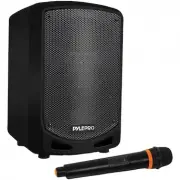
This troubleshooting guide covers the Pyle PSBT65A–a compact Bluetooth-powered portable speaker designed for karaoke and live audio applications, featuring wireless streaming, USB/SD media playback, and built-in recording capabilities. The document highlights key operational areas like connectivity issues (e.g., no sound or distorted audio), battery management, and outdoor/wet-use precautions. It also includes a rear-panel reference diagram to help users identify essential controls such as power, input mode selection, and recording functions.


Table of Contents:
- Page 1 – Product Introduction and Support Information
- Page 2 – Safety Instructions and Battery Care
- Page 3 – Troubleshooting Guide and Rear Panel Diagram
- Page 4 – PSBT65A Features and Specifications
PSBT65A
Compact & Portable Wireless
BT Streaming PA Speaker
Karaoke Sound System with Wireless Microphone,
Built-in Rechargeable Battery, MP3/USB/SD
"Loading the manual" means you need to wait until the file loads and becomes available for online reading. Some manuals are very large, and the time they take to appear depends on your internet speed.
Was this manual helpful?
About this manual
- Brand
- Pyle
- Model
- PSBT65A
- Document type
- User Manual
- Category
- Wireless Speaker
- Language(s)
- English
- Pages
- 4
- File size
- 258.7 KB
- Format
Summary
Introduction to the Pyle PSBT65A wireless Bluetooth streaming PA speaker, featuring karaoke sound system capabilities, a wireless microphone, rechargeable battery, and support for MP3/USB/SD media. Includes brand logo and customer support website.
Safety guidelines covering electrical hazards, proper installation, battery maintenance, precautions for outdoor and wet use, and tips for extending rechargeable battery life.
Simple troubleshooting guide for common speaker issues like no sound or distorted audio, along with a labeled diagram identifying controls and ports on the rear panel, including input mode switch, record button, power, and battery input.


