Promounts UF-PRO640 - User Manual
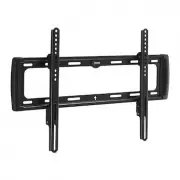
Promounts UF-PRO640 TV Bracket – User Manual, read for free online in PDF format. We hope this helps you resolve any issues you may have. If you have further questions, please contact us through the contact form.


IMPORTANT!
For safety reasons, the concrete wall must be
capable of supporting the combined weight of the mount and
the display. The manufacturer takes no responsibility for failure
caused by walls of insufficient strength.
1
2
INSTRUCTION MANUAL
FLAT WALL MOUNT
FOR LCD, PLASMA, and LED DISPLAYS
Display Size:
37” to 110”
Maximum Load:
65 kg (143 lbs)
Mounting Pattern:
600 mm x 400 mm (23.6” x 15.7”) max
Profile:
3.9 cm (1.5”)
Read these instructions before you begin.
If you are unsure
of any part of the process, contact a professional contractor or
installer for assistance. Improper installation can result in injury
or damage.
The wall or mounting surface must be capable of supporting
the combined weight of the mount and the display; if not, the
structure must be reinforced.
Locate pipes, wires, or any other hazards in the wall where you
wish to install the mount before drilling.
Safety gear and proper tools must be used. Failure to do so
can result in injury or damage.
Two people are recommended for installation. Do not attempt
to lift a heavy display without assistance.
Follow all instructions and recommendations regarding
adequate ventilation and suitable locations for mounting your
display. Consult the owner‘s manual for your particular display
for more information.
CAUTION:
This wall mount is intended for use only with the
maximum weight of 65 kg (143 lbs). Use with heavier than the
maximum weights indicated may result in instability causing
possible injury.
1
2
3
4
5
NOTE:
You must use the center of each stud to avoid cracking
or splitting the wood during installation.
Place the wall plate against the wall with the arrow pointing
up and level it using the integrated bubble level.
While another person holds the wall plate in position, mark
four locations (two per stud) for securing the mount to the
wall (see Fig. 1).
Set the wall plate aside and drill a 6 mm (1/4”) pilot hole at
each marked location.
Place the wall plate back against the wall and attach it using
the lag bolts (A) and lag bolt washers (B) provided (see Fig. 2).
Do not over-tighten these bolts and do not release the wall
plate until both bolts are in place.
Ensure that the wall plate
remains level after tightening the bolts.
Use a high quality stud finder to locate two adjacent studs
where you wish to install your mount. Mark both edges of
each stud to help identify the exact center.
1
2
3
4
5
SPECIFICATIONS
BOX CONTENTS
HARDWARE KIT
TOOLS REQUIRED
Part 1A – Mounting to the Wall (Drywall)
Part 1A – Mounting to the Wall (Drywall) (continued)
IMPORTANT!
For safety reasons, this mount must be secured
to at least two wood studs no less than 16” apart. The studs
must be capable of supporting the combined weight of the
mount and display.
INSTALLATION
WARNINGS
Fig. 3
Fig. 2
Fig. 1
6
Phillips Head Screw Driver
Ratchet or Driver with 13 mm (1/2”) Socket
Electric or Portable Drill
6 mm (1/4”) Drill Bit and Stud Finder for Drywall Installation
10 mm (3/8”) Masonry Bit for Concrete Installation
Wall Plate (x1)
Mount Arm (x2)
Instruction Manual (x1)
Hardware Kit (x1)
Part 1B – Mounting to the Wall (Concrete)
(I) M8 x 30 Screw (x4)
(J ) M8 x 50 Screw (x4)
(K) M8 Washer (x4)
(L) Small Spacer (x4)
(M) Large Spacer (x4)
(N) Long Allen Key (x1)
Place the wall plate against the wall in the desired location
with the arrow pointing up and level it using the integrated
bubble level.
While another person holds the wall
plate in place, mark four locations on
the wall for securing the mount (see
Fig. 3).
Set the wall plate aside and drill a 10
mm (3/8”) hole at each marked
location. Remove any excess dust
from the holes.
Insert a concrete anchor (C) into
each hole so that it is flush with the
concrete surface (see Fig. 4). A
hammer can be used to lightly tap
the anchors into place if necessary.
3
4
Fig. 4
(A) M8 x 63 Lag Bolt (x4)
(B) Lag Bolt Washer (x4)
(C) Concrete Anchor (x4)
(D) M4 x 15 Screw (x4)
(E) M5 x 15 Screw (x4)
(F) M5 Washer (x4)
(G) M6 x 15 Screw (x4)
(H) M8 x 15 Screw (x4)
"Loading the manual" means you need to wait until the file loads and becomes available for online reading. Some manuals are very large, and the time they take to appear depends on your internet speed.


