Page 2 - Quick Start Guide; WIRELESS SURROUNDS
Page 3 - Thank you for your Polk purchase; Technical Assistance
2 Thank you for your Polk purchase If you have a question or comment, please feel free to contact us. Technical Assistance North America: 800-377-POLK(7655) United Kingdom and Ireland: +44 2890279830 Netherlands: +31 402507800 Other countries: +1-410-358-3600 Email: [email protected] Polk FAQs: polk...
Page 4 - What’s in the Box
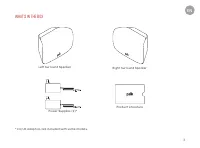
3 What’s in the Box * EU/UK adaptors are included with some models. EN Power Supplies (2)* Product Literature Left Surround Speaker Right Surround Speaker
Page 5 - Position your surround speakers
4 Position your surround speakers 1. Place the surround speakers on the left and right sides, equidistant and slightly behind the main listening position. 2. Make sure you place the speaker marked “LEFT” on the left and the speaker marked “RIGHT” on the right. 3. Aim the surround speakers toward the...
Page 6 - Connect your surround speakers; Enter pairing mode on the sound bar.
5 Connect your surround speakers Enter pairing mode on the sound bar. 1. Press and hold the CONNECT button on the back of the sound bar for about 4 seconds. Connect the surround speakers 2. Press and hold the CONNECT button on the back of the surround speaker for about 4 seconds.3. Release the butto...
Page 7 - Troubleshooting; I don’t hear sound from my surround speakers.; Updating your surround speakers
6 Troubleshooting I don’t hear sound from my surround speakers. If the light on the bottom of the surround speaker is: • Off , verify that the power supply is connected to the speaker and to a working power outlet. • Amber , make sure your sound bar is turned on, and connect the speaker to the sound...
Page 8 - Merci pour votre achat; Assistance technique
7 Merci pour votre achat Si vous avez une question ou un commentaire, n’hésitez pas à nous contacter. Assistance technique Amérique du Nord: 800-377-POLK(7655) Royaume-Uni et Irlande: +44 2890279830 Clients néerlandais: +31 402507800 Autres pays: +1-410-358-3600 Adresse électronique: [email protecte...
Page 9 - Qu’est-ce qui est dans la boîte
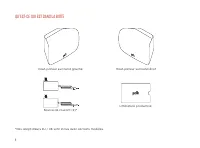
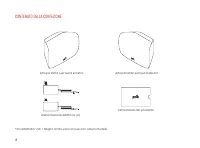
8 Qu’est-ce qui est dans la boîte Haut-parleur surround gauche Source de courant (2)* Littérature productive Haut-parleur surround droit *Des adaptateurs EU / UK sont inclus avec certains modèles.
Page 10 - Configurer les enceintes surround
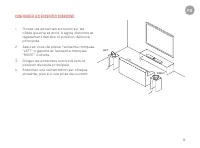
9 FR Configurer les enceintes surround 1. Placez les enceintes surround sur les côtés gauche et droit, à égale distance et légèrement derrière la position d’écoute principale. 2. Assurez-vous de placer l’enceinte marquée “LEFT” à gauche et l’enceinte marquée “RIGHT” à droite. 3. Dirigez les enceinte...
Page 11 - Connectez vos enceintes surround; Entrez en mode de couplage sur la barre de son
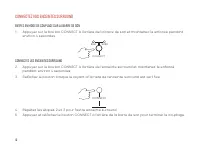
10 Connectez vos enceintes surround Entrez en mode de couplage sur la barre de son 1. Appuyez sur le bouton CONNECT à l’arrière de la barre de son et maintenez-le enfoncé pendant environ 4 secondes. Connectez les enceintes surround 2. Appuyez sur le bouton CONNECT à l’arrière de l’enceinte surround ...
Page 12 - DÉPANNAGE; Je n’entends pas le son de mes enceintes surround.; MISE À JOUR DE VOS ENCEINTES SURROUND
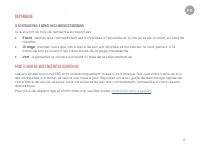
11 FR DÉPANNAGE Je n’entends pas le son de mes enceintes surround. Si le voyant au bas de l’enceinte surround est: • Éteint , vérifiez que l’alimentation est connectée à l’enceinte et à une prise de courant en état de marche. • Orange , assurez-vous que votre barre de son est allumée et connectez le...
Page 13 - Gracias por comprar Polk; Asistencia técnica
12 Gracias por comprar Polk Si tiene alguna pregunta o comentario, no dude en ponerse en contacto con nosotros. Asistencia técnica Norteamérica: 800-377-POLK(7655) Reino Unido e Irlanda: +44 2890279830 Clientes holandeses: +31 402507800 Otros paises: +1-410-358-3600 Correo electrónico: [email protec...
Page 14 - Contenido de la caja
13 Contenido de la caja Altavoz envolvente izquierdo Fuente de alimentación (2)* Documentación Altavoz envolvente derecho *Se incluyen adaptadores UE / Reino Unido con algunos modelos. ES
Page 16 - Conecte sus altavoces envolventes; Ingrese al modo de emparejamiento en la barra de sonido
15 Conecte sus altavoces envolventes Ingrese al modo de emparejamiento en la barra de sonido 1. Mantenga presionado el botón CONNECT en la parte posterior de la barra de sonido durante unos 4 segundos. Conecte los altavoces de sonido envolvente 2. Mantenga presionado el botón CONNECT en la parte pos...
Page 17 - SOLUCIÓN DE PROBLEMAS; No escucho el sonido de mis altavoces envolventes.; ACTUALIZANDO SUS ALTAVOCES SURROUND
16 SOLUCIÓN DE PROBLEMAS No escucho el sonido de mis altavoces envolventes. Si la luz en la parte inferior del altavoz de sonido envolvente es: • Apagado , verifique que la fuente de alimentación esté conectada al altavoz ya una toma de corriente que funcione. • Naranja , asegúrese de que la barra d...
Page 18 - Grazie per aver scelto Polk; Assistenza tecnica
17 Grazie per aver scelto Polk In caso di domande o commenti, non esitare a contattarci. Assistenza tecnica Nord America: 800-377-POLK(7655) Regno Unito e Irlanda: +44 2890279830 Clienti olandesi: +31 402507800 Altri paesi: +1-410-358-3600 Email: [email protected] Polk FAQs: polk.custhelp.com In tut...
Page 19 - Contenuto della confezione
18 Contenuto della confezione Altoparlante surround sinistro Alimentazione elettrica (2) Letteratura del prodotto Altoparlante surround destro *Gli adattatori UE / Regno Unito sono inclusi con alcuni modelli.
Page 20 - Configuratore les enceintes surround
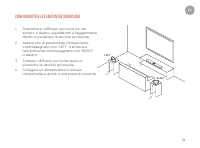
19 IT Configuratore les enceintes surround 1. Posizionare i diffusori surround sui lati sinistro e destro, equidistanti e leggermente dietro la posizione di ascolto principale. 2. Assicurarsi di posizionare l’altoparlante contrassegnato con “LEFT” a sinistra e l’altoparlante contrassegnato con “RIGH...
Page 21 - Collega i tuoi altoparlanti surround; Accedi alla modalità di accoppiamento sulla soundbar
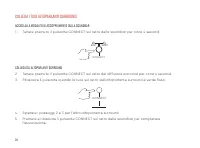
20 Collega i tuoi altoparlanti surround Accedi alla modalità di accoppiamento sulla soundbar 1. Tenere premuto il pulsante CONNECT sul retro della soundbar per circa 4 secondi. Collega gli altoparlanti surround 2. Tenere premuto il pulsante CONNECT sul retro del diffusore surround per circa 4 second...
Page 22 - RISOLUZIONE DEI PROBLEMI; Non sento il suono dai miei altoparlanti surround.; AGGIORNAMENTO DEI VOSTRI ALTOPARLANTI SURROUND
21 IT RISOLUZIONE DEI PROBLEMI Non sento il suono dai miei altoparlanti surround. Se la luce nella parte inferiore del diffusore surround è: • Spento , verificare che l’alimentatore sia collegato all’altoparlante e a una presa di corrente funzionante. • Arancione , assicurati che la barra audio sia ...
Page 23 - Vielen Dank, dass Sie sich für Polk entschieden haben; Technische Hilfe
22 Vielen Dank, dass Sie sich für Polk entschieden haben Wenn Sie Fragen oder Anmerkungen haben, können Sie uns gerne kontaktieren. Technische Hilfe Noord Amerika: 800-377-POLK(7655) Verenigd Koninkrijk en Ierland: +44 2890279830 Nederlandse klanten: +31 402507800 Andere landen: +1-410-358-3600 Emai...
Page 24 - Verpackungsinhalt
23 Verpackungsinhalt Linker Surround-Lautsprecher Energieversorgung (2)* Produktliteratur Rechter Surround-Lautsprecher *EU / UK-Adapter sind in einigen Modellen enthalten. DE
Page 25 - Konfigurator les enceintes Surround
24 Konfigurator les enceintes Surround 1. Stellen Sie die Surround-Lautsprecher auf der linken und rechten Seite in gleichem Abstand und leicht hinter der Haupthörposition auf. 2. Stellen Sie sicher, dass Sie den Lautsprecher mit der Aufschrift „LEFT“ links und den Lautsprecher mit der Aufschrift „R...
Page 26 - Schließen Sie Ihre Surround-Lautsprecher an; Aktivieren Sie den Pairing-Modus in der Soundleiste
25 Schließen Sie Ihre Surround-Lautsprecher an Aktivieren Sie den Pairing-Modus in der Soundleiste 1. Halten Sie die CONNECT-Taste auf der Rückseite der Soundleiste etwa 4 Sekunden lang gedrückt. Schließen Sie die Surround-Lautsprecher an 2. Halten Sie die CONNECT-Taste auf der Rückseite des Surroun...
Page 27 - FEHLERBEHEBUNG; Ich höre keinen Ton von meinen Surround-Lautsprechern.; AKTUALISIEREN IHRER UMGEBUNGSSPRECHER
26 FEHLERBEHEBUNG Ich höre keinen Ton von meinen Surround-Lautsprechern. Wenn das Licht an der Unterseite des Surround-Lautsprechers ist: • Aus , stellen Sie sicher, dass das Netzteil an den Lautsprecher und an eine funktionierende Steckdose angeschlossen ist. • Orange , stellen Sie sicher, dass Ihr...
Page 28 - Tack för ditt köp från Polk; Teknisk hjälp; SWE
27 Tack för ditt köp från Polk Kontakta oss om du har en fråga eller kommentar. Teknisk hjälp Nordamerika: 800-377-POLK(7655) Storbritannien och Irland: +44 2890279830 Nederländerna: +31 402507800 Andra länder: +1-410-358-3600 E-post: [email protected] Vanliga frågor om Polk: polk.custhelp.com I all...
Page 29 - Innehåll i lådan
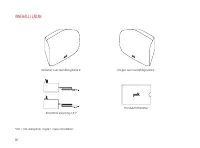
28 Innehåll i lådan Vänster surroundhögtalare Strömförsörjning (2)* Produktlitteratur Höger surroundhögtalare *EU / UK-adaptrar ingår i vissa modeller.
Page 30 - Placera dina surroundhögtalare
29 SWE Placera dina surroundhögtalare 1. Placera surroundhögtalarna på vänster och höger sida, lika långt och något bakom huvudlyssningspositionen. 2. Se till att placera högtalaren märkt “LEFT” till vänster och högtalaren märkt “RIGHT” till höger. 3. Rikta surroundhögtalarna mot huvudlyssningsposit...
Page 31 - Anslut dina surroundhögtalare; Gå in i parningsläge på ljudfältet
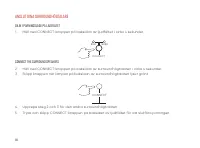
30 Anslut dina surroundhögtalare Gå in i parningsläge på ljudfältet 1. Håll ned CONNECT-knappen på baksidan av ljudfältet i cirka 4 sekunder. Connect the surround speakers 2. Håll ned CONNECT-knappen på baksidan av surroundhögtalaren i cirka 4 sekunder.3. Släpp knappen när lampan på baksidan av surr...
Page 32 - FELSÖKNING; Jag hör inte ljud från mina surroundhögtalare.; UPPDATERAR DINA SURROUNDHÖGTALARE
31 SWE FELSÖKNING Jag hör inte ljud från mina surroundhögtalare. Om lampan på surroundhögtalarens botten är: • Av , kontrollera att strömförsörjningen är ansluten till högtalaren och till ett fungerande eluttag. • Orange , se till att din ljudfält är påslagen och anslut högtalaren till ljudfältet en...
Page 33 - Спасибо за покупку Polk; Если у вас есть вопрос или комментарий, свяжитесь с нами.
32 Спасибо за покупку Polk Если у вас есть вопрос или комментарий, свяжитесь с нами. Техническая поддержка Северная Америка: 800-377-POLK(7655) Великобритания и Ирландия: +44 2890279830 Нидерланды: +31 402507800 Другие страны: +1-410-358-3600 Почта: [email protected] Часто задаваемые вопросы о Polk:...
Page 34 - Содержимое в коробке
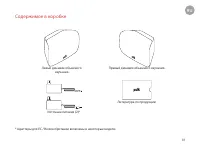
33 Содержимое в коробке Левый динамик объемного звучания Источник питания (2)* Литература по продукции Правый динамик объемного звучания * Адаптеры для ЕС / Великобритании включены в некоторые модели.. RU
Page 35 - Расположите динамики объемного звучания
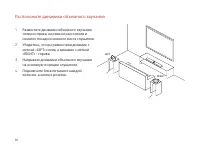
34 Расположите динамики объемного звучания 1. Разместите динамики объемного звучания слева и справа, на равном расстоянии и немного позади основного места слушателя. 2. Убедитесь, что вы разместили динамик с меткой «LEFT» слева, а динамик с меткой «RIGHT» - справа. 3. Направьте динамики объемного зв...
Page 36 - Подключите колонки объемного звучания; Войдите в режим сопряжения на звуковой панели; Повторите шаги 2 и 3 для другого динамика объемного звучания.
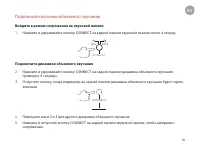
35 Подключите колонки объемного звучания Войдите в режим сопряжения на звуковой панели 1. Нажмите и удерживайте кнопку CONNECT на задней панели звуковой панели около 4 секунд. Подключите динамики объемного звучания 2. Нажмите и удерживайте кнопку CONNECT на задней панели динамика объемного звучания ...
Page 37 - ИСПРАВЛЕНИЕ ПРОБЛЕМ; Я не слышу звук из динамиков объемного звучания.; Если индикатор внизу динамика объемного звучания:; Выключено; панели, следуя инструкциям на предыдущей странице.; Зеленый; ОБНОВЛЕНИЕ ОБЪЕМНЫХ ДИНАМИКОВ
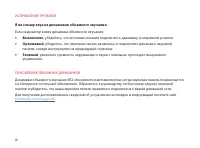
36 ИСПРАВЛЕНИЕ ПРОБЛЕМ Я не слышу звук из динамиков объемного звучания. Если индикатор внизу динамика объемного звучания: • Выключено , убедитесь, что источник питания подключен к динамику и исправной розетке. • Оранжевый , убедитесь, что звуковая панель включена, и подключите динамик к звуковой пан...
Page 38 - Bedankt voor uw aankoop bij Polk; Technische ondersteuning
37 Bedankt voor uw aankoop bij Polk Als u een vraag of opmerking heeft, neem dan gerust contact met ons op. Technische ondersteuning Noord Amerika: 800-377-POLK(7655) Verenigd Koninkrijk en Ierland: +44 2890279830 Nederlandse klanten: +31 402507800 Andere landen: +1-410-358-3600 Email: [email protec...
Page 39 - Wat zit er in de doos?
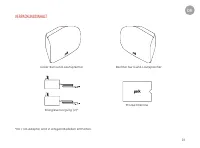
38 Wat zit er in de doos? Linker surround-luidspreker Stroomvoorziening (2)* Productliteratuur Rechter surround-luidspreker *Bij sommige modellen worden EU / UK-adapters meegeleverd.
Page 40 - Plaats uw surround-luidsprekers
39 NL Plaats uw surround-luidsprekers 1. Plaats de surroundluidsprekers aan de linker- en rechterkant, op gelijke afstand en iets achter de hoofdluisterpositie. 2. Zorg ervoor dat u de luidspreker gemarkeerd met “LEFT” aan de linkerkant plaatst en de luidspreker gemarkeerd met “RIGHT” aan de rechter...
Page 41 - Sluit uw surroundluidsprekers aan; Ga naar de koppelingsmodus op de soundbar
40 Sluit uw surroundluidsprekers aan Ga naar de koppelingsmodus op de soundbar 1. Houd de CONNECT-knop aan de achterkant van de soundbar ongeveer 4 seconden ingedrukt. Sluit de surroundluidsprekers aan 2. Houd de CONNECT-knop aan de achterkant van de surround-luidspreker ongeveer 4 seconden ingedruk...
Page 42 - PROBLEEMOPLOSSEN; Ik hoor geen geluid uit mijn surround-luidsprekers; UW SURROUND-SPEAKERS BIJWERKEN
41 NL PROBLEEMOPLOSSEN Ik hoor geen geluid uit mijn surround-luidsprekers Als het lampje aan de onderkant van de surround-luidspreker: • Uit , controleer of de voeding is aangesloten op de luidspreker en op een werkend stopcontact. • Oranje , zorg ervoor dat uw soundbar is ingeschakeld en sluit de l...
Page 43 - Dziękujemy za zakup firmy Polk; Pomoc techniczna
42 Dziękujemy za zakup firmy Polk Jeśli masz pytanie lub komentarz, skontaktuj się z nami. Pomoc techniczna Ameryka Północna: 800-377-POLK(7655) Wielka Brytania i Irlandia: +44 2890279830 Holandia: +31 402507800 Inne kraje: +1-410-358-3600 Email: [email protected] Polk FAQs: polk.custhelp.com We wsz...
Page 44 - Zawartość w pudełku
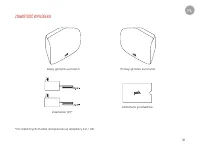
43 Zawartość w pudełku Lewy głośnik surround Zasilacze (2)* Literatura produktów Prawy głośnik surround *Do niektórych modeli dołączone są adaptery EU / UK. PL
Page 45 - Ustaw głośniki surround
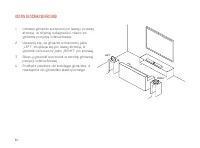
44 Ustaw głośniki surround 1. Umieść głośniki surround po lewej i prawej stronie, w równej odległości i nieco za główną pozycją odsłuchową. 2. Upewnij się, że głośnik oznaczony jako „LEFT” znajduje się po lewej stronie, a głośnik oznaczony jako „RIGHT” po prawej. 3. Skieruj głośniki surround w stron...
Page 46 - Podłącz głośniki surround; Wejdź w tryb parowania na soundbarze
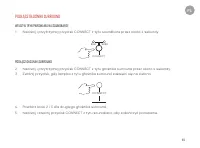
45 Podłącz głośniki surround Wejdź w tryb parowania na soundbarze 1. Naciśnij i przytrzymaj przycisk CONNECT z tyłu soundbara przez około 4 sekundy. Podłącz głośniki surround 2. Naciśnij i przytrzymaj przycisk CONNECT z tyłu głośnika surround przez około 4 sekundy.3. Zwolnij przycisk, gdy lampka z t...
Page 47 - ROZWIĄZYWANIE PROBLEMÓW; Nie słyszę dźwięku z głośników surround; AKTUALIZACJA GŁOŚNIKÓW SURROUND
46 ROZWIĄZYWANIE PROBLEMÓW Nie słyszę dźwięku z głośników surround Jeśli kontrolka na spodzie głośnika surround to: • Wyłączony , sprawdź, czy zasilacz jest podłączony do głośnika i do działającego gniazdka elektrycznego. • Pomarańczowy , upewnij się, że soundbar jest włączony, i podłącz głośnik do ...