Philips TAA5508BK/00 - User Manual
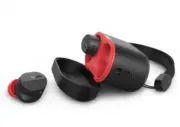
This user manual covers Philips Bluetooth wireless headphones, specifically the TAA5508 series, focusing on their setup, operation, and maintenance. The guide includes essential safety instructions–such as hearing protection and proper battery handling–to ensure safe use in various environments. It also details pairing procedures with Bluetooth devices, advanced features like active noise cancellation (ANC) and voice assistant controls, and troubleshooting common connectivity or performance issues. Technical specifications, charging methods, and regulatory compliance are addressed to provide a comprehensive understanding of the product’s capabilities and limitations.


Table of Contents:
- Page 1 – Product Identification and Support Information
- Page 2 – User Manual Structure
- Page 3 – Safety Instructions
- Page 4 – Package Contents and Compatibility
- Page 5 – Earpiece and Charging Case Components
- Page 6 – Battery Charging Procedure
- Page 7 – Initial Setup and Pairing
- Page 8 – Advanced Bluetooth Connectivity Modes
- Page 9 – Active Noise Cancellation Control
- Page 10 – Wireless Operation Controls
- Page 11 – Charging Box Indicator Status
- Page 12 – Reset Procedure and Technical Specifications
- Page 13 – Environmental Notices and Disposal
- Page 14 – Electromagnetic Field and Licensing Compliance
- Page 15 – Canadian Regulatory Statements
- Page 16 – Trademark Ownership
- Page 17 – Bluetooth Troubleshooting Guide
- Page 18 – Copyright and Manufacturer Notice
TAA5508
5000
Series
Sports
Headphones
User manual
Register your product and get support at
www.philips.com/support
"Loading the manual" means you need to wait until the file loads and becomes available for online reading. Some manuals are very large, and the time they take to appear depends on your internet speed.
Was this manual helpful?
About this manual
- Brand
- Philips
- Model
- TAA5508BK/00
- Document type
- User Manual
- Language(s)
- English
- Pages
- 18
- File size
- 1.3 MB
- Format
Other Manuals for Philips TAA5508BK/00
Summary
Identification details, model reference, product registration information, and support website.
Outline of the user manual sections including safety instructions, setup, usage, troubleshooting, specifications, legal notices, trademarks, and FAQs.
Guidelines for hearing safety, precautions against heat or water exposure, proper battery handling, and safe storage conditions.
Ask a question
Related manuals
Popular Philips Other


More Philips Other models
 Philips T388 Manual
 Philips TAA1105BK/00 Quick Guide
 Philips TAA1105WT/00 Quick Guide
 Philips TAA4205BK/00 User Manual
 Philips TAA4216BK/00 User Manual
 Philips TAA5205BK/00 User Manual
 Philips TAA5608BK/00 User Manual
 Philips TAA6219BK/00 User Manual
 Philips TAA6606BK/00 User Manual
 Philips TAA6709BK/00 User Manual
 Philips TAA7306BK/00 User Manual
 Philips TAA7507BK/00 User Manual