Page 2 - English; Important; Safety
English 1 Important Safety a Read these instructions. b Keep these instructions. c Heed all warnings. d Follow all instructions. e Do not use this apparatus near water. f Clean only with dry cloth. g Do not block any ventilation openings. Install in accordance with the manufacturer’s instructions. h...
Page 4 - Hearing safety
Warning Never remove the casing of this Micro Hi-Fi. • Never lubricate any par t of this Micro Hi-Fi. • Never place this Micro Hi-Fi on other electrical equipment. • Keep this Micro Hi-Fi away from direct sunlight, naked fl ames or heat. • Never look into the laser beam inside the Micro Hi-Fi. • Ens...
Page 5 - Notice; Recycling
Listen for reasonable periods of time: Prolonged exposure to sound, even at normally ‘safe’ levels, • can also cause hearing loss. Be sure to use your equipment reasonably and take • appropriate breaks. Be sure to observe the following guidelines when using your headphones. Listen at reasonable volu...
Page 7 - Norge; Introduction
This Micro Hi-Fi includes this label: Norge Typeskilt fi nnes på apparatens underside. Observer : Nettbryteren er sekunder t innkoplet. Den innebygde netdelen er derfor ikke frakoplet nettet så lenge apparatet er tilsluttet nettkontakten.For å redusere faren for brann eller elektrisk støt, skal appa...
Page 8 - What’s in the box
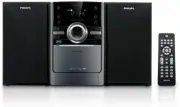
What’s in the box Check and identify the contents of your package: Main unit • Loudspeaker boxes x 2 • Remote control • MP3 link cable •
Page 9 - Overview of the main unit
Page 12 - Overview of the remote control
Page 14 - Connect; Connect speakers
Program radio stations. • Select 12 hour or 24 hour format. • n MUTE Mute volume. • o ALB/PRESET+/- Skip to the previous/nex t album. • Select a preset radio station. • p DSC Select a preset sound set ting: POP, JA ZZ, CL ASSIC or • ROCK . q TIMER ON/OFF Turn on or off alarm timer. • r REP ALL Play ...
Page 16 - Connect power; Get
Connect power Caution Risk of product damage! Ensure that the power supply voltage • corresponds to the voltage printed on the back or the underside of the Micro Hi-Fi. Before connecting the AC power cord, ensure you have completed • all other connections. 1 Connect the AC power cord to the wall soc...
Page 17 - Prepare the remote control
Always follow the instructions in this chapter in sequence. If you contact Philips, you will be asked for the model and serial number of your Micro Hi-Fi. The model number and serial number are on the back of your Micro Hi-Fi. Write the numbers here: Model No. __________________________ Serial No. _...
Page 18 - Auto install radio stations
Note Before pressing any function button on the remote control, fi rst select • the correct source with the remote control instead of the main unit. If you are not going to use the remote control for a long time, remove • the bat teries. Auto install radio stations When you connect the Micro Hi-Fi t...
Page 19 - Turn on; Switch to standby; Play; Play disc
5 Press CLOCK /DISPLAY to con fi rm. The minute digits are displayed and begin to blink. » 6 Press / to set the minute. 7 Press CLOCK /DISPLAY to con fi rm. Tip To view the clock during play, press • CLOCK /DISPL AY repeatedly until the clock is displayed. Turn on 1 Press POWER . The Micro Hi-Fi swi...
Page 20 - Play from USB
3 Inser t a disc with the printed side facing up, then close the disc tray. 4 Press to star t play. Play from USB Note • Ensure that the USB device contains playable audio contents for suppor ted formats . 1 Inser t the USB plug of a USB device into the socket. 2 Press USB to select the USB source. ...
Page 21 - Skip to a track; Pause/resume play; Play a track repeatedly
6 Play options Skip to a track For CD: 1 Press / to select another track. To select a track directly, you can also press a key on the • numerical keypad. For MP3 disc and USB: 1 Press ALB/PRESET+/- to select an album or folder. 2 Press / to select select a track or fi le. Pause/resume play 1 During ...
Page 22 - Play all tracks or an album repeatedly; Random play; Program tracks
Play all tracks or an album repeatedly 1 During play, press REP ALL repeatedly to select: [REP ALL] (repeat all) is displayed: all tracks are played » repeatedly. [REP ALB] (repeat album) is displayed (for MP3 and USB » only): the current album is played repeatedly. 2 To return to normal play, press...
Page 23 - Adjust volume level; Enhance bass; Mute sound; Receive; Tune to a radio station
7 Adjust volume level and sound effect Adjust volume level 1 During play, press VOL +/- to increase/decrease the volume level. Select a preset sound effect 1 During play, press DSC repeatedly to select: [POP] (pop) • [ JA ZZ] ( jazz) • [CL ASSIC] (classic) • [ROCK ] (rock) • Enhance bass 1 During pl...
Page 24 - Program radio stations automatically; Program radio stations manually
3 Repeat step 2 to tune to more stations. To tune to a weak station, press • / repeatedly until you fi nd optimal reception. Program radio stations automatically Note You can program a maximum of 40 preset radio stations. • 1 In the tuner mode, press and hold PROG for 2 seconds to activate automatic...
Page 25 - Select a preset radio station; Other; Set the alarm timer
4 Repeat the above steps to program other stations. Note To over write a programmed station, store another station in its • place. Select a preset radio station 1 Press ALB/PRESET+/- to select a preset number. Tip FM antenna is fi xed to the main unit. • Position the antenna as far as possible from ...
Page 26 - Activate and deactivate alarm timer; Set the sleep timer
5 Press / to set the hour. 6 Press TIMER to con fi rm. The minute digits are displayed and begin to blink. » 7 Press / to set the minute. 8 Press TIMER to con fi rm. The timer is set and activated. » Activate and deactivate alarm timer 1 Press TIMER ON/OFF repeatedly to activate or deactivate timer....
Page 27 - Listen to an external device; 0 Product; Speci; Ampli
Listen to an external device You can listen to an MP3 player through this Micro Hi-Fi. 1 Press MP3 LINK to select AUX source. 2 Use an MP3 link cable (supplied) to connect MP3 LINK jack (3.5mm) on this Micro Hi-Fi and the headphone jack on an MP3 player. 10 Product information Note Product informati...
Page 28 - Tuner; Speakers
Audio DAC 24Bits / 44.1kHz Total Harmonic Distor tion <1% Frequency Response 60Hz -16kHz (44.1kHz) S/N Ratio >65dBA Tuner Tuning Range FM: 87. 5 - 108MHz; MW: 531 - 1602kHz Tuning grid 50KHz FM Sensitivity - Mono, 26dB S/N Ratio - Stereo, 46dB S/N Ratio <22 dBf <43 dBf Search Selectivity...
Page 29 - General information; USB playability information
General information AC power 220 - 230V, 50Hz Operation Power Consumption 20W Standby Power Consumption <4W Eco Standby Power Consumption <2W USB Direct Version 2.0/1.1 Dimensions - Main Unit ( W x H x D) - Speaker Box ( W x H x D) 147 x231 x 209 mm134 x 233 x 153 mm Weight - With Packing - Ma...
Page 30 - Supported MP3 disc formats; 1 Troubleshooting
File name in Unicode UTF8 (maximum leng th: 128 by tes) • Unsupported formats: Empty albums: an empty album is an album that does not • contain MP3/ WMA fi les, and is not be shown in the display. Unsuppor ted fi le formats are skipped. For example, Word • documents (.doc) or MP3 fi les with ex tens...