Page 3 - Contents
1 EN Contents 1 Important 2 Safety 2 2 Your Philips 2-in-1 Air Dehumidifier and Purifier 6 Product Overview (fig. a ) 6 Controls Overview (fig. b ) 6 3 Getting started 7 Installing the filter 7 Positioning the dehumidifier 7 4 Using the dehumidifier 8 The air quality light 8 Turning on and off 8 Set...
Page 4 - Important; Safety; Danger
2 EN 1 Important Safety Read this user manual carefully before you use the dehumidifier, and save it for future reference. Danger • Do not spray any flammable materials such as insecticides or fragrance around the dehumidifier to avoid electric shock and/or a fire hazard. • Do not drink the accumula...
Page 5 - Caution
3 EN • Do not block the air inlet and outlet, e.g. by placing items on the air outlet or in front of the air inlet. • Do not insert your fingers or objects into the air inlet and outlet to prevent physical injury or product malfunction. Caution • Do not turn the appliance on and off frequently. • If...
Page 8 - and Purifier
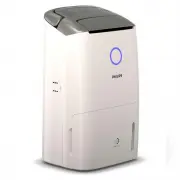
6 EN 2 Your Philips 2-in-1 Air Dehumidifier and Purifier Congratulations on your purchase, and welcome to Philips!To fully benefit from the support that Philips offers, register your product at www.Philips.com/welcome. Product Overview (fig. a ) a Handle h Unilateral rotating wheels b Louver i Displ...
Page 9 - Getting started; Installing the filter
7 EN Positioning the dehumidifier To increase the dehumidifying effectiveness, position the dehumidifier in a location that can draw the most air. Note • When the dehumidifier is operating, do not open exterior doors or windows. 3 Getting started Installing the filter Note • Make sure that the appli...
Page 10 - Using the; The air quality light
8 EN 2 Touch the button once to turn on the appliance (fig. h ). » The current humidity level is displayed on the screen. » After measuring the air quality for a short time, the air quality sensor automatically selects the color of the air quality light. » The dehumidifier goes to combi AUTO mode. 3...
Page 11 - Changing the fan speed
9 EN Note • Do not point the airflow of the dehumidifier directly at the body for a prolonged period of time, especially where there is someone who is unable to adjust the humidity. • When you use the dehumidifier for laundry drying, hang your clothes from a distance where water droplets will not dr...
Page 12 - Using the swing function; Setting the Timer
10 EN 2 Touch the fan speed button to select the desired fan speed (fig. o ). » The fan speed and display on the screen. 3 Touch the button again to exit the purification only mode. » The dehumidifier goes to combi AUTO mode. Note • Whenever the current mode of appliance works, it goes to purificati...
Page 13 - Draining the; Emptying the water tank
11 EN Note • During defrosting, the dehumidifier operates in clothes dry mode. • The dehumidifier will resume working and operate the previous settings after defrosting is completed. Setting the child lock1 Touch and hold the child lock button for 3 seconds to activate child lock (fig. t ). » " ...
Page 14 - Cleaning
12 EN 6 Cleaning Note • Always turn the appliance off and unplug the appliance from the electrical outlet before cleaning. • Never immerse the appliance in water or any other liquid. • Never use abrasive or aggressive cleaning agents such as bleach or alcohol to clean any part of the appliance. • On...
Page 15 - Cleaning the water tank
13 EN 5 Allow the pre-filter to air dry thoroughly before placing back in the dehumidifier. Note • To optimize the lifetime of the pre-filter, make sure it dries completely after cleaning. • Wash your hands after handling the filter. 6 Put the pre-filter back into the appliance (fig. ‚ ). 7 Reattach...
Page 16 - Replacing the HEPA filter
14 EN 7 Replacing the HEPA filter HEPA filter replacement indicator This dehumidifier is equipped with a HEPA filter replacement indicator to make sure that the air filter is in optimal condition when the dehumidifier is operating. When the HEPA filter needs to be replaced, the filter replacement al...
Page 17 - Storage
15 EN Note • Do not touch the pleated filter surface, or smell the filters as they have collected pollutants from the air. 3 Remove all packaging material from the new HEPA filter (fig. e ). 4 Place the new HEPA filter into the appliance (fig. ˆ ). 5 Put the plug of the dehumidifier in to wall outle...
Page 18 - Troubleshooting
16 EN 9 Troubleshooting This chapter summarizes the most common problems you could encounter with the dehumidifier. If you are unable to solve the problem with the information below, visit www.philips.com/support or c ontact the Consumer Care Center in your country for assistance. Problem Possible s...
Page 20 - Recycling; 0 Guarantee and
18 EN Compliance with EMF Koninklijke Philips N.V. manufactures and sells many products targeted at consumers, which, like any electronic apparatus, in general have the ability to emit and receive electromagnetic signals. One of Philips’ leading Business Principles is to take all necessary health an...