Philips D4751B/01 - Quick Guide
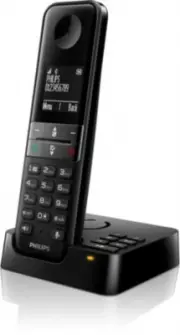
Philips D4751B/01 – Quick Guide, read for free online in PDF format. We hope this helps you resolve any issues you may have. If you have further questions, please contact us through the contact form.


Phone setup
1
When using your phone for the first time,
you see a welcome message (country
dependent).
2
Set the country and language if prompted.
3
Set the date and time.
• If the time is in 12-hour format, press /
keys to select
[am]
or
[pm]
(country
dependent).
Register your product and get support on our website
www.philips.com/support
Quick user manual
D470
D475
Important safety instructions
Overview
Enter the options
menu.
Change the sound
profile.
Adjust the volume.
Recall (network
dependent).
End a call.
Enter a pause
(press and hold
the key).
Mute/unmute the
loudspeaker.
Mute/unmute the
microphone.
During a call
Access the main
menu.
Access the redial list.
Phonebook
Call log
Make and answer
calls.
Switch the handset
on or off (press and
hold the key).
Make an intercom
call (press and hold
the key).
Lock/unlock the
keypad (press and
hold the key).
Make and receive
calls through the
loudspeaker.
For D475: Press to
play a new message
recorded in the
answering machine /
Access the answering
machine menu.
Standby
Loudspeaker
Icons
Earpiece
Loudspeaker
(back)
Microphone
D470
D475
Find
handset
(down)
Confirm / Select /
Access the options
menu.
Cancel / Back
Up / Down
Exit menu.
In menu
In text input
Delete text.
Enter a space.
Switch between
uppercase and
lowercase (press
and hold the key).
Icons
It shows the connection status between the
handset and base station. The more bars are
shown, the better the signal strength is.
This symbol remains steadily on when
browsing blocked calls in the call log.
This symbol remains steadily on when
browsing outgoing calls in the redial list.
This symbol flashes when there is a new
missed call or when browsing new missed
calls not read in the call log. This symbol
remains steadily on when a call log exists and
when browsing the missed calls in the call log.
This symbol remains steadily on when
browsing blocked calls in the call log.
This symbol remains steadily on when
browsing incoming calls in the call log.
Activated alarm.
The loudspeaker is on.
The silent mode is set, but is outside of active
period.
The ringer is off.
The silent mode is set and within active
period (the phone does not ring).
For D475: Answering machine: this symbol
flashes when there is a new message or when
the memory is full. It is displayed when the
answering machine is turned on.
Voice message indicator: this symbol flashes
when there is a new message, it remains
steadily on when the voice messages are
already viewed.
* This function is network dependent.
This symbol is displayed when you scroll
up/down a list or increase and decrease the
volume.
The Eco mode is activated.
The ECO+ mode is activated.
D470
D475
Multi-handset version only.
Connection
Inserting the batteries
Get started
Charge the
device for
8 hours.
> 70%
40% - 70%
10% - 40%
Flashing: low battery
Scrolling: charging in progress.
Charge your phone
Warning
• The electrical network is rated as dangerous. The
only way to turn off the charger is to unplug the
power at the outlet. You must therefore ensure that
the electrical outlet is always easily accessible.
• Refer to the safety information before using the
product.
• Hereby, MMD Hong Kong Holding Limited declares
that this product is in compliance with the essential
requirements and other relevant provisions of
Directive RED 2014/53/EU.
• Use only the power supply type listed in the user
instructions.
• Use only the battery type listed in the user
instructions.
• Do not allow the product to come into contact with
liquids.
• Risk of explosion if an incorrect battery type is
inserted in the device.
• Dispose of used batteries according to the instructions.
• When the handset rings or when the handsfree is
activated, keep the handset away from your ear to
avoid hearing damage.
Head, trunk and limb SAR value
• Philips handsets: < 0.1W/kg
"Loading the manual" means you need to wait until the file loads and becomes available for online reading. Some manuals are very large, and the time they take to appear depends on your internet speed.


