Page 2 - Contents
Contents 1 Get Support 4 1.1 Identify and Register your TV 4 1.2 TV Help and User Manual 4 1.3 On-line Help and User Manual 4 1.4 Consumer Care / Repair 4 2 Software 6 2.1 Update Software 6 2.2 Software Version 6 3 Quick Guide 7 3.1 Remote Control 7 3.2 Pair Your Remote Control to TV 9 3.3 IR sensor...
Page 4 - Get Support; Identify and Register your TV
1 Get Support 1.1 Identify and Register your TV Identify your TV - TV model number and serial number You might be asked to provide the TV product modelnumber and serial number. Find these numbers onthe packaging label or on the type label on the backor bottom of the TV. Register your TV Register you...
Page 6 - Software; Update Software; Software Version
2 Software 2.1 Update Software Search for Updates Update from Internet (Home) > Settings > Update software > Search for updates > Internet (Recommended) Look for a software update yourself. • If the TV is connected to the Internet, you mayreceive a message to update the TV software. Yo...
Page 7 - Quick Guide; Remote Control
3 Quick Guide 3.1 Remote Control Batteries and Cleaning Replace batteries If the TV does not react on a key press on the remotecontrol, the batteries might be empty. To replace the batteries, open the batterycompartment on the back of the remote control. 1 - Slide the battery door in the direction s...
Page 9 - IR sensor
1 - To open the Netflix App directly. With the TV switchedon or from standby. • If you have a Netflix membership subscription, youcan enjoy Netflix on this TV. Your TV must beconnected to the Internet.• To open Netflix, press to open the Netflix App. You can open Netflix immediately from a TV in...
Page 10 - Joystick - Local Control
Warning Do not put any objects in front of IR sensor of the TV,it may block the IR signal. 3.4 Joystick - Local Control Keys on TV If you lost the remote control or its batteries areempty, you can still do some basic TV operations. To open the basic menu… 1 - With the TV switched on, press the joy...
Page 11 - Setting Up; Read Safety; TV Placement
4 Setting Up 4.1 Read Safety Read the safety instructions first before you use theTV. To read the instructions, in Help > User manual , press the colour key Keywords and look up Safety and Care . 4.2 TV Placement Tips on Placement • Position the TV where light does not shine directlyon the scre...
Page 12 - Turn on TV
4.3 Turn on TV Connect Power Cable • Insert the power cable into the POWER connector on the back of the TV.• Make sure the power cable is securely inserted inthe connector.• Make sure that the power plug, in the wall socket, isaccessible at all times.• When you unplug the power cable, always pull th...
Page 13 - Connections; Connectivity guide; Satellite; Video Device; Audio Device
5 Connections 5.1 Connectivity guide Always connect a device to the TV with the highestquality connection available. Also, use good qualitycables to ensure a good transfer of picture andsound. When you connect a device, the TV recognizes itstype and gives each device a correct type name. Youcan chan...
Page 14 - Mobile Device
HDMI ARC All HDMI on the TV have HDMI ARC (Audio Return Channel). If the device, typically a Home Theatre System (HTS),also has the HDMI ARC connection, connect itto HDMI connection on this TV. With the HDMI ARC connection, you do not need to connect the extraaudio cable that sends the sound of the ...
Page 15 - Other Device
you can disconnect and stop watching the screen ofthe device on TV. The TV will switch back to the lastselected programme. From the TV To stop watching the screen of the device on TV, youcan . . . • press EXIT to watch a TV broadcast • press (Home) to start another activity on TV • press SOURC...
Page 18 - Switch Source; Source List
6 Switch Source 6.1 Source List • To open the sources menu, press SOURCES . • To switch to a connected device, select the devicewith the arrows (Right) or (Left) and press OK . • To view the technical information of the connecteddevice you are watching, press OPTIONS and select Device info. ...
Page 19 - Channels; Install Channel
7 Channels 7.1 About Channels and SwitchChannels To watch TV channels • Press . The TV tunes to the TV channel you last watched.• Press (Home) > TV > Channels and press OK . • Press + or - to switch channels. • If you know the channel number, type in the numberwith the number keys. Pre...
Page 24 - Channel List
language (the language set on TV), the TV can showsubtitles automatically in one of your preferredsubtitle languages. One of these subtitle languagesmust also be part of the broadcast. You can select your preferred subtitle languagesin Subtitle language . Subtitles Language If none of the preferred ...
Page 26 - Favourite Channels
7.4 Favourite Channels About Favourite Channels You can create a favourite channel list that only holdsthe channels you want to watch. With the Favouritechannel list selected, you will only see your favouritechannels when you switch through channels. Create a Favourites List 1 - While watching a TV ...
Page 28 - TV Guide; What You Need
8 TV Guide 8.1 What You Need With the TV guide you can view a list of the currentand scheduled TV programmes of your channels.Depending on where the TV guide information (data)is coming from, analogue and digital channels or onlydigital channels are shown. Not all channels offer TVguide information....
Page 31 - Recording
10 Recording andPause TV 10.1 Recording What You Need You can record a digital TV broadcast and watch itlater. To record a TV programme you need… • a connected USB Hard Drive formatted on this TV• digital TV channels installed on this TV• to receive channel information for the on screen TVGuide• a r...
Page 32 - Pause TV
and press OK . 5 - Select the channel to record from and press OK . 6 - Select the day of the recording and press OK . 7 - Set the start and end time of the recording. Select a button and use the (up) or (down) keys to set the hours and minutes. 8 - Select Schedule and press OK to schedule the m...
Page 34 - Videos
Set the transition from one picture to the next. 11.4 360 Photo View 360 Photos 1 - Press SOURCES , select USB and press OK . 2 - Select USB Flash Drive and press (right) to select the USB device you need. 3 - Select 360 Photos , you can press Sort to browse your 360 photos by date, month,...
Page 35 - Music
Select subtitles language if available. Character set Select the character set if external subtitle is available. Audio language Select audio language if available. Status Display the information of the video file. Repeat, Play once Play videos repeatedly or once. Subtitle settings Set the Font size...
Page 49 - Smart TV; Setup Smart TV
14 Smart TV 14.1 Setup Smart TV The first time you open Smart TV, you need toconfigure your connection. Read and agree to theterms and conditions to continue. The Smart TV start page is your link to the Internet.You can rent movies online, read newspapers, watchvideos and listen to music, also shop ...
Page 51 - Ambilight; Ambilight Style
16 Ambilight 16.1 Ambilight Style (Home) > Settings > All settings > Ambilight > Ambilight style You can select the way Ambilight follows or select Off to turn off the Ambilight. Follow Video (Home) > Settings > Ambilight > Ambilight style > Follow video Select one of the...
Page 52 - Advanced Ambilight Settings
1 - With the TV connected to your home network, it will show the available Hue Bridges. If the TV did notfind your Hue Bridge yet, you can select Scan again and press OK . If the TV found the only Hue Bridge you have, selectthe Hue Bridge name and press OK . If you have more than one Hue Bridge avai...
Page 53 - Lounge Light Mode
level of Ambilight saturation. Wall colour (Home) > Settings > All settings > Ambilight > Advanced > Wall colour • Neutralise the influence of a coloured wall on theAmbilight colours• Select the colour of the wall behind the TV and theTV will modify the Ambilight colours to appear a...
Page 54 - Netflix
17 Netflix If you have a Netflix menbership subscription, youcan enjoy Netflix on this TV. Your TV must beconnected to the Internet. To open Netflix, press to open the Netflix App. You can open Netflix immediately from a TV instandby. www.netflix.com 54
Page 55 - Rakuten TV
18 Rakuten TV Watch the latest new releases on your Smart TV. Thebiggest blockbusters, award winning classics and TVseries available instantly. Press the key on your remote control or the app icon to open the Rakuten TV app. Your TV mustbe connected to the Internet to use the app. For moreinformat...
Page 57 - YouTube
20 YouTube YouTube provides a platform to connect to the world.Watch and discover popular videos that uploaded byYouTube users around the world. Use the YouTubeapp to explore the latest topics on music, news, andmore. Press the app icon to open the YouTube app. Your TVmust be connected to the Intern...
Page 58 - Alexa; Using Alexa
21 Alexa 21.1 About Alexa Your TV supports Amazon Alexa* voice controloperations. About Alexa Alexa is a cloud-based voice service available onAlexa Echo devices from Amazon and devicemanufacturers. With Alexa working on your TV, youcan switch on/off TV, change channels, changevolume and more. To co...
Page 59 - Environmental; European Energy Label; End of Use
22 Environmental 22.1 European Energy Label The European Energy Label informs you on the energy efficiency class of this product. The greenerthe energy efficiency class of this product is, thelower the energy it consumes.On the label, you can find the energy efficiency class,the average power consum...
Page 60 - Specifications; Power
23 Specifications 23.1 Power Product specifications are subject to change withoutnotice. For more specification details of this product,see www.philips.com/TVsupport Power • Mains power : AC 220-240V +/-10%• Ambient temperature : 5°C to 35°C For power consumption information, seechapter Product Fich...
Page 61 - Connectivity
Note: For HDMI Input only 23.6 Sound • Dolby Atmos® Virtualizer• Clear Dialogue• A.I Sound• 5 Band Equalizer• Output power (RMS) : 20W• Dolby® Audio• DTS ® 23.7 Multimedia Connections • USB 2.0 / USB 3.0• Ethernet LAN RJ-45• Wi-Fi 802.11n (built-in) Supported USB file systems • FAT, NTFS Playback ...
Page 62 - Troubleshooting; Tips
24 Troubleshooting 24.1 Tips If you can't find a solution for your TV problem in Troubleshooting , you can use Keywords in Help > User manual to find the information you are looking for. Select a keyword to go the most relevant page inthe User manual. If the User manual doen't answer your quest...
Page 66 - Safety and Care; Safety
25 Safety and Care 25.1 Safety Important Read and understand all safety instructions beforeyou use the TV. If damage is caused by failure tofollow instructions, the warranty does not apply. Risk of Electric Shock or Fire • Never expose the TV to rain or water. Never placeliquid containers, such as v...
Page 67 - Screen Care
times. Risk of Overheating Never install the TV in a confined space. Always leavea space of at least 10 cm or 4 inches around the TVfor ventilation. Ensure curtains or other objects nevercover the ventilation slots on the TV. Lightning Storms Disconnect the TV from the power outlet and antennabefore...
Page 68 - Terms of Use
26 Terms of Use 2020 © TP Vision Europe B.V. All rights reserved. This product was brought to the market by TP VisionEurope B.V. or one of its affiliates, hereinafter referredto as TP Vision, which is the manufacturer of theproduct. TP Vision is the warrantor in relation to theTV with which this boo...
Page 69 - Copyrights; Other Trademarks
27 Copyrights 27.1 HDMI The terms HDMI and HDMI High-DefinitionMultimedia Interface, and the HDMI Logo aretrademarks or registered trademarks of HDMILicensing Administrator, Inc. in the United States andother countries. 27.2 Dolby Audio Dolby Audio Dolby, Dolby Audio, and the double-D symbol aretrad...
Page 70 - Open Source; Open Source Software
28 Open Source 28.1 Open Source Software This television contains open source software. TPVision Europe B.V. hereby offers to deliver, uponrequest, a copy of the complete correspondingsource code for the copyrighted open sourcesoftware packages used in this product for which suchoffer is requested b...
Page 75 - Index
Index A Advanced Ambilight Settings 52 Advanced Picture Settings 37 Advanced Sound Settings 40 AI Equalizer 40 Alexa 58 Ambilight 51 Ambilight Style 51 Ambilight+hue 51 Ambilight+hue, Hue Bulbs 51 Antenna 13 App Gallery 49 App lock 45 Audio Language 45 Audio Out Menu 40 Auto Clock Mode 45 C CAM PIN ...
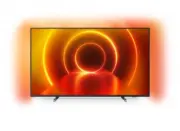


 Philips 50PUS7556/12 User Manual
 Philips 50PUS7607/12 User Manual
 Philips 50PUS7608/12 User Manual
 Philips 50PUS7609/12 User Manual
 Philips 50PUS7657/12 User Manual
 Philips 50PUS7800/12 Quick Guide
 Philips 50PUS7810/12 Quick Guide
 Philips 50PUS7855/12 User Manual
 Philips 50PUS7906/12 User Manual
 Philips 50PUS8007/12 User Manual
 Philips 50PUS8007/62 User Manual
 Philips 50PUS8009/12 User Manual