Philips 50PUL6534/F7 - User Manual
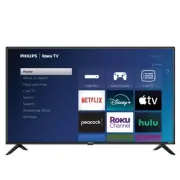
Philips 50PUL6534/F7 – User Manual, read for free online in PDF format. We hope this helps you resolve any issues you may have. If you have further questions, please contact us through the contact form.


Table of Contents:
- Page 2 – CAUTION; Know these safety symbols
- Page 4 – Notice
- Page 14 – The new standard in Smart TVs
- Page 15 – Connecting brings out your TV’s full potential
- Page 16 – Take advantage of awesome features
- Page 20 – Connecting an antenna, cable, or satellite box
- Page 24 – Roku TV remote
- Page 27 – Panel buttons
- Page 29 – Starting Guided Setup
- Page 30 – Guided Setup
- Page 32 – Network connection
- Page 38 – Activation
- Page 39 – Connect your devices
- Page 43 – Customize your Home screen
- Page 46 – How do I set up the TV tuner?
- Page 51 – Status indicator
- Page 54 – Watching live TV channels; Changing channels; Using the Live TV Channel Guide
- Page 58 – Changing channel options
- Page 60 – Pausing live TV; Requirements
- Page 62 – Notes about Live TV Pause
- Page 63 – More Ways to Watch; Using More Ways to Watch
- Page 66 – Getting the most from More Ways to Watch; Switching TV inputs; Auto-detecting devices
- Page 68 – Automatic game console configuration
- Page 69 – Using Roku Voice commands
- Page 72 – Using Roku Voice with Amazon Alexa; Using Roku Voice Remotes (certain models only); Connecting headphones to a Roku Voice Remote
- Page 73 – Re-pairing your Roku Voice Remote
- Page 76 – Changing and previewing the remote finder sound
- Page 77 – Playing content from USB storage devices; Auto player launch
- Page 78 – Playing content from local network media servers; Setting up a payment method
- Page 79 – Using your TV in a hotel or dorm room; About using your TV on a restricted public network
- Page 82 – Apple AirPlay; Other AirPlay things to try
- Page 83 – Apple Home app; Some Apple HomeKit things to try
- Page 84 – Main Settings menu
- Page 86 – TV settings menu
- Page 90 – Fine tune picture menu options
- Page 93 – Expert Picture Settings (4K models only)
- Page 94 – Sound settings
- Page 97 – Roku premium audio products
- Page 98 – Manage channels
- Page 99 – Favorite channels
- Page 100 – Edit channel lineup
- Page 101 – Hide streaming TV channels; Accessibility & captions
- Page 102 – Accessibility & captions menu settings
- Page 103 – Video description through Secondary Audio Program (SAP); Picture off
- Page 106 – Voice Search from a Roku Voice remote
- Page 108 – Searching with Amazon Alexa
- Page 112 – Automatic Account Link
- Page 113 – Add TV inputs to your Home screen
- Page 115 – Custom input names/icons; Remove unwanted inputs and channels
- Page 117 – Change the look and feel with themes
- Page 118 – Power on settings
- Page 120 – Configure accessibility; Captions mode
- Page 122 – Screen reader settings; Customize the Home screen
- Page 123 – Creating a parental control PIN
- Page 124 – Blocking broadcast TV programs; Enabling parental control of TV programs
- Page 125 – Blocking based on US TV ratings
- Page 126 – Blocking based on US movie ratings
- Page 128 – Blocking based on Canadian French ratings
- Page 129 – Blocking unrated programs
- Page 130 – What happens when a TV program is blocked?
- Page 131 – Changing your PIN
- Page 132 – Resetting parental controls
- Page 133 – Guest Mode
- Page 135 – Network settings
- Page 138 – Control by mobile apps
- Page 139 – Changing privacy settings; Advertising
- Page 140 – Voice
- Page 142 – Smart TV experience
- Page 143 – Setting up Roku wireless speakers
- Page 145 – Home theater configuration; Controlling audio output
- Page 147 – Setting up a digital audio connection
- Page 152 – Restart the TV; Reset audio/picture settings
- Page 155 – Roku Account PIN
- Page 156 – Update the TV
- Page 157 – Using Bluetooth; Pair your Bluetooth headphones
- Page 159 – Disable Bluetooth auto detect; Pairing your phone, tablet, or computer with Bluetooth; Pair your device
- Page 160 – Connect your device and play audio on your TV
- Page 161 – Disconnect your device; Mirroring your phone or tablet
- Page 162 – Roku mobile app
- Page 163 – Private Listening on the Roku mobile app; Using a universal remote
- Page 164 – What you’re missing by not connecting
- Page 166 – Managing live TV channels when your TV is not connected; Designating favorite channels
- Page 167 – Editing the channel lineup
- Page 168 – Connecting your TV
- Page 169 – Updating a TV that is not connected
- Page 174 – Warranty; LIMITED WARRANTY
- Page 175 – License
User manual
To obtain assistance, contact Philips customer care center;
In the U.S.A., Canada, Puerto Rico, or the U.S. Virgin Islands
www.philips.com/support
1-833-978-3323
Call us:
Register your product and get support at
"Loading the manual" means you need to wait until the file loads and becomes available for online reading. Some manuals are very large, and the time they take to appear depends on your internet speed.
Was this manual helpful?
Helpful for 5 of 5 readers
About this manual
- Brand
- Philips
- Model
- 50PUL6534/F7
- Document type
- User Manual
- Language(s)
- English
- Pages
- 176
- File size
- 24.4 MB
- Format
Summary
equilateral triangle, is intended to alert the user to the presence of uninsulated “dangerous voltage” within the apparatus’s enclosure magnitude to constitute a risk of electric shock to persons. The exclamation point within an equilateral triangle is intended to alert the user to the presence of i...
Notice Pixel characteristics This LCD product has a high number of color pixels. Although it has effec- tive pixels of 99.999% or more, black dots or bright points of light (red, green or blue) may appear constantly on the screen. This is a structural property of the display (within common industry ...
Ask a question
Related manuals
Popular Philips Other


More Philips Other models
 Philips 50PFS5823/12 Quick Guide
 Philips 50PFT4509/12 User Manual
 Philips 50PUH6400/88 Quick Guide
 Philips 50PUK6400/12 Quick Guide
 Philips 50PUK6809 Manual
 Philips 50PUK6809/12 Quick Guide
 Philips 50PUL7552/F7 User Manual
 Philips 50PUS6162/12 Quick Guide
 Philips 50PUS6203/12 User Manual
 Philips 50PUS6262/12 Quick Guide
 Philips 50PUS6272/12 Quick Guide
 Philips 50PUS6503/12 User Manual