Page 2 - Contents
Contents 1 Home Screen Overview 4 2 Get Support 5 2.1 Identify and Register your TV 5 2.2 TV Help and User Manual 5 2.3 TV Diagnose and Self-diagnose 5 2.4 Consumer Care / Repair 5 3 Quick Guide 7 3.1 Remote Control 7 3.2 IR sensor 10 3.3 Batteries and Cleaning 10 4 Setting Up 11 4.1 Read the Safety...
Page 5 - Get Support; Identify and Register your TV
2 Get Support 2.1 Identify and Register your TV Identify your TV - TV model number and serial number You might be asked to provide the TV product modelnumber and serial number. Find these numbers onthe packaging label or on the type label on the backor bottom of the TV. Register your TV Register you...
Page 6 - Consumer Care / Repair
2.4 Consumer Care / Repair For support and repair, call the Consumer Carehotline in your country. Our service engineers will takecare of a repair, if necessary. Find the telephone number in the printeddocumentation that came with the TV.Or consult ourwebsite www.philips.com/TVsupport and select your...
Page 7 - Quick Guide; Remote Control; Key Overview
3 Quick Guide 3.1 Remote Control Key Overview Top (Type 1) 1 - Standby / On To switch the TV on or back to Standby. 2 - TV Guide To open or close the TV Guide. 3 - To launch the Amazon prime video App. 4 - To open the Netflix App directly. With the TV switchedon or from standby. • If you hav...
Page 11 - Setting Up; Read the Safety Instructions; TV Placement; Tips on Placement
4 Setting Up 4.1 Read the Safety Instructions Please read the safety instructions before you use theTV. To read the instructions, in Help > User manual , press the colour key Keywords and look up Safety and Care . 4.2 TV Placement Tips on Placement • Position the TV where light does not shine d...
Page 12 - Turn on TV; Connect Power Cable; On or Standby
4.3 Turn on TV Connect Power Cable • Insert the power cable into the POWER connector on the back of the TV.• Make sure the power cable is securely inserted inthe connector.• Make sure that the power plug, in the wall socket, isaccessible at all times.• When you unplug the power cable, always pull th...
Page 13 - Connections; Connectivity guide; Satellite; Video Device; HDMI
5 Connections 5.1 Connectivity guide Always connect a device to the TV with the highestquality connection available. Also, use good qualitycables to ensure a good transfer of picture andsound. When you connect a device, the TV recognizes itstype and gives each device a correct type name. Youcan chan...
Page 14 - Audio Device; HDMI ARC; Digital Audio Out - Optical; Mobile Device; Screen Mirroring
5.5 Audio Device HDMI ARC Only HDMI 1 on the TV have HDMI ARC (Audio Return Channel). If the device, typically a Home Theatre System (HTS),also has the HDMI ARC connection, connect it to anyof the HDMI connections on this TV. With the HDMIARC connection, you do not need to connect theextra audio cab...
Page 15 - Apps - Philips TV Remote App; Other Device
Using Screen Mirroring Switch on Screen Mirroring Press SOURCES > Screen Mirroring Share a Screen on TV 1 - Activate Screen mirroring on your mobile device. 2 - On your mobile device, select the TV. (This TV will be displayed as TV model name) 3 - Select the TV name on your mobile device, after...
Page 16 - USB Flash Drive
Digital TV operators provide a CI+ module(Conditional Access Module - CAM) and anaccompanying smart card, when you subscribe totheir premium programmes. These programmes havea high level of copy protection. Contact a digital TV operator for more information onterms & conditions. Smart Card Digit...
Page 17 - Computer
5.8 Computer You can connect your computer to the TV and usethe TV as a PC monitor. Use an HDMI cable toconnect the computer to the TV. 17
Page 18 - Switch Source; Source List
6 Switch Source 6.1 Source List • To open the sources menu, press SOURCES . • To switch to a connected device, select the devicewith the Arrow / navigation keys and press OK . • To view the technical information of the connecteddevice you are watching, press OPTIONS and select Device info. • To ...
Page 19 - Channels; Install Channel; Antenna and Cable
7 Channels 7.1 About Channels and SwitchChannels To watch TV channels • Press . The TV tunes to the TV channel you last watched.• Press (Home) > TV > Channels and press OK . • Press + or - to switch channels. • If you know the channel number, type in the numberwith the number keys. Pre...
Page 22 - Channel List Copy
Manual Installation (Home) > Settings > Install Channels > Satellite installation > Manual installation Manually install satellite. • LNB - Select the LNB for which you want to addnew channels.• Polarisation - Select the polarisation you need.• Symbol rate mode - Select Manual to enter...
Page 23 - Channel Options
2 - Plug in the USB flash drive that holds the channel list of the other TV. 3 - To start the channel list upload, select (Home) > Settings > Channels > Channel List Copy or Satellite list Copy > Copy to TV and press OK . Enter your PIN code if necessary. 4 - The TV notifies you if the...
Page 24 - Channel List; Open Channel List
HbbTV on This Channel If you want to avoid access to HbbTV pages on aspecific channel, you can block the HbbTV pages forthis channel only. 1 - Tune to the channel of which you want to block the HbbTV pages. 2 - Press OPTIONS and select HbbTV on this channel and press (right). 3 - Select Off and ...
Page 25 - Favourite Channels; About Favourite Channels
Select Channel List > OK > OPTIONS > Select channel list Select one of channel lists that sorted by differentkinds of channels. Search Channels > OK > OPTIONS > Search channel You can search for a channel to find it in a long list ofchannels. The search will return the matc...
Page 27 - TV Guide; What You Need; Open the TV Guide
8 TV Guide 8.1 What You Need With the TV guide you can view a list of the currentand scheduled TV programmes of your channels.Depending on where the TV guide information (data)is coming from, analogue and digital channels or onlydigital channels are shown. Not all channels offer TVguide information....
Page 29 - View Photos
10 Videos, Photos andMusic 10.1 From a USB Connection You can view your photos or play your music andvideos from a connected USB flash drive or USB HardDrive. With the TV switched on, plug in a USB flash drive or aUSB Hard Drive to one of the USB connections. Press SOURCES , then select USB, you c...
Page 30 - Videos; Play Videos; Music; Play Music
10.4 Videos Play Videos To play a video on TV… Select Videos , and select the file name and press OK . • To pause the video, press OK . Press OK again to continue.• To rewind or go fast forward, press or . Press the keys several times to speed up - 2x, 4x, 8x, 16x,32x.• To jump to the next vid...
Page 31 - All Settings; Picture Settings
11 Open TV SettingMenus 11.1 Qucik Menu and FrequentSettings Press Quick Menu/MENU key on the remote control to find the Quick Menu , then press the arrows (Left) to find the Frequent settings . Quick menu: • Help - Diagnose and get more information about your TV.• Install channels - Update chan...
Page 33 - Sound Settings
Picture Clean Noise reduction (Home) > Settings > Picture > Expert mode settings > Noise reduction Select Maximum , Medium , Minimum to set the level for removing the noise in video content.Noise is mostly visible as small moving dots in on-screen picture. MPEG Artefact Reduction (Ho...
Page 36 - General Settings
Digital out delay (Home) > Settings > Sound > Advanced > Digital out delay For some Home Theatre Systems you might need toadjust the audio sync delay to synchronise the audioto the video. Select Off if a sound delay is set on your Home Theatre System. Digital out offset (Only available...
Page 38 - Universal Access Settings
• If you use the TV as a monitor or use a digitalreceiver to watch TV (a Set-Top Box - STB) and youdo not use the remote control of the TV, you shoulddeactivate this automatic switch off, to set the valueto 0 . Location - Home or Shop (Home) > Settings > General settings > Location • Sele...
Page 41 - Wireless Connection
12 Wireless andNetworks 12.1 Home Network To enjoy the full capabilities of your Philips Smart TV,your TV must be connected to the Internet. Connect the TV to a home network with a high-speedInternet connection. You can connect your TVwirelessly or wired to your network router. 12.2 Connect to Netwo...
Page 43 - Smart TV and Apps; Setup Smart TV
13 Smart TV and Apps 13.1 Setup Smart TV The first time you open Smart TV, you need toconfigure your connection. Read and agree to theterms and conditions to continue. The Smart TV Home screen is your link to the Internet.You can rent movies online, read newspapers, watchvideos and listen to music, ...
Page 44 - Netflix
14 Netflix If you have a Netflix membership subscription, youcan enjoy Netflix on this TV. Your TV must beconnected to the Internet. To open Netflix, press to open the Netflix App. You can open Netflix immediately from a TV instandby. www.netflix.com 44
Page 45 - Rakuten TV
15 Rakuten TV Watch the latest new releases on your Smart TV. Thebiggest blockbusters, award winning classics and TVseries available instantly. Press the key on your remote control or the app icon to open the Rakuten TV app. Your TV mustbe connected to the Internet to use the app. For moreinformat...
Page 47 - YouTube
17 YouTube YouTube provides a platform to connect to the world.Watch and discover popular videos that uploaded byYouTube users around the world. Use the YouTubeapp to explore the latest topics on music, news, andmore. Press the app icon to open the YouTube app. Your TVmust be connected to the Intern...
Page 48 - Alexa; Using Alexa
18 Alexa 18.1 About Alexa Your TV supports Amazon Alexa* voice controloperations. About Alexa Alexa is a cloud-based voice service available onAlexa Echo devices from Amazon and devicemanufacturers. With Alexa working on your TV, youcan switch on/off TV, change channels, changevolume and more. To co...
Page 49 - Google Assistant
19 Google Assistant Your TV can work with the Google Assistant. GoogleAssistant allows you to use your voice to control yourTV – e.g. changing volume, channels and more. Note : Google Assistant is not available in all languages and countries. To enable Google Assistant on your TV, you will need: • A...
Page 50 - Software; Update Software; Search for Updates; Software Version
20 Software 20.1 Update Software Search for Updates Update from Internet (Home) > Settings > Update software > Search for updates > Internet (Recommended) Look for a software update yourself. • If the TV is connected to the Internet, you mayreceive a message to update the TV software. ...
Page 52 - Environmental; European Energy Label; EPREL Registration Number; End of Use; UK Declaration of Conformity
21 Environmental 21.1 European Energy Label The European Energy Label informs you on the energy efficiency class of this product. The greenerthe energy efficiency class of this product is, thelower the energy it consumes.On the label, you can find the energy efficiency class,the average power consum...
Page 53 - Specifications
22 Specifications 22.1 Power Product specifications are subject to change withoutnotice. For more specification details of this product,see www.philips.com/TVsupport Power • Mains power : AC 220-240V +/-10%• Ambient temperature : 5°C to 35°C 22.2 Reception • Aerial input : 75 ohm coaxial (IEC75)• Tu...
Page 54 - Connectivity
22.7 Connectivity TV Side • USB 1 - USB 2.0• USB 2 - USB 2.0• Common Interface slot: CI+/CAM• HDMI 3 in• HDMI 2 in• HDMI 1 in - ARC• Antenna (75 ohm)• Satellite tuner TV Rear • Headphones - Stereo mini-jack 3.5mm• Audio out - Optical Toslink• Network LAN - RJ45 54
Page 55 - Troubleshooting; Tips
23 Troubleshooting 23.1 Tips If you can't find a solution for your TV problem in Troubleshooting , you can use Keywords in Help > User manual to find the information you are looking for. Select a keyword to go the most relevant page inthe User manual. If the User manual doesn't answer your ques...
Page 59 - Safety and Care; Safety; Important; Stability Hazards
24 Safety and Care 24.1 Safety Important Read and understand all safety instructions beforeyou use the TV. If damage is caused by failure tofollow instructions, the warranty does not apply. Risk of Electric Shock or Fire • Never expose the TV to rain or water. Never placeliquid containers, such as v...
Page 60 - Screen Care
some lithium battery types).• Disposal of a battery into fire or a hot oven, ormechanically crushing or cutting of a battery, that canresult in an explosion.• Leaving a battery in an extremely high temperaturesurrounding environment that can result in anexplosion or the leakage of flammable liquid o...
Page 61 - Terms of Use
25 Terms of Use 2023 © TP Vision Europe B.V. All rights reserved. This product was brought to the market by TP VisionEurope B.V. or one of its affiliates, hereinafter referredto as TP Vision, which is the manufacturer of theproduct. TP Vision is the warrantor in relation to theTV with which this boo...
Page 62 - Copyrights
26 Copyrights 26.1 HDMI The terms HDMI, HDMI High-Definition MultimediaInterface, HDMI trade dress and the HDMI Logos aretrademarks or registered trademarks of HDMILicensing Administrator, Inc. 26.2 HEVC Advance Covered by one or more claims of the HEVC patentslisted at patentlist.accessadvance.com....
Page 63 - Open Source; Open Source Software; About Open Source License
27 Open Source 27.1 Open Source Software This television contains open source software. TPVision Europe B.V. hereby offers to deliver, uponrequest, a copy of the complete correspondingsource code for the copyrighted open sourcesoftware packages used in this product for which suchoffer is requested b...
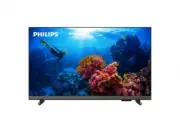


 Philips 43PFS5505/12 Quick Guide
 Philips 43PFS5507/12 User Manual
 Philips 43PFS5525/12 User Manual
 Philips 43PFS5803/12 User Manual
 Philips 43PFS5823/12 Quick Guide
 Philips 43PFS6805/12 User Manual
 Philips 43PFS6808/62 Quick Guide
 Philips 43PFS6855/12 User Manual
 Philips 43PFT4112/12 Quick Guide
 Philips 43PFT4203/12 Quick Guide
 Philips 43PFT5301/12 Quick Guide
 Philips 43PFT5503/12 Quick Guide