Philips 40PFL5505D/F7 - User Manual
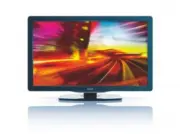
Philips 40PFL5505D/F7 – User Manual, read for free online in PDF format. We hope this helps you resolve any issues you may have. If you have further questions, please contact us through the contact form.


Table of Contents:
- Page 2 – Contents
- Page 3 – Return your Product Registration Card or register online at; Dear PHILIPS product owner :; Know these; safety; symbols; Notification
- Page 4 – IMPORTANT SAFETY INSTRUCTIONS
- Page 5 – Notice
- Page 6 – Environmental care; Regulatory notices; Important; For further assistance; Product information
- Page 7 – Remote control; Your; Side controls and indicators
- Page 9 – Positioning the TV; Using a Kensington lock; Adjusting the swivel angle; Installing the remote control batteries; Get started; Supplied accessories
- Page 10 – Connecting the antenna or cable
- Page 11 – Connecting the AC power cord; Disconnect the TV from the power outlet; Managing cables
- Page 12 – Switching on and set up the TV
- Page 13 – Switching channels; Use your; Switching your TV on or to standby
- Page 14 – Watching channels from a set-top box
- Page 15 – Use more of your TV; Access TV menus; Access the home menu
- Page 16 – Changing picture and sound settings; Changing picture settings
- Page 18 – Using auto mode; Create and use lists of favorite channels; Select a list of favorite channels; Supported screen resolutions
- Page 19 – Closed caption; Setting the clock
- Page 20 – Child and rating locks; Sleeptimer
- Page 21 – Summary of TV ratings; Locking a channel; Using the TV ratings lock
- Page 22 – Summary of Canada English ratings lock; Summary of Canada French ratings lock; Use the region ratings lock; Summary of Movie ratings lock
- Page 23 – EasyLink; Use the demo mode; Activate Master EasyLink
- Page 24 – Connect a USB storage device; Disconnect a USB storage device; Set your location to home; View photos and play music on a USB storage device
- Page 25 – Listen to music on a USB storage device; View your picture on a USB storage device
- Page 26 – Weak channel installation; Installation mode; Install channels; Autoprogram
- Page 27 – Updating software; Update your TV software; Preparing for the software update; Downloading the software
- Page 28 – Connect devices; Connection overview
- Page 29 – Selecting your connection quality; HDMI - Highest quality; Composite - Basic quality
- Page 30 – Connecting your devices
- Page 31 – Connecting a PC; Connecting a digital home theater ampli
- Page 32 – Add devices
- Page 33 – 0 Troubleshooting; Downloading an electronic copy
- Page 34 – 1 Product information; Picture enhancement; Ease of use; Power
- Page 35 – LIMITED WARRANTY
- Page 37 – LEA CUIDADOSAMENTE ESTE INSTRUCTIVO
MODEL NUMBER
SERIAL NUMBER
55PFL5505D
46PFL5505D
40PFL5505D
Register your product and get support at
www.philips.com/welcome
EN
User manual
FR
Manuel d’utilisation
ES
Manual del usuario
EN:
For fur ther assistance, call the customer suppor t ser vice in your countr y.
•
To obtain assistance in the U.S.A., Canada, Puer to Rico, or the U.S. Virgin Islands, contact Philips
Customer Care Center at
1-866-309-0841
•
To obtain assistance in Mexico, contact Philips Customer Care Center at
01 800 504 62 00
Enter below the model and serial numbers located on the back and right side of the TV cabinet.
FR:
Pour obtenir de l’aide supplémentaire, communiquez avec le centre de ser vice à la clientèle de
votre pays.
•
Pour obtenir de l’aide aux États-Unis, au Canada, à Puer to Rico ou aux Îles Vierges américaines,
communiquez avec le centre de ser vice à la clientèle Philips au :
1-866-309-0841
•
Pour obtenir l’aide au Mexique, entrez en contact avec le centre de soin de client de Philips à
01 800 504 62 00
Entrer ci dessous le modèle et le numéro de série situés dérrière à droite sur le dos du téléviseur.
ES:
Para obtener más información, llame al ser vicio de sopor te al cliente de su país.
•
Para obtener asistencia en los Estados Unidos, en Canadá, Puer to Rico o en las Islas
Vírgenes de los Estados Unidos, comuníquese con Centro de atención al cliente de Philips al
1-866-309-0841
•
Solo para Mexico CENTRO DE ATENCIÓN A CLIENTES LADA.
01 800 504 62 00
Solo
Para México.
Escriba a continuación el modelo y número de serie que estan localizados en lado derecho y par te
posterior de el gabinete de el televisor.
NOT FINAL
A01R5̲Q5̲P5UF̲55̲46̲40PFL5505D̲cover.indd 1
A01R5̲Q5̲P5UF̲55̲46̲40PFL5505D̲cover.indd 1
2010/01/18 13:51:57
2010/01/18 13:51:57
"Loading the manual" means you need to wait until the file loads and becomes available for online reading. Some manuals are very large, and the time they take to appear depends on your internet speed.
Was this manual helpful?
Helpful for 3 of 3 readers
About this manual
- Brand
- Philips
- Model
- 40PFL5505D/F7
- Document type
- User Manual
- Language(s)
- English
- Pages
- 37
- File size
- 3 MB
- Format
Summary
1 English EN 9 Connect devices 27 Connection over view 27 Selecting your connection quality 28 Connecting your devices 29 Add devices 31 Remove devices 31 10 Troubleshooting 32 Downloading an electronic copy 32 Contact us 32 11 Product information 33 12 Warranty 34 13 Index 35 Contents 1 Notice 4 2 ...
2 Registering your model with PHILIPS makes you eligible for all of the valuable benefits listed below, so don't miss out.Complete and return your Product Registration Card at once, or register online at www.philips.com/welcome to ensure: Return your Product Registration Card or register online at w...
3 English IMPORTANT SAFETY INSTRUCTIONS Read before operating equipment 1. Read these instructions. 2. Keep these instructions. 3. Heed all warnings. 4. Follow all instructions. 5. Do not use this apparatus near water. 6. Clean only with a dry cloth. 7. Do not block any of the ventilation openings. ...
Ask a question
Related manuals
Popular Philips Other


More Philips Other models
 Philips 40PFL4508H/12 Quick Guide
 Philips 40PFL4609/F7 User Manual
 Philips 40PFL4775/F7 User Manual
 Philips 40PFL4908/F7 User Manual
 Philips 40PFL4909 Manual
 Philips 40PFL5206H/12 Quick Guide
 Philips 40PFL5605/98 Manual
 Philips 40PFL5605H/05 User Manual
 Philips 40PFL5605K Manual
 Philips 40PFL5605K/02 Quick Guide
 Philips 40PFL5606H Manual
 Philips 40PFL5606H/12 Quick Guide