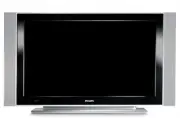
Page 2 - Recycling; Disposal of your old product
1 Thank you for purchasing this television set.This handbook has been designed to help you install and operate your TV set.We strongly recommend that you read it thoroughly. Safety Information . . . . . . . . . . . . . . . . . . . . . . . . . . . . . . . . . . . . . . . . . . . . . . . . . . . . . ....
Page 3 - Safety Information
2 X X X X X X 10 cm 10 cm 10 cm X Safety Information Avoid placing your TV set under direct sunlight or heat. To prevent fire or shock hazard, do not expose your TV to rain or moisture. Take care not to connect too many equipment to the same mains socket as it may cause overloading resulting in fire...
Page 4 - Preparation / Getting started; Positioning the TV set
3 2 3 Using the Remote Control Pull out the plastic insulation sheet from the battery to enable the remote control to operate. Switching on the TV set • To switch on the TV set, press the POWER button. A green indicator comes on and the screen lights up. • If the TV set remains in standby mode (red ...
Page 5 - Televison keys and connectors
4 Televison keys and connectors Headphone Audio In Video In S-Video AUDIO IN R L VIDEO IN S-VIDEO 11 6 7 8 9 10 EXT 4 EXT 2 /SVHS2 EXT 1 DVI (AUDIO IN) HDMI 2 HDMI 1 AUDIO R L IN Pr Pb Y L R 5 AC in ~ 1 POWER . : to switch the TV on and off. Note : The power remains on even when the Power switch is ...
Page 6 - Unused key in TV mode; Remote Control keys; Î ï
5 1 Standby To set the TV to standby mode. To switch the TV set on again, press , to , P – / + or AV key. 2 Unused key in TV mode . 3 DVD / AUX (see page 6). 4 Surround Sound To activate / deactivate the surround sound effect. In stereo, this gives the impression that the speakers are further apart....
Page 7 - Quick Installation
6 Remote Control keys (DVD or AUX) The remote control also allows you to control the main functions of some Philips DVD models NOTE : Functions not available to Philips DVD-R device. Press the key to select the required mode: DVD or AUX . The remote control indicator lights up to display the selecte...
Page 8 - Program Sort; Auto Store
7 Program Sort Press the key. The TV Menu is displayed on the screen. Use the ï key, select the Install menu and the Æ / key to enter the Install menu. Use the ï key to select Sort and the Æ / key to enter sort mode. Select the programme number you want to move using the Î ï keys and the Æ / key to ...
Page 9 - Manual Store; If no picture is found, see “Troubleshooting Tips”; Naming of Channel
8 Manual Store Search : Press the Æ / key. The search starts. Once a programme is found, the scanning stops and its name is displayed (if available). Go to the next step. If you know the frequency of the required programme, this can be entered directly using the to keys. If no picture is found, see ...
Page 10 - Picture and Sound Settings; Description of the Picture settings; You can also access these settings with the
9 Picture and Sound Settings Press the key. Use the Î ï keys to select Picture or S ound . Use the Í Æ / keys to enter Picture or Sound menu. Use the Î ï keys to select a Picture or Sound setting and the Í Æ keys to adjust. To return to previous menu, press the key. To exit the menu, press the key. ...
Page 11 - Timer function
10 Using the Contrast+ and NR (Noise Reduction) features Press the key. With the ï key, select Features and the Æ / key to enter the Features menu. Use the Î ï keys to select Contrast+ or NR (Noise Reduction) and the Í Æ keys to select an On or Off option. To return to previous menu, press the key. ...
Page 12 - NOTE
11 Using the PIP (Picture-in-Picture) feature “ Use the Î ï keys to select PIP ‘ Use the Æ / key to enter PIP menu. ( Use the Î ï keys to select PIP menu items. § Use the Í Æ Î ï keys to access the PIP menu items, make the following adjustments or options. § To exit the PIP screen, select PIP Size ....
Page 13 - Screen Formats; allows you to optimise the picture display on screen.; Subtitle Zoom; The picture is displayed in the correct proportions of images
12 Screen Formats The pictures you receive may be transmitted in 16:9 format (wide screen) or 4:3 format (conventional screen). 4:3 pictures sometimes have a black band at the left and right of the screen. This function allows you to optimise the picture display on screen. Press the key (or Í Æ ) to...
Page 15 - Teletext
14 Teletext Teletext is an information system broadcast by certain channels which can be consulted like a newspaper. It also offers access to subtitles for viewers with hearing problems or who are not familiar with the transmission language (cable networks, satellite channels, etc.). 1 3 4 2 6 5 Tel...
Page 16 - Using the TV as a PC Monitor; Source List; Using the PC menus; Supported PC Resolutions
15 Using the TV as a PC Monitor Your TV can be used as a computer monitor. IMPORTANTFor the TV to function as PC monitor, the following steps must be taken : & HDMI 1 or HDMI 2 input MUST be connected to the DVI output of the PC. Use a DVI to HDMI adaptor to do the connection. é Press the key to...
Page 17 - Using the TV in HD (High Definition) Mode; HD Mode; Using the HD menus; HD Install menu; Supported HD format; Please note that this is not a defect of the TV set.
16 Using the TV in HD (High Definition) Mode HD Mode The HD (High Definition) mode allows you to enjoy clearer and sharper pictures if you are using a HD equipment that can transmit high definition programming. IMPORTANTFor the TV to function in HD mode, the following steps must be taken : & HDM...
Page 18 - Troubleshooting Tips; key on the remote control.
17 Troubleshooting Tips Below is a list of symptoms you may encounter with your TV. Before you call for service, make these simple checks. Symptom Possible Causes What you should do No display on screen • Faulty power supply • Check whether power cord is properly connected • TV’s Power not turned in...
Page 20 - Specifications; Reference table of Countries available for selection
19 Specifications 26PF5321 32PF5321 Panel screen size 660 mm (26”) 800 mm (32”) Audio output 2 x 5 W RMS 2 x 15 W RMS TV System PAL, SECAM Video playback NTSC, PAL, SECAM Sound System Mono, Nicam Stereo, Virtual Dolby Surround Connectivity Rear Antenna In 75 Ω, Scart 1, Scart 2, HDMI 1, HDMI 2, Comp...
Page 21 - Information for users in the UK
CANAL ................FREQ (MHz) E2 ........................48.25E3 ........................55.25E4 ........................62.25E5 ......................175.25E6 ......................182.25E7 ......................189.25E8 ......................196.25E9 ......................203.25E10 ...............